
The Tools tab
Find and open any of Gun Diary's 27 calculators, grouped by job, with a search box and a clear mark on the ones that estimate.
The Tools tab holds Gun Diary’s 27 calculators: geometry, statistics and plain arithmetic on numbers you measured at the range or proved on paper. They are grouped by the job they do, each tile shows its number and a one-line description, and the few that rest on an assumption carry an est. tag. Every calculator is free.
Steps
-
Tap Tools in the tab bar. The top card reads 27 calculators, your numbers, then the groups follow, each with a count such as “6 tools”.
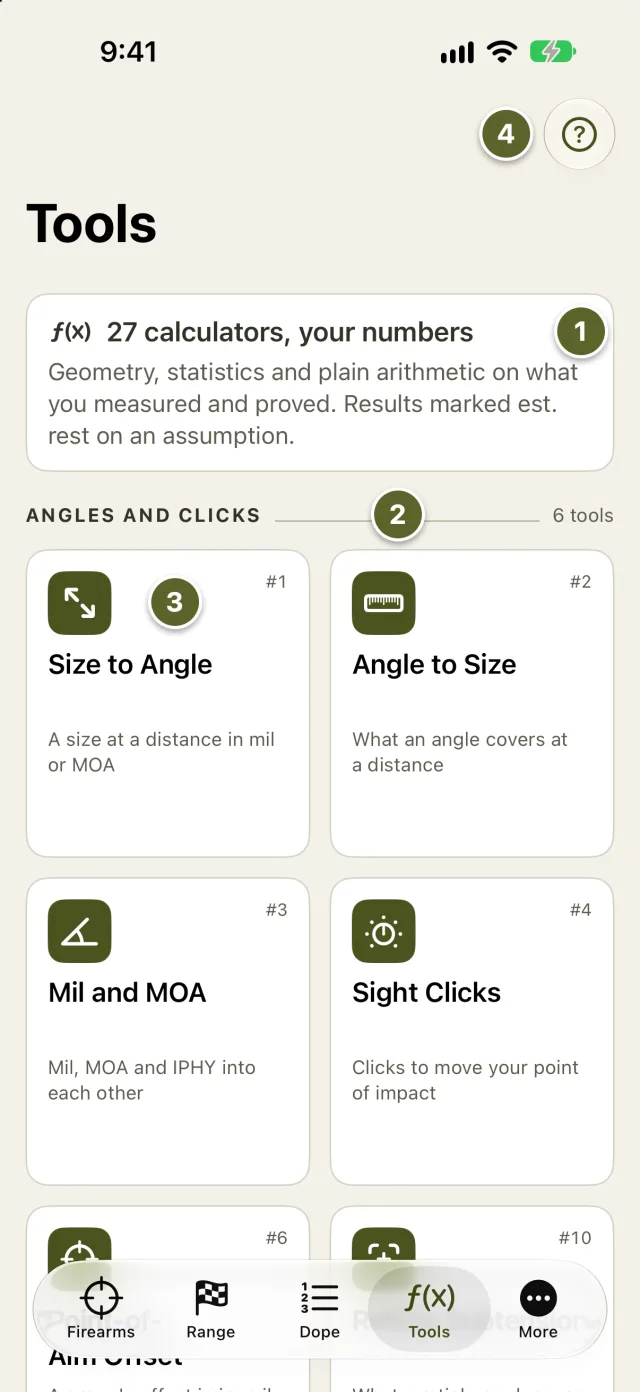
Numbers on the picture: 1 the summary card, 2 a group heading with its count, 3 a calculator tile (icon, number, title, description), 4 the “?” that opens this article.
-
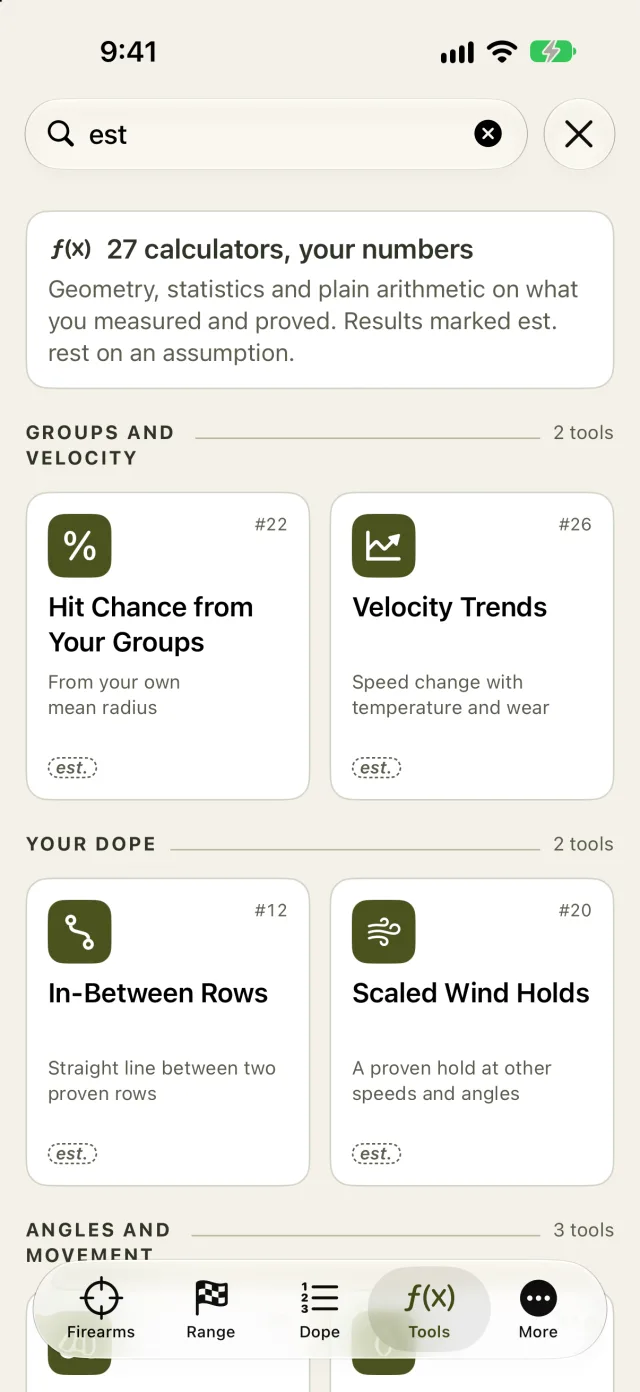
Scroll to the group you want, or pull the list down a little and type in Search calculators. The search looks at each calculator’s title, its description and its kind (Geometry, Statistics, Arithmetic or Est.), so typing “clicks“, “velocity” or “est” all work.
-
Tap a tile to open that calculator. Each one opens with sensible starting values (often a worked example already filled in), so you see what it does before you type anything.
- Change the numbers. Results update as you type; there’s no Calculate button.
- Tap the back arrow to return to the list. Nothing you typed in a calculator is saved as a record.
Why it’s useful
Shooting is full of small sums that are easy to get wrong in your head at the bench: how many clicks is a 1.2 inch miss at 100 yards with a quarter-MOA scope, what does 0.3 mil cover at 425 yards, what was the SD of today’s chronograph string. The Tools tab puts all of them in one place, worked on your own numbers.
Who uses it, and how:
- New gun owners sighting in a first scope: Sight Clicks and the Zero and Sight-In Helper turn “the group is high and right” into “Down 4 clicks, Left 2 clicks”.
- Hunters: check what a reticle mark covers on an animal-sized target, or turn a proven come-up into a hold with Holdover from Your Dope so you don’t have to dial in a hurry.
- Long-range and precision shooters: convert between mil and MOA, range with the reticle, and fill gaps in a dope table with In-Between Rows.
- Factory-ammo testers: Group Statistics and Velocity Statistics give extreme spread, mean radius, SD and ES from typed numbers.
- Competitors: hit rates, hit factor and drill times are in the Competition group.
- Shotgunners: the Shotgun group holds pattern percentage.
- Collectors and anyone keeping records: the Records group counts one firearm’s rounds: lifetime, current barrel, since cleaning and per year.
Gun Diary has no ballistic solver. None of these calculators predicts bullet drop, wind drift, a trajectory or a time of flight, and none uses a ballistic coefficient. They work on what you measured and proved.
What’s on the Tools screen
The 27 calculators, by group:
The seven estimating calculators are #12, #14, #15, #20, #22, #25 and #26. A search for “est” also shows #5 Range Estimate, because its name contains “est”; it isn’t one of the seven.
Example
You’re sighting in a new scope on your Mountain Rifle (6.5 Creedmoor) at 100 yards, and your first group lands about 1.2 inches high and a little left.
- Tap Tools, then type “clicks” in Search calculators. Three tiles stay: Sight Clicks, Point-of-Aim Offset and Zero and Sight-In Helper (its description mentions clicks).
- Tap Point-of-Aim Offset, type 1.2 in Up or down with High picked, 0.36 in Left or right with Left picked, and leave Distance at 100 yd.
- With a 0.1 mil scope the Clicks (0.1 mil) row reads “Down 3 clicks, Right 1 click”. Dial it and shoot again.
The full walk-through is in Point-of-Aim Offset.
Tips
- Search by job, not by name. “SD”, “clicks”, “recoil”, “pattern” or “est” find the right tiles faster than scrolling.
- The numbers on the tiles are fixed. Calculator #11 is always Holdover from Your Dope, here, in the help and in support emails, so “#11” is a quick way to say which one you mean.
- Calculators that work on a dope table are also on the table itself. Open a table on the Dope tab and scroll to Calculators for This Table; the calculator opens with that table already picked. See A dope table.
- Put your scope in the Garage. Calculators with a Scope picker fill in the click value, reticle and focal plane from your optic settings.
What it affects
Nothing. The Tools tab and its calculators never change a record: no firearm, session, group or dope row is created or edited by typing in a calculator. A few remember a setting for next time (for example the click value you last used in Sight Clicks).
If something goes wrong
- A calculator I expected isn’t there. Clear Search calculators: groups with no match are hidden while you search.
- I can’t find the tab bar on my iPad. On a wide iPad screen the tabs can show as a sidebar; Tools is listed there with Firearms, Range, Dope and More, and under Also, Ammo Library and Search.
- I want Gun Diary to tell me my drop at 600 yards. It can’t: Gun Diary has no ballistic solver on purpose. Prove the distance at the range, save it as a dope row, then use the Your dope calculators on what you proved. See What confirmed dope is.
- A result has an est. tag. That calculator rests on an assumption. Read About estimates.
Related
- Next: About estimates.
- Unit Converter, Sight Clicks, Holdover from Your Dope, The Dope tab.
- Learning paths: Sighting in a new scope, Building your dope card.
- Words used here: mil, MOA, click value, dope, come-up, hold.
Gun Diary keeps records you enter and does arithmetic on them. It never predicts a trajectory; confirm every hold by shooting it at the range, and always know your target and what is beyond it.
Still stuck? In the app, open More > Help > Contact Support, or More > Settings > Support, which also has Send Error Log (the error log helps us find the problem), or email contact@setriksoftware.com. You can also browse the Help Center or the messages the app can show.