
"Calculator #1: Size to Angle"
Turn a group size, or a miss measured in inches or millimeters, into mil and MOA at the distance you shot it.
Size to Angle (calculator #1) answers “how big is that, as an angle?” Type a size (a group, or how far a group landed from your aim) and the distance you shot it, and it shows the same thing in mil and MOA. It’s plain geometry: no bullet drop, no wind.
Steps
-
On the Tools tab, under Angles and clicks, tap Size to Angle.
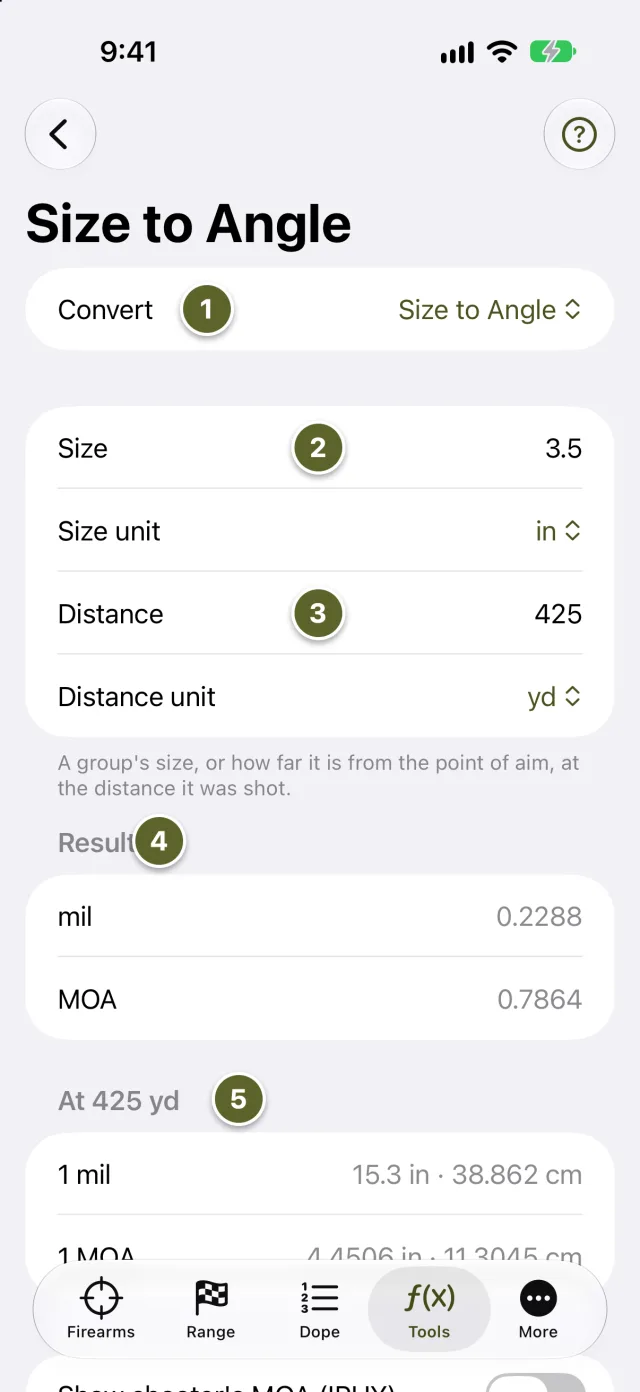
Numbers on the picture: 1 Convert (which tool), 2 Size and Size unit, 3 Distance and Distance unit, 4 Result, 5 what one unit covers at this distance. Show shooter’s MOA (IPHY) is further down.
-
Type the Size and pick its Size unit (in, mm or cm).
- Type the Distance and pick the Distance unit (yd or m).
- Read Result: the size as mil and as MOA, to up to four decimals.
- Below it, the section headed with your distance (for example At 425 yd) shows what one mil and one MOA cover there, in inches and centimeters.
- If your scope uses shooter’s MOA, turn on Show shooter’s MOA (IPHY) at the bottom; an IPHY row is added.
Why it’s useful
A 1-inch group means something very different at 100 yards and at 500. Angles don’t change with distance, which is why scopes, reticles and dope are all in mil or MOA. Size to Angle puts any measured size on the same footing.
Who uses it, and how:
- Factory-ammo testers: compare a 0.9 in group at 100 yd with a 2.6 in group at 300 yd. As angles (0.86 MOA and 0.83 MOA) the second load is actually the tighter one.
- Hunters: check how big a group or a miss was in the angle your reticle uses.
- Long-range shooters: turn a miss you measured on the target (“3.5 inches high”) into the mil or MOA you’d correct by.
- Metric shooters: type mm or cm and meters; the math is the same.
- Anyone whose scope uses shooter’s MOA: see the IPHY value too.
What each option means
Result rows: mil, MOA, and IPHY (shooter’s MOA) when the switch is on.
The formula, in plain words: angle = size ÷ (distance x the size of one unit as a share of distance).
- One mil is 1/1000 of the distance: 3.6 in at 100 yd, 10 cm at 100 m.
- One MOA (true minute of angle, 1/60 of a degree) is 1.0472 in at 100 yd.
- One IPHY (inch per hundred yards, “shooter’s MOA”) is exactly 1 in at 100 yd.
The footer under the switch says the same, and reminds you this is geometry only.
Example
Your Mountain Rifle (6.5 Creedmoor) put a group 3.5 inches high at 425 yards.
- Open Size to Angle. Type 3.5 in Size (in), 425 in Distance (yd).
- Result: mil 0.2288, MOA 0.7864.
- At 425 yd: 1 mil 15.3 in · 38.862 cm; 1 MOA 4.4506 in · 11.3045 cm.
- With Show shooter’s MOA (IPHY) on, IPHY reads 0.8235.
So the miss was a little under a quarter mil, or about three quarters of an MOA. To turn that into turret clicks, use Sight Clicks.
Tips
- Measure center to center. For a group’s size, use extreme spread (center of one hole to the center of the farthest hole), the same way Gun Diary records groups.
- Use the distance you actually shot. An angle is only as right as the distance.
- Switch tools without leaving. Convert at the top changes to any other converter tool, for example Sight Clicks, without going back to the Tools tab.
- Already recorded the group? A group record shows its size and offset as angles too. See A group record.
What it affects
Nothing is saved. The IPHY switch is remembered and applies to all the angle tools. Your default units come from Settings.
If something goes wrong
- “Type a distance above 0 to see the result.” The distance is blank or 0. Type it.
- My MOA number is a little smaller than I expected. Gun Diary’s MOA is the true minute of angle (1.0472 in at 100 yd). If you expected exactly 1 in per 100 yd, turn on Show shooter’s MOA (IPHY) and read the IPHY row.
- The title says Size to Angle but the screen shows another tool. You picked another tool in Convert. Pick Size to Angle again.
Related
- Next: Sight Clicks.
- The reverse: Angle to Size. Also Mil and MOA, Unit Converter, Record a group.
- Learning path: Testing factory ammo.
- Words used here: mil, MOA, IPHY, extreme spread, subtension.
Gun Diary keeps records you enter and does arithmetic on them. It never predicts a trajectory; confirm every hold by shooting it at the range, and always know your target and what is beyond it.
Guides on this topic
Still stuck? In the app, open More > Help > Contact Support, or More > Settings > Support, which also has Send Error Log (the error log helps us find the problem), or email contact@setriksoftware.com. You can also browse the Help Center or the messages the app can show.