
Settings
Check iCloud sync, set the starting units for new groups, set up Range Mode and Zero Check, remove or restore the Example Rifle, reach the Help Center and support, and find About Estimates, the privacy policy, the terms and the version.
Settings holds the few choices that apply across the whole diary: whether iCloud sync is working, the units a new group starts in, how Range Mode looks and behaves, the default Zero Check tolerance, the Example Rifle, the way to reach help and support, and the About lines (About Estimates, Privacy Policy, Terms of Use and the version). Open it from More > Settings.
Steps
-
Tap More > Settings.
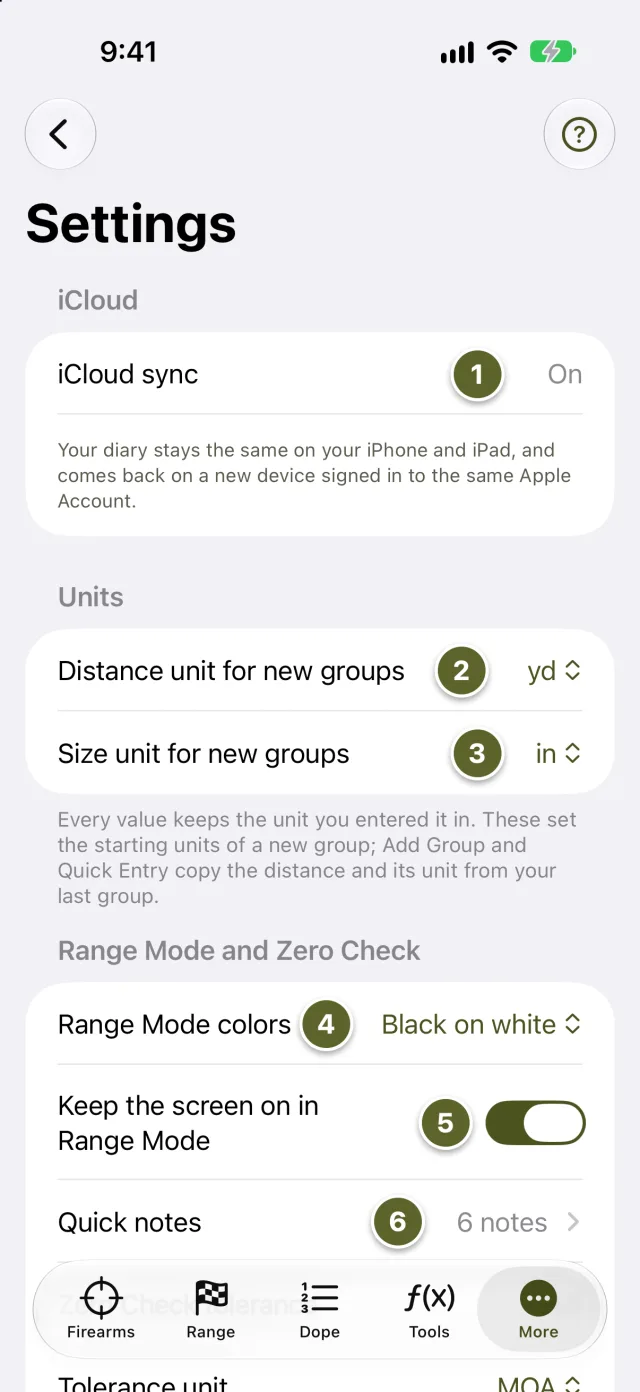
Numbers on the picture: 1 iCloud sync, 2 Distance unit for new groups, 3 Size unit for new groups, 4 Range Mode colors, 5 Keep the screen on in Range Mode, 6 Quick notes.
- Under iCloud, read iCloud sync. It’s a status, not a switch: On means your diary syncs. The line below it says what the status means for your diary; if it isn’t On, the fix is in the iPhone’s Settings app (see “If something goes wrong”).
- Under Units, pick the Distance unit for new groups (yd or m) and the Size unit for new groups (in, mm, MOA or mil).
-
Under Range Mode and Zero Check (Range Mode itself is part of Gun Diary Pro; the Zero Check tolerance is free):
- Range Mode colors: Black on white (the default) or White on black.
- Keep the screen on in Range Mode: on by default.
- Quick notes: tap to change the one-tap notes in Range Mode (see step 5).
- Zero Check tolerance and Tolerance unit: how far a group’s center may be from your aim and still count as zeroed (default 0.5 MOA).
-
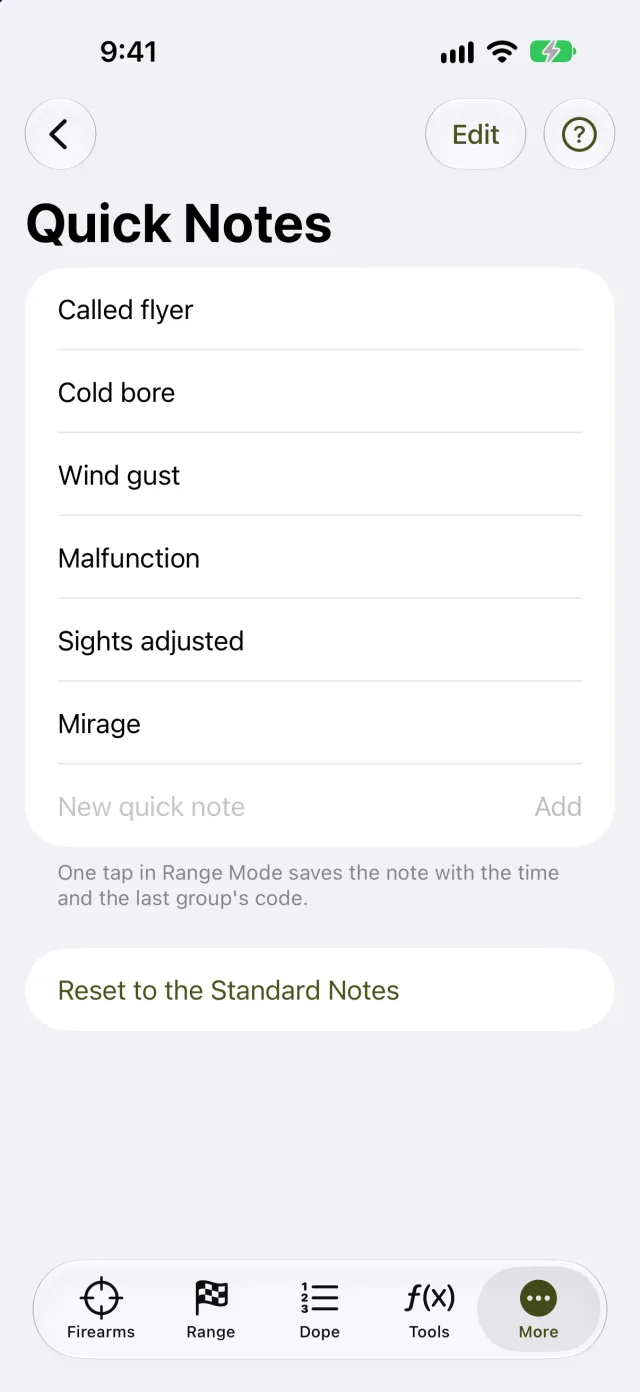
To change the quick notes: tap Quick notes. On the Quick Notes screen, type over a note to change it; type in New quick note and tap Add to add one; tap Edit to drag notes into order or delete them (or swipe left on one and tap Delete). Reset to the Standard Notes brings back the six standard ones.
-
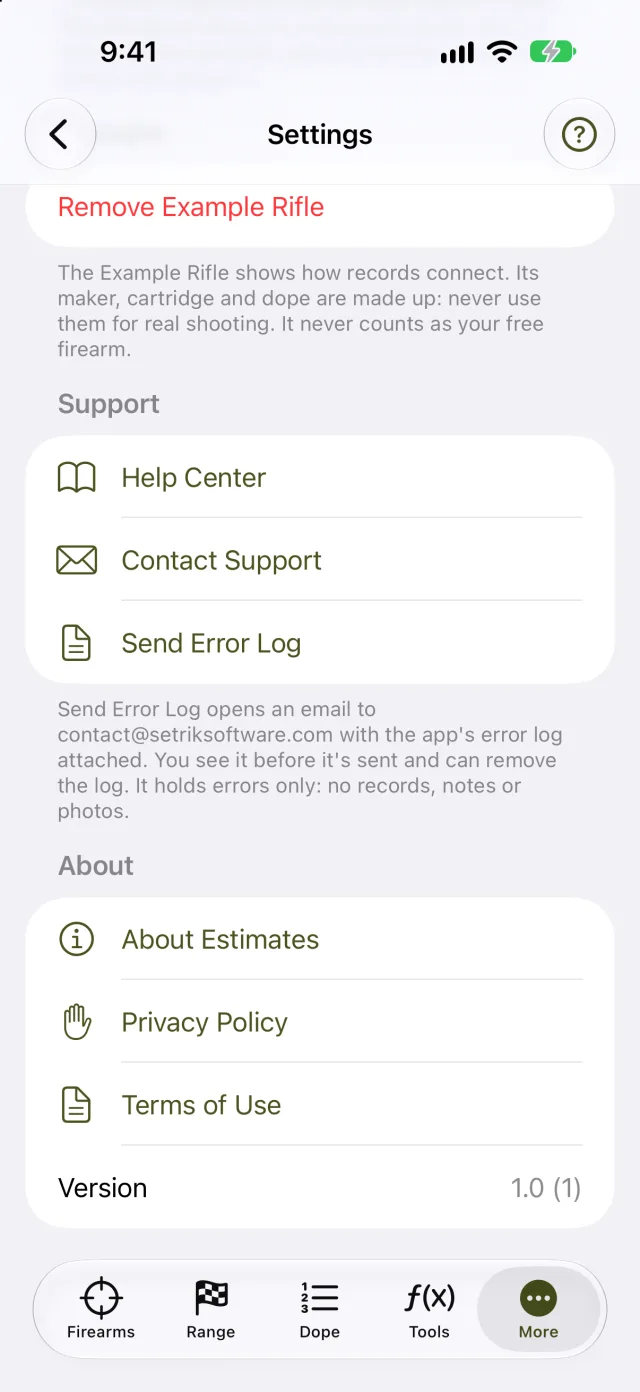
Under Example, tap Remove Example Rifle and confirm with Remove Example Rifle in “Remove the Example Rifle?”. Once removed, the button reads Restore Example Rifle; tap it to bring the Example back.
- Under Support: Help Center, Contact Support and Send Error Log. See Contact support and the error log.
- Under About at the bottom: About Estimates (the About estimates article), Privacy Policy, Terms of Use and Version (the app’s version and build, handy when you write to support). About Estimates is also in More > Help.
Why it’s useful
Most of Gun Diary’s choices are made on the record itself (each value keeps the unit you typed it in, each Zero Check can change its own tolerance), so Settings is short. What’s here are the starting points and the things you check once: is my diary syncing, what units do I measure in, how do I want Range Mode to behave.
Who uses which setting:
- Everyone, on day one: iCloud sync. On means your diary is on your iPhone and iPad and comes back on a new device.
- Metric shooters: set the distance to m and the size to mm once, so every new group starts that way.
- Shooters who measure groups as angles: set the size unit to MOA or mil.
- Range Mode users: Black on white reads best in bright sun, even when the phone is in dark mode; White on black suits dawn, dusk or indoor ranges. Keep the screen on so it doesn’t lock between strings; turn it off to save battery on long days.
- Hunters: set a Zero Check tolerance that matches how precise you need to be (a tighter one for small game or long shots).
- Competitors and precision shooters: replace the quick notes with your own (like “Stage 3 jam” or “Mirage boiling”).
- Anyone finished with the example: remove the Example Rifle so lists show only your records.
What each option means
About units: every value keeps the unit you entered it in, so changing these never changes an old record. Add Group and Quick Entry copy the distance and its unit from your last group, so you mostly see these defaults on a firearm’s first group.
What the iCloud lines mean:
- On: “Your diary stays the same on your iPhone and iPad, and comes back on a new device signed in to the same Apple Account.”
- Not signed in to iCloud: “Sign in to iCloud in the Settings app to keep your diary on your other devices. Make backups in the meantime.”
- Restricted or Not available: “Your diary is kept on this device only. Make backups to keep it safe.”
Example
You shoot at a metric range and measure groups in millimeters. In Settings you set Distance unit for new groups to m and Size unit for new groups to mm. You also change Range Mode colors to White on black for the indoor 50 m range, and set Zero Check tolerance to 0.3 with Tolerance unit mil. Your first group on a new rifle now starts at m and mm; your older groups in yards and inches are unchanged.
Tips
- Check iCloud on a new device before you start typing: if it isn’t On, your records stay on that device only.
- iCloud sync is not a backup. A deletion syncs too. Make backups in More > Backup and Export. See Back up and restore.
- Keep quick notes short and distinct, so they’re easy to hit with gloves on.
- Tolerance is per check too. The setting is only the starting value; each Zero Check can change it.
What it affects
- Units: only new groups. Calculators have their own unit choices.
- Range Mode colors and keep-awake: Range Mode only (Range Mode is part of Gun Diary Pro); the rest of the app follows the phone’s light or dark mode.
- Quick notes: Range Mode’s note buttons. Notes already saved don’t change.
- Zero Check tolerance: the starting tolerance of new Zero Checks; saved zero records keep theirs.
- Remove Example Rifle: removes the Example firearm with its ammunition, session, groups, target and dope table. Your own records aren’t touched. The Example’s codes are never reused.
- Settings are kept on this device; the Range Mode and Zero Check settings also sync with your diary.
If something goes wrong
- iCloud sync says Not signed in to iCloud. Open the iPhone’s Settings app, sign in with your Apple Account and make sure iCloud Drive is on, then come back. Until then, make backups.
- iCloud sync says Restricted or Not available. A device restriction (Screen Time, a work profile) or an iCloud problem is blocking sync. Your diary works on this device; make backups.
- My records don’t appear on my iPad. Both devices must show On with the same Apple Account. Large diaries can take a while the first time; keep the app open on Wi-Fi. See Use Gun Diary on iPhone and iPad.
- Restore Example Rifle doesn’t appear. The Example is still in your diary (maybe archived or filtered on the Firearms tab).
- A new group didn’t start in my unit. Add Group copies the distance and unit from your last group for that firearm; change it once in the group and it carries on.
Related
- Next: Personalize your diary.
- Range Mode, Range Mode: notes, Zero Check.
- Use Gun Diary on iPhone and iPad: iCloud sync, step by step.
- Your records and your privacy: who can see your diary, and locking the app with Face ID.
- Explore the Example Rifle, Contact support and the error log, Back up and restore, Start over.
- Learning path: Keeping your records safe.
- Words used here: icloud sync, range mode, zero check, tolerance, MOA, mil, Example Rifle.
Still stuck? In the app, open More > Help > Contact Support, or More > Settings > Support, which also has Send Error Log (the error log helps us find the problem), or email contact@setriksoftware.com. You can also browse the Help Center or the messages the app can show.