
Personalize your diary
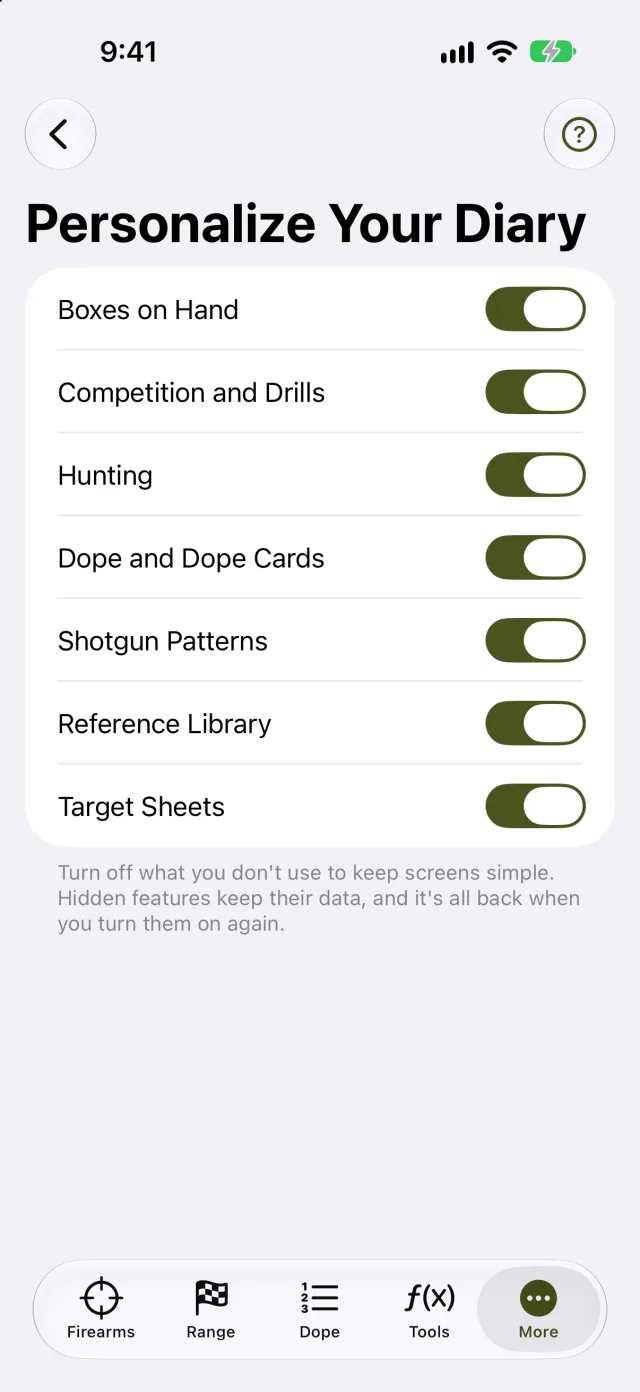
Hide the features you don't use (boxes on hand, competition and drills, hunting, dope, shotgun patterns, the Reference Library, target sheets) to keep screens simple; their records are kept and come back when you turn them on.
Personalize Your Diary lets you switch off parts of Gun Diary you don’t use, so the screens you do use stay short. A hidden feature keeps every record it holds; turn it back on and it’s all there, exactly as it was.
Steps
-
Tap More > Personalize Your Diary.
-
Turn off a switch to hide that feature; turn it on to show it again. The change takes effect at once, everywhere.
- Go back with <. There’s nothing to save.
Why it’s useful
Gun Diary serves hunters, target shooters, competitors, shotgunners and collectors, and few people are all of those. Someone with one deer rifle doesn’t need pattern records or drill runs on every session; a collector who never goes to the range doesn’t need target sheets. Hiding them removes buttons and sections without throwing anything away.
Who turns off what:
- Hunters with one or two rifles: Competition and Drills, Shotgun Patterns, Target Sheets, perhaps Boxes on Hand.
- Target and precision shooters who don’t hunt: Hunting and Shotgun Patterns.
- Shotgunners only: Dope and Dope Cards and Target Sheets; keep Shotgun Patterns.
- Collectors: everything range-related they don’t use; keep the Reference Library for receipts and manuals.
- Beginners: start with fewer features and turn them on as you grow into them.
- Anyone sharing screenshots or teaching: a simpler diary is easier to explain.
What each option means
Every switch is on when you start. Nothing else changes: calculators, search, backups and exports still include everything.
Example
You hunt with one rifle and never compete or shoot a shotgun. You turn off Competition and Drills, Shotgun Patterns and Target Sheets. The Range tab loses Pattern a Shotgun and Target Sheets, and your practice sessions no longer show an empty drills section. Two years later you join a club match: you turn Competition and Drills back on, and your sessions show scores and drill runs again.
Tips
- Turn off, don’t delete. If you’re not sure you’ll need something, hide it. Its records survive.
- Search still finds hidden records. So do backups and Export All Data.
- For one firearm’s dashboard only, use Arrange Dashboard on that firearm instead. See Arrange the dashboard.
What it affects
- Only what’s shown. No record is changed, deleted or left out of backups, exports, Search or iCloud sync.
- The switches are kept on this device. On your iPad, set them separately.
If something goes wrong
- A button or section has disappeared (like Quick Hunt Log, Hunt Log or Boxes on Hand). It’s probably switched off here. Turn it back on.
- I turned off Dope and Dope Cards but the Dope tab is still there. The Dope tab stays; the switch hides the Dope section on firearm dashboards and the dope report. If you don’t use dope, simply ignore the tab.
- A report is missing from Reports. The dope table, hunt log, pattern, and competition and drills reports follow their switches (Dope and Dope Cards, Hunting, Shotgun Patterns, Competition and Drills).
Related
- Next: Drafts.
- Settings, The More tab, Arrange the dashboard, A tour of Gun Diary.
- Words used here: boxes on hand, drill run, hunt log, dope, pattern percentage, target sheet.
Still stuck? In the app, open More > Help > Contact Support, or More > Settings > Support, which also has Send Error Log (the error log helps us find the problem), or email contact@setriksoftware.com. You can also browse the Help Center or the messages the app can show.