
Zero Check
Fire a few shots at your zero distance, type (or, with Pro, tap on a photo) where each one hit, and see at once whether the rifle is still zeroed or how many clicks to move the sight; the result is saved as the firearm's zero record.
Zero Check answers the question every hunter asks before the season: does the rifle still hit where it’s aimed? Shoot a few rounds at your zero distance, type how far each one landed from your aim, and Gun Diary works out the group’s center. If it’s within your tolerance you get Still zeroed; if not, it tells you which way and how many clicks to move the sight. Every check is saved as a zero record, so you have proof the rifle was on before the hunt. Zero Check is free; tapping the shots on a photo of the target is part of Gun Diary Pro.
Before you start
- Set the scope’s click value in its optic settings (Garage > the scope > Optic settings). The clicks to move come only from there; without it, Zero Check still shows where the group hit but gives no click counts.
- Zero Check checks a zero you already have. New rifle or new scope that has never been sighted in? Follow Sighting in a new scope first, then come back here.
Steps
-
Tap Zero Check on the Range tab or the Firearms tab (also in Range Mode, on a firearm’s Zero History, and on a Zero check or Sight-in session as Add Zero Check).
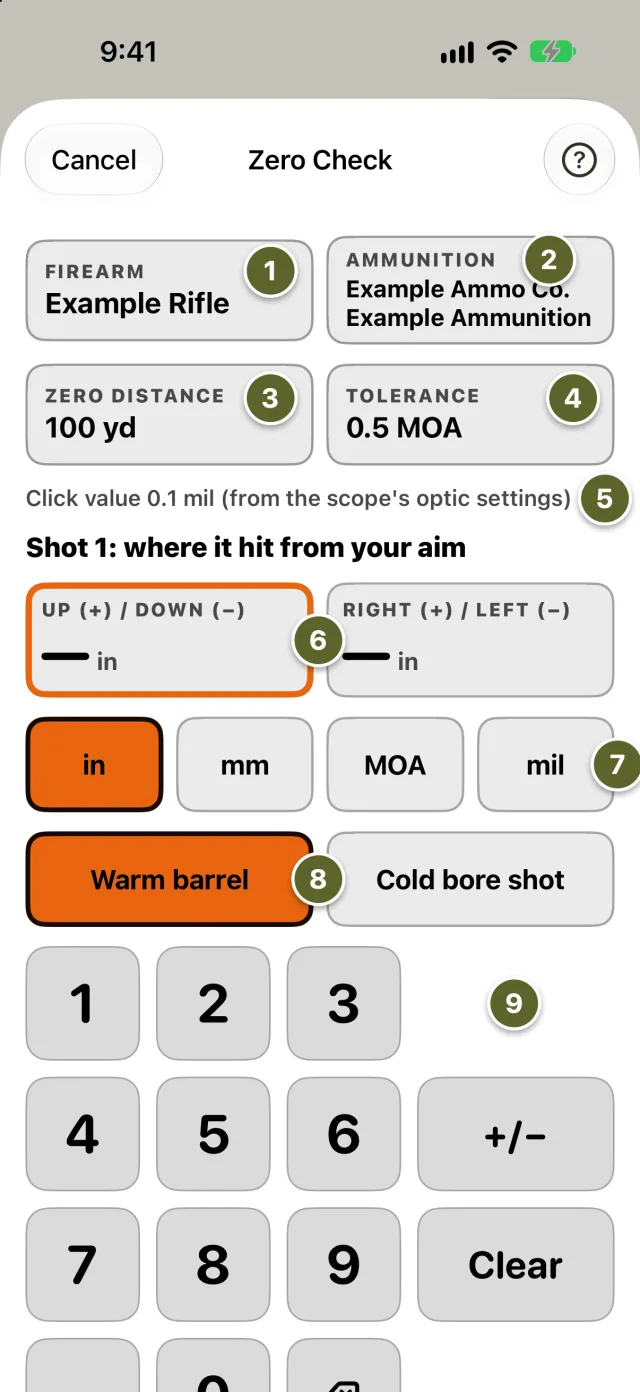
Numbers on the picture: 1 Firearm, 2 Ammunition, 3 Zero distance, 4 Tolerance, 5 the click value line, 6 Up (+) / down (−) and Right (+) / left (−), 7 the unit buttons, 8 Warm barrel / Cold bore shot, 9 the pad.
-
Check the chips and tap any to change it:
- Firearm: pick from the big list. It starts on the firearm you came from, else your only firearm, else the one you shot most recently.
- Ammunition: what you’re shooting (and its lot).
- Zero distance: type it, pick yd or m, tap Save.
- Tolerance: how far from your aim the group’s center may be and still count as zeroed. Type it, pick MOA or mil, tap Save.
- Check the click value line under the chips. It comes from the scope’s optic settings in the Garage: “Click value 0.1 mil (from the scope’s optic settings)”. With no optic settings it reads “No click value: add the scope’s optic settings in the Garage to see clicks.”
- Before the first shot, pick the unit you’ll measure in (in, mm, MOA or mil), and whether it’s a Cold bore shot or Warm barrel.
- Shoot. For “Shot 1: where it hit from your aim”:
- With Up (+) / down (−) selected, type how far above (or, with +/−, below) the aim point it hit.
- Tap Right (+) / left (−) and type how far right (or left).
- Tap Add Shot.
-
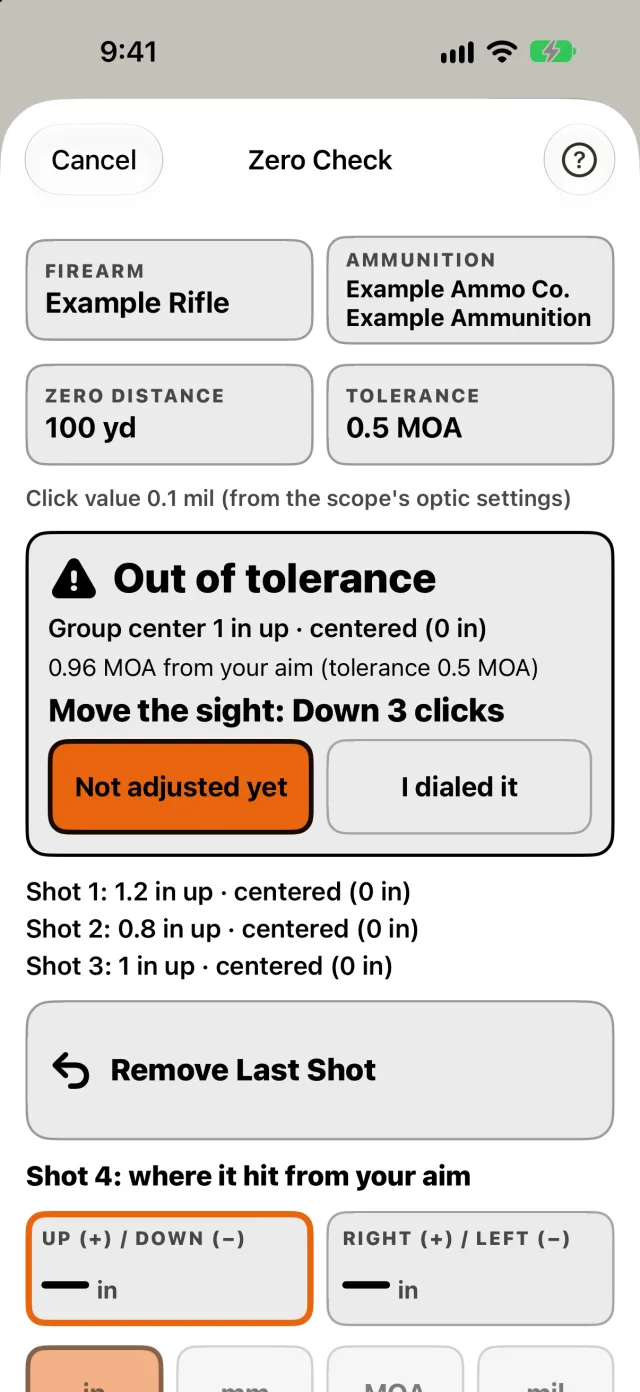
Repeat for each shot (up to 10). The result card appears after the first shot and updates with each one.
-
Read the result:
- Still zeroed: the group’s center is within your tolerance.
- Out of tolerance: “Move the sight: Down 3 clicks, Left 1 click”. If you dial that now, tap I dialed it; otherwise leave Not adjusted yet.
- Add any Notes and tap Save Zero Check.
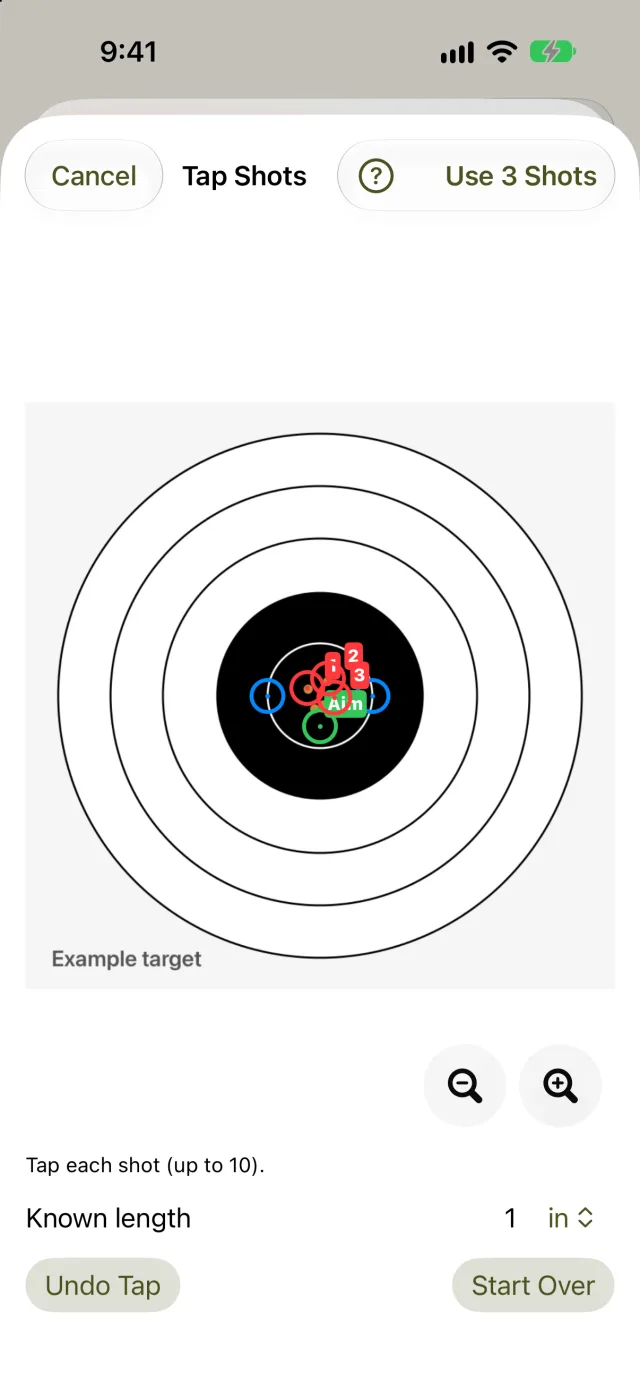
With Gun Diary Pro, tap the shots on a photo instead:
- Tap Tap on Photo. Choose Choose a Target Photo or Take a Photo.
- Tap both ends of something whose size you know (a ruler mark, a grid square), and type its Known length in in or mm.
- Tap your point of aim, then each shot. Undo Tap takes back the last tap; Start Over clears them.
-
Tap Use 3 Shots (the count changes). The shots join the list marked “photo”.
Why it’s useful
A rifle can lose its zero in a truck bed, on a flight, after a cleaning or from a bump on the gun rack. Hunters owe the animal a rifle that hits where it’s aimed, and the only way to know is to shoot it. Zero Check turns a few shots into a clear answer and a saved, dated record.
It serves several situations. A hunter before the season shoots three rounds and gets Still zeroed, recorded with the date and ammunition. A hunter who flew to elk camp checks again on arrival and marks the first shot as cold bore. A long-range shooter confirms the 100-yard zero after a scope remount before trusting any dope. Someone who just mounted a new scope uses it to walk the group onto the aim point, dialing between checks. A new rifle owner learns how the clicks relate to where the bullets land. Each record keeps the setup (scope, mount) the rifle had that day, so Zero History shows when the zero moved and why.
What each option means
How it’s worked out. The group’s center is the average of every shot, the cold bore shot included (it’s also shown on its own). The center is turned into an angle at the zero distance and compared with the tolerance. The clicks are that angle divided by the click value, rounded to whole clicks; “No change (under half a click)” means it rounds to zero. Clicks move the impact toward the point of aim, so a group that hit high reads “Down”.
Example
Before deer season, the Mountain Rifle (6.5 Creedmoor), zeroed at 100 yd, tolerance 0.5 MOA, scope 0.1 mil per click (in its optic settings).
- Zero Check. Chips: Mountain Rifle, Ridgeline Match 140 gr, 100 yd, 0.5 MOA. “Click value 0.1 mil (from the scope’s optic settings)”.
- Unit in, Cold bore shot. Shot 1: up 1, right 0.4, Add Shot.
- Shot 2: up 0.8, right 0.2. Shot 3: up 1.2, right 0.6.
- Result: Out of tolerance. “Group center 1 in up · 0.4 in right”. “1.03 MOA from your aim (tolerance 0.5 MOA)”. “Move the sight: Down 3 clicks, Left 1 click”. “Cold bore shot: 1 in up · 0.4 in right”.
- You dial 3 clicks down and 1 left, tap I dialed it, Save Zero Check. Z004 is saved as “Sight adjusted”.
- A second Zero Check, three shots near the center: Still zeroed. Z005 is your proof for the season.
Not a scoped rifle?
Zero Check works for any firearm; only the clicks depend on a scope.
- Iron sights: there are no optic settings and no clicks to show. Read the Group center (“1 in up · 0.4 in right”) and move the sight the way its maker’s instructions say (many front sights move the opposite way to the rear).
- Red dot or holographic sight: add it as equipment and set its click value in Optic settings (often 1 MOA or 0.5 MOA per click; it’s in the sight’s manual), so the clicks come out right.
- Handguns: use a shorter Zero distance, like 15 to 25 yd, and a looser Tolerance; shoot from a rest.
- Shotguns with a bead: pattern them instead; see Pattern a shotgun.
Tips
- Use a steady rest for a zero check; you’re testing the rifle, not your offhand shooting.
- Three shots or more give a center worth trusting; one shot tells you little.
- Mark the cold bore shot. Hunters care most where the first shot from a cold rifle goes.
- Add the scope’s optic settings in the Garage so the clicks use the right click value. See Optic settings. A 1/4 MOA scope is 0.25 MOA, not 4.
- Measure in the reticle‘s units at distance. Reading “0.2 mil low” through the scope? Pick mil and type −0.2.
- Set your usual tolerance once in Settings > Range Mode and Zero Check > Zero Check tolerance.
- Type what you see, even if a number was already on the pad. Only shots added with Add Shot count.
What it affects
- A zero record (Z001…) for the firearm, with each shot, the result, the ammunition, the setup on that date and the scope.
- Session: started from the Range tab, Firearms tab or Zero History, it makes a new session named “Zero Check” (activity Zero check) with the firearm and ammunition. From Range Mode or a session, it goes in that session.
- Round counters: the shots are added to the firearm’s Rounds fired in that session, once. Editing the record later adds or takes back only the difference.
- The firearm’s Zero History and the zero history report.
- The firearm’s next Zero Check starts with this zero distance.
If something goes wrong
- “Pick the firearm first” or “Add at least one shot first”. Save Zero Check shows what’s missing. Tap Firearm and pick one, or add a shot with Add Shot.
- “Set the zero distance to compare with the tolerance.” Shots in in or mm need a distance to become an angle. Set Zero distance.
- No clicks shown. The result is within tolerance, or the scope has no click value (“No click value: add the scope’s optic settings in the Garage to see clicks.”). Add it in the scope’s optic settings.
- The click value is wrong. It’s the firearm’s current scope’s optic settings. Fix the click value there. Just swapped scopes with New Configuration? The copy keeps the old scope’s settings until you change them.
- “Remove the shots to change the unit” The unit is fixed after the first shot. Remove Last Shot until the list is empty, then pick the unit.
- Tap on Photo shows a Gun Diary Pro screen (“Tapping shots on a photo is part of Gun Diary Pro. Typing the numbers is always free.”). Type the shots instead, or get Pro.
- A message under the photo on Tap Shots. Use … Shots says what’s still missing, in order: “Choose a target photo first”, “Tap both ends of something whose size you know first”, “Type the known length”, “Tap your point of aim”, “Tap at least one shot”. Do that step, then tap Use … Shots again.
- The directions seem backwards. Type where the shot hit, not which way to dial: up and right are +. The clicks then point back toward the aim.
Related
- Next: Zero history.
- Optic settings, Sight clicks calculator, Sight-in calculator, Re-zero shift calculator.
- Range Mode, Quick Hunt Log, A session.
- Learning paths: Sighting in a new scope, Before and after the hunt.
- Words used here: zero, zero distance, tolerance, click value, cold bore, point of aim, point of impact, MOA, mil.
Gun Diary keeps records you enter and does arithmetic on them. It never predicts a trajectory; confirm every hold by shooting it at the range, and always know your target and what is beyond it.
Guides on this topic
- Rifle Zero Distance: What Changes When You Move Your Zero
- Hunting Log: How to Record Every Shot, Hits and Misses
- What Is Dope in Shooting? Proven Numbers, Not Guesses
- How to Zero a Red Dot Scope: Steps, Click Math and the Record to Keep
Still stuck? In the app, open More > Help > Contact Support, or More > Settings > Support, which also has Send Error Log (the error log helps us find the problem), or email contact@setriksoftware.com. You can also browse the Help Center or the messages the app can show.