
Pattern a shotgun
Record a shotgun pattern test (choke, ammunition, distance, circle and the pellets in the circle for each shot) and Gun Diary works out the pattern percentage for each shot and the average.
Patterning shows how a shotgun spreads its shot with a given choke and shell: you shoot at a big sheet of paper from a set distance, draw a circle around the densest part, and count the pellet holes inside it. Gun Diary records each test and works out the pattern percentage: the pellets in the circle as a share of the pellets in the shell. Pattern records are free.
Steps
-
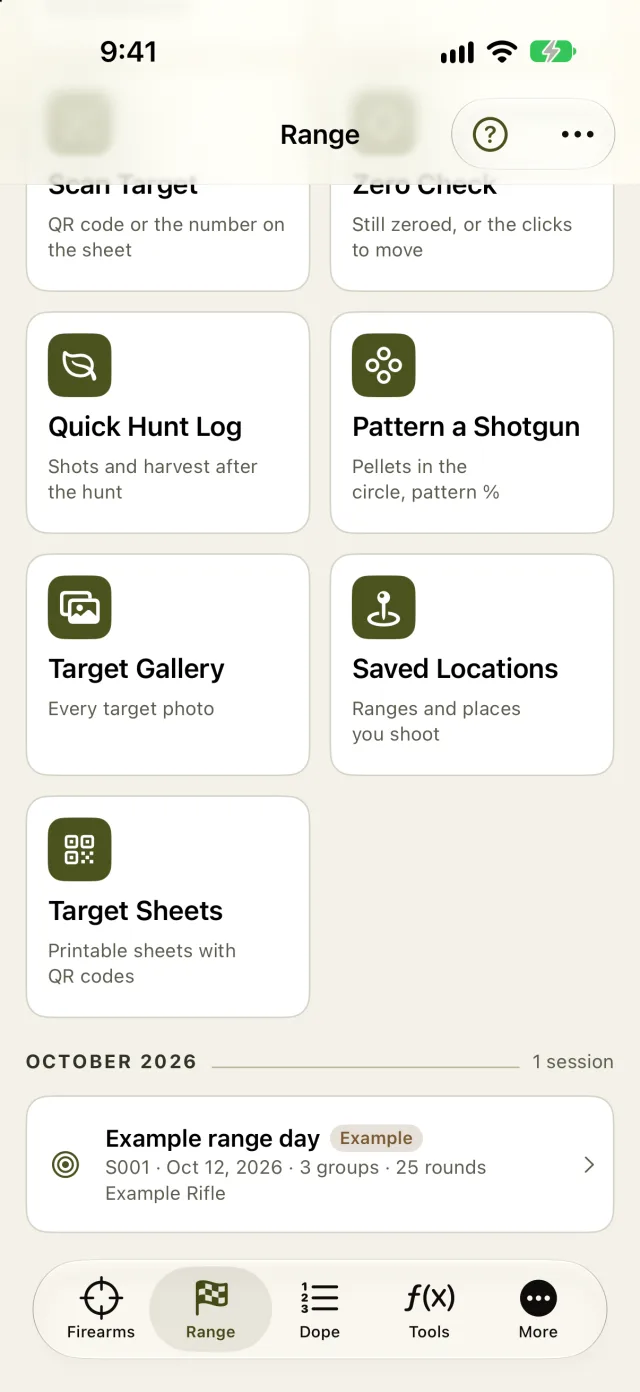
Start a new pattern from one of these places:
- On the Range tab, tap Pattern a Shotgun, then tap the shotgun on Which Firearm? (shotguns are listed first).
- On a shotgun’s dashboard, tap Patterns, then New Pattern (+). See Patterns.
- In a patterning session, under Patterns, tap Add Pattern.
-
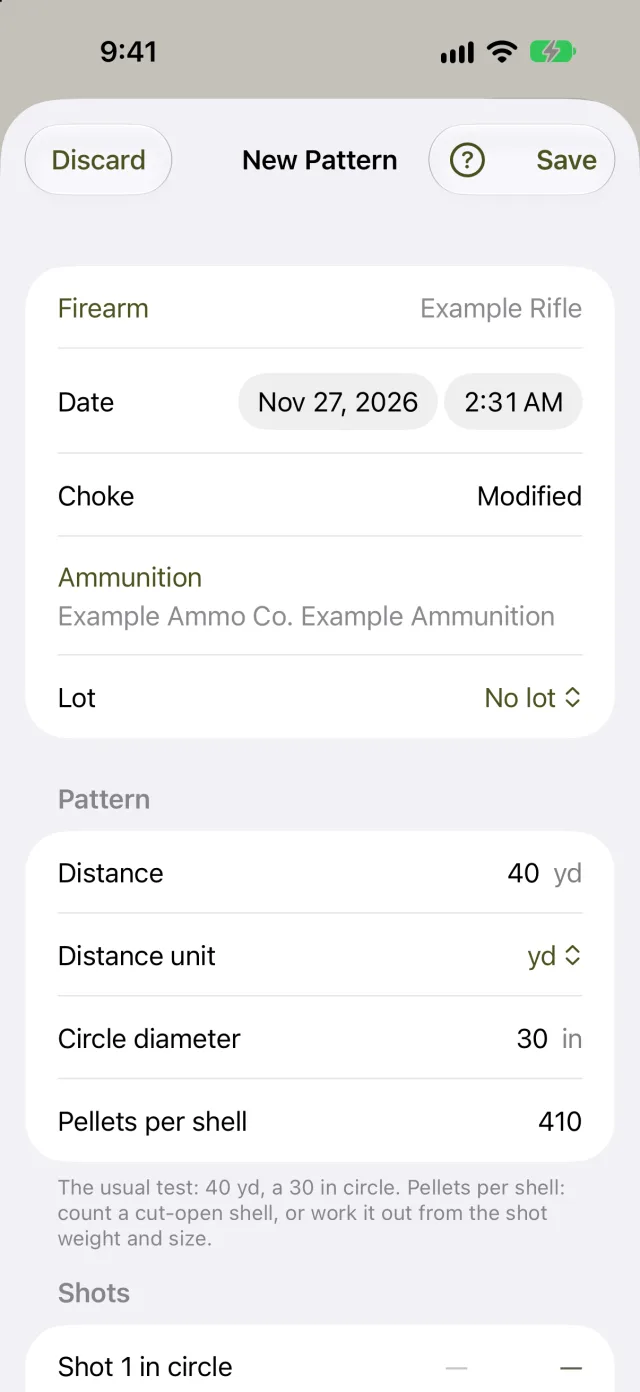
The New Pattern form opens. Check the Firearm and Date. Type the Choke (like Modified or Full), and tap Ammunition to pick the shells from your Ammo Library. If they have lots, pick the Lot.
-
Under Pattern, check the Distance (starts at 40 yd) and Distance unit, the Circle diameter (starts at 30 in), and type the Pellets per shell.
- Under Shots, type the pellets you counted inside the circle in Shot 1 in circle. Its percentage shows at the right. Tap Add Shot for each further shot; Remove Last Shot removes the last row. Average pattern shows the average of all shots with a count.
- Optional: under Photos, tap Take Photo or Add from Photos to keep a picture of each pattern sheet. Add Notes (wind, point of impact, gaps in the pattern).
-
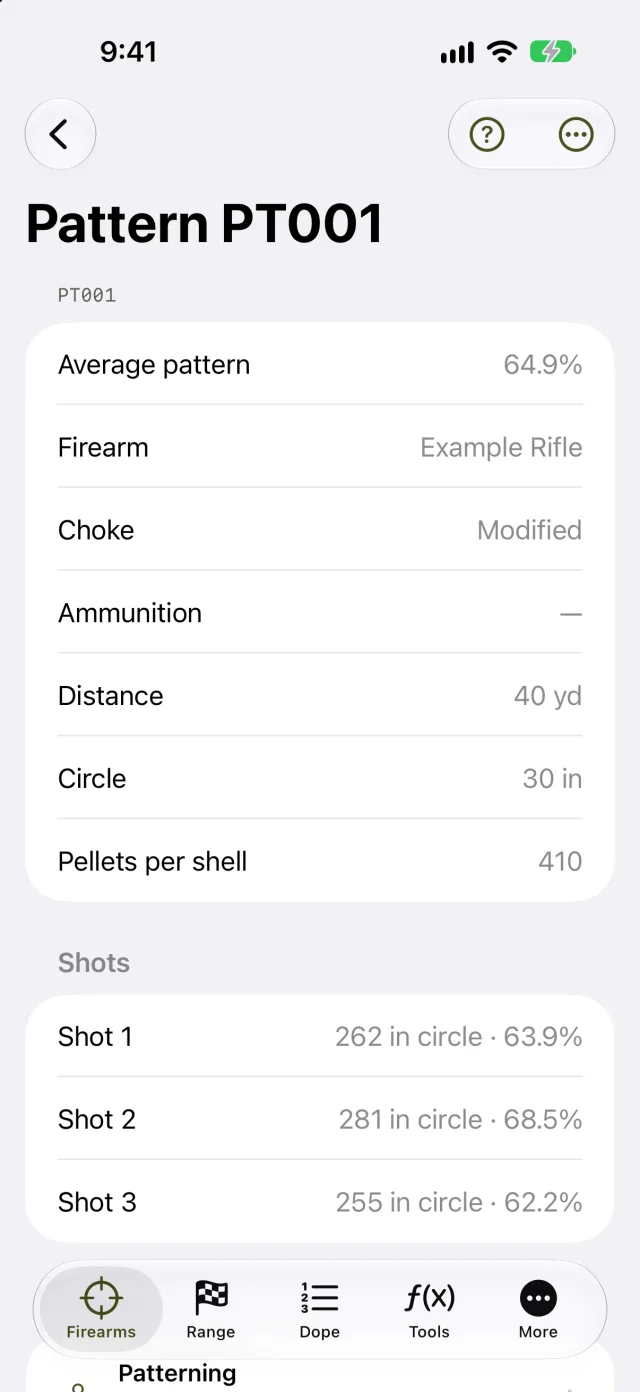
Tap Save. The pattern is saved with a number like PT001. Find it on the shotgun’s Patterns screen or in its session; tap it to see the record.
Not keeping it? Tap Discard, then Discard again. Photos you added go with it, and so does the Patterning session Gun Diary made for it if nothing else is in that session.
Why it’s useful
A choke’s name says what it should do; patterning shows what it really does with your gun and your shells. The same choke can pattern very differently with two brands of shells, and two “Modified” tubes from different makers can differ too. Writing down every test, with the choke, ammunition and distance, turns a few afternoons at the pattern board into a record you can choose from before each season.
Who uses it, and how:
- Waterfowl and upland hunters: pattern each choke with your hunting shells at the distance you expect to shoot, and pick the combination that puts the most pellets in the circle.
- Turkey hunters: test tight chokes with turkey loads (shells made for turkey, with dense, heavy shot) at the distance you’ll shoot, often closer than 40 yd with a smaller circle; type your own distance and circle.
- Trap, skeet and sporting clays shooters: compare chokes for the distances each station or course needs.
- Home-defense and buckshot users (buckshot: shells with a few large pellets): count the pellets that stay inside a circle at room distances to see how much your load spreads.
- New shotgun owners: the form’s defaults (40 yd, 30 in circle) are the usual test, so you can start without knowing the conventions.
- Anyone with several chokes: Duplicate for the Next Choke on a saved pattern copies the ammunition, distance and circle, so testing the next tube takes seconds.
What each option means
How the percentage is worked out: “Pattern % = pellets in the circle ÷ pellets in the shell.” For example 287 ÷ 410 = 70%. It’s shown to one decimal and never stored, so changing Pellets per shell updates every shot.
Pellets per shell: “count a cut-open shell, or work it out from the shot weight and size.” The box or the maker’s published data often gives the shot weight and size; the pattern percent calculator on the Tools tab does the same arithmetic without saving a record.
Example
You’re testing the Field Shotgun with a Modified tube and 1 1/8 oz No. 7 1/2 target loads. You cut open one shell and count 410 pellets.
- Range > Pattern a Shotgun > Field Shotgun.
- Choke Modified, Ammunition your target load, Distance 40 yd, Circle diameter 30, Pellets per shell 410.
- Three shots at three fresh sheets. You count 287, 301 and 276 pellets inside the circle: the rows show 70%, 73.4% and 67.3%.
- Average pattern reads 70.2%. You take a photo of the best sheet and Save: PT004.
Then on PT004, ••• > Duplicate for the Next Choke, type Improved Cylinder in Choke, and shoot three more: 242, 255 and 236 give 59%, 62.2% and 57.6%, an average of 59.6%. Both tests are listed side by side under Patterns.
Tips
- Shoot at least three shots per choke and shell. Single patterns vary a lot; the average is what you compare.
- Draw the circle around the densest part of the pattern, not around your aiming point, and count every hole that touches the inside of the line the same way each time.
- Use fresh paper for every shot, and write the shot number and choke on each sheet before you count.
- Type chokes the same way every time (“Modified”, not “Mod” one day and “modified” the next): the Patterns list groups tests by choke text.
- Note where the pattern centered compared with your aiming point; a shotgun that shoots high or to one side is worth knowing about.
- Turn off Shotgun Patterns in Personalize your diary if you never shoot a shotgun, to keep the Range tab simple.
What it affects
- A session: the first time a pattern is saved (or a photo added) without a session, Gun Diary makes a patterning session called “Patterning” for that shotgun and date. The pattern and its photos belong to it, and it’s listed on the Range tab and in the shotgun’s Shooting Diary.
- Round counts: every saved shot with a count adds one round fired to the shotgun in that session. Editing the pattern adds or takes back only the difference. See Round counts.
- Patterns list: the pattern is listed under its choke and ammunition on the shotgun’s Patterns screen, and in the Pattern Report.
- Shots left blank aren’t saved and don’t count rounds.
- The ammunition: the pattern shows where that ammunition is used.
If something goes wrong
- “Pick the firearm for this pattern”. Tapping Save with no firearm shows this under Firearm. Pick the shotgun there.
- There’s no Pattern a Shotgun tile. Shotgun Patterns is turned off in Personalize Your Diary; turn it on there.
- My shotgun has no Patterns card on its dashboard. The card shows only for firearms whose kind is shotgun. Edit the firearm and set its kind, or start from Pattern a Shotgun on the Range tab.
- There’s no Photos button. Choose the Firearm first; the photos belong to the shotgun’s session.
- The percentage shows “—”. Pellets per shell is blank or 0, or the shot’s count is blank.
- A percentage is over 100%. The count in the circle is higher than Pellets per shell. Check both numbers.
- Distance went back to 40 when I cleared it. A pattern always has a distance and a circle; blank returns to the usual 40 yd and 30 in. Type your own.
- The round count went up more than expected. Each saved shot counts as one round. If you typed shots that weren’t fired, remove them and save again.
Related
- Next: Patterns: compare chokes and shells.
- Pattern percent calculator, Pattern Report, A session, Round counts.
- Add an ammunition, Personalize your diary.
- Learning path: Shotgun patterning.
- Words used here: pattern percentage, choke, pellet, lot, session.
Guides on this topic
- How to Pattern a Shotgun and Keep a Record of Every Test
- What Tightens a Shotgun Shot Pattern? Choke, Shells, Distance and Your Own Tests
Still stuck? In the app, open More > Help > Contact Support, or More > Settings > Support, which also has Send Error Log (the error log helps us find the problem), or email contact@setriksoftware.com. You can also browse the Help Center or the messages the app can show.