
Round counts
How Gun Diary counts a firearm's rounds (lifetime, current barrel and since cleaning) from your sessions, starting counts and adjustments, and how to set the starting counts or correct a count.
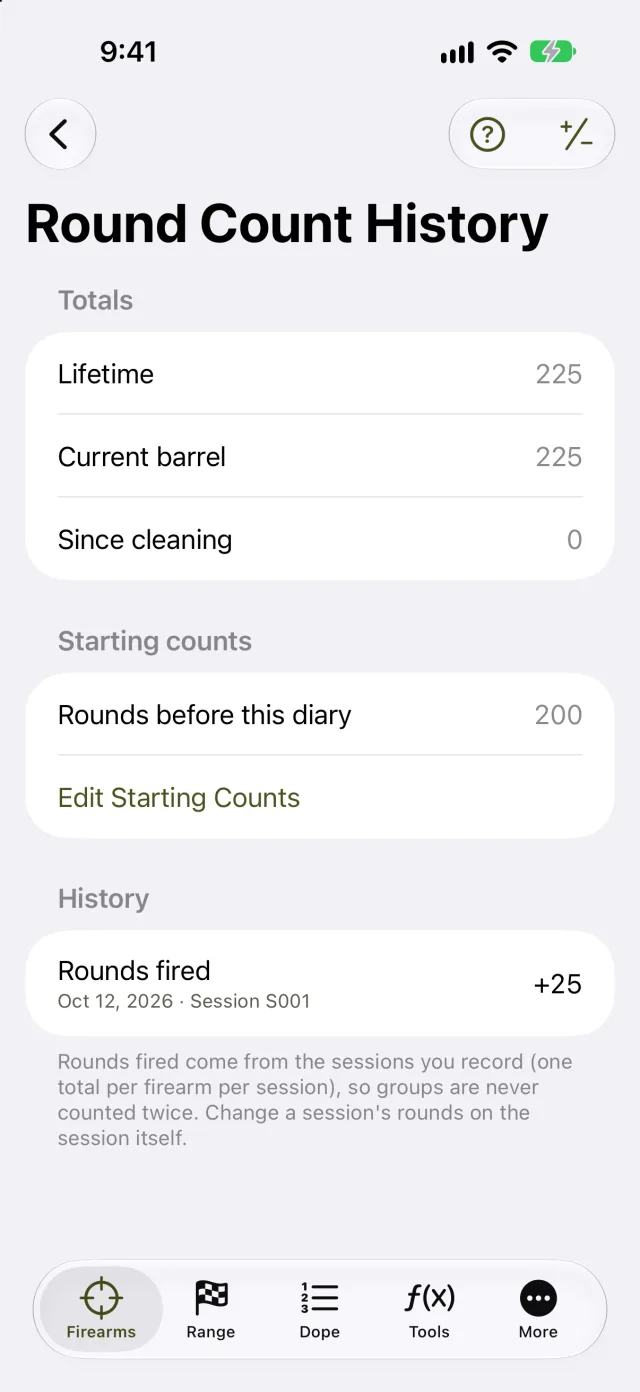
Gun Diary keeps three round counters for each firearm: Lifetime (every round the gun has fired), Current barrel (rounds on the barrel fitted now) and Since cleaning (rounds fired after the last cleaning). They’re worked out from what you record: the rounds the gun fired before this diary, the rounds you enter for it in each session, and any adjustments. Round Count History shows the totals, the starting counts and every entry behind them.
Steps
See where the numbers come from
- Open the firearm > The Garage. The three counters are at the top.
- Tap Round Count History. Under Totals: Lifetime, Current barrel, Since cleaning. Under Starting counts: Rounds before this diary. Under History: each entry, newest first, with its kind (Rounds fired, Adjustment…), its date and reason, and its count (+60, -10).
Set the starting counts
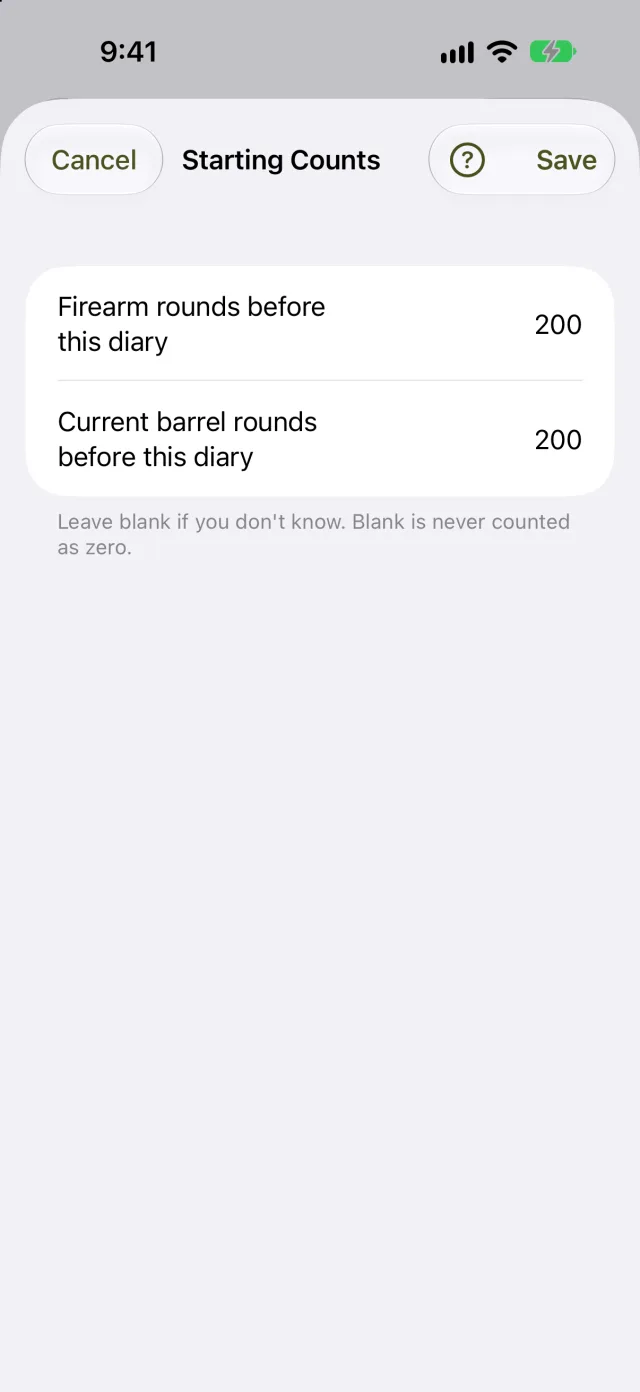
- In Round Count History, tap Edit Starting Counts.
-
Type Firearm rounds before this diary: the rounds the gun fired before you started recording. If a barrel is recorded, also type Current barrel rounds before this diary.
-
Leave a field blank if you don’t know. Blank is never counted as zero.
- Tap Save. The counters update at once.
Add rounds you fired without a session, or correct a count
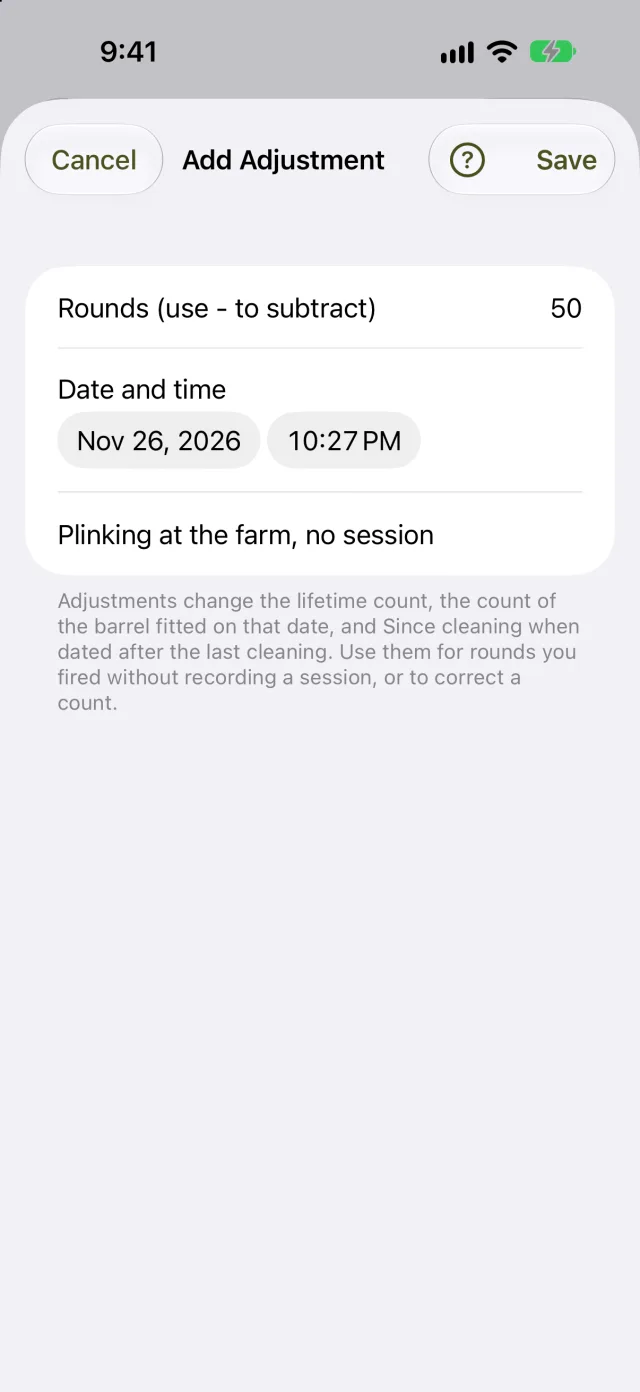
- In Round Count History, tap Add Adjustment (the +/- button at the top right).
- Type Rounds (use – to subtract): 50 to add, -20 to take away.
- Set the Date and time. It decides which barrel the rounds go to and whether they count toward Since cleaning.
-
Type a Reason (required), like “Plinking at the farm, no session” or “Miscounted in March”.
-
Tap Save. Without a count other than 0 or a reason, it says which, like “Type the reason for the adjustment”.
Delete an adjustment
- In History, swipe left on the adjustment and tap Delete.
- Tap Move to Recently Deleted. The counters change back at once; you can restore it for 30 days.
Rounds fired in sessions can’t be deleted here: change them on the session itself. See A session.
Why it’s useful
Round count is the simplest measure of wear and the first question anyone asks about a used gun. A barrel’s accuracy life, a spring replacement interval, a cleaning routine: all of them are counted in rounds. Counting by hand in a notebook drifts; counting from the sessions you already record doesn’t.
Who uses it, and how:
- Precision and long-range shooters watch Current barrel against the barrel’s expected life.
- Competitors track a season’s rounds and rounds on each barrel. The round count calculator works out rounds per week or rounds left.
- Handgun and carry owners track rounds between spring changes and since the last cleaning.
- New gun owners see the count climb from zero and know exactly what’s been through the gun.
- Buyers of a used gun type a best guess or leave it blank (“don’t know”), and the count starts honestly.
- Hunters see the few rounds fired each year at a glance, and that the gun was cleaned after the last trip.
- Plinkers add an adjustment for a day of shooting they didn’t log as a session.
What each option means
The three counters
“—” means nothing is recorded yet for that counter (not zero).
Where session rounds come from: each session stores one rounds total per firearm, which you type (or Range Mode adds up) on the session. Groups never add rounds by themselves, so nothing is counted twice. The History footer says so: “Rounds fired come from the sessions you record (one total per firearm per session), so groups are never counted twice. Change a session’s rounds on the session itself.”
Entries in History
Add Adjustment
The footer says: “Adjustments change the lifetime count, the count of the barrel fitted on that date, and Since cleaning when dated after the last cleaning. Use them for rounds you fired without recording a session, or to correct a count.”
Example
On January 10, 2026 you add the Mountain Rifle with Rounds already fired 600 (no barrel recorded).
- Counters: Lifetime 600, Current barrel 600, Since cleaning “—”.
On April 5 you log a session with 60 rounds for it.
- Lifetime 660, Current barrel 660, Since cleaning 60.
That evening you record a cleaning.
- Since cleaning 0. The others stay 660.
On April 12 you shoot 50 rounds at a friend’s farm without logging a session: Add Adjustment, Rounds (use – to subtract) 50, Date and time April 12, Reason (required) “Farm plinking”.
- Lifetime 710, Current barrel 710, Since cleaning 50.
Tips
- Type the rounds on each session. That’s what the counters count, whichever way the session was made.
- Blank is honest. If you don’t know a used gun’s past, leave the starting count blank; it’s shown as unknown, not as zero.
- Correct, don’t delete. For a miscount, add an adjustment with a reason rather than changing old sessions; the history stays clear.
- Date adjustments correctly. A date before the last cleaning doesn’t count toward Since cleaning; a date before the current barrel’s install date doesn’t count toward Current barrel.
- Record barrels to split the count per barrel. See Barrel history.
What it affects
- The Garage, the dashboard and the firearm’s card show the counters.
- Barrel History: each barrel’s own total. See Barrel history.
- The Firearms tab: sorting by Most rounds uses Lifetime.
- Reports and export: the round count report (PDF Pro, CSV free), the firearm history PDF (Pro), backups and Export All Data. See Round count report.
If something goes wrong
- A counter shows “—”. Nothing is recorded for it: no starting count, no session rounds, no adjustments (or, for Since cleaning, no rounds at all yet).
- Lifetime didn’t change after a session. The session has no rounds typed for this firearm. Open the session and enter the rounds.
- Since cleaning includes rounds from before the cleaning. The cleaning is dated before the session. See Maintenance log.
- “Type the number of rounds (use – to subtract)”, “Type a number of rounds other than 0” or “Type the reason for the adjustment” on Add Adjustment. Save says what’s missing instead of saving. Type a count other than 0 and a reason. “Must be at most 1,000,000” means the count is too large.
- I can’t delete a Rounds fired entry. Session rounds come and go with their session. Change the rounds on the session.
- Current barrel rounds before this diary isn’t there. It shows only when a current barrel is recorded. See Barrel history.
Related
- The Garage, Barrel history, Maintenance log, Log a session, A session.
- Round count report and Calculator: round count.
- See also the learning path New gun owner.
- Words used here: round count, starting counts, adjustment, barrel life.
Still stuck? In the app, open More > Help > Contact Support, or More > Settings > Support, which also has Send Error Log (the error log helps us find the problem), or email contact@setriksoftware.com. You can also browse the Help Center or the messages the app can show.