
Round count report
Print or export one firearm's round counts: lifetime, current barrel and since cleaning, rounds per barrel, and every round event with its session or reason, for any dates.
The Round Count report shows how many rounds a firearm has fired: today’s totals (lifetime, current barrel, since cleaning), the rounds on each barrel, and every round event in the dates you choose, from sessions, adjustments, cleanings and barrel changes. The PDF is part of Gun Diary Pro; the spreadsheet is free.
Steps
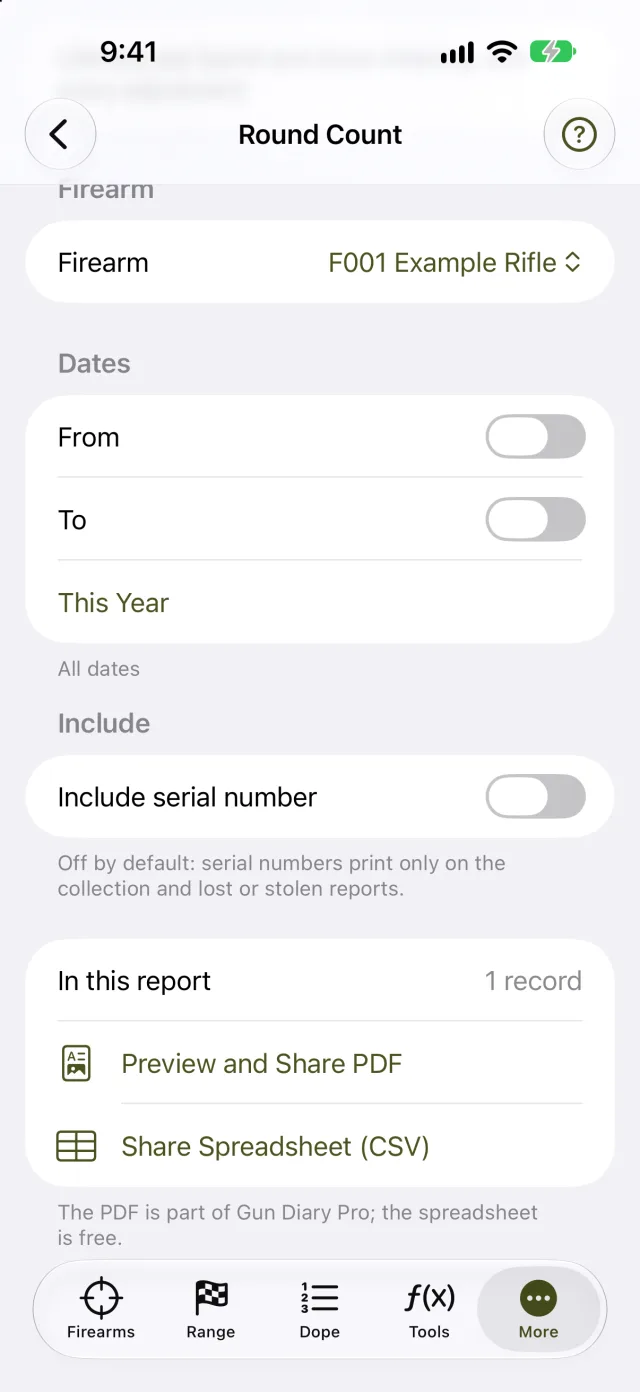
- Tap More > Reports > Round Count. (Or in The Garage, under Garage reports, tap Round Count Report (PDF or CSV): it opens on that firearm.)
- Pick the firearm next to Firearm.
- Under Dates, switch on From and To or tap This Year to limit the list of events. Leave them off for every event.
- Switch Include serial number on if you want the serial under the title.
- In this report shows how many round events it lists.
-
Tap Preview and Share PDF or Share Spreadsheet (CSV).
Why it’s useful
Barrels wear out, parts have service intervals, and a gun’s round count matters to its value. Counting from memory is guesswork; Gun Diary adds up every session and adjustment, and this report shows the totals and where each number came from.
Who uses it, and how:
- Precision rifle shooters watch rounds on the current barrel to plan a rebarrel before accuracy drops.
- Handgun and competition shooters track rounds between spring or part changes.
- Anyone with a cleaning routine sees rounds since the last cleaning.
- Buyers and sellers use the lifetime count and per-barrel history as proof.
- Spreadsheet users chart rounds per month or per season from the CSV.
What’s on the Round Count screen
What the PDF prints
- The title, the firearm (code, name, maker, model, cartridge), when it was prepared and the date range.
- Totals today: Lifetime, Current barrel, Since cleaning, and the Starting count you entered for rounds fired before the diary.
- Per barrel: each barrel (code, maker, twist), installed and removed dates (“Current” for the fitted one) and its rounds.
- Round events: date, kind (Starting count, Rounds fired, Cleaning, Barrel change, Adjustment), rounds, barrel, and the session or reason, newest first, with a total of the rounds fired and adjusted. With no events in the dates: “No round events in this range.”
File: “Round count – Mountain Rifle.pdf”.
What the spreadsheet holds (one row per round event, newest first; file “Round count – Mountain Rifle.csv”): Firearm code, Firearm, Date, Kind, Rounds, Barrel, Session, Reason, Event ID. No serial column.
Example
Your Mountain Rifle’s barrel is rated by its maker for about 2,500 rounds and you want to know where you stand.
- The Garage > Round Count Report (PDF or CSV). Firearm: F002 Mountain Rifle. This Year.
- Preview and Share PDF. Totals today: Lifetime 1,455, Current barrel 455, Since cleaning 43, Starting count 1,000.
- Per barrel: BL001 (Mar 3, 2024 to Aug 30, 2026) 1,000 rounds; BL002 (Aug 30, 2026, Current) 455.
- Round events lists each session this year, like “Oct 1, 2026 · Rounds fired · 40 · BL002 · S021 Practice”, and totals the rounds fired and adjusted.
- You also tap Share Spreadsheet (CSV) and keep it in Numbers to chart rounds per month.
Tips
- Enter the starting count when you add a used gun, so the lifetime total is right. See Round counts.
- Use an adjustment (with a reason) for rounds you fired without logging a session.
- Record barrel changes so each barrel keeps its own count. See Barrel history.
- Clean, then log it: a cleaning resets “since cleaning”.
What it affects
Nothing. The report reads round events, barrels and totals and builds a new file; it doesn’t add or change any count.
If something goes wrong
- The Pro screen opens. The PDF is Pro; Share Spreadsheet (CSV) is free.
- “No round events in this range.” Nothing was counted in those dates. Turn From and To off.
- “Pick a firearm for this report”. Tapping a share button with no firearm picked shows this under Firearm. Pick one there.
- A barrel shows the wrong rounds. Rounds belong to the barrel fitted on each event’s date. Check its installed and removed dates in Barrel history.
- Lifetime looks too low. Add the rounds fired before you started the diary as the starting count, or an adjustment. See Round counts.
Related
- Next: Round counts: how counting works and how to adjust it.
- Barrel history, Maintenance report, The Garage.
- Reports, Save and share PDF reports.
- Words used here: round count, CSV.
Still stuck? In the app, open More > Help > Contact Support, or More > Settings > Support, which also has Send Error Log (the error log helps us find the problem), or email contact@setriksoftware.com. You can also browse the Help Center or the messages the app can show.