
Maintenance report
Print or export one firearm's maintenance (cleaning, repairs, professional service and modifications) with dates and round counts, plus its safety observations, for any dates.
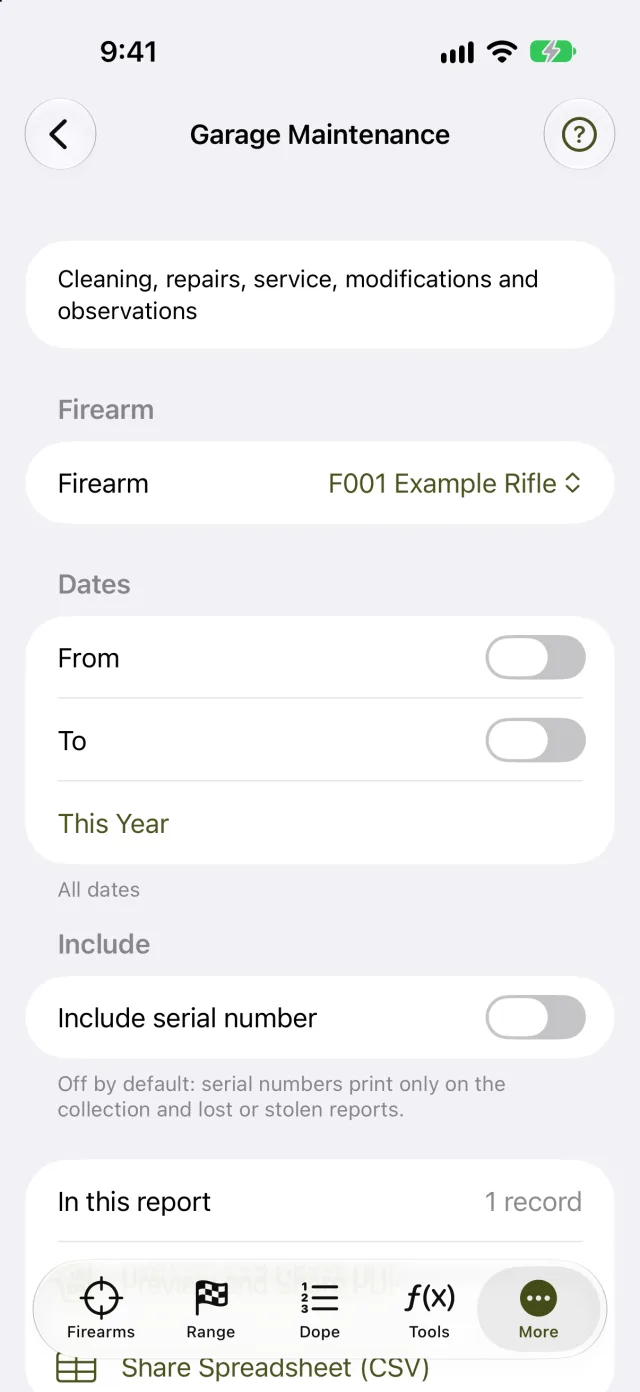
The Garage Maintenance report lists every cleaning, repair, professional service and modification recorded for one firearm, with its date and the round count at the time, followed by the firearm’s safety observations. Pick a date range to cover one season or the whole life of the gun. The PDF is part of Gun Diary Pro; the spreadsheet is free.
Steps
- Tap More > Reports > Garage Maintenance. (Or in The Garage, under Garage reports, tap Maintenance Report (PDF or CSV).)
- Pick the firearm next to Firearm.
- Under Dates, switch on From and To or tap This Year, or leave them off for every entry.
- Switch Include serial number on only if the reader needs it.
-
Tap Preview and Share PDF or Share Spreadsheet (CSV).
Quicker: Maintenance PDF at the top right of The Garage makes the PDF at once, for all dates, without the serial number.
Why it’s useful
A clear maintenance record keeps a gun reliable and holds its value. It tells a gunsmith what’s already been done, shows a buyer the gun was cared for, and helps you spot a pattern (like a problem that started after a modification).
Who uses it, and how:
- Gunsmith visits: send it ahead so the smith knows past work and the round count at each job.
- Warranty claims: dated service and repair entries back up your claim.
- Competition shooters keep part-replacement intervals (springs, extractors) in view.
- Hunters show the rifle was cleaned and checked before the season.
- Collectors and sellers document care and modifications for provenance.
- Spreadsheet users sort and filter every entry in the CSV.
What’s on the Garage Maintenance screen
What the PDF prints
- Title, the firearm, when it was prepared and the date range.
- A table: Code, Date, Kind (Cleaning, Repair, Professional service, Modification, Other), What was done (title, details and notes), Rounds (the round count when it was done). Newest first. With none: “No maintenance in this range.”
- Safety observations (when there are any in the dates): date, observation and status.
File: “Garage maintenance – Mountain Rifle.pdf”. The Garage’s Maintenance PDF prints the same table for all dates and all observations, titled “Maintenance:” and the firearm’s name; its What was done column leaves out the notes.
What the spreadsheet holds (one row per maintenance entry; file “Garage maintenance – Mountain Rifle.csv”): Firearm code, Firearm, Code, Date, Kind, Title, Details, Notes, Rounds at the time, Equipment (the part it was done to), Entry ID. Observations have their own report.
Example
Before a match season you want a clean record for your Carry Pistol.
- More > Reports > Garage Maintenance, Firearm: F004 Carry Pistol, This Year.
- In this report: 5 records. Preview and Share PDF.
- The table lists M011 “Cleaning” (Feb 2, 2026, 820 rounds), M012 “Repair: recoil spring replaced” (May 14, 2026, 2,150 rounds) and three more cleanings; under Safety observations, OBS-002 “Failure to feed”, Resolved.
- Share > Save to Files.
Tips
- Log the round count with each entry: it’s what makes the report useful to a gunsmith. See Maintenance log.
- Put the work in the title (“Trigger set to 2.5 lb”) and the details in the notes; the PDF joins them.
- Use the CSV to find how many rounds you usually go between cleanings.
What it affects
Nothing. The report reads maintenance entries and observations and builds a new file.
If something goes wrong
- The Pro screen opens. The PDF is Pro; the spreadsheet is free.
- “No maintenance in this range.” Nothing in the dates. Turn From and To off, or check the firearm.
- An entry is missing. It’s in Recently Deleted, or its date is outside the range.
- The Rounds column is blank. No round count was saved with that entry.
Related
- Next: Maintenance log: add and edit entries.
- Safety observations report, Round count report.
- The Garage, Reports, Save and share PDF reports.
- Words used here: round count, safety observation.
Still stuck? In the app, open More > Help > Contact Support, or More > Settings > Support, which also has Send Error Log (the error log helps us find the problem), or email contact@setriksoftware.com. You can also browse the Help Center or the messages the app can show.