
"Calculator #18: Round Count Statistics"
See one firearm's round counters and how many rounds it fired per year, per month and per ammunition, from your own records.
Round Count Statistics (calculator #18) gathers one firearm’s round counts in one place: its lifetime, current-barrel and since-cleaning counters, and the rounds it fired broken down per year, per month (the latest 12) and per ammunition. Everything comes from the records you already keep; you don’t type numbers here, you just pick the firearm.
Steps
- Tap the Tools tab. Under Records, tap Round Count Statistics.
- Pick the Firearm. If you have only one, it’s picked for you; otherwise the first by name is.
-
Read the sections:
- Counters: Lifetime, Current barrel and Since cleaning, the same counters as the firearm’s round counts.
- Per year: rounds fired in each year, newest first.
- Per month (latest 12): rounds fired in each month, like 2026-10, newest first.
- Per ammunition: rounds fired with each ammunition, most-used first.
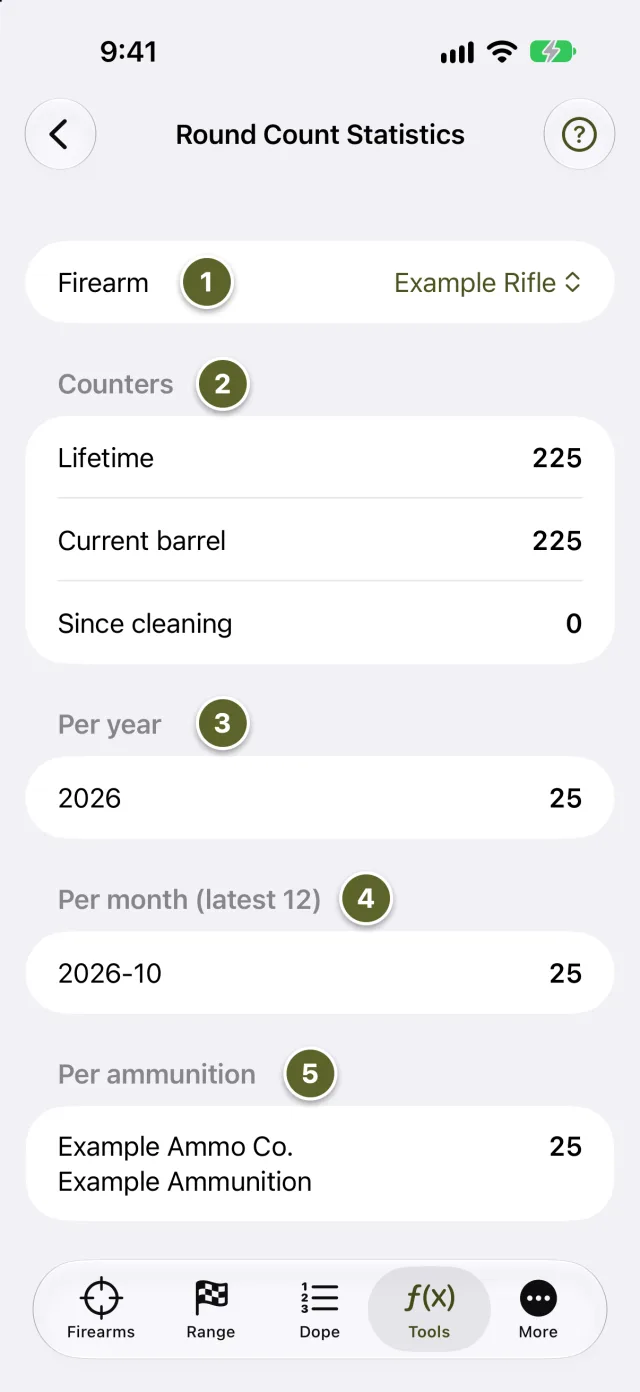
Numbers on the picture: 1 Firearm, 2 Counters, 3 Per year, 4 Per month (latest 12), 5 Per ammunition.
-
Pick another firearm to compare. Nothing here is saved or changed.
Why it’s useful
Round counts answer practical questions: when is this rifle due for cleaning, how far into its barrel life is it, how much do I actually shoot, and which ammunition do I go through. The counters on the firearm show the totals; this calculator shows the pattern behind them.
Who uses it, and how:
- Precision and long-range shooters: watch the current-barrel count against the barrel life you expect for your cartridge, and see how fast it’s climbing per month.
- Competitors and trainers: see training volume per month and per year, and whether the plan for the season was kept.
- Hunters: see how much a hunting rifle is really shot between seasons, and that the since-cleaning count is low before a trip.
- Collectors and casual shooters: an easy history of how each gun is used, and which ammunition it eats.
- Anyone buying ammunition: Per ammunition shows how much of each kind you use in a year, useful for planning purchases.
What each option means
The breakdowns count only Rounds fired entries (from sessions and round-count entries). Starting counts and adjustments count in Lifetime but not per year, month or ammunition, because they have no single date or ammunition. That’s why Lifetime is often bigger than the per-year total.
Example
On the Example Rifle (in the app’s example data):
- Counters shows Lifetime 225, Current barrel 225 and Since cleaning 0.
- Per year shows 2026: 25, Per month (latest 12) 2026-10: 25, and Per ammunition Example Ammo Co. Example Ammunition: 25.
- The other 200 rounds in Lifetime are the starting count entered when the rifle was added, so they don’t appear per year.
For your own Mountain Rifle, with 100 rounds fired in May 2025 with one ammunition, then 50 in February 2026 with another and 30 later that month with the first: Per year shows 2026: 80 and 2025: 100, the first month line is 2026-02: 80, and Per ammunition lists the first ammunition first with 130. (These are the numbers the app’s tests check.)
Tips
- Record rounds fired in every session. Groups never add to the counters; Rounds fired does. See Log a session.
- Pick the ammunition in the session so Per ammunition can tell your loads apart; otherwise rounds land in Not recorded.
- Enter a starting count when you add a used gun; it keeps Lifetime honest even if the breakdowns start later.
- For a printable record, use the round count report.
What it affects
Nothing. This screen only reads round-count entries, sessions and the maintenance log. To change a count, edit the entry in Round counts or the session.
If something goes wrong
- “No rounds recorded yet.” The firearm has no Rounds fired entries. Add rounds fired to a session or in Round counts.
- Lifetime is higher than the per-year total. The difference is the starting count and any adjustments, which aren’t dated usage.
- Rounds show under Not recorded. Those rounds came from a session with no ammunition picked, or from a round-count entry outside a session.
- Since cleaning didn’t go to zero. Record the cleaning in the maintenance log with the right date.
- A firearm is missing from the list. It’s in Recently Deleted. Restore it first.
Related
- Next: Re-Zero Shift.
- Round counts, Barrel history, Maintenance log, Log a session.
- Round count report, Velocity Trends.
- The Tools tab.
- Words used here: round count, barrel life.
Still stuck? In the app, open More > Help > Contact Support, or More > Settings > Support, which also has Send Error Log (the error log helps us find the problem), or email contact@setriksoftware.com. You can also browse the Help Center or the messages the app can show.