
Log a session
Write up a range day, hunt or match on the full session form: activity, date, place, each firearm's rounds and ammunition, weather, photos, tags and notes.
A session is one trip: a morning at the range, a hunt, a match, an afternoon of plinking. Log a Session opens the full form so you can write it up afterwards, with every firearm you shot, how many rounds each fired, which ammunition, where you were and what the weather was. The same form opens as Edit Session later, and as Session Info inside Range Mode.
Steps
-
On the Range tab, tap Log a Session. (From a firearm’s Shooting Diary, + does the same with that firearm already on.) The New Session form opens.
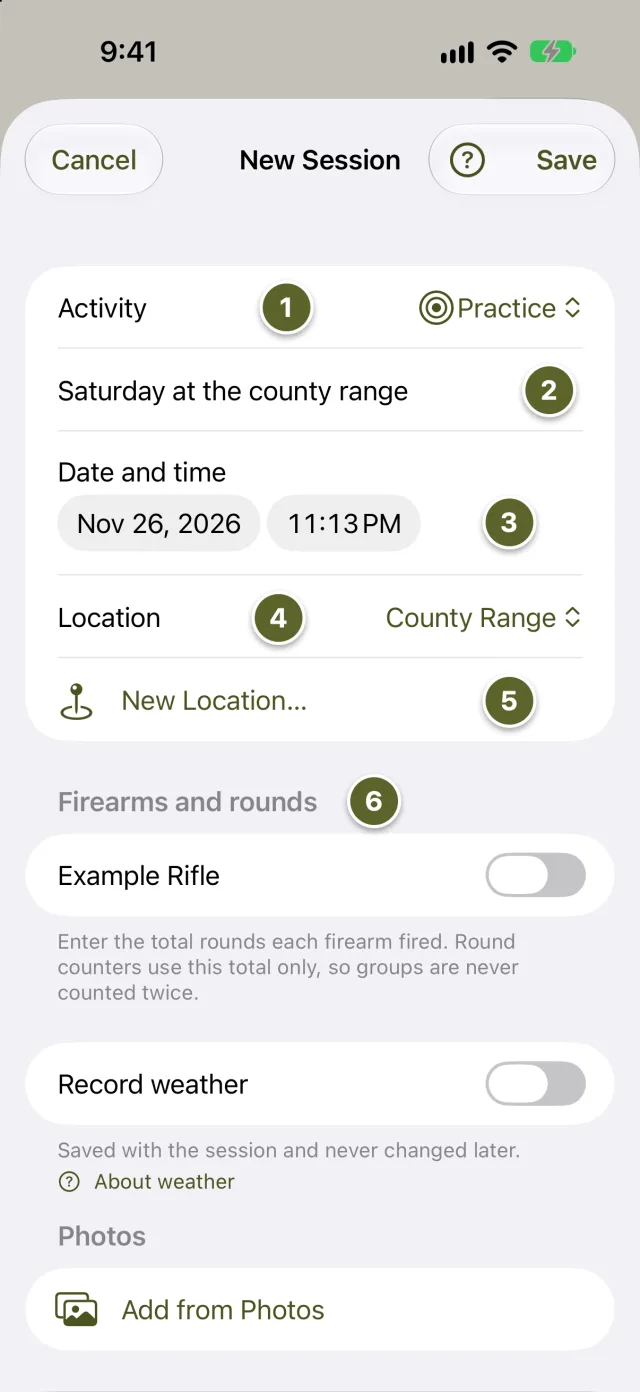
Numbers on the picture: 1 Activity, 2 Session name (optional), 3 Date and time, 4 Location, 5 New Location…, 6 Firearms and rounds.
-
Pick the Activity: Practice, Sight-in, Zero check, Hunting, Competition, Patterning, Recreational or Other. For Other, type an Activity name.
- Optionally type a Session name, like “Pre-season zero”. Without one, the session shows as the activity and date.
- Set the Date and time you started shooting.
- Pick a Location from your saved places, or tap New Location… to add one. See Saved locations.
-
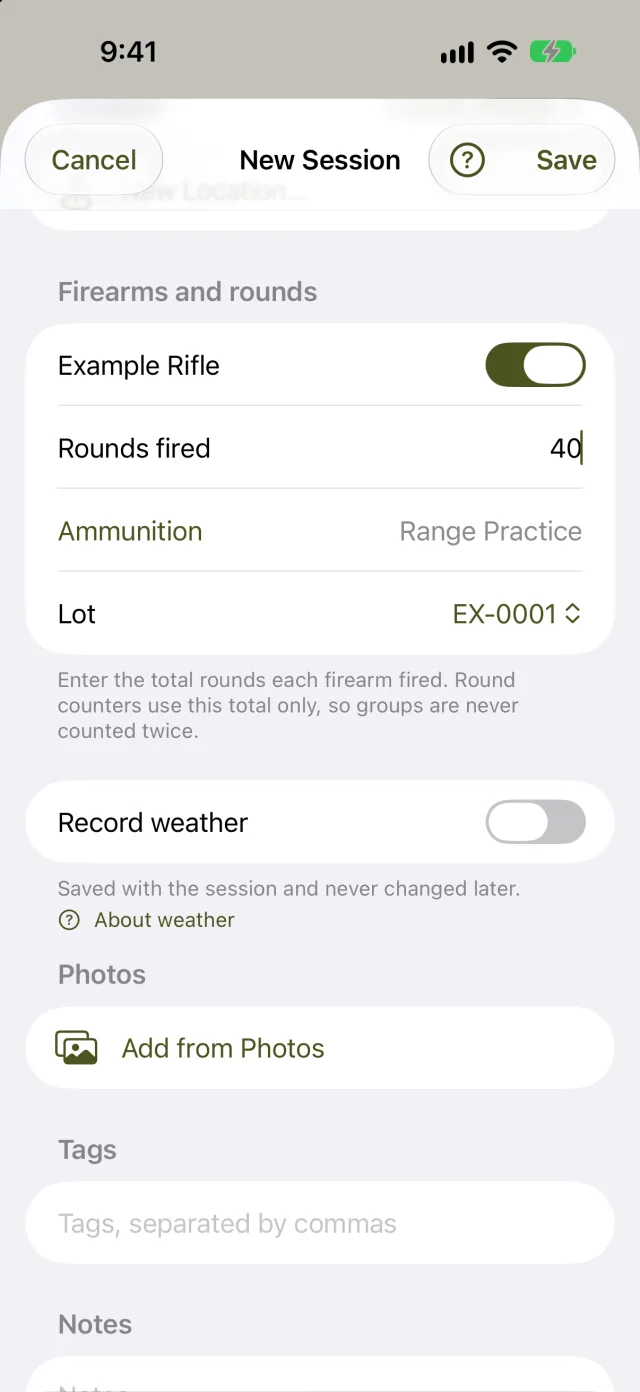
Under Firearms and rounds, turn on each firearm you shot. For each one that’s on:
- Type Rounds fired: every round that firearm fired today, sighters and groups included.
- Tap Ammunition and pick a favorite, Choose ammunition… from the library, or None. A firearm has one Ammunition row per session: shooting more than one ammunition in this firearm? Pick the main one here, then set each group’s own Ammunition when you record it; Ammo comparison uses the group’s.
- If the ammunition has lots, pick the Lot.
-
For a Competition session, type the Score and Placement.
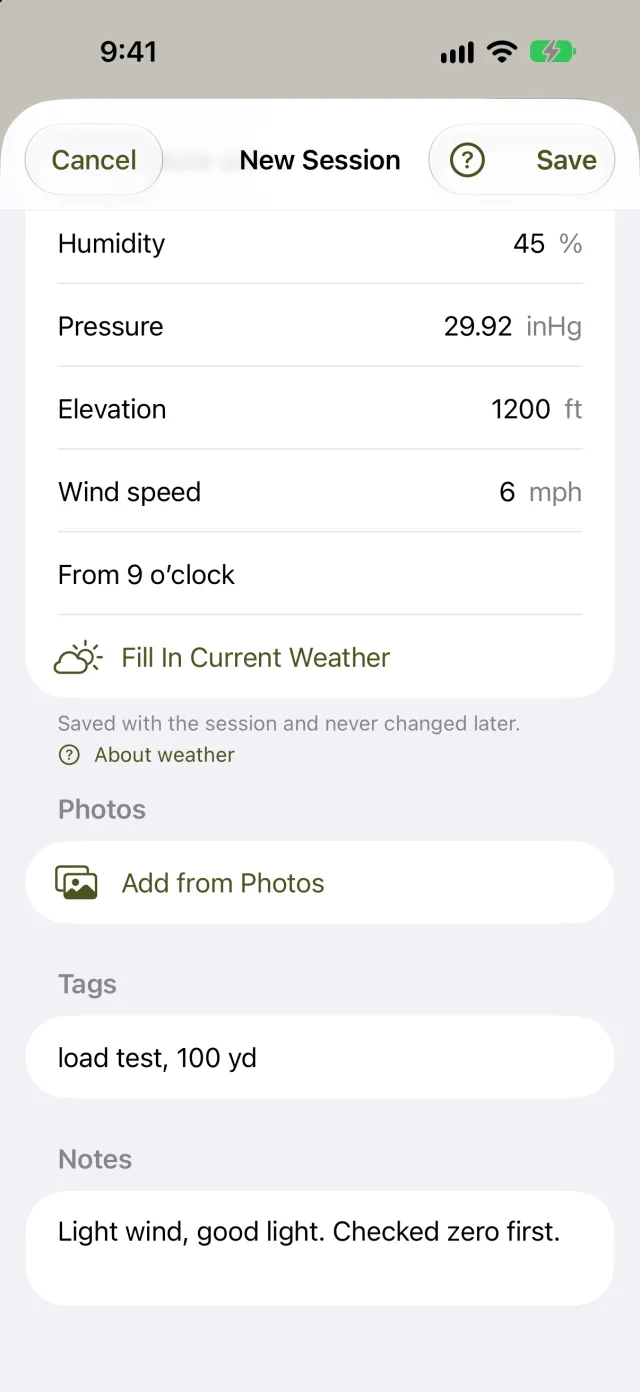
- To record the weather, turn on Record weather, then tap Fill In Current Weather or type the values. See Session weather.
-
Add pictures under Photos with Add from Photos or Take Photo, add Tags, and type any Notes.
-
Tap Save. The session is finished and appears in the range diary. Add groups and targets from the session screen. See A session.
To change it later: open the session, tap ••• > Edit Session, change anything, then tap Done.
Why it’s useful
Most of what you’ll want to know about your shooting later starts with the session: when, where, which gun, which ammunition and how many rounds. Rounds fired drive the round counters, which tell you when a barrel is wearing or a cleaning is due. The ammunition and lot let Ammo comparison and Group History show what shot best. The place and weather explain a strange day.
Different people use it differently. A new gun owner who shot a box at a public range logs one firearm, 50 rounds and a note, and still builds an honest round count. A hunter writes up the opening-morning hunt (or uses Quick Hunt Log). A competitor records the match with Score and Placement, then adds stage drills from the session screen. A collector who takes three handguns out once a month logs all three in one session with each one’s rounds. Long-range shooters record weather and location so they can match a later dope change to the conditions. Anyone without Gun Diary Pro uses this form instead of Range Mode.
What each option means
The section footer says it plainly: “Enter the total rounds each firearm fired. Round counters use this total only, so groups are never counted twice.” Groups you record don’t add rounds on their own here; only Rounds fired does. (In Range Mode the app fills Rounds fired for you as you add groups.)
Score and Placement show only when Competition and Drills is on in Personalize your diary.
Example
You spent Saturday morning at the county range with two guns.
- Log a Session. Activity: Practice. Session name: “Saturday at County”. Date and time: Nov 28, 8:30 AM. Location: County Range.
- Turn on Mountain Rifle: Rounds fired 30, Ammunition your favorite “Hunting load” (Ridgeline Match 140 gr), Lot 2251.
- Turn on Field 9mm: Rounds fired 100, Ammunition > Choose ammunition… > a 115 gr FMJ.
- Record weather > Fill In Current Weather (or type 48 °F, 5 mph).
- Notes: “Rifle: 3 groups at 100 yd. Pistol: Bill Drill practice.”
- Save. Each firearm’s lifetime and since-cleaning counts go up by its rounds: 30 and 100.
Tips
- Count rounds per firearm, not per group. Fouling shots, sighters and plinking all count toward barrel wear.
- Pick a favorite rather than raw ammunition when you have one; the session remembers which revision of the favorite you shot.
- Testing several ammunitions? One session per trip is enough: each group carries its own Ammunition and Lot. Add a tag like “ammo test” under Tags so Group History can filter test days by tag (Gun Diary has no separate testing activity).
- Use the activity honestly. Sight-in and Zero check sessions get a Zero Checks section; Hunting gets hunt shots and harvests.
- Cancel isn’t lost work. Keep as Draft keeps everything for later in Drafts.
- A firearm you turn off loses its line in the session, including its rounds and ammunition.
What it affects
- Round counters: each firearm’s Rounds fired adds to its lifetime, current barrel and since-cleaning counts, dated with the session. Change it later and the counts follow. See Round counts.
- Shooting Diary: the session appears in each turned-on firearm’s diary.
- Saved location: its visit count goes up.
- Groups added later from the session screen pick up each firearm’s ammunition and lot.
- Change history: edits to a finished session are recorded. See Change history and locking.
- A new session is a draft until you tap Save.
If something goes wrong
- “Keep this session?” when I tap Cancel. A new session already exists as a draft. Keep as Draft saves it for later (“A draft stays in Drafts until you finish it.”); Discard Session removes it.
- My firearm isn’t in the list. Archived and deleted firearms aren’t listed; unarchive it first. Every other firearm is, including ones marked sold, lost or stolen.
- Round counts look doubled. Check you didn’t type the same rounds in two sessions. Groups never add rounds on this form.
- No Score field. The activity must be Competition, and Competition and Drills must be on in Personalize.
- Weather won’t fill in. See Session weather.
- I swiped Edit Session down. Swiping an edit sheet down keeps your changes. (A new session can’t be swiped away; use Cancel.)
Related
- Next: A session, then Record a group.
- Session weather, Saved locations, Round counts, Favorite ammunition, Drafts.
- At the range instead: Range Mode (Pro) or Quick Entry.
- Learning paths: New gun owner, Testing factory ammo.
- Words used here: session, lot, favorite ammunition, round count, draft.
Guides on this topic
Still stuck? In the app, open More > Help > Contact Support, or More > Settings > Support, which also has Send Error Log (the error log helps us find the problem), or email contact@setriksoftware.com. You can also browse the Help Center or the messages the app can show.