
Favorite ammunition
Give the ammunition a firearm shoots best a name like "Elk Hunting" or "Range Practice", so it's one tap away in sessions and on the dashboard.
A favorite is a name you give to the ammunition one firearm shoots best for a purpose: “Elk Hunting”, “Range Practice”, “Carry”, “Match”. It points to the ammunition in your library; it never copies it. Favorites belong to one firearm, sit at the top of its dashboard, and are offered first when you record a session.
Steps
-
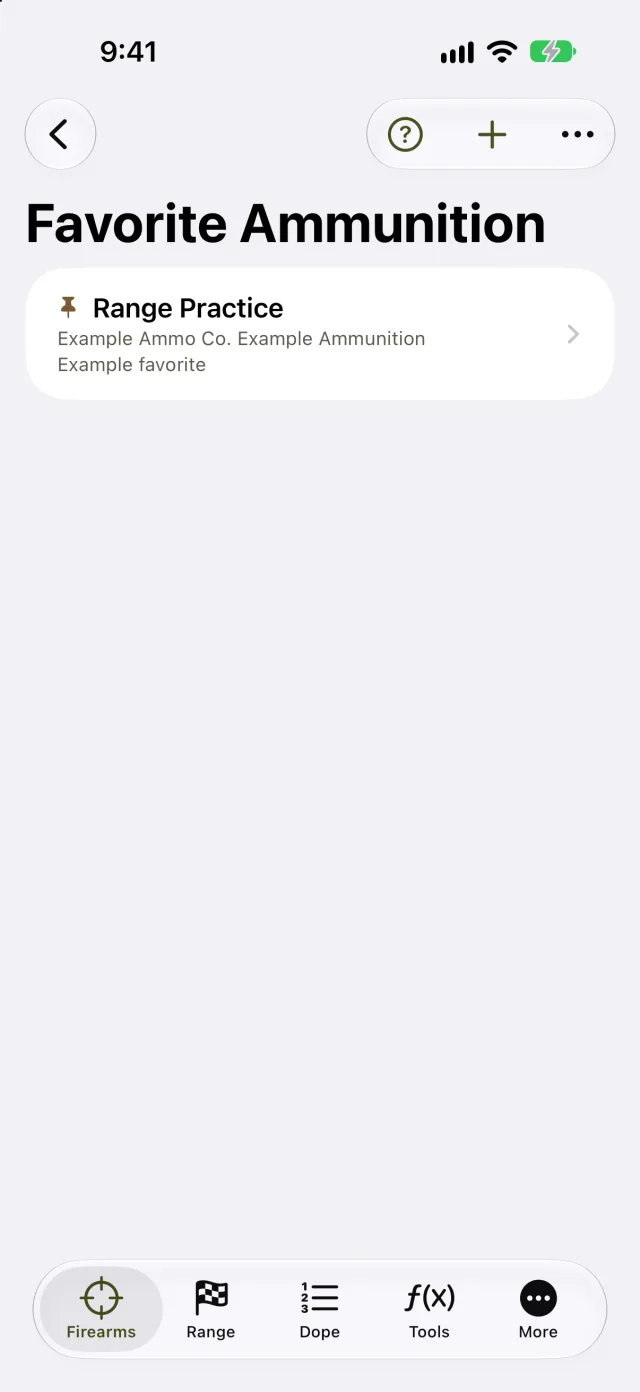
Open the firearm (Firearms tab > tap it). On its dashboard, tap Favorite Ammunition. The Favorite Ammunition screen opens.
-
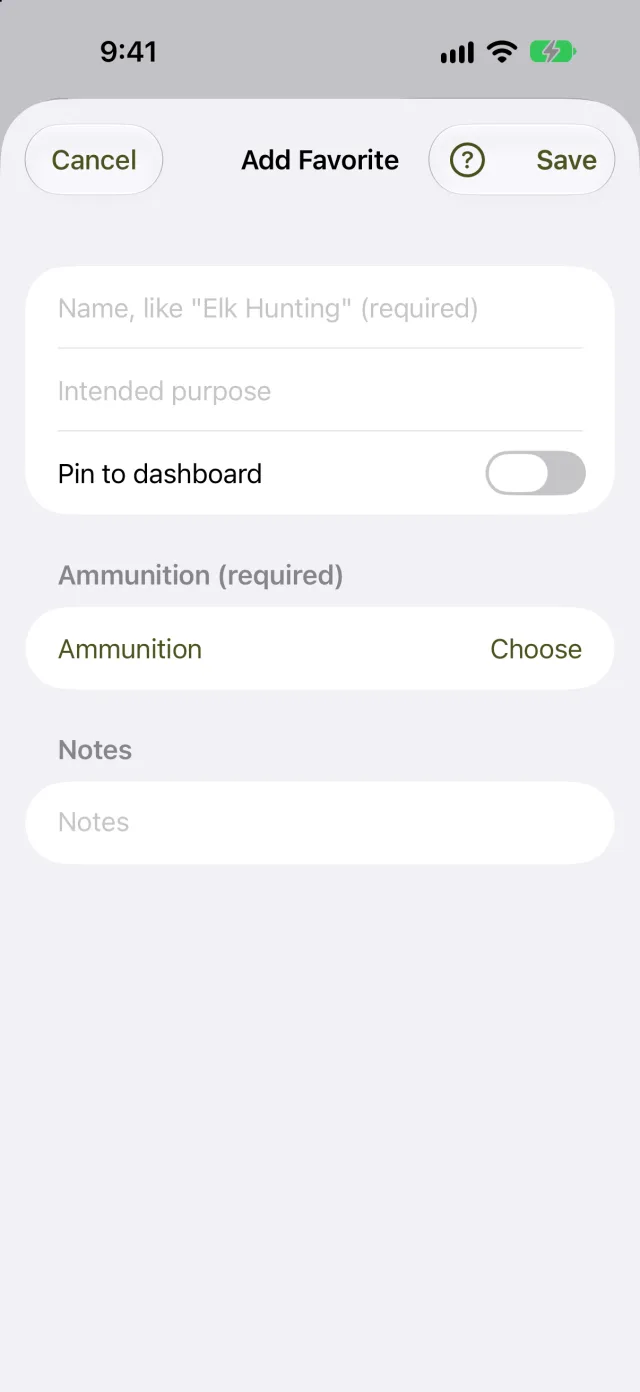
Tap + (Add Favorite) at the top right (or Add Favorite on the empty screen).
- Type a name, like “Elk Hunting”, and the Intended purpose if you want (like “Elk, inside 400 yd”).
- Turn on Pin to dashboard if you want it at the top of the firearm’s dashboard.
- Under Ammunition (required), tap the Ammunition row (it reads Choose) and pick the ammunition from your library, or add it with Add Custom Product. See Pick an ammunition.
-
Add Notes if you like, then tap Save.
-
The favorite appears in the list with its ammunition and purpose; a pin shows on pinned ones.
- To change the order, tap ••• > Edit and drag the handles, then Done.
- Retired favorites are folded under Retired favorites at the bottom; tap it to see them.
- Tap a favorite to open it, change its ammunition, retire it or remove it. See A favorite ammunition.
Why it’s useful
Most firearms end up with one or two ammunitions that work, and the reason you chose them is worth keeping. A favorite saves you remembering which box is “the good one” and saves taps every session. And because a favorite keeps dated revisions, it remembers which ammunition it meant on each date, even after you switch.
Who uses it, and how:
- Hunters name their hunting ammunition (“Elk Hunting”) and their cheaper zero-check ammunition (“Practice”), so the season’s sessions always say which was used.
- Concealed carry and home-defense owners name their carry ammunition and their range FMJ, and see both on the pistol’s dashboard.
- Competitors keep “Match” pointing at the lot or ammunition they settled on; when they change, they add a revision and the old sessions keep the old one.
- Shotgunners name their pattern loads: “Turkey #5”, “Skeet #9”.
- Families sharing guns see at a glance what each firearm should be fed.
- New gun owners write down what the gun runs well with, in plain words.
What each option means
On the dashboard, the Favorite Ammunition section shows up to three current favorites (pinned first) and a row with the count, like “2 saved favorites”.
Example
Your Mountain Rifle (6.5 Creedmoor) shoots Ridgeline Match best at the range and you hunt with Summit Hunter:
- Dashboard > Favorite Ammunition > +.
- Name “Range Practice”, purpose “Steel and paper”, ammunition Ridgeline Match. Save.
- + again: name “Elk Hunting”, purpose “Elk, inside 400 yd”, Pin to dashboard on, ammunition Summit Hunter. Save.
- The dashboard now shows “Elk Hunting” (pinned) first, then “Range Practice”.
- Next session, the firearm’s Ammunition row opens a menu with Favorites: Elk Hunting, Range Practice. One tap records the right box.
Tips
- Name it by purpose, not by box. “Elk Hunting” keeps meaning the same thing when you change ammunition; the box name doesn’t.
- Change, don’t replace. When you switch ammunition, open the favorite and use Change Ammunition. Old sessions keep the old one; see A favorite ammunition.
- Pin the one you use most so it’s at the top of the dashboard.
- Retire instead of removing a favorite you’ve stopped using: its history stays readable.
- Hidden section? If the dashboard has no Favorite Ammunition row, it may be hidden; see Arrange the dashboard.
What it affects
- The firearm’s dashboard shows pinned and current favorites.
- Sessions: the firearm’s Ammunition menu lists its current favorites first. A session records the favorite and the ammunition it meant that day.
- The ammunition’s record lists the favorite under Used in.
- Range Mode, Zero Check and the Quick Hunt Log put the ammunition of current favorites among the big buttons.
- Search finds favorites by name, purpose and notes.
If something goes wrong
- “Make an ammunition a favorite” on an empty screen: this firearm has no current favorites. Tap Add Favorite.
- “Type a name for the favorite” or “Pick the ammunition for this favorite”. Tapping Save says what’s missing and marks the field. Type a name and pick an ammunition. When the firearm has shot only one ammunition, it’s already picked.
- My favorite isn’t offered in a session. It’s retired (look under Retired favorites) or belongs to another firearm. Favorites are per firearm.
- The dashboard shows only three. The dashboard shows the first three; tap Favorite Ammunition to see all.
- The order on the dashboard differs from this screen. Pinned favorites come first on the dashboard.
Related
- Next: A favorite ammunition.
- Pick an ammunition, Firearm dashboard, Log a session.
- Learning paths: New gun owner, Before and after the hunt.
- Words used here: favorite, revision, factory ammunition.
Still stuck? In the app, open More > Help > Contact Support, or More > Settings > Support, which also has Send Error Log (the error log helps us find the problem), or email contact@setriksoftware.com. You can also browse the Help Center or the messages the app can show.