
About estimates
What "est." means in Gun Diary, which calculators estimate, what each one assumes, and how estimated results look on screen, on dope cards and in PDFs.
Almost everything in Gun Diary is either a number you entered or plain math on it. A few results go one step further and rest on an assumption: those are marked est. (estimated) everywhere they appear. This article holds the full estimate notice, the short form printed on cards and PDFs, and, for each estimating calculator, exactly what it assumes.
Steps
How you meet estimates in the app, and how to read this article again:
-
The first time you open an estimating calculator, a note slides up titled This calculator estimates. It says, in plain words, what that calculator assumes.
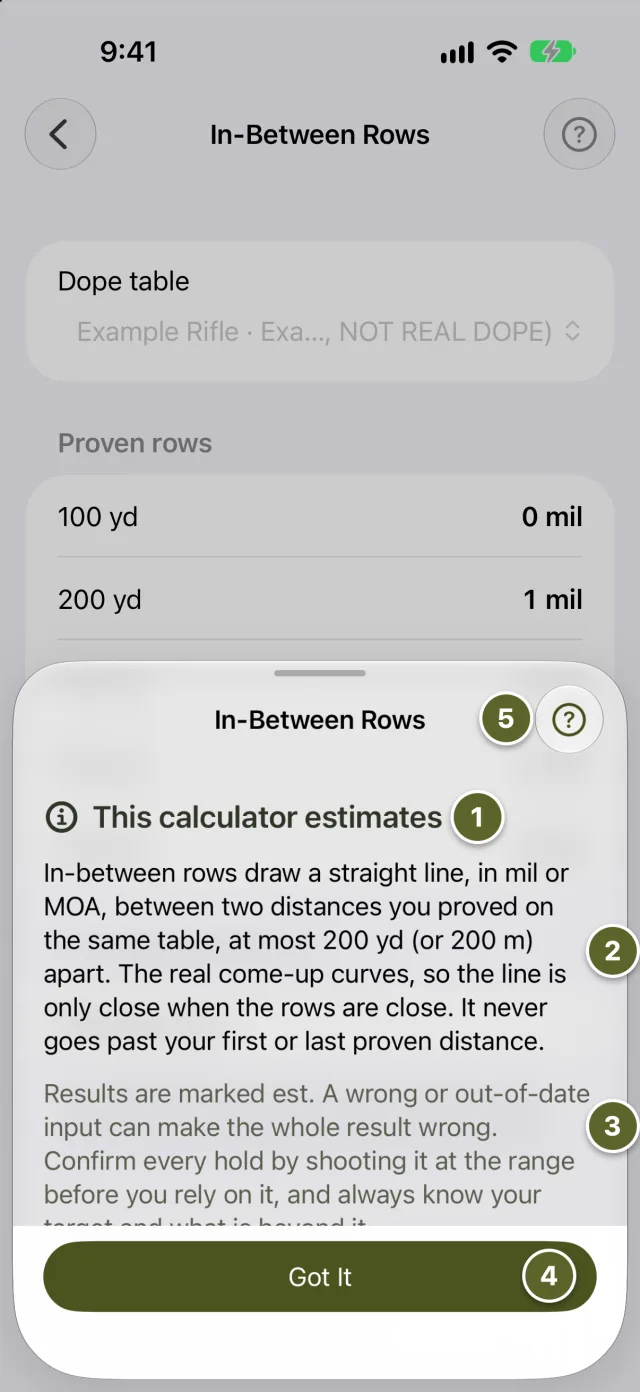
Numbers on the picture: 1 This calculator estimates, 2 what this calculator assumes, 3 the general warning, 4 Got It, 5 the “?” that opens this article.
-
Read it and tap Got It (it stays pinned at the bottom of the note). The note doesn’t close any other way (no swipe down), so it’s never dismissed by accident. It won’t show again for that calculator, on this device or any device that syncs with it.
-
On the calculator, every estimated result has the est. tag next to it, the number is in italics, and an info button (ⓘ) sits beside the tag.
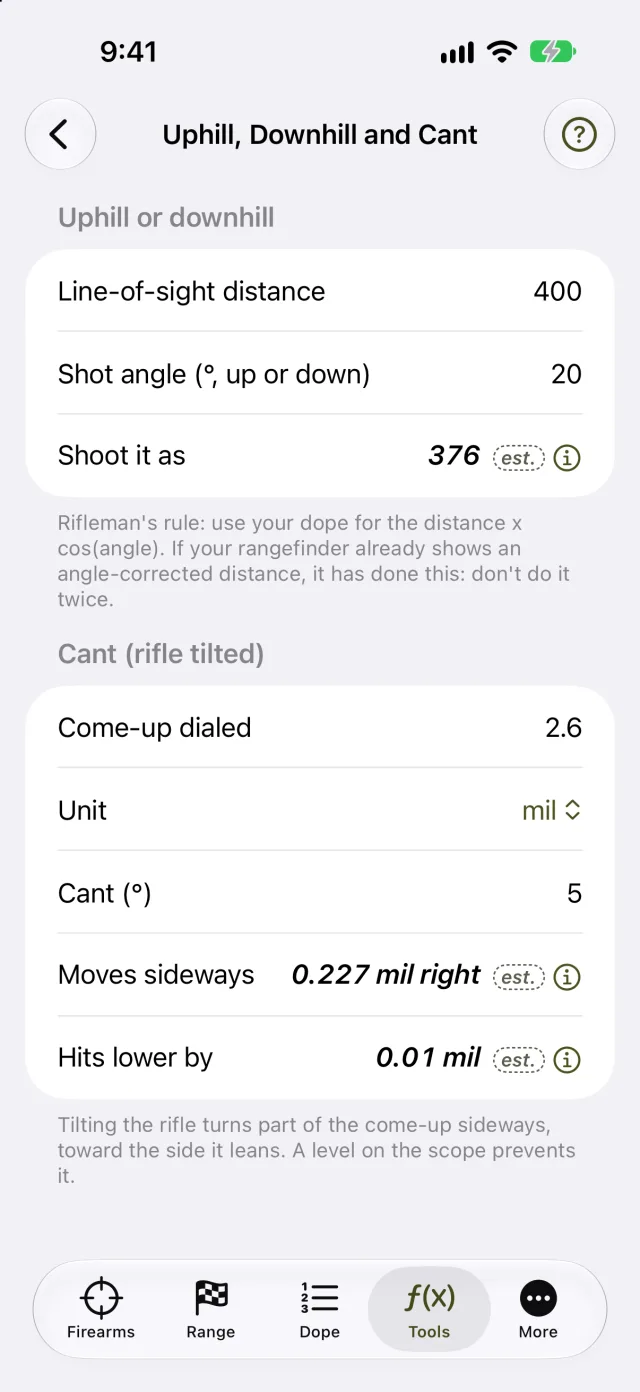
-
Tap the info button any time to open this article inside the app. Tap Done to go back to the calculator.
- Any time, you can also open this article from More > About Estimates, or from More > Settings > About Estimates.
Why it’s useful
Gun Diary is built around proof: dope you shot and confirmed, groups you measured, velocities your chronograph recorded. Estimates are useful too (a come-up halfway between two proven distances, a hold scaled for a stronger wind), but they’re a different kind of number, and mixing the two up is how a shooter misses.
So the app keeps them apart, quietly. There are no banners or warnings on every screen, just the est. tag, a style you can see without color, and this page.
Who this helps:
- Long-range shooters building a dope card: in-between rows fill gaps between proven distances, and the card shows at a glance which rows you proved and which are estimates to confirm next trip.
- Hunters: uphill and downhill corrections, lead on a walking animal and scaled wind holds are all est.; you know which numbers to practice before the season.
- New shooters: the one-time note explains what each estimate assumes in a sentence or two, so you learn where the math stops and the range starts.
- Competitors and data-minded shooters: hit chance and velocity trends come from your own records but assume things stay the same; the tag reminds you.
- Anyone sharing a dope card or PDF: the short notice prints on it, so whoever reads it knows est. rows aren’t proven.
What each option means
The estimate notice (full form)
This is Gun Diary’s full estimate notice. The Terms of Use (written for the website) carry the same words:
About estimates. Some calculators use assumptions and the numbers you enter. A wrong or out-of-date input, or conditions that differ from the assumptions, can make the whole result wrong. Confirm every hold by shooting it at the range before you rely on it, and always know your target and what is beyond it.
The short form
Dope cards and PDFs print the short form:
Est. = estimated, not proven. Confirm at the range.
The one-time note
Which calculators estimate, and what each assumes
Seven of the 27 calculators estimate. On the Tools tab their tiles carry the est. tag.
Some other results become est. because of what they’re built on. These calculators aren’t among the seven and show no one-time note, because their est. comes only from a choice you make or a row you pick:
- Holdover from Your Dope (#11): picking an in-between row makes the hold and the clicks est.
- Re-Zero Shift (#19): a new zero that falls between proven rows makes the shifted values est.
- Hold-On Distances (#21) and Elevation Left (#24): in-between rows on the list are est.
- Energy, Momentum, Power Factor (#16): with Speed from set to The box (est.), the energy, momentum and power factor are est., because the box speed comes from the maker’s test barrel, not your rifle.
- In Lead for Moving Targets (#15, one of the seven), the Time of flight used row is also est. when Gun Diary worked it out for you.
How “est.” looks
- The tag: a small “est.” in italics inside a dashed outline, in gray. It’s readable in black and white and to color-blind eyes; color is never the only signal.
- The number: shown in italics.
- The info button (ⓘ): next to the tag on calculator results; it opens this article. Screen readers read the tag as “estimated” and the button as “About estimates”.
- On a dope table: in-between rows appear only when Show In-Between Rows (est.) is on, in the same style. See In-between rows.
- In pickers: a row label ends in “est.”, for example “350 yd: 2.1 mil est.”.
- On dope cards and PDFs: est. rows are printed in a different style from proven rows, and the short form is printed on the card or page. See Dope cards.
Example
Your Mountain Rifle’s dope table has proven rows at 300 yd (1.6 mil) and 400 yd (2.6 mil). You want 350 yd.
- On the Tools tab, tap In-Between Rows. The note This calculator estimates opens the first time. You read that it draws a straight line between proven rows at most 200 yd apart, and tap Got It.
- Pick the table and type 350 in Distance (yd). The result reads 2.1 mil with the est. tag, and the clicks read Up 21 clicks with the tag too.
- Next range trip you shoot 350 yd, it takes 2.2 mil, and you save that as a proven row. The table now shows 350 yd as proven, and the estimate is gone.
Tips
- Treat every est. row as a to-do list. It tells you which distances to prove next time.
- Close rows make better estimates. The 200 yd limit is the most Gun Diary allows; 100 yd apart is better.
- Missed the note? Everything it says is in the table above, and the info button next to any est. result brings you here.
- Printing for someone else? Leave the short form on the card; it tells them which numbers you didn’t prove.
What it affects
- Estimates are never saved as records. In-between rows are worked out each time from your proven rows and change when you prove more.
- Seeing a note and tapping Got It is remembered in your settings (it syncs through iCloud with your diary).
- Nothing else in the app changes because of an estimate.
If something goes wrong
- The note opened and I can’t swipe it away. That’s on purpose. Tap Got It, pinned at the bottom of the note.
- I want to see the note again. It shows only once per calculator. The same wording is in the table on this page; open this page any time from More > About Estimates or the info button next to an est. result.
- An in-between distance shows a message instead of a number. For example “Outside your proven rows. Gun Diary never estimates past the first or last distance you proved.” or “The proven rows around it are more than 200 yd (200 m) apart. Prove a distance in between first.” See In-Between Rows.
- “This table is for an earlier setup, so nothing is estimated from it.” The scope, mount or barrel changed since the table was proven. See Earlier setup.
- Why is there no ballistic solver to fill in my whole table? Gun Diary keeps what you proved, on purpose. See What confirmed dope is.
Related
- The Tools tab, In-Between Rows, In-between rows, Dope cards, Proven holds.
- Learning path: Building your dope card.
- Words used here: estimate, proven row, in-between row, come-up, rifleman’s rule, time of flight.
Gun Diary keeps records you enter and does arithmetic on them. It never predicts a trajectory; confirm every hold by shooting it at the range, and always know your target and what is beyond it.
Guides on this topic
- How to Make a Dope Card for Your Rifle (and Print It True)
- Rifle Zero Distance: What Changes When You Move Your Zero
Still stuck? In the app, open More > Help > Contact Support, or More > Settings > Support, which also has Send Error Log (the error log helps us find the problem), or email contact@setriksoftware.com. You can also browse the Help Center or the messages the app can show.