
"Calculator #25: Free Recoil"
Estimate how hard a gun kicks, as recoil energy and recoil velocity, from the gun's weight, the bullet's weight and speed, and the powder charge if you know it.
Free Recoil (calculator #25) estimates how hard a gun pushes back when it fires: the recoil energy (ft-lb) and the speed the gun moves backward (fps), from the gun’s weight, the bullet’s weight and speed, and the powder charge. Without the powder charge (factory boxes rarely list it), it shows the bullet’s part only, marked “at least”. The results are estimates, marked est.
Steps
- Tap the Tools tab. Under Energy and recoil, tap Free Recoil.
-
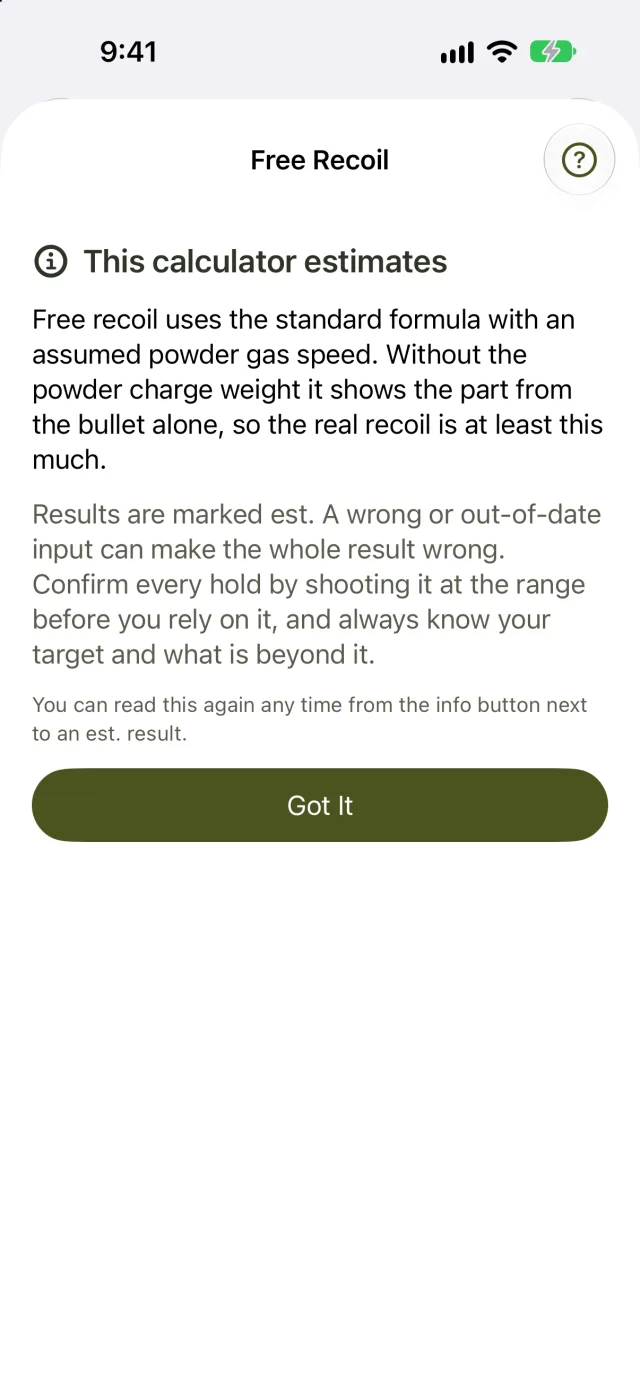
The first time, a note titled This calculator estimates explains the assumptions. Read it and tap Got It. It’s also in About estimates.
-
Type the Gun weight (with scope) in pounds, the Bullet weight in grains and the Muzzle velocity in fps.
- If you know it, type the Powder charge (if known) in grains. Leave it blank if you don’t.
-
Read Result: Recoil energy and Recoil velocity, each with “at least” in front when the charge is blank.
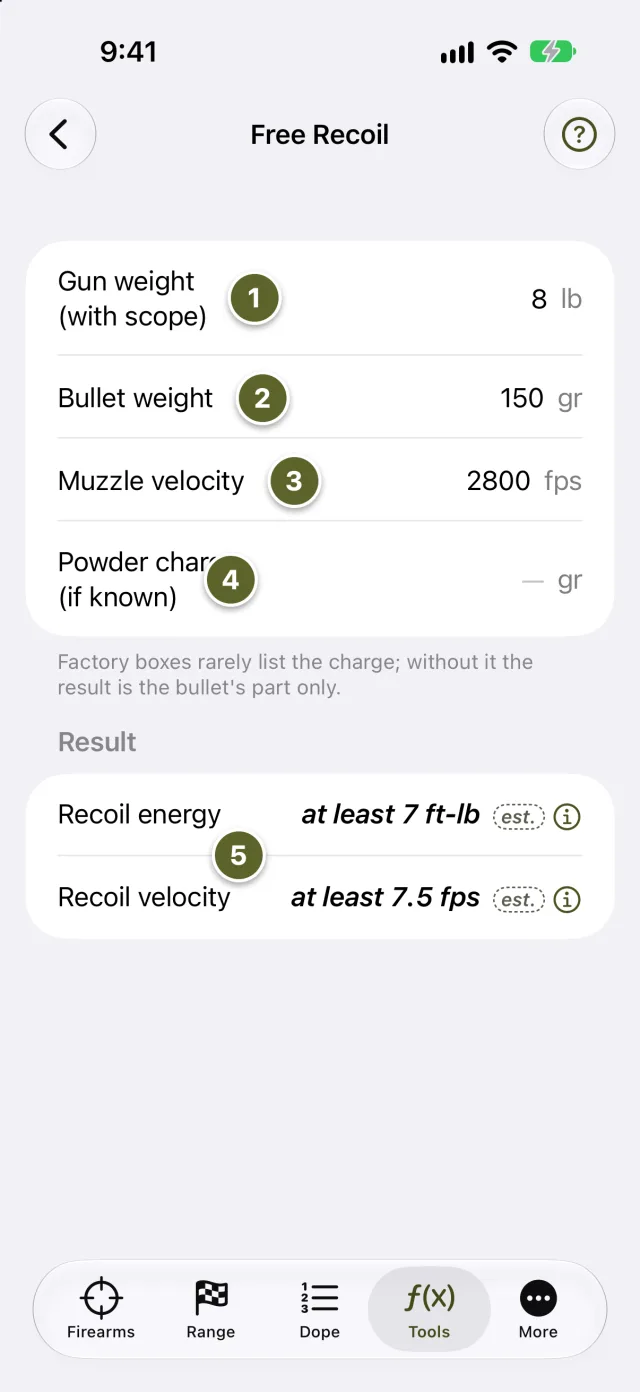
Numbers on the picture: 1 Gun weight (with scope), 2 Bullet weight, 3 Muzzle velocity, 4 Powder charge (if known), 5 Recoil energy and Recoil velocity.
Nothing is saved.
Why it’s useful
Recoil affects how well people shoot: a rifle that kicks too hard causes flinching, and a flinch ruins groups and first shots. Free recoil is the standard way to compare guns and loads on paper, using the same formula everyone uses, so you can judge a change before you buy or shoot it.
Who uses it, and how:
- Hunters choosing a rifle or cartridge: compare a light mountain rifle with a heavier one in the same cartridge, or two cartridges in the same rifle.
- Parents and instructors setting up a young or new shooter: find a gun weight and load combination that’s comfortable to learn on.
- Shooters sensitive to recoil: see how much a heavier stock, a lighter bullet or a slower load helps.
- Precision shooters: lower recoil helps you see your own impacts through the scope; compare setups.
It doesn’t account for a muzzle brake, a suppressor or the stock’s fit; those change felt recoil, not the free-recoil number.
What each option means
What it assumes (the one-time note): free recoil uses the standard formula with an assumed powder gas speed. Without the powder charge weight it shows the part from the bullet alone, so the real recoil is at least this much. The gas speed in the formula is 4,000 fps, the usual figure for rifles; handgun and shotgun results are rougher.
Example
- The screen opens with an 8 lb gun, 150 gr at 2800 fps and no charge: Recoil energy at least 7 ft-lb est., Recoil velocity at least 7.5 fps est.
- Type a charge of 50 gr: 15.2 ft-lb and 11.1 fps, no longer “at least”. (These are the app’s tested examples; the charge more than doubles the energy.)
- A Mountain Rifle in 6.5 Creedmoor weighing 9.5 lb with scope, 140 gr at 2710 fps from your chronograph: at least 4.8 ft-lb and at least 5.7 fps. If you know the powder charge, for example 41.5 gr, type it: 9.9 ft-lb and 8.2 fps.
Tips
- Weigh the whole gun as you’d shoot it, with scope, mount and a loaded magazine.
- Use your measured velocity. It’s usually a little lower than the box’s.
- Compare with the same inputs. For two rifles, change only the gun weight; for two loads, change only the bullet and speed.
- Compare, don’t judge by one number. The result is most useful side by side: this rifle against that one, this load against that one.
What it affects
Nothing. The calculator saves nothing and changes no records.
If something goes wrong
- “Type the gun weight, bullet weight and velocity.” All three need a number above zero.
- Every result says “at least”. The powder charge is blank. That’s expected for factory ammunition; the real recoil is higher.
- My gun weight is in kilograms. Convert it with the Unit Converter (weight) first.
- The number doesn’t match what I feel. Free recoil ignores muzzle brakes, suppressors, stock fit and recoil pads, which all change felt recoil.
Related
- Next: Velocity Trends.
- Energy, Momentum, Power Factor, Velocity Statistics.
- Specs, equipment and configurations: where the gun’s weight and scope are recorded.
- About estimates, The Tools tab.
- Words used here: free recoil, muzzle velocity, flinch.
Gun Diary keeps records you enter and does arithmetic on them. It never predicts a trajectory; confirm every hold by shooting it at the range, and always know your target and what is beyond it.
Still stuck? In the app, open More > Help > Contact Support, or More > Settings > Support, which also has Send Error Log (the error log helps us find the problem), or email contact@setriksoftware.com. You can also browse the Help Center or the messages the app can show.