
Dope cards
Your saved dope card layouts, ready to print again; start a new card, duplicate one for another size, or delete one.
A dope card is your dope table, printed small enough to tape to a stock, stick inside a scope cap, or carry in a pocket. Gun Diary saves each card’s layout (its tables, size and options), so printing a fresh card after you prove a new distance takes two taps. The pocket card (3.5 x 2 in) is free; other sizes and options are part of Gun Diary Pro.
Steps
-
On the Dope tab, tap Dope Cards (or the Dope Cards row at the bottom of a firearm’s dope tables).
-
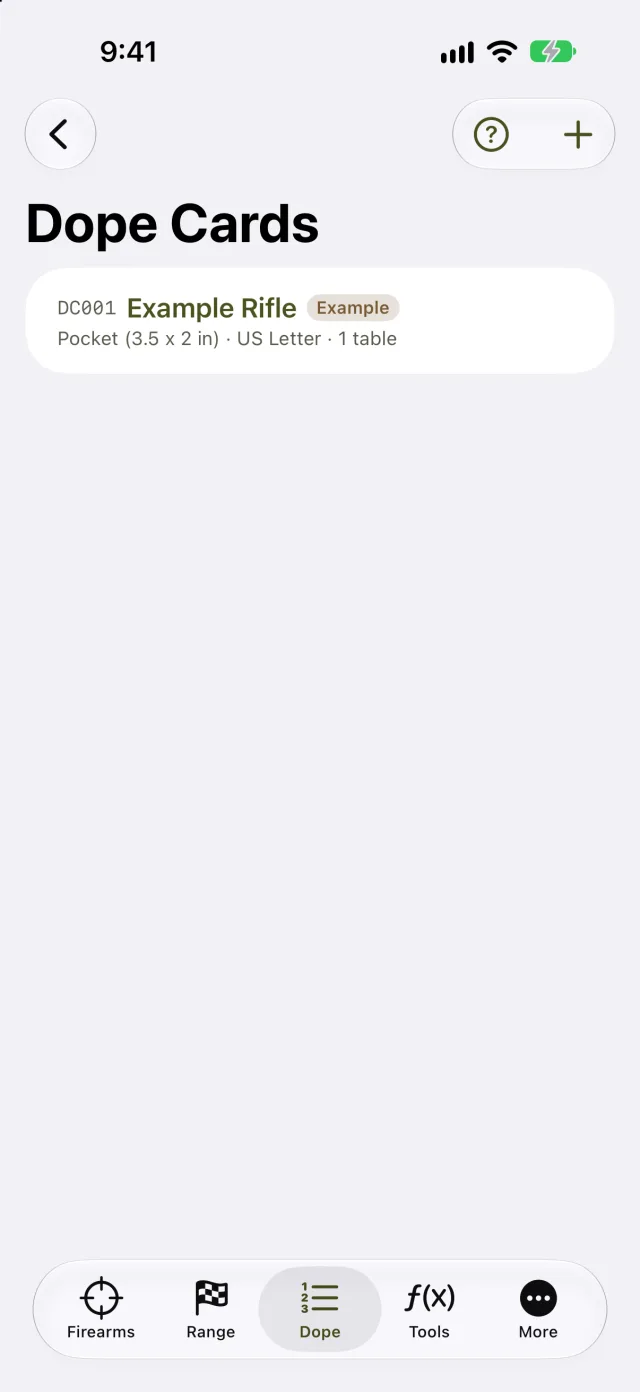
Each saved card shows its code (DC001), its title, and a line like “Pocket (3.5 x 2 in) · US Letter · 1 table”, plus “printed” with the date once you’ve printed it. Example cards show the Example badge.
- Tap a card to open it in the card editor, check the preview, and print it again. See Make a dope card.
- Tap New Card (the + at the top right) to make a new card and pick its table. (You can also tap Make Dope Card on a dope table, which starts a card with that table already picked.)
- Swipe a card left (or touch and hold it) for Duplicate and Delete:
- Duplicate makes a copy (titled “… copy”) and opens it, so you can change the size or options and keep both.
- Delete asks “Delete DC003?” and says only the card layout goes; your dope tables stay, and you can restore it for 30 days. Tap Move to Recently Deleted.
- To find a card, pull the list down to show Search cards and type its code or title.
Why it’s useful
In the field you won’t open an app between shots. You’ll read a card. Gun Diary prints that card from your proven dope, at real size, with est. rows clearly marked, and keeps its layout so the card you print next month matches the one you’re used to, with the newest numbers.
Who uses it, and how:
- Hunters: one free pocket card per rifle, reprinted after each range trip. Laminate it or slip it in a plastic sleeve.
- Long-range and PRS-style shooters (Pro): a scope-cap card for the come-ups you dial most and a wrist coach with everything, from the same table.
- Shooters with several rifles (Pro): one sheet with a card for each gun.
- Competitors: a fresh card for each match, with the newest lot’s table.
- Anyone learning: the Example card shows what a card looks like, with “EXAMPLE, NOT REAL DOPE” printed across it.
What’s on the Dope Cards screen
When you have no cards yet, the screen says Make a card from a dope table (tap + to pick a table, a size and what to print; the pocket card is free). With no dope tables at all, it says Prove a distance first: cards are printed from your dope tables.
Example
Pat has two cards:
- DC001 “Mountain Rifle”: Pocket (3.5 x 2 in) · US Letter · 1 table · printed Oct 3, 2026.
- DC002 “Mountain Rifle copy” (a duplicate, Pro): Scope cap (2 x 2 in) with the Distances set to 300; 400; 500 and the clicks column on, for the inside of the scope cap.
After proving 450 yd on Oct 20, Pat opens DC001, checks the preview shows the new row, and taps Print or Share Card (free).
Tips
- A card always prints today’s numbers. The layout is saved, not the numbers. Reprint after you add or replace rows.
- Duplicate for a second size rather than changing the first card back and forth.
- Print a few copies at once. A pocket card sheet holds 8 cards on US Letter or A4: set Copies of each card to 8 and cut them out.
- Delete old cards freely. Your dope tables aren’t touched.
What it affects
- Cards print from the tables, so editing a table changes what its cards print next time.
- Deleting a card moves only the layout to Recently Deleted under Dope Cards, for 30 days.
- Deleting a dope table removes it from the cards that show it.
- Search finds cards by code and title.
If something goes wrong
- “Make a dope table first: cards print from your dope tables”. Tapping New Card (+) shows this when there’s no dope table yet. See New dope table.
- I chose a bigger size and the Pro screen opened. Only the pocket size is free. See Compare Free and Pro.
- A card prints with no rows. Its table was deleted, or it has no proven rows yet. Open the card and pick a table under Dope tables.
- I deleted a card by mistake. Restore it from Recently Deleted within 30 days.
Related
- Next: Make a dope card, then Print a dope card at the right size.
- A dope table, What confirmed dope is, Compare Free and Pro.
- Learning path: Building your dope card.
- Words used here: dope card, dope, est., Pro.
Gun Diary keeps records you enter and does arithmetic on them. It never predicts a trajectory; confirm every hold by shooting it at the range, and always know your target and what is beyond it.
Still stuck? In the app, open More > Help > Contact Support, or More > Settings > Support, which also has Send Error Log (the error log helps us find the problem), or email contact@setriksoftware.com. You can also browse the Help Center or the messages the app can show.