
Free and Pro
What the free diary includes, what Gun Diary Pro adds, the three plans (Monthly, Yearly, Lifetime), and how to buy, restore or manage Pro.
Gun Diary is free to use with one firearm of your own, and every diary in it is unlimited. Gun Diary Pro adds unlimited firearms and the extras: PDF reports, every dope card size, Range Mode, photo taps, target sheets, saved views and importing a gun list. Your own records are never locked behind Pro. This article lists exactly what’s free and what’s Pro, and how the Pro screen works.
Steps
-
Tap More > Gun Diary Pro (it reads Gun Diary Pro (unlocked) once you have Pro). The Pro screen also opens by itself when you tap a Pro feature; its headline then says which one, like “Range Mode is part of Gun Diary Pro”.
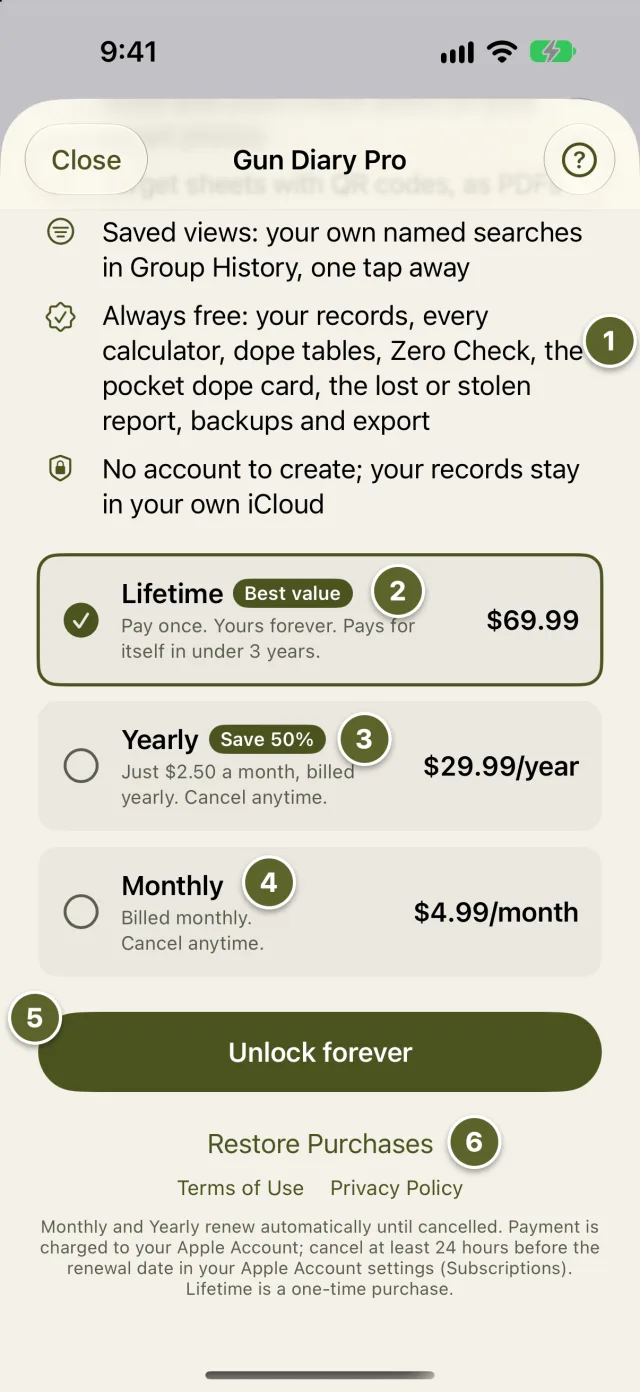
Numbers on the picture: 1 what Pro adds (the headline is above it), 2 Lifetime (selected, Best value), 3 Yearly, 4 Monthly, 5 Unlock forever, 6 Restore Purchases.
- Read the list of what Pro adds. The last two lines are what’s always free and that there’s no account to create.
- Tap a plan. Lifetime is selected when the screen opens.
- Tap Unlock forever (Lifetime) or Subscribe (Monthly or Yearly). Apple’s purchase sheet opens; confirm with Face ID, Touch ID or your Apple Account password.
- When it’s done you see “Thank you! Gun Diary Pro is unlocked.” Tap OK. Pro features work at once.
- Already bought Pro (on another device, or before reinstalling)? Tap Restore Purchases instead. You see “Your purchase was restored. Thank you!” or “No earlier purchase was found for this Apple Account.”
- With Pro, the screen shows “Pro is unlocked. Thank you!” and Your plan. On Monthly or Yearly, Manage subscription opens Apple’s subscription settings, where you can change or cancel.
- Tap Close to leave.
Why it’s useful
Gun Diary’s free version is a complete record book for one firearm: you never lose access to your own records, calculators or backups. Pro is for people who need more firearms or the extra output and speed: PDFs to hand to an insurer, every card size for the field, big-button Range Mode, and measuring straight from target photos.
Who needs what:
- One rifle, one owner: the free diary does it all, including dope tables, the pocket dope card, Zero Check, the hunt log, every calculator, backups and spreadsheets.
- More than one firearm: Pro, for unlimited firearms. The Example Rifle never counts.
- Collectors and insurance: Pro for the collection report and importing a gun list; the lost or stolen report is free for everyone, because it’s needed at the worst moment.
- Range regulars: Range Mode (Pro) is built for gloves, sun and one hand.
- Precision shooters: Pro for measuring groups and tapping shot holes on photos, every dope card size and QR target sheets. Typing the numbers yourself is always free.
- Short projects: Monthly or Yearly if you want Pro for one season; Lifetime if you’ll keep the diary for years.
What each option means
Free and Pro, feature by feature
The plans (US prices; the App Store shows your local price)
Monthly and Yearly renew automatically until cancelled; cancel at least 24 hours before the renewal date in your Apple Account settings (Subscriptions). Lifetime is a one-time purchase. There’s no free trial. Gun Diary Pro is separate from Reloading Diary’s Pro.
Gun Diary Pro isn’t shared through Family Sharing: each Apple Account buys its own. Your own devices signed in to the same Apple Account share it with Restore Purchases.
Other items on the screen: Restore Purchases; Terms of Use (our terms page, which takes in Apple’s standard license agreement and holds the full estimate notice) and Privacy Policy, which open in the app.
Example
Alex starts free with a deer rifle, logs a season of sessions and prints the pocket dope card. In spring Alex buys a .22 for practice and taps + on the Firearms tab: the Pro screen opens with “Your free diary holds one firearm”. Alex picks Lifetime, taps Unlock forever, confirms with Face ID, and adds the .22. Later, on a new iPad signed in to the same Apple Account, Alex opens More > Gun Diary Pro > Restore Purchases: Pro is unlocked there too, at no extra cost.
Tips
- Lifetime is the better deal if you’ll use Pro for more than about two and a third years of Yearly ($69.99 once against $29.99 a year).
- Restore, don’t buy again. On a new device, a reinstall, or an iPad, use Restore Purchases with the same Apple Account.
- Typing is always free. Every place that offers photo taps also lets you type the numbers.
- There’s no free trial. Pro features ask for Pro on the Example Rifle too; the Pro screen says what each feature does before you buy.
What it affects
- Unlocking Pro changes nothing in your records; it only opens the Pro features.
- If a subscription ends, nothing is deleted. Your firearms stay fully usable; only adding a new firearm beyond one, and the Pro features, stop. Records restored from a backup work the same way.
- PDFs made while you had Pro stay wherever you saved them.
If something goes wrong
- “Couldn’t reach the App Store. Check your connection and try again.” No connection. Connect and tap Try again.
- “Your purchase is waiting for approval. Pro unlocks as soon as it’s approved.” Ask to Buy or a payment check is pending. Pro unlocks by itself once it’s approved.
- “No earlier purchase was found for this Apple Account.” You’re signed in to the App Store with a different Apple Account from the one that bought Pro, or it was bought in Reloading Diary (a separate purchase).
- “Couldn’t restore right now. Check your connection and try again.” Try again with a connection.
- “The purchase didn’t go through. Please try again.” Try again with a connection.
- “The App Store couldn’t confirm that purchase. Please try again.” If you were charged, tap Restore Purchases: it unlocks Pro. If it still doesn’t, ask Apple at reportaproblem.apple.com or contact us.
- My only firearm was stolen or sold, and I want to add my new one. Every firearm that isn’t deleted counts toward the free one-firearm limit, whatever its status. You have two choices: buy Pro and keep the old gun’s record (best after a theft: the police report and claim numbers stay with it), or keep a copy and then delete it. To keep a copy, first make its Lost or Stolen Report (free) and a full backup (see Back up and restore), and write the report and claim numbers somewhere safe; then delete the firearm. It goes to Recently Deleted for 30 days and no longer counts, so + adds your new gun. See Change a firearm’s status.
- Does Family Sharing share Pro? No: each Apple Account buys its own. Your own devices on the same Apple Account share it with Restore Purchases.
- I want to cancel or get a refund. Cancel in Manage subscription (or the App Store’s account settings). Refunds are handled by Apple at reportaproblem.apple.com.
Related
- Next: The More tab.
- Your firearms list, Reports, Range Mode, Make a dope card, Import a gun list.
- Words used here: Pro, dope card, range mode, Example Rifle.
Still stuck? In the app, open More > Help > Contact Support, or More > Settings > Support, which also has Send Error Log (the error log helps us find the problem), or email contact@setriksoftware.com. You can also browse the Help Center or the messages the app can show.