
Make a dope card
Pick a dope table, a card size, the paper and what to print (units, clicks, wind, est. rows, chosen distances), check the preview, and print or share the card sheet as a PDF.
The card editor turns a dope table into a printable sheet of cards, drawn at real size. You pick the table, the size and what goes on it; the preview at the top shows the sheet exactly as it will print. The free card is the pocket size (3.5 x 2 in), light style, one table, with a small “Made with Gun Diary” footer. Gun Diary Pro adds every other size, a custom size, the high-contrast style, no footer and several guns on one sheet.
Steps
- Start a card one of two ways:
- On a dope table, tap Make Dope Card (at the bottom, or in the ••• menu). The table is already picked, and the card’s units are the table’s.
- On Dope Cards, tap New Card (+). The card starts on a table for you: your only one, else the firearm’s current table when you opened Dope Cards from a firearm’s dope, else the table on your last card, else the table you changed most recently. The table list comes first on a new card (headed Pick a dope table while none is picked), so you can change it.
-
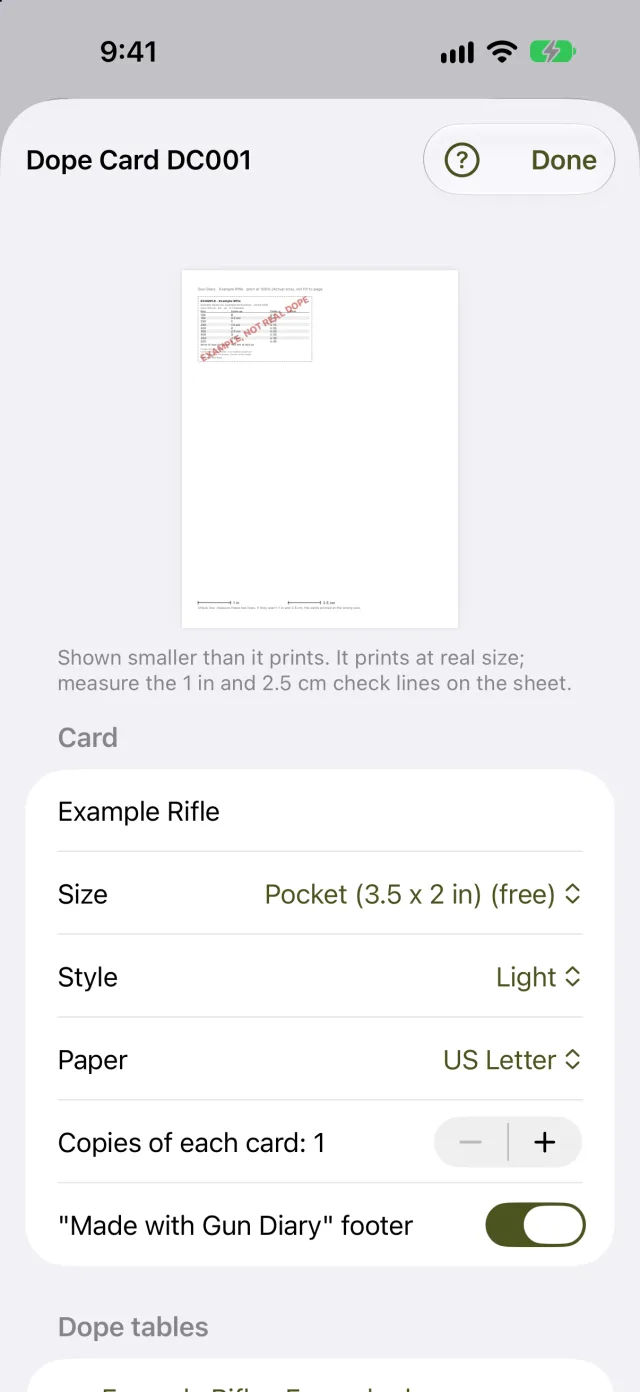
The editor opens (New Dope Card, or “Dope Card DC001” for a saved card) with the preview at the top (below the table list on a new card). The preview is shown smaller than it prints; it prints at real size.
-
Under Card:
- Title (optional): the card’s name in your Dope Cards list, on the top line of the sheet and in the PDF‘s file name. It’s filled in with the firearm’s name when you pick a table. (Each card itself is headed with the firearm’s name, plus the table’s name if it has one.)
- Size: the free size is marked “(free)”; the others are marked “(Pro)” without Pro. Picking a Pro size without Pro opens the Pro screen and keeps the pocket size.
- For Custom size (Pro): Width (in) and Height (in), from 1 x 1 in up to 7 x 8.9 in.
- Style: Light, or High contrast (Pro): bold type, a black title band and solid cut lines, easier to read in poor light.
- Paper: US Letter or A4, the sheet you’ll print on.
- Copies of each card: 1 to 20, laid out on the sheet to cut apart.
- The Made with Gun Diary footer switch: always on without Pro; Pro can turn it off.
-
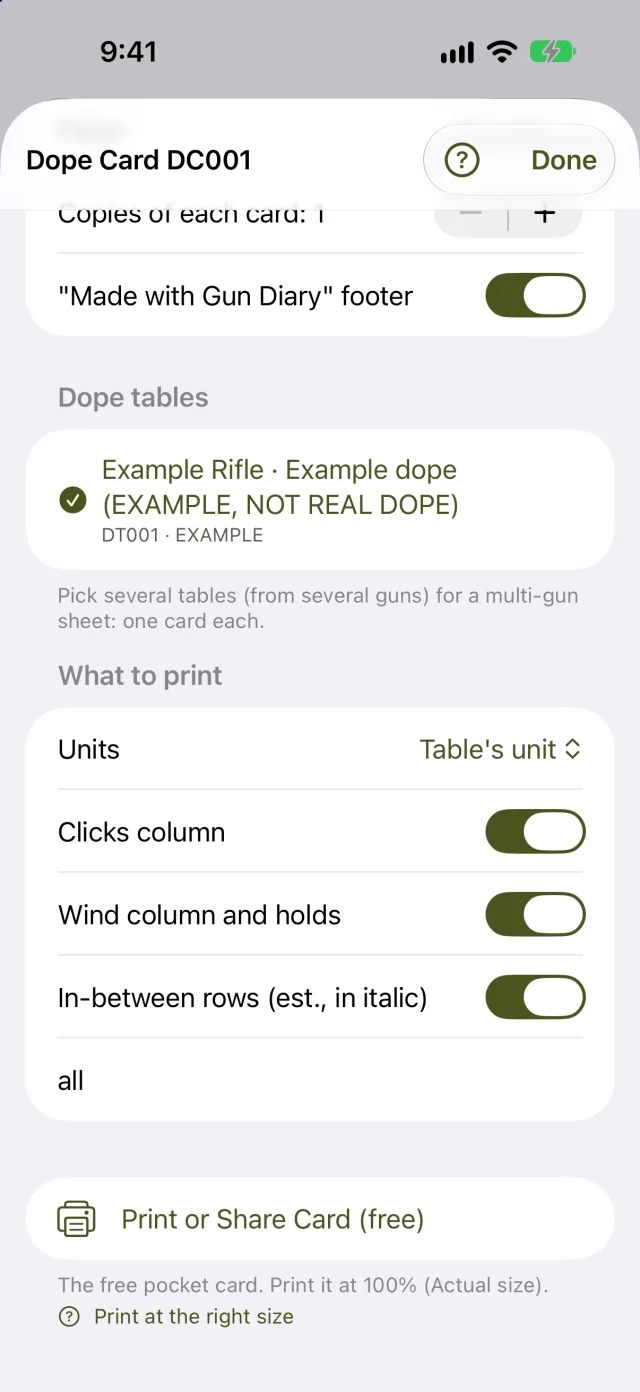
Under Dope tables (first on a new card, after Card on a saved one), tap the table to print (a check mark shows it). Without Pro, one table per card: tapping another replaces it. With Pro, tap several (from several guns) for a multi-gun sheet, one card each. Earlier-setup tables are marked “earlier setup”; Example tables “EXAMPLE”.
-
Under What to print:
- Units: Table’s unit, mil or MOA. Choosing the other unit converts the come-ups on the card.
- Clicks column: adds clicks for the table’s scope (“U 12” means 12 clicks up). Off unless you turn it on: hunters who dial will want it. The clicks use the click value in the scope’s optic settings; with none, the card’s header line says “no click value: add the scope’s optic settings” and the column stays empty.
- Wind column and holds: adds each row’s windage note and the table’s proven holds (on unless you turn it off).
- In-between rows (est., in italic): adds the in-between rows, printed in italic with “est.” (off unless you turn it on).
- Distances (blank = all, or 100; 200; 300): leave blank (or “all”) for every row, or list only the distances you want.
- Check the preview. It updates as you change things.
-
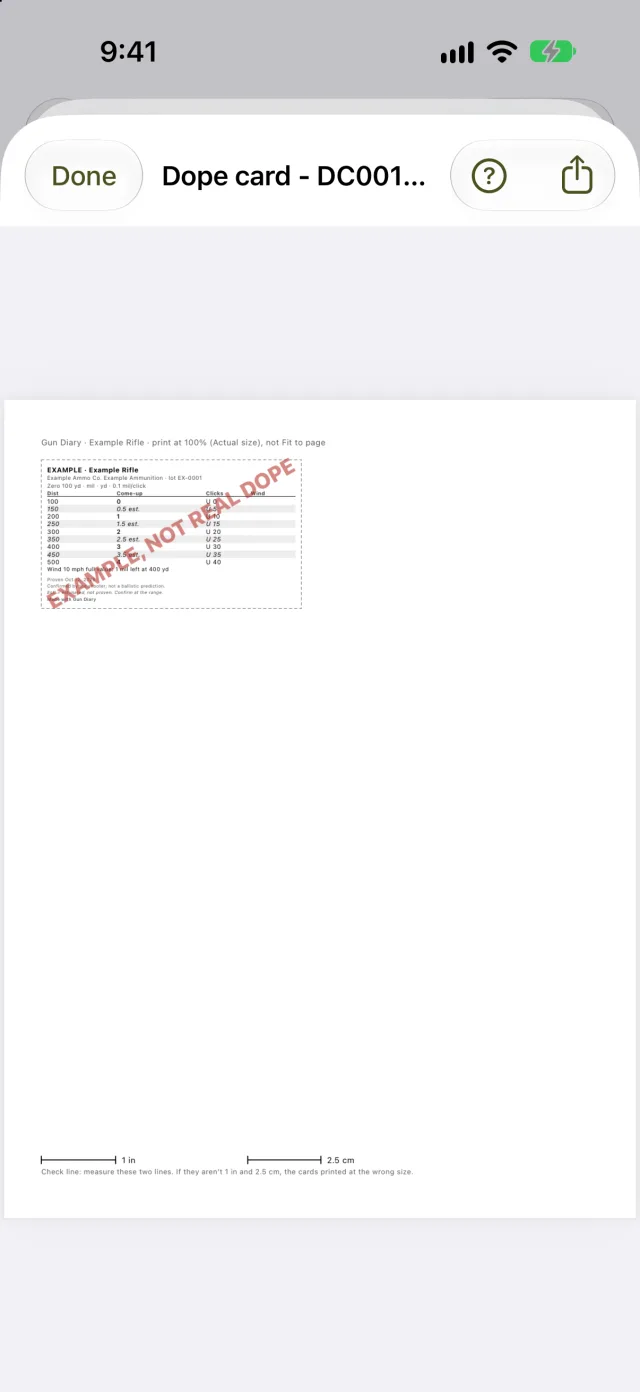
Tap Print or Share Card (free) (or Print or Share Card with Pro options). The sheet opens as a PDF. With no table picked, it says “Pick a dope table to print a card” and takes you to the table list instead. Tap Share and pick Print to print it, or Save to Files, Mail or Messages to keep or send it.
-
Print at 100% (Actual size), not Fit to page, then measure the check lines. See Print a dope card at the right size.
- Tap Save (new card) or Done (saved card) to keep the layout, or Cancel on a new card to throw it away.
Why it’s useful
A dope card is what you actually use when it counts: in a stand, behind a rifle, with gloves on. It has to be the right size for where you’ll keep it, show only rows you trust, and make est. rows impossible to confuse with proven ones. The editor lets you build exactly that, and the preview shows the real result before you waste paper.
Who uses it, and how:
- Hunters (free): a pocket card with 100 to 400 yd, clicks and one wind hold, a few copies on one sheet.
- Shooters who dial in the field (Pro): a scope-cap card (2 x 2 in) with only the distances you’ll dial, clicks on.
- PRS-style and long-range shooters (Pro): a wrist coach (3 x 4 in) or an index card (5 x 3 in) with every row and holds, in high contrast.
- Shooters who tape data to the rifle (Pro): a stock strip (1.5 x 4 in).
- Families and clubs with several rifles (Pro): one sheet with a card for each gun.
- Older eyes, dim light: the full-page size prints the table large.
What each option means
What every card prints: a heading (the firearm, and the table’s name if it has one), the ammunition and lot, the zero with the units and the click value, the rows (Dist, Come-up, then Clicks and Wind if on), the holds, the proven dates (“Proven Sep 2, 2026 to Oct 20, 2026”), and at the bottom “Confirmed by the shooter; not a ballistic prediction.” When the card has est. rows it adds “Est. = estimated, not proven. Confirm at the range.” Then the footer, if on.
Special cards: a card from an earlier-setup table prints “EARLIER SETUP · ” before its title and no est. rows. A card from the Example table prints “EXAMPLE · ” before its title and EXAMPLE, NOT REAL DOPE in large letters across the card: never shoot with it.
Come-ups print to two decimals, exactly as the dope table shows them (5.25 MOA prints 5.25). A number too wide for its column is printed in smaller type, never cut off.
Many rows on a small card: the type gets smaller to fit (down to a small minimum). If the rows still don’t fit, the card shows what fits and a line like “+3 more rows: use a bigger card”. Pick fewer distances or a bigger size.
The sheet: along the top, “Gun Diary · (title) · print at 100% (Actual size), not Fit to page”. Along the bottom, a 1 in line and a 2.5 cm line with “Check line: measure these two lines. If they aren’t 1 in and 2.5 cm, the cards printed at the wrong size.”
Example
Lee wants a free pocket card for deer season from DT002 (Mountain Rifle, 140 gr, lot 2241, zero 100 yd, mil, 0.1 mil clicks).
- On DT002, Lee taps Make Dope Card. Title (optional) is “Mountain Rifle”; Size is Pocket (3.5 x 2 in); Paper US Letter.
- Copies of each card: 4 (one for the pack, one for the truck, two spares).
- Clicks column on; Wind column and holds on; In-between rows (est., in italic) on; Distances (blank = all, or 100; 200; 300): “100; 200; 250; 300; 350; 400”.
- The preview shows each card: “Mountain Rifle”, “Factory 140 gr · lot 2241”, “Zero 100 yd · mil · yd · 0.1 mil/click”, then 100: 0, U 0; 200: 0.4, U 4; 250: 0.8 est., U 8 (italic); 300: 1.2, U 12; 350: 1.6 est., U 16 (italic); 400: 2, U 20; the wind hold, “Proven Sep 2, 2026 to Sep 30, 2026”, the two notes and “Made with Gun Diary”.
- Print or Share Card (free) > Share > Print, at 100%. Lee measures the 1 in line with a ruler: exactly 1 in. Then Save.
Tips
- Fewer rows, bigger type. On a pocket card, five to eight distances read well; list them in Distances.
- Mark est. rows plainly. Leave In-between rows (est., in italic) off if you want a card of proven rows only.
- Fill a sheet. Eight pocket cards fit on Letter or A4; set copies to 8 and cut along the dashed lines.
- Protect it. Laminate the card or slip it into a clear sleeve; a damp card smudges.
- Reprint after every change. The card shows the table as it is when you print.
- Check before you go. Read the printed card against the table on screen once.
What it affects
- The card layout is saved on Dope Cards (with Save or Done); a new card dropped with Cancel isn’t kept.
- “printed” date: making the PDF records the date on the card’s line in Dope Cards.
- Nothing in your dope tables changes.
If something goes wrong
- The Pro screen opened when I picked a size or style. Only the pocket size and light style are free; the card stays on the pocket size. See Compare Free and Pro.
- I can’t turn the footer off. Turning off the “Made with Gun Diary” footer is part of Pro.
- Tapping a second table unpicked the first. Without Pro, a card prints one table. Several guns on one sheet is part of Gun Diary Pro.
- “Pick a dope table to print a card”. Tapping the print button with no table picked shows this above the table list. Pick a table under Dope tables.
- The preview says “Pick a dope table to see the card”. No table is picked, or the picked table was deleted.
- “+N more rows: use a bigger card”. List fewer Distances, turn est. rows off, or pick a bigger size (Pro).
- No est. rows on the card though the switch is on. The table is an earlier setup, or has no proven rows within 200 of each other. See In-between rows.
- The footer under the print button says “This card uses Pro options.” A card saved while you had Pro uses Pro sizes or options. Without Pro, pick the pocket size, the light style and one table.
- The Clicks column is empty and the card says “no click value: add the scope’s optic settings”. The table’s scope (and the firearm’s current scope) has no optic settings. Add the click value in Optic settings.
- The printed card is the wrong size. See Print a dope card at the right size.
Related
- Next: Print a dope card at the right size, then Using your dope in the field.
- Dope cards, A dope table, In-between rows, Proven holds, Compare Free and Pro, Save and share PDF reports.
- Learning path: Building your dope card.
- Words used here: dope card, est., click value, mil, MOA, earlier setup, Pro.
Gun Diary keeps records you enter and does arithmetic on them. It never predicts a trajectory; confirm every hold by shooting it at the range, and always know your target and what is beyond it.
Guides on this topic
Still stuck? In the app, open More > Help > Contact Support, or More > Settings > Support, which also has Send Error Log (the error log helps us find the problem), or email contact@setriksoftware.com. You can also browse the Help Center or the messages the app can show.