
A dope table
Read a dope table's proven come-ups and clicks, add distances and holds, check elevation left on the scope, run the dope calculators, make a card, and duplicate, archive or delete the table.
A dope table is one firearm’s proven come-ups for one ammunition and setup, from the nearest distance to the farthest, with clicks for your scope, the holds that worked, and everything you can do with them. Open one from the Dope tab or a firearm’s Dope row.
Steps
-
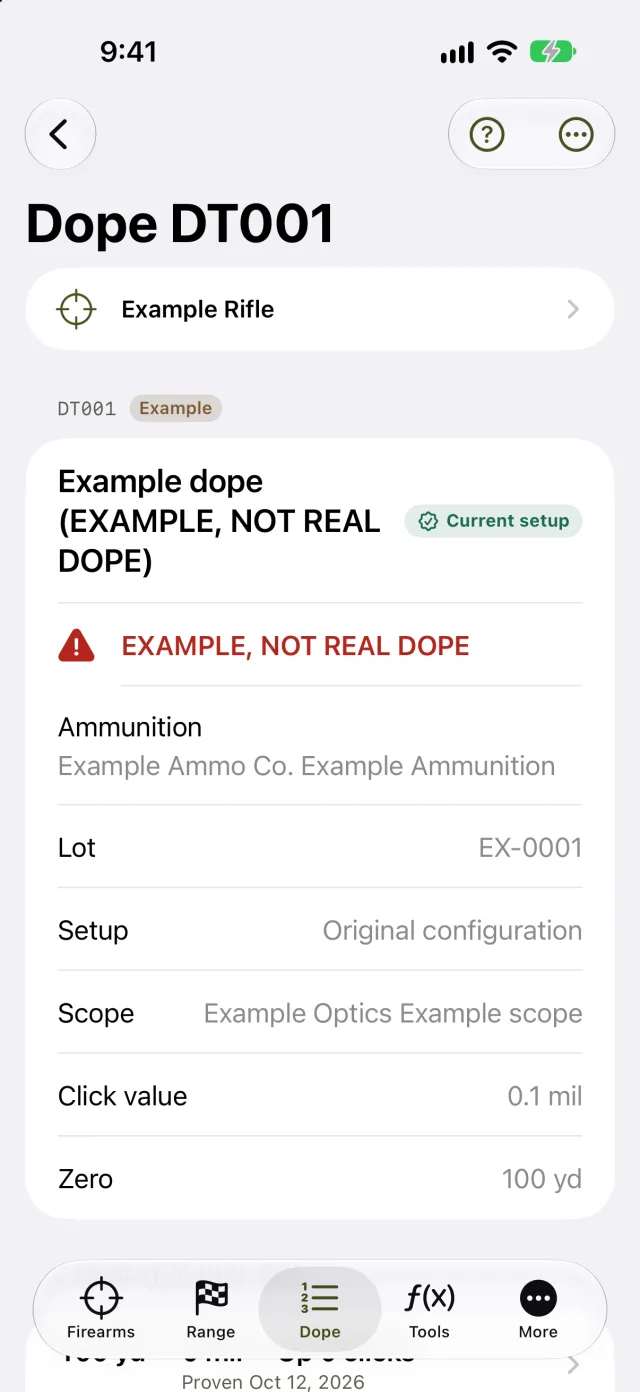
Tap a table on the Dope tab. The screen is titled with its code (“Dope DT001”).
-
The top names the firearm (tap it to open its dashboard), the table’s name with Current setup or Earlier setup, and its Ammunition, Lot, Setup, Scope, Click value and Zero.
-
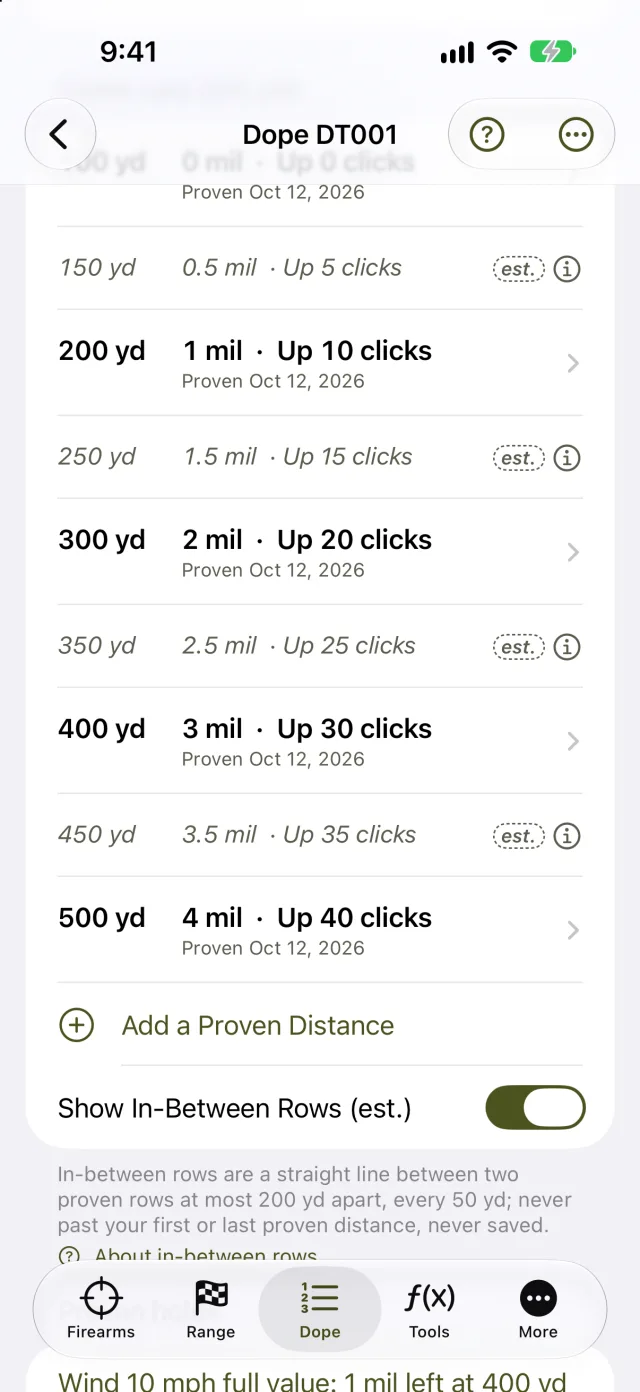
Come-ups lists the rows, nearest first, with the unit in the heading (“Come-ups (mil, yd)”):
- A proven row shows the distance, the come-up and the clicks (“1.2 mil · Up 12 clicks”), then “Proven” with the date, “proof attached” when a group is linked, and the windage note. Tap it to open the row; see A dope row.
- An in-between row is in italic with est., and has no date. See In-between rows.
- Add a Proven Distance adds a row. See Add a dope row.
- Show In-Between Rows (est.) shows or hides the in-between rows (not shown on an earlier-setup table).
-
Proven holds lists your wind and lead holds. Add a Wind Hold and Add a Lead Hold add one. See Proven holds.
- Elevation left on the scope appears when the table’s scope has its elevation travel recorded (in Optic settings). It shows Travel above zero, the Farthest row it can dial, and a warning for rows past the turret‘s travel.
- Calculators for This Table opens six calculators already set to this table: Holdover from Your Dope, In-Between Rows, Re-Zero Shift, Scaled Wind Holds, Hold-On Distances and Elevation Left.
- At the bottom: Make Dope Card, Dope Table PDF (Pro), Dope Table Spreadsheet (CSV) (free) and Report Options. Then the table’s notes.
-
The ••• menu (top right): Edit Dope Table, Duplicate for a New Lot, Make Dope Card, Archive (or Unarchive) and Delete Dope Table.
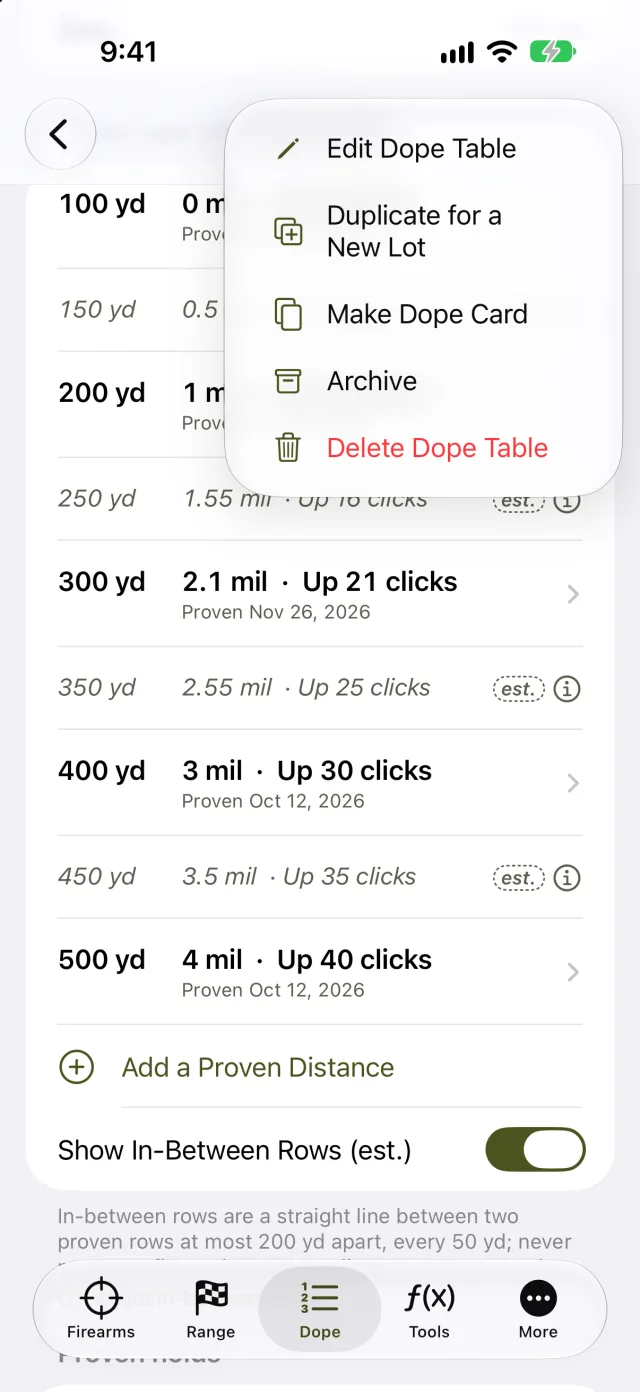
Duplicate for a New Lot: pick the New lot (or No lot) and tap Duplicate. The copy keeps the name, ammunition, setup (even an earlier setup), zero and units but none of the proven rows (or holds): they were proven with the other lot, so prove each distance again. Its notes say which table it was copied from (“Copied from DT002 for a new lot; prove each distance with this lot.”). It’s listed right after the original; rename it with Edit Dope Table if you like.
Delete Dope Table: the question “Delete DT004?” says the table goes to Recently Deleted with its rows (history included) and proven holds, that you can restore it for 30 days, and that dope cards that show it leave it out. A table with no proven rows goes with Move to Recently Deleted. A table that holds proven dope takes two steps: tap Continue, type the table’s code (for example DT004) and tap Move to Recently Deleted.
Why it’s useful
This is the page you’d otherwise keep in a notebook: every proven distance with the clicks to dial, the date you proved it, and the proof behind it, next to the scope and ammunition it belongs to. Because the numbers are linked to real groups and dates, you can always tell a fresh, solid row from an old one.
Who uses it, and how:
- Hunters: read the come-up for a distance at a glance (with clicks, so you don’t do math in the field), and print a pocket card from it.
- Long-range and PRS-style shooters: check which rows have proof attached, which are old, and whether the farthest rows still fit inside the scope’s elevation travel.
- Shooters testing factory ammunition: a new lot gets its own table with one tap, keeping the old lot’s rows apart.
- Shooters who reticle-hold rather than dial: Holdover from Your Dope shows each row as a hold in your reticle‘s marks.
- Anyone sharing data with a coach or a hunting partner: the CSV (free) or the PDF (Pro) holds every row with its proof and conditions.
What each option means
On an earlier-setup table, the top also says what changed (“The barrel changed. The rows keep their values and dates.”) and offers Start a Table for the New Setup. See Earlier setup.
Example
DT002, Mountain Rifle, 140 gr factory load, lot 2241, scope clicks 0.1 mil, zero 100 yd, Current setup. Come-ups (mil, yd):
| Distance | Come-up | Clicks | Kind |
|---|---|---|---|
| 100 yd | 0 mil | Up 0 clicks | Proven Sep 2, 2026 |
| 150 yd | 0.2 mil | Up 2 clicks | est. |
| 200 yd | 0.4 mil | Up 4 clicks | Proven Sep 2, 2026 · proof attached |
| 250 yd | 0.8 mil | Up 8 clicks | est. |
| 300 yd | 1.2 mil | Up 12 clicks | Proven Sep 2, 2026 · proof attached |
| 350 yd | 1.6 mil | Up 16 clicks | est. |
| 400 yd | 2 mil | Up 20 clicks | Proven Sep 30, 2026 |
The scope has 10 mil of travel above zero, so Farthest row it can dial is 400 yd and nothing is out of travel. A proven hold reads “Wind 10 mph full value: 0.6 mil left at 400 yd”.
When a new case arrives with lot 2307, the shooter taps ••• > Duplicate for a New Lot, picks 2307, and gets DT003 with the same zero and units and no rows, ready to prove.
Tips
- Attach proof. A row with a linked group shows “proof attached”, and the group’s record shows exactly how it shot.
- Record the scope’s travel. With Elevation left in the scope’s Optic settings, the table warns you before you find out at 900 yd that the turret has run out.
- Use the calculators from here, not from the Tools tab: they open already set to this table and its scope.
- Archive old tables instead of deleting them. Their rows and dates are your history.
- The PDF and CSV follow the in-between switch. Turn Show In-Between Rows (est.) off for a report of proven rows only.
What it affects
- Dope cards: cards print this table’s rows, holds, ammunition, lot, zero and units. Deleting the table removes it from those cards.
- Calculators: the six calculators read this table’s proven (and est.) rows.
- Quick Hunt Log: a shot can name one of this table’s rows as the dope used.
- Search and reports: the table, its rows and holds are in Search, the Dope Table report and Export All Data.
- Archive hides it from the Dope tab, from Save as Confirmed Dope and from the card editor’s table list.
- Delete moves the table, all its rows and holds to Recently Deleted for 30 days.
If something goes wrong
- The rows show no clicks, and Click value reads “Not set: add the scope’s optic settings in the Garage”. Neither the table’s scope nor the firearm’s current scope has optic settings, and Gun Diary doesn’t guess a click value. Set it in Optic settings.
- The new table is already Earlier setup. It was made with Duplicate for a New Lot, which keeps the copied table’s setup: if that table was an earlier setup, so is the copy. Use Start a Table for the New Setup on the old table instead.
- There’s no in-between switch. The table is an earlier setup; nothing is estimated from it. See Earlier setup.
- An in-between row I expected isn’t there. The two proven rows around it are more than 200 yd (or 200 m) apart, or it’s past your first or last proven row. See In-between rows.
- There’s no Elevation left section. Record Elevation left for the scope in Optic settings.
- “Out of travel: …” Those rows need more elevation than the turret has above your zero. The app’s own suggestion is to hold over in the reticle for those (see Holdover from your dope).
- Dope Table PDF shows the Pro screen. PDF reports are part of Gun Diary Pro. The CSV is free, and so is the pocket dope card.
- “That didn’t match. Type “DT004″ exactly to delete it”. After Continue, the code you typed wasn’t the table’s code. The box opens again: type the code exactly as shown (for example DT004; small letters are fine) and tap Move to Recently Deleted.
- I deleted a table by mistake. Restore it from Recently Deleted within 30 days.
Related
- Next: Add a dope row, then Make a dope card.
- A dope row, In-between rows, Proven holds, Earlier setup, Dope table report, Holdover from your dope, Elevation left, Optic settings.
- Learning path: Building your dope card.
- Words used here: come-up, click value, zero, lot, hold, elevation left, est., earlier setup.
Gun Diary keeps records you enter and does arithmetic on them. It never predicts a trajectory; confirm every hold by shooting it at the range, and always know your target and what is beyond it.
Guides on this topic
Still stuck? In the app, open More > Help > Contact Support, or More > Settings > Support, which also has Send Error Log (the error log helps us find the problem), or email contact@setriksoftware.com. You can also browse the Help Center or the messages the app can show.