
Proven holds (wind and lead)
Keep the wind holds and moving-target lead holds that worked for you, on the dope table and its card, marked proven or "not yet proven".
Besides come-ups for distance, many shooters keep a few holds that worked: how far to hold into a 10 mph crosswind at 400 yd, or how far to lead a walking deer at 200. A dope table keeps these as proven holds, next to its come-ups and on its card. Gun Diary doesn’t work them out; you enter what you shot and saw work.
Steps
-
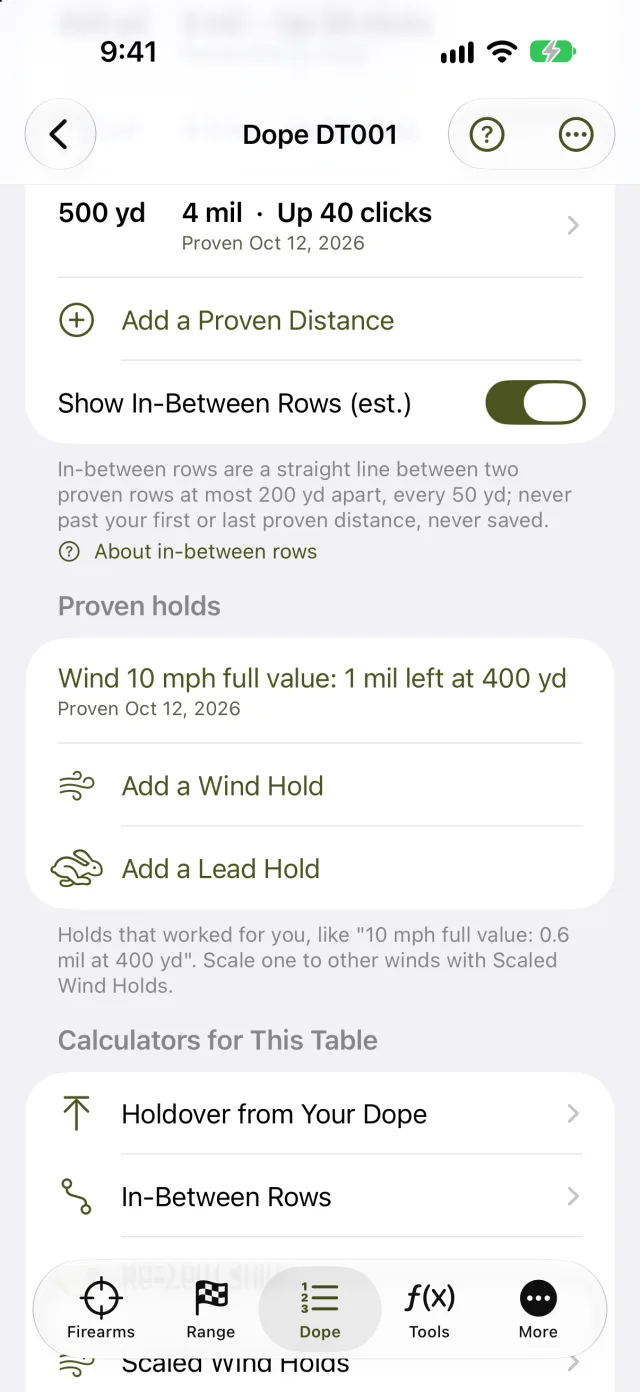
Open the dope table and scroll to Proven holds.
-
Tap Add a Wind Hold (or Add a Lead Hold for a moving target).
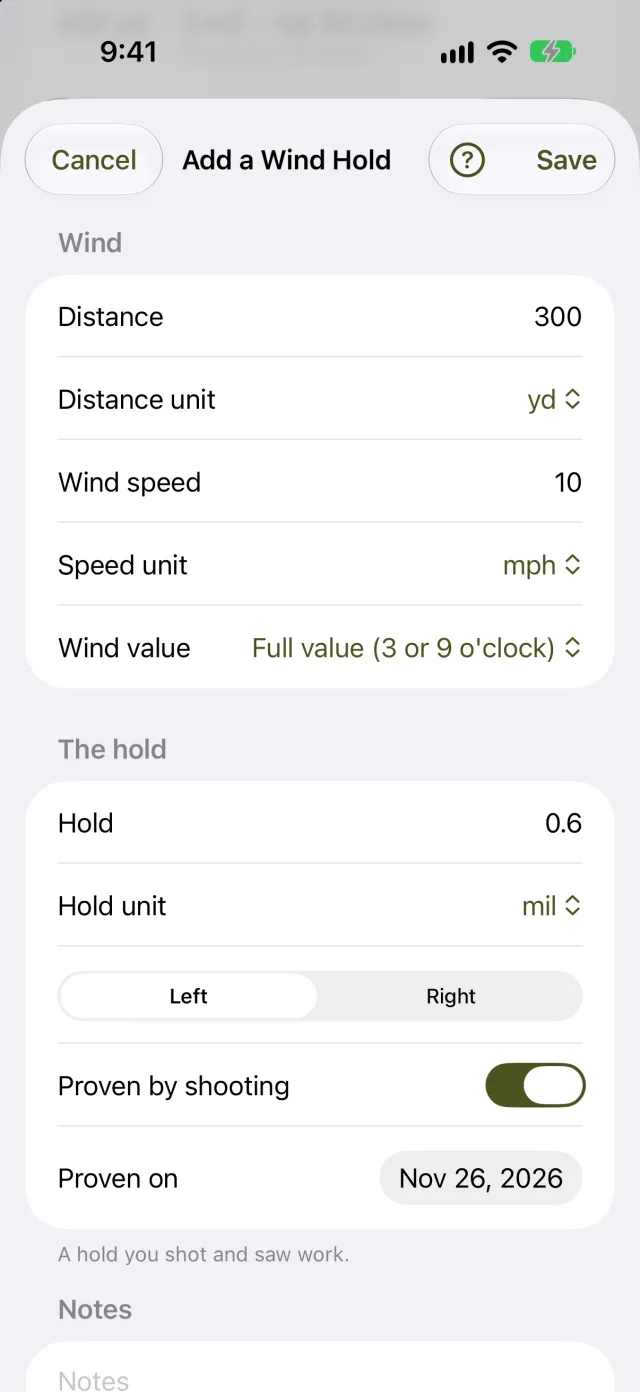
- Under Wind (or Moving target):
- Distance and Distance unit: where the hold worked. Distance starts at 100 and the unit at the table’s unit: change it to the distance you actually held at.
- Wind speed (or Target speed) and Speed unit: mph, km/h or m/s.
- For wind, Wind value: Full value (3 or 9 o’clock), Half value, No value (head or tail), or Exact angle (then type the Angle from straight ahead (°)).
-
Under The hold:
- Hold: how far you held, for example 0.6. Hold unit: mil or MOA.
- Side: Left or Right.
- Proven by shooting: on when you shot it and saw it work, with Proven on for the date. Turn it off to keep a hold you’ve only been told or read about; it’s then marked “Entered, not yet proven“.
-
Notes: anything that helps (gusting, the range, the target).
- Tap Save. The hold appears under Proven holds as one line, for example “Wind 10 mph full value: 0.6 mil left at 400 yd”, with “Proven” and its date (or “Entered, not yet proven”).
- To change or delete a hold, tap it: the Edit Hold form opens. Delete Hold asks “Delete this hold?”; it can’t be undone.
Why it’s useful
Wind and movement are where most misses happen past a few hundred yards. A hold you shot and watched work is worth writing down with its distance, speed and direction, so you can find it again in the field instead of guessing. Keeping it next to the come-ups, and on the card, puts it where you need it.
Who uses it, and how:
- Hunters: one or two wind holds for the distances you’d shoot, printed on the pocket card.
- Long-range and PRS-style shooters: a full-value 10 mph hold at a few distances, the base for scaling to other winds with Scaled Wind Holds.
- Hog and varmint hunters, and moving-target shooters: lead holds for a walking or running target at the distances you shoot.
- New shooters learning wind: enter the hold a coach or mentor gave you as “not yet proven”, then prove it and switch it to proven.
- Anyone who shoots several loads: each table keeps the holds for its own ammunition.
What each option means
A hold reads in one line on the table and the card: kind, speed, value, hold, side and distance, for example “Wind 10 mph full value: 0.6 mil left at 400 yd” or “Lead 3 mph: 0.8 mil right at 200 yd”.
Example
On a calm-to-breezy morning Jamie shoots the 400 yd plate with a steady 10 mph wind from 9 o’clock, holds 0.6 mil left, and hits three times in a row. On DT002:
- Add a Wind Hold. Distance 400 yd. Wind speed 10, mph. Wind value Full value (3 or 9 o’clock).
- Hold 0.6, mil, Side Left. Proven by shooting on, Proven on today.
- Save. The table shows “Wind 10 mph full value: 0.6 mil left at 400 yd”, “Proven Oct 12, 2026”.
Jamie’s hunting partner says a walking deer at 200 yd takes about 0.8 mil of lead. Jamie adds it as a lead hold with Proven by shooting off: “Lead 3 mph: 0.8 mil right at 200 yd”, “Entered, not yet proven”.
Tips
- Record the conditions you really had. A hold is only proven for its distance, speed and value.
- Scale with the calculator, then prove. Scaled Wind Holds turns a proven hold into holds for other wind speeds (marked as worked out, not proven). Shoot the ones you rely on and add them here.
- Keep the list short. Two or three holds fit on a pocket card; more fit on a bigger card.
- Holds belong to their table. A different ammunition drifts differently, so keep its holds on its own table.
What it affects
- Dope cards: with Wind column and holds on, each hold prints under the rows, in the same one-line form.
- The Dope Table report lists the holds.
- Calculators: Scaled Wind Holds starts from this table’s holds.
- Deleting the table moves its holds to Recently Deleted with it.
If something goes wrong
- “Type the distance for this hold” or “Type the hold”. Tapping Save says what’s missing under that field. The distance is from 1 to 5,000; the hold at most 100 mil (343.8 MOA), with the side picked under Side.
- My hold isn’t on the card. Turn on Wind column and holds in the card editor. On a very small card, holds may not fit; use a bigger size (Pro).
- The hold says “not yet proven”. Proven by shooting is off. Tap the hold, turn it on, set Proven on, and Save.
- I deleted a hold by mistake. Holds can’t be restored. Add it again with its original date.
Related
- Next: Dope cards.
- A dope table, Scaled Wind Holds, Lead calculator, Make a dope card.
- Learning path: Building your dope card.
- Words used here: hold, wind hold, lead, full value wind, mil, MOA.
Gun Diary keeps records you enter and does arithmetic on them. It never predicts a trajectory; confirm every hold by shooting it at the range, and always know your target and what is beyond it.
Still stuck? In the app, open More > Help > Contact Support, or More > Settings > Support, which also has Send Error Log (the error log helps us find the problem), or email contact@setriksoftware.com. You can also browse the Help Center or the messages the app can show.