
"Calculator #7: Group Statistics"
Type where each shot hit and get the group's extreme spread, mean radius, vertical and horizontal spread and center; or average several group sizes.
Group Statistics (calculator #7) measures a group from the shot positions you type: extreme spread, mean radius, vertical and horizontal spread, and where its center is. A second box averages several group sizes. Typing numbers is free; tapping holes on a target photo is part of a group record and needs Pro.
Steps
-
On the Tools tab, under Groups and velocity, tap Group Statistics. It opens with a five-shot example already typed in.
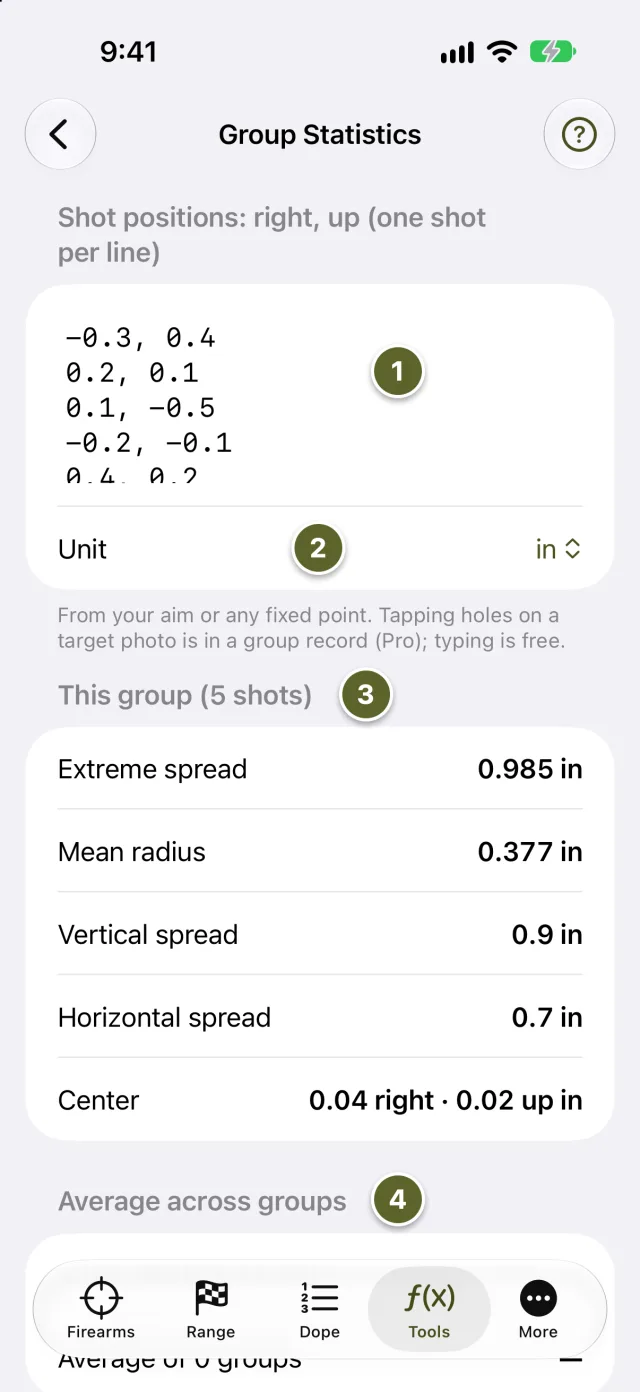
Numbers on the picture: 1 the shot positions box, 2 Unit, 3 This group results, 4 Average across groups.
-
In the box under Shot positions: right, up (one shot per line), clear the example and type each shot on its own line as two numbers: how far right, then how far up, from your aim or any fixed point. Left and down are negative, for example
-0.3, 0.4. - Pick the Unit you measured in (in, mm, cm, MOA or mil). It labels the results; nothing is converted.
- Read This group, with the shot count in the heading: Extreme spread, Mean radius, Vertical spread, Horizontal spread and Center.
- To average several groups’ sizes, type them in the field under Average across groups, separated by semicolons, commas or spaces (for example
0.9; 1.1; 0.8). The Average of … groups row shows the mean.
Why it’s useful
A single “group size” number hides a lot. Two groups can both measure 1 inch, yet one is four shots in a hole plus a flyer and the other a round, even spread. Mean radius (the average distance of each shot from the group’s center) uses every shot, so it’s a steadier measure of how a load or rifle really shoots. Vertical and horizontal spread show whether the problem is elevation (often ammo or velocity) or side to side (often wind or you).
Who uses it, and how:
- Factory-ammo testers: compare loads by mean radius, not just the two widest holes.
- Precision shooters: split a group into vertical and horizontal to diagnose what’s opening it up.
- Hunters: average three or four groups from a hunting load to know what it really does, not just the best day.
- People sighting in: the Center is the offset to correct; take it to Sight Clicks.
- Anyone with a printed target and a ruler: measure each hole from the aim point and type it in; no photo needed.
What each option means
The formulas, in plain words: the center is the average of the right values and of the up values. Mean radius is the average straight-line distance from each shot to that center. Extreme spread is the longest distance between any two shots. Results are rounded to three decimals.
Example
Five shots from your Mountain Rifle at 100 yards, measured in inches from the aim point:
0.3, 0.5 0.9, 0.2 0.6, -0.1 0.2, 0.1 0.7, 0.6
This group (5 shots) reads:
- Extreme spread: 0.707 in
- Mean radius: 0.364 in
- Vertical spread: 0.7 in
- Horizontal spread: 0.7 in
- Center: 0.54 right · 0.26 up in
Then type your last three group sizes for this ammo, 0.62; 0.71; 0.58, under Average across groups: Average of 3 groups reads 0.637 in.
Tips
- Measure every shot from the same point. The aim point is best: then Center is also your correction.
- Measure hole centers, not edges. A caliper across the outside edges minus one bullet diameter gives center to center.
- Five or more shots tell you more than three. Mean radius settles down as shots are added.
- Save it with the group instead. In a group record (Pro), tap each hole on the target photo and Gun Diary works out the same numbers and keeps them. See Shot holes.
What it affects
Nothing is saved. To keep group numbers, record a group; see Record a group.
If something goes wrong
- “Type each shot as two numbers, like 0.2, -0.4.” No line has two numbers yet. Each line needs both right and up, even if one is 0.
- The shot count is lower than I typed. A line with only one number (or text) is skipped. Check each line.
- I measured in mm but the results say in. Pick the Unit: it only labels the results.
- Decimal commas. A comma separates the two numbers, so type decimals with a point (0.3, not 0,3).
Related
- Next: Velocity Statistics.
- Record a group, Shot holes, Measure a group from a photo, Hit Chance from Your Groups, Ammo comparison.
- Learning path: Testing factory ammo.
- Words used here: extreme spread, mean radius, group, flyer, point of aim.
Guides on this topic
- Mean Radius vs Group Size: Why MR Uses Every Shot
- Shot Group: What It Is, How Many Shots, and How to Measure One
Still stuck? In the app, open More > Help > Contact Support, or More > Settings > Support, which also has Send Error Log (the error log helps us find the problem), or email contact@setriksoftware.com. You can also browse the Help Center or the messages the app can show.