
"Calculator #17: Hit Rate and Scores"
Count hits out of shots per distance, drill or stage, see the total, and see your hunting and drill hit rates per season from your diary.
Hit Rate and Scores (calculator #17) is a quick tally: type hits out of shots for each distance, drill or stage, and it shows the percentage for each line and the total. Below that, it reads your own diary and shows your hunting shots and drill runs as hits out of shots, per season. It’s plain counting; nothing is estimated.
Steps
- Tap the Tools tab. Under Competition, tap Hit Rate and Scores.
- In Hits out of shots, each line has a name (Distance or drill), the number of hits, the word “of”, and the number of shots. The percentage shows at the end of the line.
- To add a line, tap Add a Line and fill it in. To remove one, swipe it left and tap Delete.
-
Total adds up every complete line: hits of shots and the overall percentage.
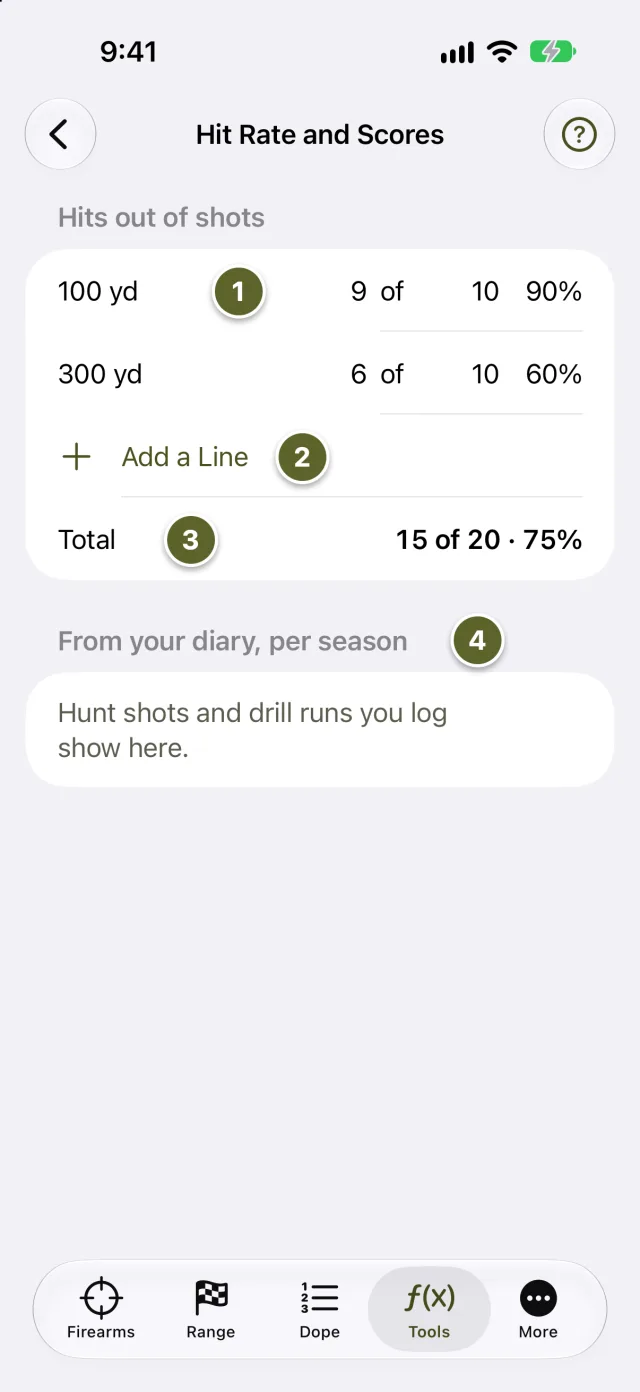
Numbers on the picture: 1 a line (name, hits, shots, percentage), 2 Add a Line, 3 Total, 4 From your diary, per season.
-
Look at From your diary, per season: a “Hunting” line for each season (a calendar year) with hunt shots you logged (like “Hunting 2026: 3 of 4 · 75%”), and a “Drills” line counting every drill run with shots recorded.
The lines you type aren’t saved; the diary section always comes from your records.
Why it’s useful
Group size says how tight a rifle shoots; hit rate says how often you actually hit what you aimed at, which is what matters in a match or in the field. Writing hits down per distance shows where your skill falls off, and seeing it per season shows whether practice is paying off.
Who uses it, and how:
- Steel and PRS-style shooters: tally hits per distance or per stage after a practice day: 9 of 10 at 300, 6 of 10 at 500 says where to practice next.
- Action-pistol shooters: count hits per drill when the timer isn’t the point.
- Hunters: the season lines come from the shots you logged in the Hunt Log and Quick Hunt Log: an honest record of hits and misses, year by year.
- Instructors and new shooters: a simple scoreboard for a practice session without making records.
- Anyone comparing two setups or positions: one line each, same number of shots.
What each option means
The screen opens with two sample lines (100 yd: 9 of 10, 300 yd: 6 of 10), so you can see how it works. Change or delete them.
Example
- The sample lines show 90% and 60%, and Total 15 of 20 · 75%. (This is the app’s tested example.)
- After a steel day with the Mountain Rifle, change the lines to 300 yd: 9 of 10, 500 yd: 7 of 10, and add a line 700 yd: 3 of 10. The lines show 90%, 70% and 30%; Total shows 19 of 30 · 63.3%. The drop at 700 is where to practice.
- Add a line with 11 hits of 10 shots by mistake: it shows a dash and isn’t in the total until you fix it.
- With four hunt shots logged in the 2026 season (three hits, one miss), From your diary, per season shows Hunting 2026: 3 of 4 · 75%.
Tips
- Keep the same number of shots per line when comparing distances; it makes the percentages fair.
- Log every hunt shot, misses included, in the Hunt Log. The season line is only as honest as the log.
- Use drill runs for timed work. Drill runs keep times, hits and scores; this screen totals their hits.
- For a chance before you shoot, see Hit Chance from Your Groups.
What it affects
Nothing. Typed lines are never saved. The diary section only reads hunt shots and drill runs; it doesn’t change them.
If something goes wrong
- A line shows a dash. Fill in both hits and shots, with hits no more than shots.
- The total doesn’t include a line. That line is incomplete or has more hits than shots.
- “Hunt shots and drill runs you log show here.” You haven’t logged any yet. See Hunt log and Drill runs.
- A hunt shot isn’t counted. Its result is Not sure, or it’s in Recently Deleted. Open the shot in the hunt log and set Hit or Miss.
- My typed lines are gone. Typed lines aren’t saved when you leave the screen. Use a drill run to keep a score.
Related
- Next: Round Count Statistics.
- Drill runs, Hunt log, Quick Hunt Log.
- Drill Times and Hit Factor, Hit Chance from Your Groups.
- The Tools tab.
- Words used here: drill, stage, season.
Guides on this topic
Still stuck? In the app, open More > Help > Contact Support, or More > Settings > Support, which also has Send Error Log (the error log helps us find the problem), or email contact@setriksoftware.com. You can also browse the Help Center or the messages the app can show.