
Hunt log
Every hunt by season, for one firearm or all of them, with shots and harvests; filter by species, open a harvest to edit its details and photos, and print the hunt log report.
The Hunt Log collects every hunting session, grouped by season (year), newest first, with how many shots each hunt had and what was taken. Open it from More for all your firearms, or from a firearm’s dashboard for just that one. Each harvest has its own record with species, tag number, weight, trophy notes and photos.
Steps
-
Open the hunt log:
- All firearms: More > Hunt Log.
- One firearm: open it on the Firearms tab and tap Hunt Log on its dashboard (the title reads “Hunt Log · Mountain Rifle”).
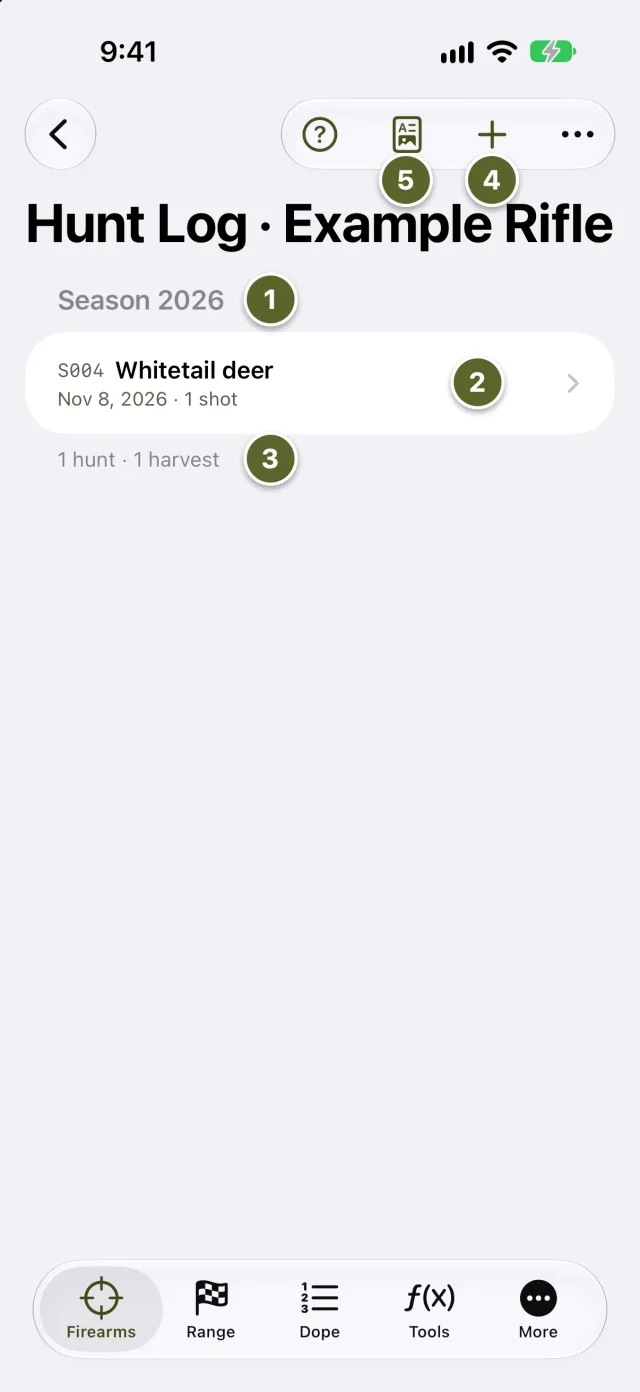
Numbers on the picture: 1 the season heading, 2 a hunt with its harvest, 3 the season’s count of hunts and harvests, 4 + (Quick Hunt Log), 5 Hunt Log Report.
-
Each row shows the session code, the species taken (or the hunt’s name when nothing was taken), the date, the number of shots and, on the all-firearms log, the firearm.
- To see one species, tap ••• and pick it (shown once you have harvests with a species). All species shows every hunt again.
- Tap a hunt to open its session: Hunt shots and Harvest are listed there with Add Hunt Shot and Add Harvest. See A session.
-
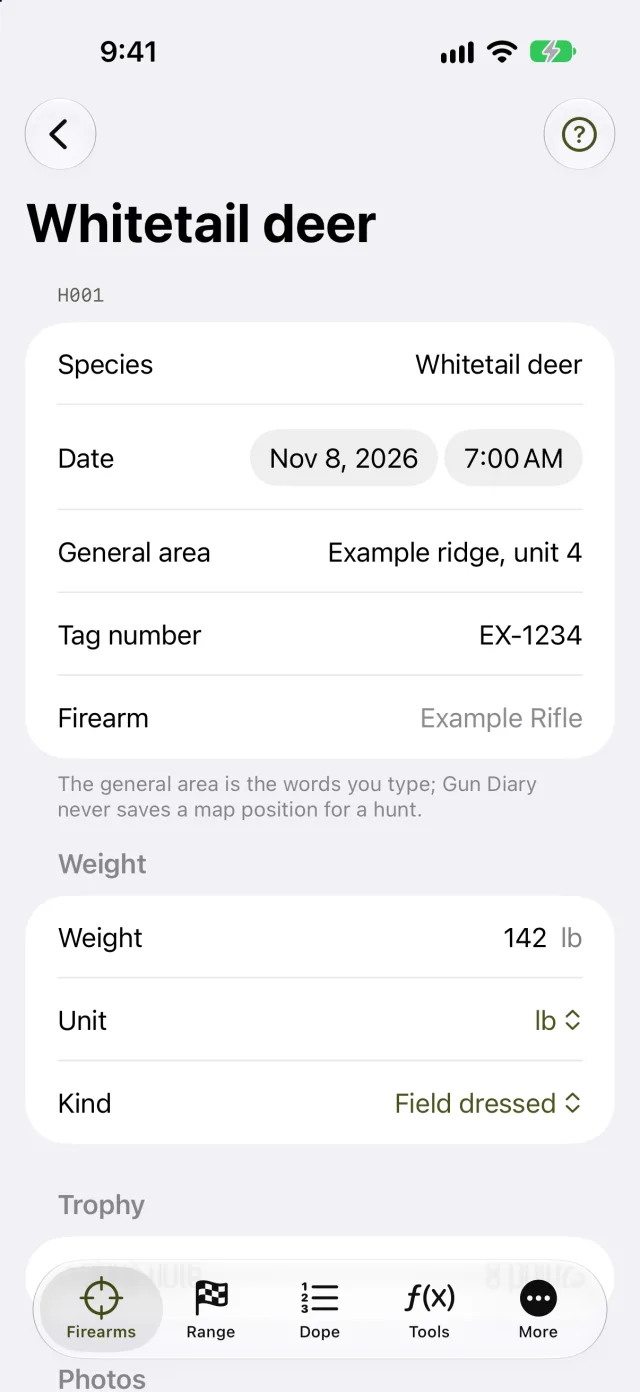
Tap a harvest on the session to open it. Change any field; changes save as you go.
-
To log a new hunt, tap + (Quick Hunt Log). See Quick Hunt Log.
- For a printable record, tap the report button at the top right (Hunt Log Report, a page icon). See Hunt log report.
Why it’s useful
A hunting record grows more valuable every year. Looking back over seasons you see where and when you were successful, how far your shots really were, and how a rifle and its dope performed on game. Many hunters keep a paper journal for exactly this; the Hunt Log keeps it with the rifle’s other records.
Families keep the first-deer story with photos and the tag number. Elk and western hunters review their shot distances against what they practised. Hunters who travel keep a record per state and season. Someone with several rifles sees which one has done the work, and the per-firearm log shows just that rifle’s hunts. Shotgun hunters keep turkey seasons the same way. Because general areas are only words you type, never map positions, you can share the log without giving away your spot.
What each option means
Hunt Log: | On screen | What it is | |—|—| | “Season 2026” | Hunts in that calendar year (January to December). A season that runs past New Year shows in two: December hunts under one year, January hunts under the next | | Season footer | “… hunts · … harvests” in that season | | Row | Code, species (or hunt name), date, shots, and the firearm on the all-firearms log | | ••• > species | Only hunts where that species was taken; All species for all | | + (Quick Hunt Log) | Logs a new hunt | | Hunt Log Report (page icon) | The report screen (PDF is Pro, CSV free) |
Only finished sessions with the activity Hunting are listed.
Harvest: | Field | What it is | |—|—| | Species | Like “Whitetail deer” | | Date | When it was taken | | General area | Words only, no map | | Tag number | Your tag or permit number (optional) | | Firearm | The firearm of the hunt | | Weight, Unit, Kind | Weight in lb or kg; Live weight, Field dressed or Boned out | | Trophy note | Points, length, score | | Photos | Add from Photos, Take Photo | | Notes | Anything else | | Hunt | The hunting session | | Delete Harvest | Moves it to Recently Deleted |
The harvest footer says: “The general area is the words you type; Gun Diary never saves a map position for a hunt.”
Hunt shot (tap one in the session): Time, Result, Distance and Distance unit, Position, Follow-up shots, Dope row (when the firearm has dope), Hold used, Notes, Delete Shot; tap Done. Most changes save as you make them, but a change to Follow-up shots is kept only when you tap Done.
Example
After three seasons, the all-firearms Hunt Log reads:
- Season 2026 (“2 hunts · 1 harvest”): S041 Whitetail deer, Nov 15 · 1 shot · Mountain Rifle; S038 Hunt, Nov 8 · 0 shots · Mountain Rifle.
- Season 2025 (“3 hunts · 2 harvests”): …
You pick Elk from ••• to see only elk hunts, then open last year’s to check the distance: 340 yd, dope row “350 yd: 2.1 mil up”, Hit. You open the harvest and add a photo from the butcher.
Tips
- Add photos later from the harvest screen; the first photos often come from someone else’s phone.
- Fill in the weight when you get it back from the processor, and pick the Kind so years compare fairly.
- Use the per-firearm log before a hunt to remind yourself how that rifle has done.
- Hunts with no harvest still count. They show your effort and your shots.
What it affects
- Viewing and filtering change nothing.
- Edits to a harvest are saved at once.
- Delete Harvest moves it to Recently Deleted; the hunt and its shots stay. You can restore it from More > Recently Deleted for 30 days.
- Deleting a hunt shot doesn’t change the session’s rounds; change Rounds fired on the session if you need to.
If something goes wrong
- “Log a hunt afterwards with Quick Hunt Log“ and an empty list. No finished hunting sessions yet (or none for this firearm or species). Tap +.
- A hunt I logged with Log a Session is missing. Its Activity must be Hunting, and it must be saved (not a draft).
- No species filter. It appears once a harvest has a species.
- Hunt Log isn’t in More. Hunting is turned off in Personalize your diary.
- The report shows a Gun Diary Pro screen. PDF reports are Pro; the CSV is free.
Related
- Quick Hunt Log, A session, Hunt log report, Zero Check, Firearm dashboard, The More tab.
- Learning path: Before and after the hunt.
- Words used here: harvest, field dressed, dope, session.
Gun Diary keeps records you enter and does arithmetic on them. It never predicts a trajectory; confirm every hold by shooting it at the range, and always know your target and what is beyond it.
Guides on this topic
- Hunting Log: How to Record Every Shot, Hits and Misses
- Deer Hunting Journal: Keeping Each Season's Harvests, Tags and Photos
- How to Keep a Hunting Journal You'll Still Use in Five Years
- Duck Hunting Log Book: What to Write After Every Hunt
Still stuck? In the app, open More > Help > Contact Support, or More > Settings > Support, which also has Send Error Log (the error log helps us find the problem), or email contact@setriksoftware.com. You can also browse the Help Center or the messages the app can show.