
Hunt log report
Print or export your hunts, the shots you took and your harvests, season by season, for one firearm or all of them, with places shown only as the general area you typed.
The Hunt Log report gathers your hunting sessions, every shot you logged and every harvest, grouped by season (the calendar year), for one firearm or all of them. Places print only as the general area you typed for a harvest, never as a saved place or a map position. The PDF is part of Gun Diary Pro; the spreadsheet is free.
Steps
-
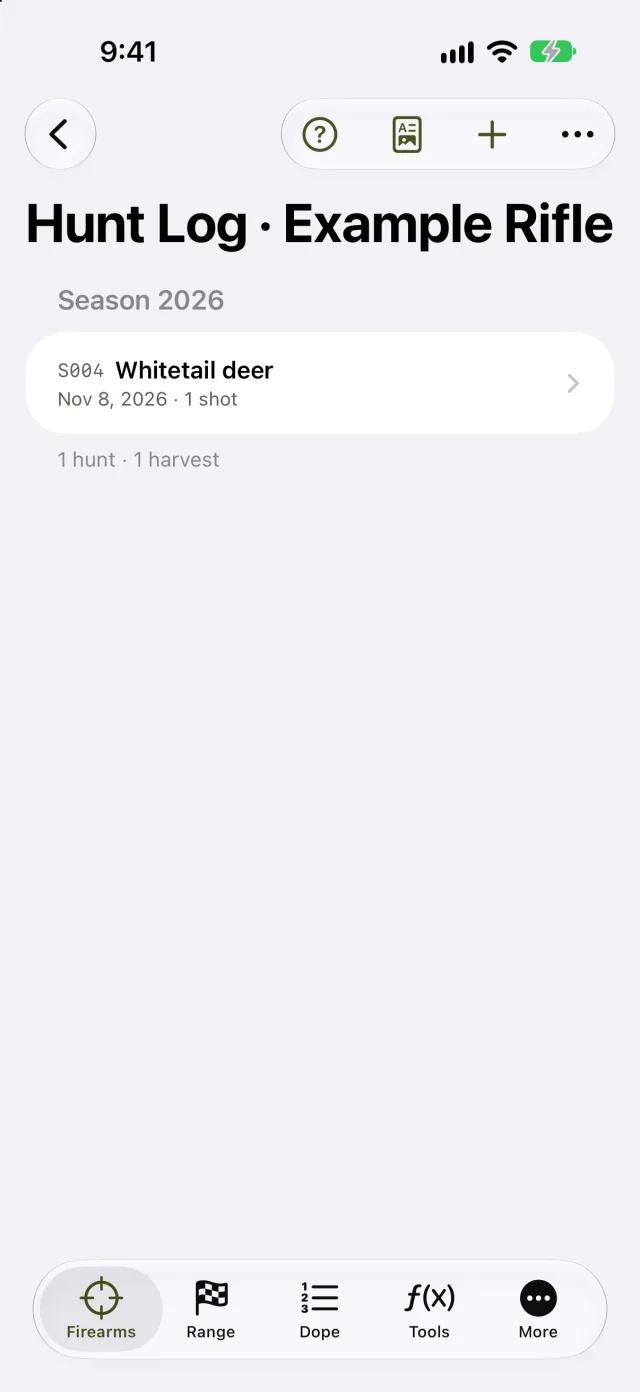
Tap More > Reports > Hunt Log (under Dope and the field). Or on the Hunt Log, tap the document button (Hunt Log Report) at the top right.
-
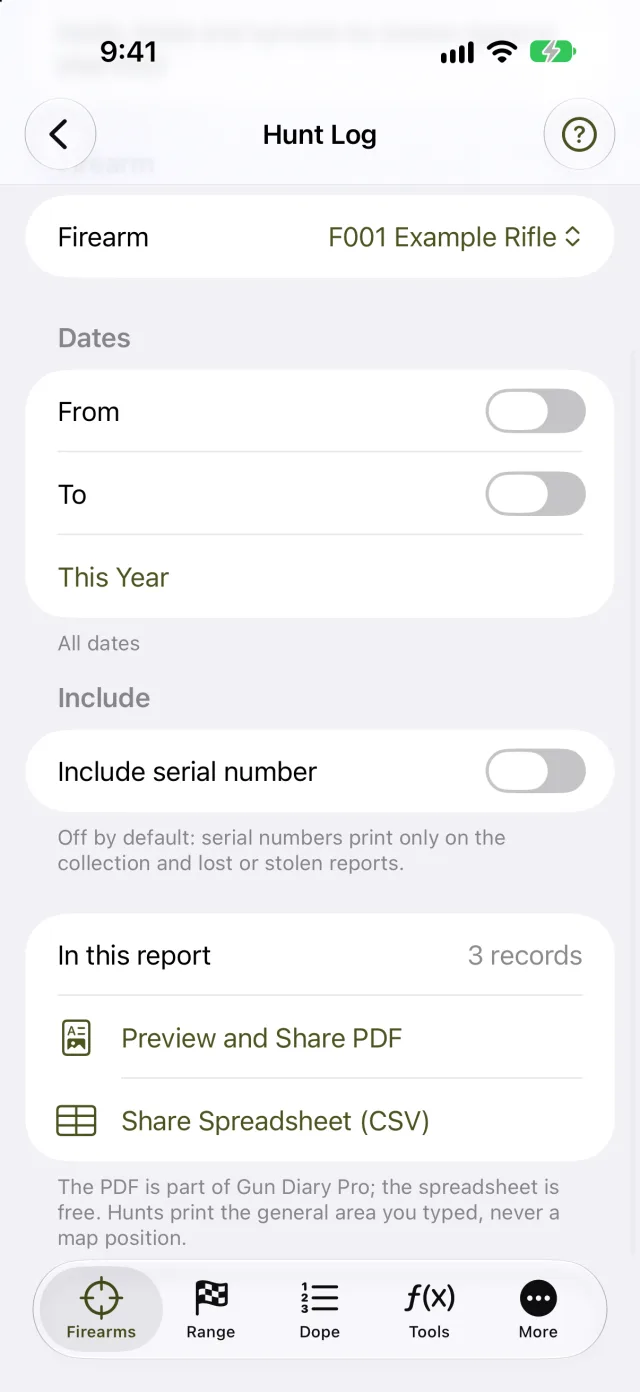
Next to Firearm, keep All firearms or pick one.
- Under Dates, tap This Year for this season, or set From and To (useful when a season crosses New Year).
- Switch Include serial number on only if needed (it prints only for one firearm).
-
Tap Preview and Share PDF or Share Spreadsheet (CSV).
Why it’s useful
Every season teaches something: which rifle and load worked, how far your shots really were, how often you needed a follow-up. A season-by-season record keeps those lessons, and the tag numbers and weights you may need later.
Who uses it, and how:
- Hunters look back at shot distances, positions and results before choosing practice for next season.
- Families and hunting camps keep a yearly record of who harvested what.
- Anyone keeping tag records has the tag numbers and dates in one place.
- Hunters trying a new rifle or ammunition compare results across seasons.
- Spreadsheet users total harvests or average shot distance per season from the CSV.
What’s on the Hunt Log screen
What the PDF prints, for each season, newest first:
- “Season 2026” and a count, like “3 hunts · 2 shots · 1 harvest”.
- Hunts: Session, Date, Firearms, General area (from that hunt’s harvests), Harvests (species).
- Shots: Time, Firearm, Distance, Hold, Position, Result (Hit, Miss, Not sure), Follow-ups.
- Harvests: Code, Date, Species, Firearm, General area, Tag, Weight (like “142 lb field dressed“).
- A closing line: “Places print as the general area you typed; Gun Diary never prints a map position for a hunt.”
With nothing in the dates: “No hunts in this range.” File: “Hunt log – All firearms.pdf” or “Hunt log – Mountain Rifle.pdf”.
What the spreadsheet holds (one row per hunt, shot or harvest): Record (“Hunt”, “Shot” or “Harvest”), Season, Date, Firearm code, Firearm, Session, General area, Distance, Distance unit, Hold, Position, Result, Follow-up shots, Ammunition, Species, Tag, weight and trophy, Notes, ID. Columns that don’t apply to a row are blank.
Example
Deer season is over and you want a record of it.
- More > Reports > Hunt Log, All firearms, This Year.
- Preview and Share PDF. “Season 2026: 3 hunts · 1 shot · 1 harvest”. Shots: Nov 8, 2026 7:12 AM, Mountain Rifle, 210 yd, hold “Center of the chest”, Sitting, Hit, 0 follow-ups. Harvests: H002, Whitetail deer, general area “North ridge, unit 4”, tag 26-55120, 142 lb field dressed.
- Share > Save to Files > iCloud Drive > “Hunting”.
Tips
- Type a general area you’re happy to share (“North ridge, unit 4”): that’s the only place the report prints.
- Log shots as you take them with Quick Hunt Log; the report is only as good as what’s recorded.
- Use From and To for seasons that run across New Year; This Year stops at December 31.
What it affects
Nothing. The report reads hunting sessions, hunt shots and harvests and builds a new file. Saved places and map positions on your hunts stay private: they’re never printed or put in this spreadsheet.
If something goes wrong
- The Pro screen opens. The PDF is Pro; the spreadsheet is free.
- “No hunts in this range.” Turn the dates off, or pick All firearms.
- A hunt is missing. Only hunting sessions that aren’t drafts are listed, and with one firearm picked, only hunts that firearm was on. Finish the draft or add the firearm to the session.
- The general area is blank. It comes from the hunt’s harvest; a hunt with no harvest has none.
- The Hunt Log row isn’t in Reports. Hunting is hidden in Personalize your diary.
Related
- Next: Hunt log: your hunts, shots and harvests.
- Quick hunt log: log a shot or harvest in the field.
- Zero history report, Reports.
- Learning path: Before and after the hunt.
- Words used here: hold, cold bore.
Gun Diary keeps records you enter and does arithmetic on them. It never predicts a trajectory; confirm every hold by shooting it at the range, and always know your target and what is beyond it.
Guides on this topic
Still stuck? In the app, open More > Help > Contact Support, or More > Settings > Support, which also has Send Error Log (the error log helps us find the problem), or email contact@setriksoftware.com. You can also browse the Help Center or the messages the app can show.