
Competition results and drill runs
Record a match's score and placement on its session, and each drill run with its par time, draw, splits, hits and penalties; Gun Diary works out the total time, average split, hit factor or final time.
Competitors and anyone who trains with a shot timer can keep their results in Gun Diary. A match’s overall Score and Placement go on its session; each drill or stage run gets its own record with the times from your timer. Gun Diary adds up the time, averages the splits, and works out the hit factor (USPSA style) or the final time (IDPA style), so you can watch them improve across a season.
Steps
Record a match result:
- Log the match as a session with Activity set to Competition (Log a session).
- Type the Score and Placement in the Competition section, like “1,742” and “3rd of 41, Carry Optics“.
- They show at the top of the session screen.
Add a drill run:
-
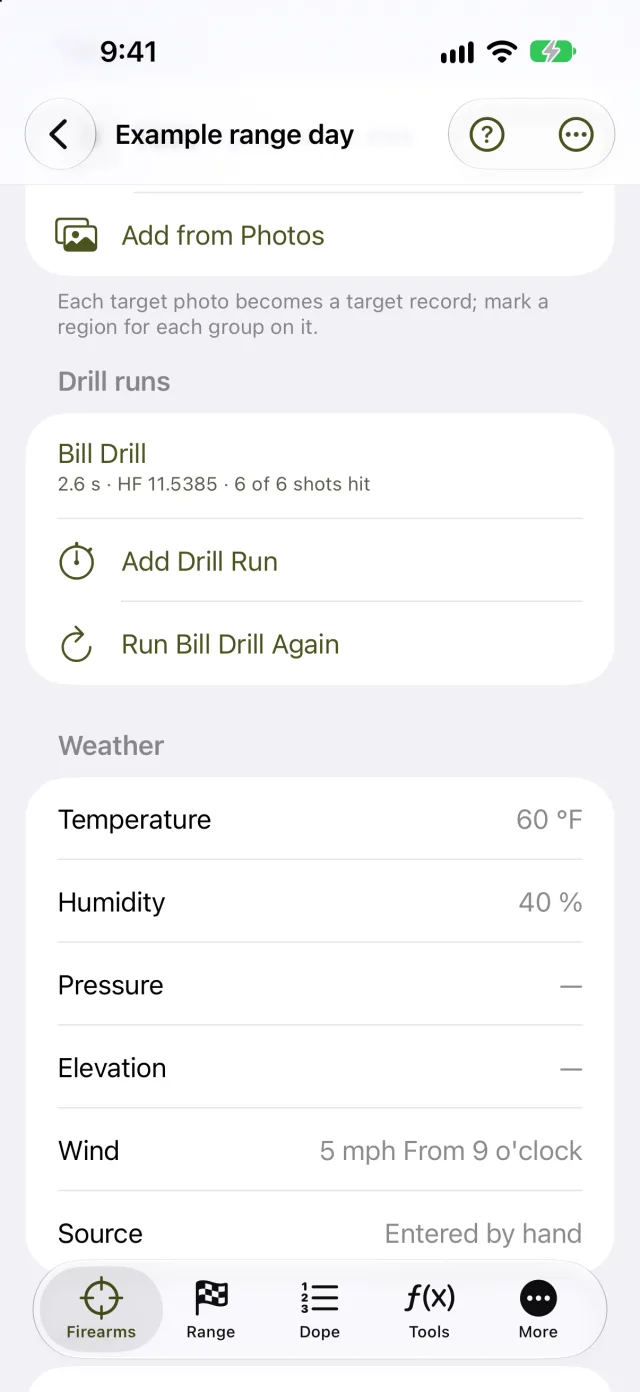
Open a Competition or Practice session. Scroll to Drill runs and tap Add Drill Run.
-
Type the Drill name, like “Bill Drill”. Check the Date and pick the Firearm (or Not recorded).
- Pick the Scoring: Time only, Hit factor (USPSA), Time plus (IDPA) or Points and time.
- Optionally type the Par time in seconds.
-
Under Times (seconds), type the Draw (first shot) time and the Splits from your timer, separated by semicolons or spaces, like “0.25; 0.22; 0.24”. Total time and Average split appear as you type.
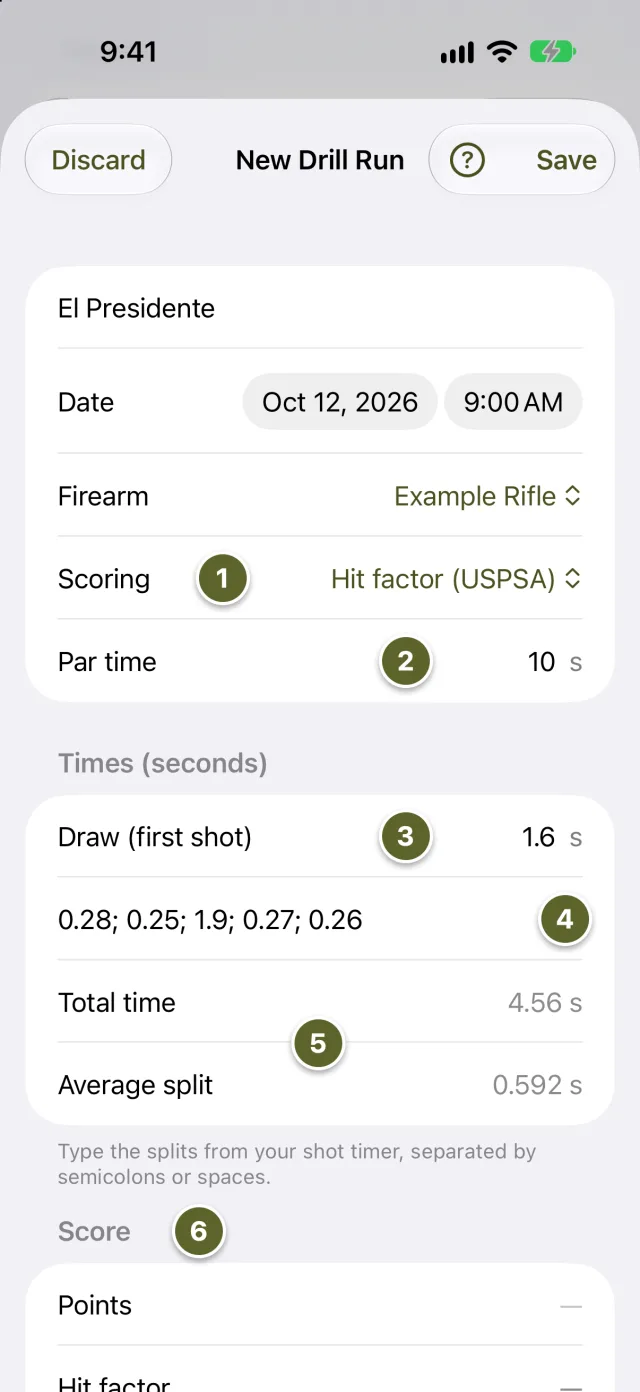
Numbers on the picture: 1 Scoring, 2 Par time, 3 Draw (first shot), 4 Splits, 5 Total time and Average split, 6 the Score section.
-
Under Score, fill in what the scoring needs (see the table) and the Hits and Shots.
- Add Notes and tap Save. To drop a new run instead, tap Discard at the top left.
Run it again: tap Run Bill Drill Again under the list (or Run the Last Drill Again for an unnamed drill). A new run opens with the same name, firearm, scoring, par time and shots; type the new times. To copy an older run, touch and hold it and tap Duplicate.
Change or delete a run: tap it in the session, change anything and tap Save; or tap Delete Drill Run.
Why it’s useful
Practice only pays off if you know whether it’s working. A shot timer tells you each run’s times and then forgets them; Gun Diary keeps every run with its date and firearm, so a draw that dropped from 1.6 to 1.3 seconds over a summer is there in black and white.
Different shooters use it differently. USPSA shooters track hit factor, which balances points against time. IDPA shooters track final time with points down and penalties added. Defensive pistol students run standards like the Bill Drill or El Presidente under a par time and see “under par” or “over par” on each run. Steel and rimfire shooters use Time only. Rifle and PRS shooters use Points and time for hits on a course. Match scores and placements on the session build a season’s results in one place, and the Competition and drills report prints them.
What each option means
Each run’s line in the session reads like “2.62 s · over par · HF 11.4504 · 6 of 6 shots hit”. Score and Placement are free text: type them as your match results show them.
The Drill runs section appears on Competition and Practice sessions (and any session that already has runs) when Competition and Drills is on in Personalize your diary.
Example
A Bill Drill (six shots on one target) with the Field 9mm, scored USPSA style.
- Add Drill Run. Drill name “Bill Drill”, Firearm Field 9mm, Scoring Hit factor (USPSA), Par time 2.5.
- Draw (first shot) 1.42, Splits “0.25 0.22 0.24 0.23 0.26”.
- Total time 2.62 s, Average split 0.24 s.
- All six in the A-zone: Points 30. Hit factor 11.4504. Hits 6, Shots 6.
- Save. The run reads “2.62 s · over par · HF 11.4504 · 6 of 6 shots hit”.
- Run Bill Drill Again: same name, firearm, scoring, par and shots. Type the new times.
An IDPA-style run: total 4.8 s, Points down 3, Penalties 3 → Final time 10.8 s.
Tips
- Use the same drill name every time so runs line up in reports and searches.
- Copy splits straight from your timer’s review screen, in order. Spaces, commas or semicolons all work.
- Record misses honestly in Hits. A fast run with misses isn’t a better run.
- Rounds: drill runs don’t add rounds. Count the rounds for the whole session in Rounds fired. See Round counts.
- Plan drill times with the Drill times calculator; see hit rates over time with the Hit rate calculator.
What it affects
- Each run is saved with its session and firearm and appears in the session, in search and in the Competition and drills report.
- Score and Placement are saved on the session.
- Round counters don’t change.
- Delete Drill Run moves the run to Recently Deleted for 30 days.
If something goes wrong
- No Drill runs section. The session’s activity must be Competition or Practice (or it already has runs), and Competition and Drills must be on in Personalize.
- No Score or Placement fields. Set the session’s Activity to Competition.
- Total time is wrong. Check the splits: each number is the gap between two shots, not the time from the start. Don’t include the draw in the splits.
- Hit factor shows —. Type Points, and at least a draw or one split.
- I swiped away a run I was editing and lost the splits. Splits are saved when you tap Save. Open the run again and retype them, then tap Save.
- “Delete this drill run?” Tap Move to Recently Deleted; you can restore it from More > Recently Deleted for 30 days.
- The Firearm picker is missing. The session has no firearm yet. Turn one on in Edit Session.
Related
- A session, Log a session, Competition and drills report.
- Drill times calculator, Hit rate calculator, Personalize your diary.
- Words used here: hit factor, par time, split, draw, points down.
Guides on this topic
- How Does a Shot Timer Work? Draw, Splits and Par Time, Explained
- Hit Factor: How USPSA-Style Scoring Works, with Worked Examples
- IDPA Scoring Explained: How Time Plus Works, with Examples
- USPSA Target Dimensions: Every Zone Measured, Full and Half Size
Still stuck? In the app, open More > Help > Contact Support, or More > Settings > Support, which also has Send Error Log (the error log helps us find the problem), or email contact@setriksoftware.com. You can also browse the Help Center or the messages the app can show.