
Reports, backup and exportGun Diary Pro
Collection report
One document listing every firearm you own, with photo, maker, model, serial number, purchase details, insured value, status and receipts, for your insurer, your records or your estate.
The Collection Report lists every firearm in your diary in one document: a summary table first, then a section per firearm with its photo, maker, model, serial number, purchase details, insured value, status and the receipts and documents on file. It’s the report for your insurer, your safe-deposit box and the people who’ll one day handle your estate. It’s part of Gun Diary Pro, as a PDF and as a spreadsheet.
Steps
-
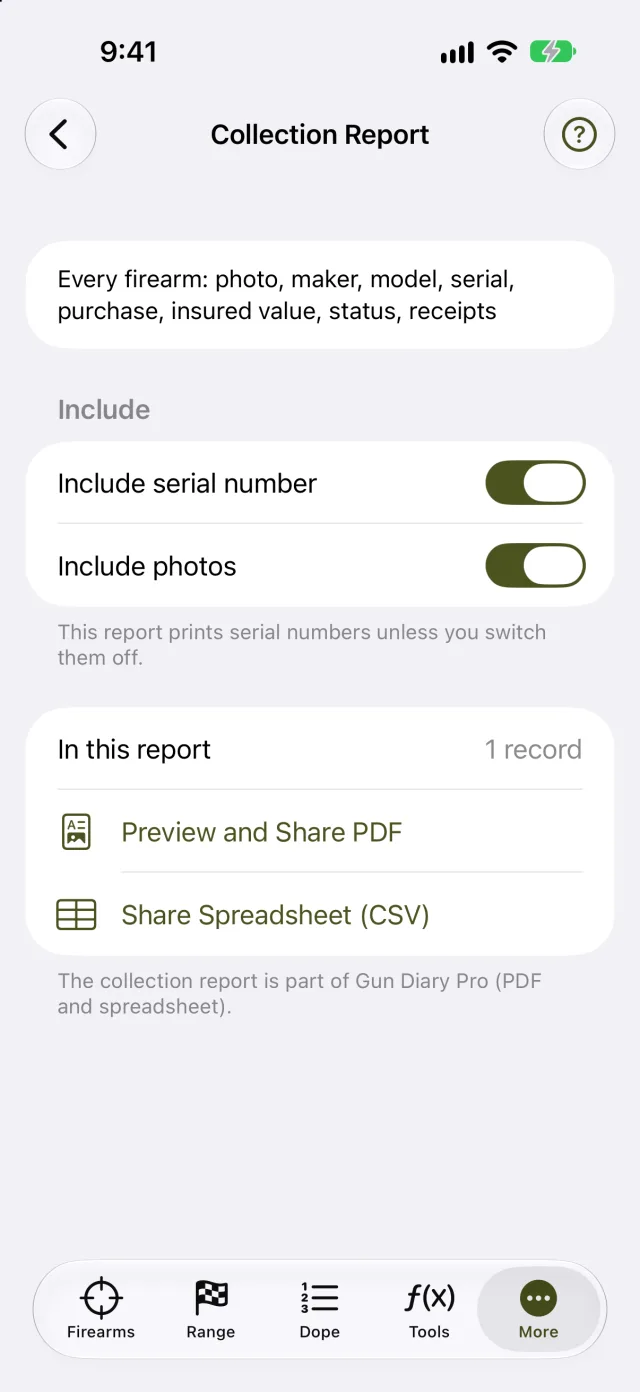
Tap More > Reports, then Collection Report under Your collection.
-
There’s no firearm or date to pick: the report always covers your whole collection, as of today.
- Under Include, leave Include serial number on (the default) for an insurer or your own records, or switch it off for a copy you’ll share more widely.
- Leave Include photos on to print each firearm’s photo beside its details, or switch it off for a smaller file.
- In this report shows how many firearms it lists.
-
Tap Preview and Share PDF to see it, then Share to print, save or send it. Or tap Share Spreadsheet (CSV) for the same list as a spreadsheet.
Why it’s useful
Insurers ask for a list of firearms with serial numbers and values, often with photos and receipts. After a fire, flood or burglary, that list is what turns “I had several rifles” into a paid claim. Building it by hand from a drawer of receipts is slow; Gun Diary already holds it, so one tap makes a dated, complete copy.
Who uses it, and how:
- Anyone with a homeowner’s or renter’s policy sends it to the agent when adding a firearms rider, and again each year.
- Collectors keep a printed copy in the safe-deposit box and a PDF in iCloud Drive, away from the guns themselves.
- Estate planning: executors and heirs get a clear list of what exists, where it came from and what it’s insured for.
- After a theft: it shows the police and the insurer everything at once (use the lost or stolen report for one gun).
- Spreadsheet users take the CSV to total values, sort by maker or track purchases over the years.
What’s on the Collection Report screen
Which firearms it lists. Every firearm that isn’t deleted: active, sold, traded, gifted, lost, stolen, recovered and archived ones, sorted by code. The Example Rifle is left out, so an insurance list never holds a made-up gun; only if it’s your only firearm does the report show it (marked “(Example)”), so a new user can see what the report looks like.
What the PDF prints
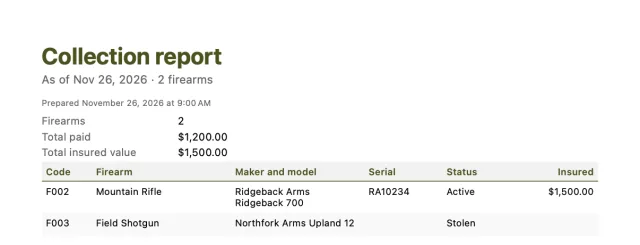
- The title “Collection report”, the date (“As of Nov 26, 2026”) and the number of firearms; when it was prepared.
- Totals: Firearms, Total paid and Total insured value. Each currency gets its own total (“$3,000.00 + €800.00”).
- A table: Code, Firearm, Maker and model, Serial (when on), Status and Insured.
- A section per firearm: Maker, Model, Kind, Cartridge or gauge, Serial number (when on), Finish, Purchase date, Bought from, Purchase price, Insured value, Status (for example “Sold Mar 3, 2026 to Pat”), Distinguishing marks, Rounds (lifetime), and for a lost or stolen gun the Police report number and Insurance claim number. Receipts and documents attached to the firearm are listed by code, title and kind. Empty values are left out.
- A closing note: “Values are what you entered. Keep this report with your insurance papers; it holds purchase details and serial numbers.”
Every page’s footer reads “Gun Diary · Collection report · As of” and the date, with the page number. The file is named like “Collection report – Nov 26, 2026.pdf”.
What the spreadsheet holds (one row per firearm, file named like “Collection report – 2026-11-26.csv”): Code, Name, Maker, Model, Kind, Cartridge or gauge, Serial number (only when the switch is on), Finish, Purchase date, Purchase price, Currency, Seller, Insured value, Status, Status date, Disposed to, Last seen, Police report number, Insurance claim number, Distinguishing marks, Documents, Lifetime rounds, Archived, Example, Firearm ID. Dates read like 2026-03-03 00:00; Archived and Example read Yes or stay blank.
Example
You insure four firearms and your agent wants an updated list.
- More > Reports > Collection Report. In this report: 4 records (the Example Rifle isn’t counted).
- You leave both switches on and tap Preview and Share PDF.
- The first page shows Firearms 4, Total paid $4,250.00 and Total insured value $5,100.00, then the table: F002 Mountain Rifle, F003 Bird Gun, F004 Carry Pistol, F005 Grandpa’s .22.
- Further down, the Mountain Rifle’s section has its photo, serial number, “Bought from Valley Sporting Goods”, purchase price $1,450.00, insured value $1,800.00, and “DOC-002 Receipt (Receipt)”.
- Share > Mail to your agent, then Share > Save to Files > iCloud Drive.
Tips
- Fill in each firearm’s details first: serial number, purchase date and price, seller, insured value, finish and distinguishing marks are on the firearm’s edit screen. See Edit a firearm.
- Attach receipts to each firearm (a photo or PDF of the bill of sale) so they’re listed. See Firearm documents.
- Keep sold guns in the list. A sold firearm still appears with “Sold” and the buyer, which is a useful record. Delete only records you truly don’t want.
- Store copies away from the guns: iCloud Drive, a family member’s email, a safe-deposit box.
- Update it after each purchase or sale, and once a year with fresh insured values.
What it affects
Nothing in your diary. The report reads your firearms and their details and builds a new file each time. The free plan’s one-firearm limit doesn’t matter here: the report lists every firearm you have, including any restored from a backup.
If something goes wrong
- The Pro screen opens, even for the spreadsheet. The collection report is Pro in both formats; the Pro screen’s headline reads “The collection report (PDF and spreadsheet) is part of Gun Diary Pro”. Without Pro, the same details are free in Export all your data (Firearms.csv and Firearm details.csv). See Compare Free and Pro.
- A firearm is missing. It’s in Recently Deleted. Restore it from Recently Deleted.
- The Example Rifle is in the list. It’s your only firearm. Add your own and it drops out, or remove it in Settings.
- The serial shows “—”. No serial number is recorded for that firearm. Add it in Edit a firearm.
- Totals show “—”. No purchase prices or insured values are recorded yet.
- Two totals joined by “+”. Your firearms use more than one currency; each currency is totaled separately.
- The file is too big to email. Switch Include photos off and make it again, or save it to Files.
Related
- Next: Lost or stolen report: one firearm, one page, free.
- Save and share PDF reports: print, save and send, and leave serials out.
- Change a firearm’s status: sold, traded, lost, stolen and recovered.
- Reports: every report.
- Learning path: Keeping your collection’s records.
- Words used here: serial number, disposition, insured value, Pro.
Guides on this topic
- How to Make a Gun Inventory Sheet for Insurance
- Gun Collection Insurance: Is Your Collection Covered, and What Records Prove It?
Still stuck? In the app, open More > Help > Contact Support, or More > Settings > Support, which also has Send Error Log (the error log helps us find the problem), or email contact@setriksoftware.com. You can also browse the Help Center or the messages the app can show.