
Optic settings
Tell Gun Diary how each scope works (click value, reticle units, first or second focal plane, true magnification, elevation and windage left) so calculators and dope tables use the right numbers for that rifle.
Every scope moves the point of impact by its own amount per turret click, and its reticle is marked in its own units. Optic Settings keeps those facts for each scope in the Garage: the click value, the reticle units, the focal plane, the magnification the reticle is true at, and how much elevation and windage the turrets have left above your zero. Every click count in the app reads the click value from here: the group’s Clicks row, Zero Check, dope tables, dope cards and the calculators that use a dope table. With no optic settings, those screens show no clicks and say “No click value: add the scope’s optic settings in the Garage to see clicks.” rather than guess.
Steps
- Open the firearm > The Garage > Specs and Equipment.
- Find the scope in the current configuration. If it isn’t there, add it with Add Equipment and a category of Optic (or anything with “scope”, “sight” or “red dot” in it).
- Tap the settings line under the scope (it reads “Not set: add the click value” the first time). Or tap the scope, then Optic settings.
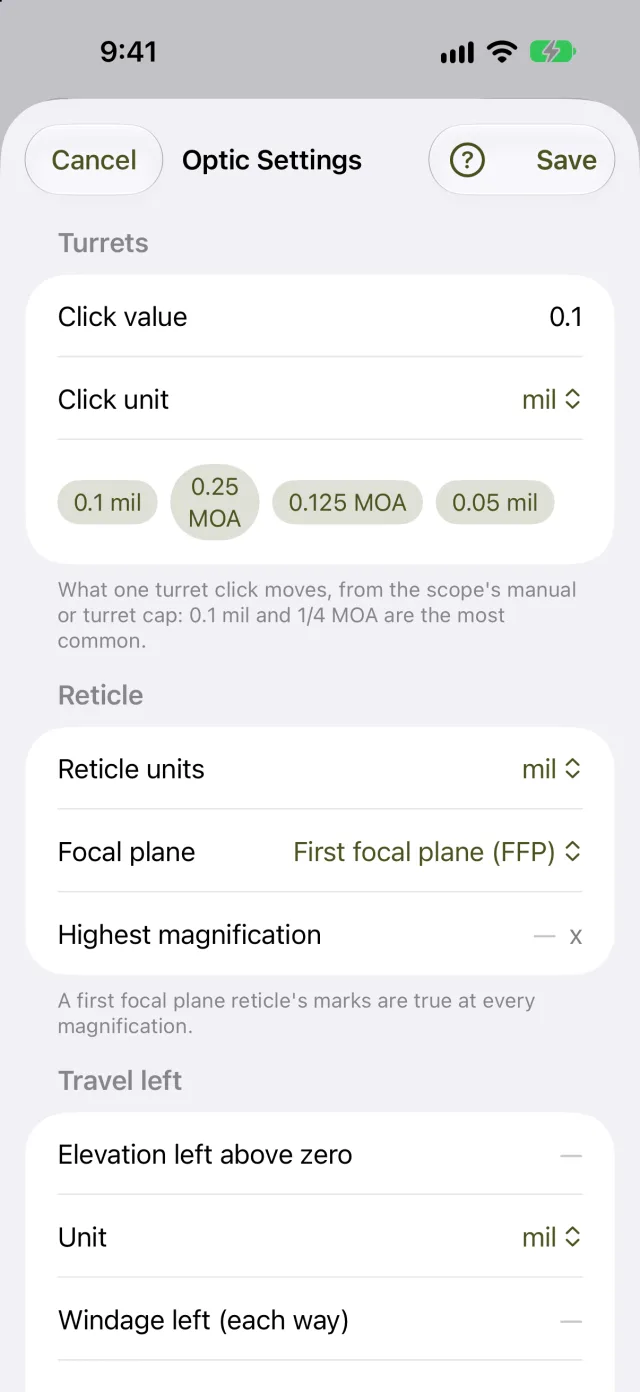
- Under Turrets, set the Click value and Click unit, or tap a common one: 0.1 mil, 0.25 MOA, 0.125 MOA or 0.05 mil. It’s in the scope’s manual or printed on the turret cap.
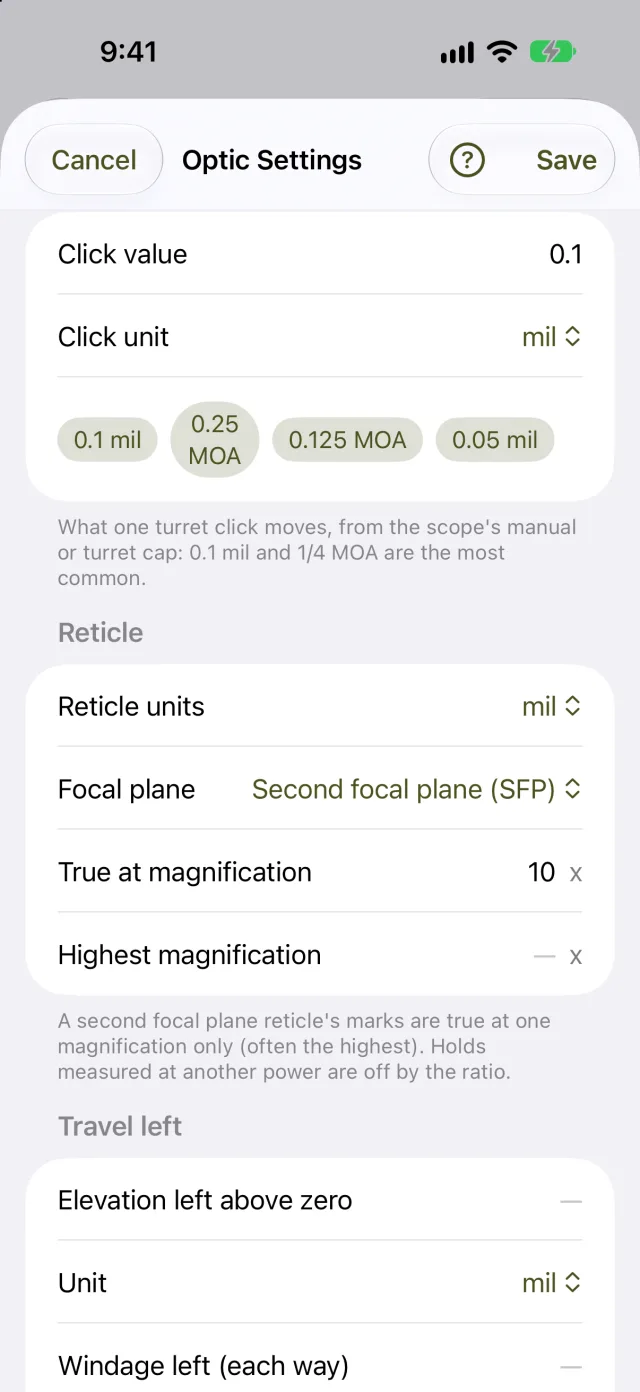
- Under Reticle, pick the Reticle units (mil, MOA or IPHY (shooter’s MOA)) and the Focal plane: First focal plane (FFP) or Second focal plane (SFP).
-
For a second focal plane scope, type True at magnification: the power the reticle’s marks are true at (often the highest). Optionally type the Highest magnification.
-
Under Travel left, type Elevation left above zero and its Unit, and Windage left (each way) and its Windage unit. Tap How to measure it for the method.
- Add Notes if you like (turret type, zero stop setting).
- Tap Save. The line under the scope now reads, for example, “0.1 mil per click · FFP · mil reticle · 12 mil left”.
Why it’s useful
The same group correction is a different number of clicks on a 0.1 mil scope and a 1/4 MOA scope. A shooter with more than one rifle can’t keep every scope’s details in their head, and a wrong click value turns a right answer into a miss. With the scope’s facts saved once, every calculator and dope table that uses this rifle starts from the right ones.
Who uses it, and how:
- Anyone sighting in a new scope sets the click value first, so the sight-in and click calculators tell them the right number of clicks. See the path Sighting in a new scope.
- Long-range shooters record the elevation left above zero; the dope table warns when a come-up needs more elevation than the scope has.
- Hunters with second focal plane scopes record the magnification the reticle is true at, so holds measured with the reticle are figured at the right power.
- Shooters with several rifles stop mixing up a mil scope and an MOA scope.
- Competitors note turret details and zero stop settings in Notes.
- New shooters use How to measure it to learn what “elevation left” means on their own scope.
What each option means
MOA and IPHY: a true minute of angle is about 1.047 inches at 100 yards; IPHY (“inches per hundred yards”, sometimes called shooter’s MOA) is exactly 1 inch. Most scopes sold in MOA are true MOA; check the manual.
How to measure elevation left (from the app): “With the rifle zeroed, count the clicks from zero to the top of the elevation turret’s travel (don’t force it), then multiply by the click value. Write down where you started and dial back to zero after.”
Not a scoped rifle?
Optic settings are for sights that click. What to do for other sights:
- Iron sights: there are no optic settings, so groups and Zero Check show no clicks. Record where the group hit compared with your aim and read the group’s center; adjust the sights the way the maker’s manual says (many front sights are drifted or turned, not clicked).
- Red dots: add the red dot with Add Equipment (category Optic, or anything with “red dot” in it) and set its Click value here, often 1 MOA or 0.5 MOA (check the manual or the turret cap). Then groups and Zero Check give clicks for it. The reticle and focal plane don’t matter for a dot.
- Handguns: use a short zero distance (often 15 or 25 yards) in Zero Check, and the red-dot or iron-sight line above.
- Shotguns: nothing to set for a bead; pattern the gun instead (Pattern a shotgun).
Example
Your Mountain Rifle wears a 4-16x scope with 0.1 mil clicks and a mil reticle in the first focal plane. Zeroed at 100 yards, you count 120 clicks to the top of the turret: 120 x 0.1 = 12 mil left.
- Specs and Equipment > the line under Optic.
- Tap the 0.1 mil button. Reticle units: mil. Focal plane: First focal plane (FFP).
- Elevation left above zero: 12, Unit: mil.
- Save. The line reads “0.1 mil per click · FFP · mil reticle · 12 mil left”.
Your dope table’s elevation check now compares each come-up to 12 mil. A 9.4 mil come-up at 800 yards is within the scope’s travel; if a row needed 13 mil, the table would warn that the scope can’t dial it.
Tips
- Count elevation left at your zero, not at the scope’s center. What matters is how far you can dial up from where the rifle is zeroed.
- Re-measure after changing rings or a canted base, which changes where your zero sits in the turret’s travel.
- Each scope has its own settings. A new configuration copies them with the scope. If you then edit the copied scope into a different one (a new maker or model), the copy still has the old scope’s settings: open Optic settings and set the new scope’s click value, reticle and focal plane. The Edit Equipment screen warns you: “You changed the maker or model. These optic settings still describe the scope this was copied from: check the click value, reticle and focal plane.”
- 1/4 MOA is 0.25, not 4. Type the click value as a decimal: 1/4 MOA is 0.25, 1/8 MOA is 0.125.
- Not sure of the click value? Check the turret cap; “1 click = 0.1 mrad” is 0.1 mil, “1/4 MOA” is 0.25 MOA.
What it affects
- Click counts everywhere: the group’s Clicks row (from the scope in the group’s configuration), Zero Check (the firearm’s current scope), dope tables and cards (the scope the table was proven with, else the current one). The Unit Converter’s own click value doesn’t change these.
- Calculators: calculators with a Scope picker (those that work in clicks, and Reticle Subtension) fill in the click value, or the reticle units, focal plane and true magnification, from the scope you pick. Holdover and Elevation Left use the scope of the dope table you pick. See Calculator: sight clicks, Calculator: holdover and Calculator: elevation left.
- Dope tables: the elevation-left check under the table uses Elevation left above zero. See Dope tables.
- New configurations: get a copy of these settings with the scope. Editing them in one configuration doesn’t change another.
- Reports and export: in backups and Export All Data.
If something goes wrong
- There’s no optic settings line under my scope. Its category doesn’t contain “optic”, “scope”, “sight” or “red dot”. Tap the item, change Category to Optic, Save.
- “Type the click value, like 0.1 mil or 0.25 MOA” under Click value. Save says this when the click value is blank. Type it or tap a quick button.
- “The click value must be more than 0 and at most 3.5”. The number is 0 or too big. For 1/4 MOA type 0.25, not 4.
- My groups or Zero Check show no clicks. The scope has no optic settings yet (or the item isn’t in the configuration the record uses). Set them here.
- True at magnification isn’t there. It only shows for Second focal plane (SFP).
- The dope table doesn’t show an elevation check. Elevation left above zero is blank, or the table’s setup has a different scope. Fill it in on the scope in the table’s configuration.
- My settings went back to 0.1 mil. Reset to Defaults was tapped, or this is a different configuration’s copy of the scope.
- I put a new scope on and the clicks are wrong. The new configuration copied the old scope’s settings. Set the new scope’s click value, reticle and focal plane here.
Related
- Specs, equipment and configurations, Record an equipment change.
- Calculator: sight clicks, Calculator: reticle subtension, Calculator: elevation left, Dope tables.
- Learning paths: Sighting in a new scope, Building your dope card.
- Words used here: click value, focal plane, FFP, SFP, mil, MOA, IPHY, come-up, zero.
Gun Diary keeps records you enter and does arithmetic on them. It never predicts a trajectory; confirm every hold by shooting it at the range, and always know your target and what is beyond it.
Guides on this topic
- Mil vs MOA: What Each Unit Means and How to Convert Them
- How to Zero a Rifle Scope (and Keep a Record That Lasts)
- First vs Second Focal Plane: What Your Reticle Marks Mean
- How to Zero a Red Dot Scope: Steps, Click Math and the Record to Keep
- Scope Zero Stop: What It Is, How It's Set, and What to Write Down
Still stuck? In the app, open More > Help > Contact Support, or More > Settings > Support, which also has Send Error Log (the error log helps us find the problem), or email contact@setriksoftware.com. You can also browse the Help Center or the messages the app can show.