
Patterns
See every pattern test for a shotgun grouped by choke and ammunition with their average pattern percentage, open a pattern's record, duplicate it for the next choke, edit or delete it.
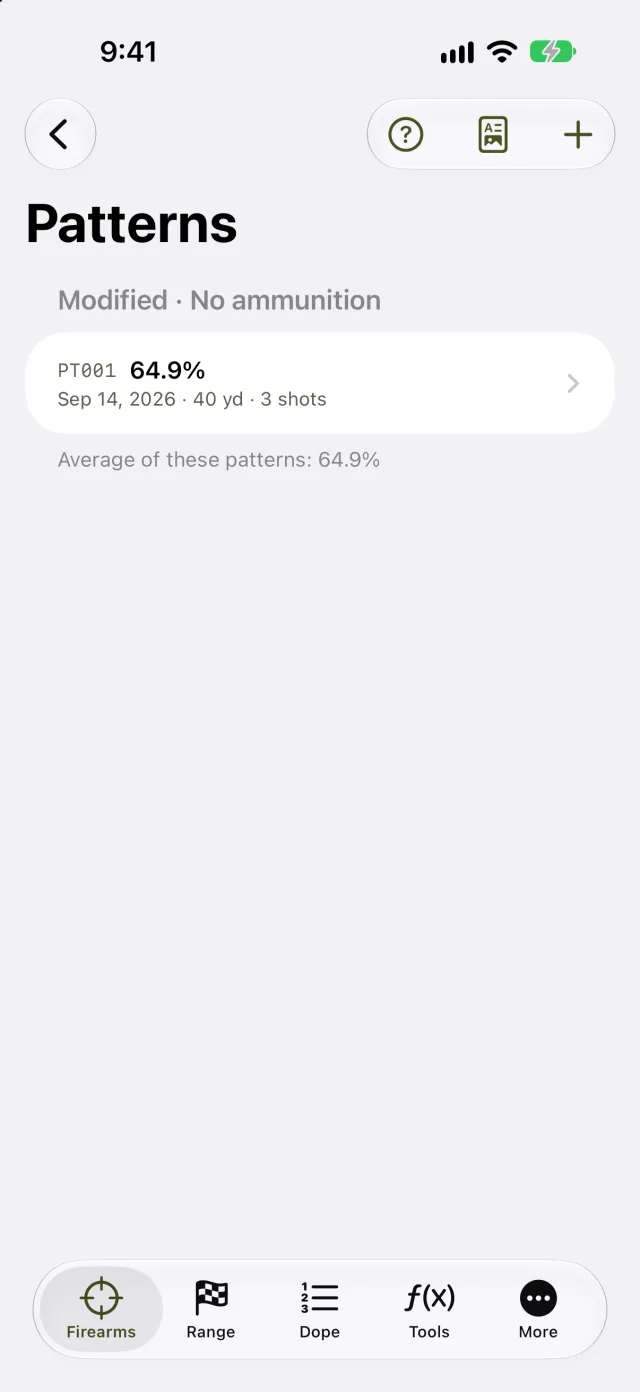
The Patterns screen is a shotgun’s pattern notebook. Every pattern test is listed under its choke and ammunition, with each test’s average pattern percentage and the average of all tests with that combination, so the choke and shell that pattern best for you stand out. Tap a test to see its Pattern record and its actions.
Steps
-
Open a shotgun’s dashboard and tap Patterns (“Pattern your shotgun” until there’s one, then the number of patterns). See Firearm dashboard.
-
Each section is one choke and ammunition, like “Modified · Example Ammo Co. Field Load”. Each row shows the pattern’s number and average, then its date, distance and number of shots. Under the section: “Average of these patterns:” and the average.
-
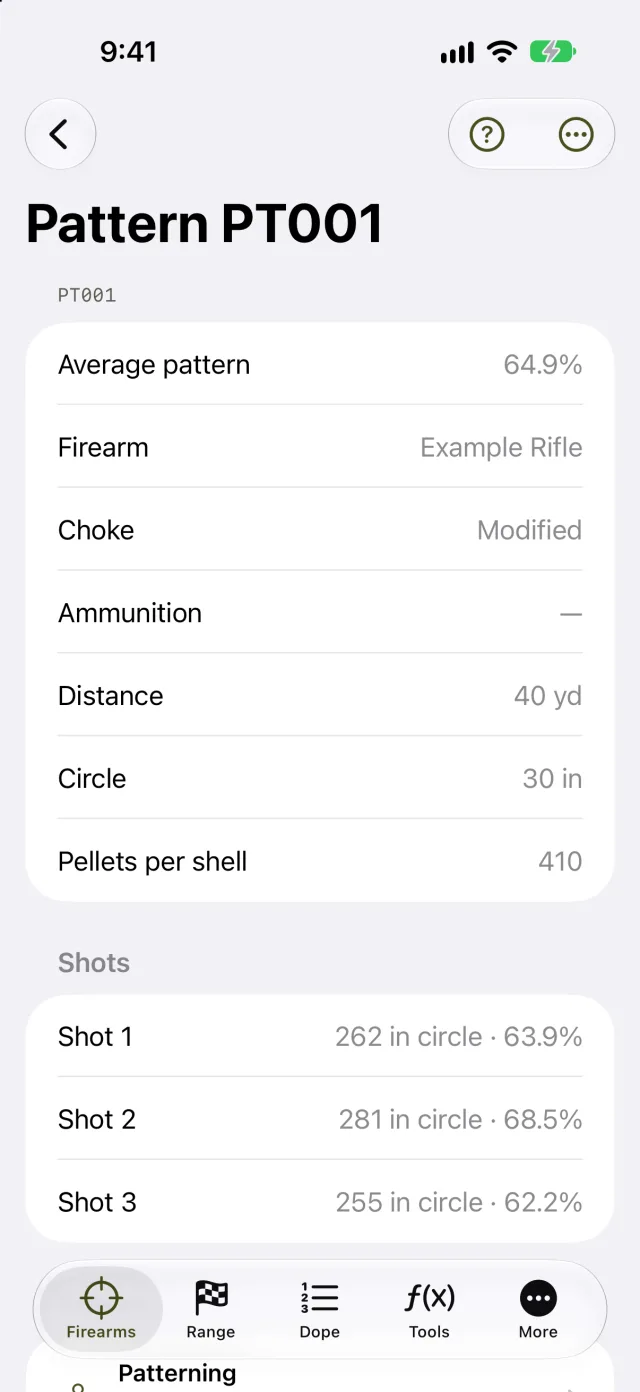
Tap a pattern to open its record: Average pattern, Firearm, Choke, Ammunition, Distance, Circle, Pellets per shell, then each shot (“287 in circle · 70%”), Photos, the Session and Notes.
-
On the record, tap ••• for Edit Pattern, Duplicate for the Next Choke and Delete Pattern.
- To add a test, tap New Pattern (+) on the Patterns screen. See Pattern a shotgun.
- For a printable summary, tap Pattern Report at the top. See Pattern report.
Why it’s useful
Patterning answers one question: which choke and shell put the most pellets where you need them? After a few sessions you might have a dozen tests across three chokes and two loads. This screen sorts them for you and averages each combination, so the answer is at the top of one screen instead of spread over sheets of paper.
Who uses it, and how:
- Hunters choosing a choke for the season: compare Modified and Improved Cylinder with your hunting load at your hunting distance, and pick the higher average.
- Clay shooters: compare chokes for close and far stations with the same target load.
- Shooters switching shells: see whether a new brand patterns better or worse than the old one through the same choke.
- Anyone testing several chokes in one afternoon: Duplicate for the Next Choke starts the next test with the same ammunition, distance, circle and pellet count, in the same session.
- Shooters keeping records over years: old tests stay with their dates, so you can see whether a gun, a tube or a load changed.
- Sharing results: the Pattern report prints the tests by choke and ammunition (the PDF is Pro; the spreadsheet is free).
What each option means
Patterns screen | Item | What it shows | |—|—| | Section heading | The choke (or “No choke recorded”) and the ammunition (or “No ammunition”) | | Row | The pattern’s number (PT001) and average, then its date, distance and number of shots | | “Average of these patterns:” | The average of the tests’ averages in that section | | New Pattern | Starts a new pattern for this shotgun | | Pattern Report | Opens the report options for this shotgun’s patterns | | “Pattern your shotgun” | Shown when there are no patterns yet |
Pattern record | Row | What it shows | |—|—| | Average pattern | The average percentage of the shots, or “—” | | Firearm, Choke, Ammunition | As recorded | | Distance, Circle, Pellets per shell | The test’s setup | | Shots | Each shot’s pellets in the circle and its percentage | | Photos, Notes | The test’s pictures and notes | | Session | The patterning session it belongs to; tap to open it |
The ••• menu | Action | What it does | |—|—| | Edit Pattern | Opens the form to change anything, add or remove shots. Changes are kept as you make them; tap Done (or swipe the form down) when finished | | Duplicate for the Next Choke | A new pattern dated now, with the same firearm, session, ammunition, lot, distance, circle and pellets per shell; the choke, shots, photos and notes start empty. Type the next choke and the counts, then Save, or Discard | | Delete Pattern | Asks “Delete pattern PT004?”, then Move to Recently Deleted: “Its session and rounds stay. You can restore it from More > Recently Deleted for 30 days.” |
Example
After two afternoons with the Field Shotgun at 40 yd, the Patterns screen shows:
- Improved Cylinder · target load: PT005 59.6%; average of these patterns 59.6%.
- Modified · target load: PT004 70.2%, PT007 68.8%; average of these patterns 69.5%.
For your 35 to 40 yd duck blind, Modified with that load puts about ten percentage points more of the shot inside the circle. You open PT004 and tap Duplicate for the Next Choke to try a Light Modified tube next time, keeping the same setup.
Tips
- Type each choke the same way every time. “Modified” and “modified” make two sections.
- Compare averages of several tests, not single tests; one pattern can be off by several percent.
- Keep distance and circle the same within a comparison. Gun Diary groups by choke and ammunition only, so a 30 yd test sits next to a 40 yd one; check the distance on each row.
- Use Notes for what the numbers don’t say: holes in the pattern, where it centered, the weather.
- Lock in your choice: a short note on the shotgun or in the Garage’s choke equipment saves you looking it up next season. See Specs, equipment and configurations.
What it affects
- Edit Pattern: changing the number of shots adds or takes back rounds on the shotgun’s count by the difference.
- Duplicate for the Next Choke: makes a new pattern in the same session when you save it; rounds are added for its shots.
- Delete Pattern: removes it from this list and the report, and moves it to Recently Deleted for 30 days. Its session and its rounds stay.
- Viewing changes nothing.
If something goes wrong
- There’s no Patterns card on the dashboard. It’s shown only for shotguns (the firearm’s kind) and when Shotgun Patterns is on in Personalize your diary. It can also be hidden from the dashboard; see Arrange the dashboard.
- A pattern shows “—” as its average. It has no shots with a count, or Pellets per shell is blank. Tap it, ••• > Edit Pattern, and fill them in.
- The same choke appears in two sections. The choke was typed two ways, or the ammunition differs. Edit the patterns so they match.
- I discarded a duplicate by mistake. Duplicate the original again; nothing else was changed.
- The round count didn’t go down when I deleted a pattern. On purpose: the shells were fired. Change Rounds fired in the session if you need to.
- Preview and Share PDF opens the Pro screen. Pattern Report opens the report options; the PDF is part of Gun Diary Pro, while Share Spreadsheet (CSV) there is free, and the pattern records themselves are free.
Related
- Pattern a shotgun, Pattern report, Pattern percent calculator.
- Firearm dashboard, A session, Recently Deleted.
- Learning path: Shotgun patterning.
- Words used here: pattern percentage, choke, session, Pro.
Guides on this topic
- Which Shotgun Choke Has the Tightest Shot Pattern? Let Your Own Patterns Answer
- What Tightens a Shotgun Shot Pattern? Choke, Shells, Distance and Your Own Tests
Still stuck? In the app, open More > Help > Contact Support, or More > Settings > Support, which also has Send Error Log (the error log helps us find the problem), or email contact@setriksoftware.com. You can also browse the Help Center or the messages the app can show.