
Drafts
Groups and sessions you started and didn't finish are kept as drafts, grouped by firearm; finish them at home when you have time.
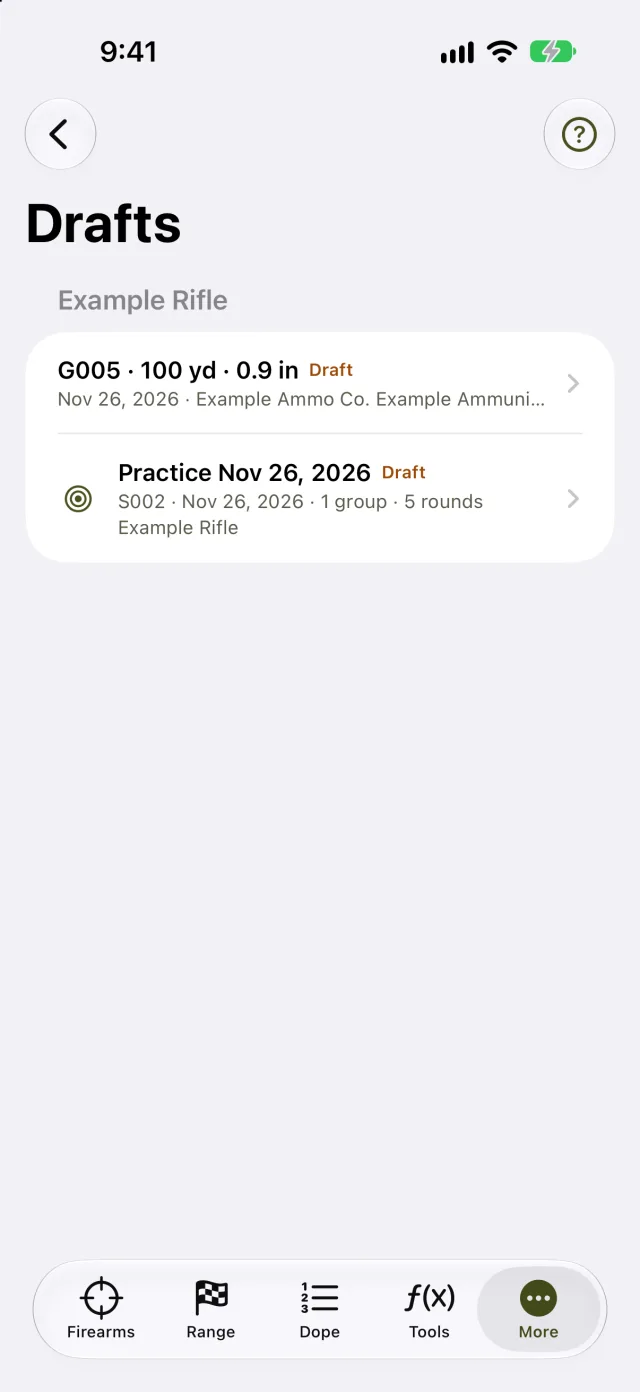
A draft is a group or session you started and didn’t finish. Gun Diary never throws away what you typed at the range: a group you cancel with Keep as Draft, a Range Mode group without a size, and a Range Mode session you haven’t ended are all kept. Drafts lists them in one place, grouped by firearm (groups first, then sessions, newest first in each), so you can finish them at home.
Steps
-
Tap More > Drafts. (When you have drafts, the Firearms tab also shows a line like “Drafts: 3 unfinished records”: tap it.)
-
Drafts are listed under the name of their firearm, groups first, then sessions. A session with no firearm yet is under “No firearm yet”.
- Tap a draft to open it.
- Finish it:
- A group: tap ••• > Edit Group, fill in what’s missing (usually the size), and tap Done. The group is finished and leaves Drafts.
- A session: tap ••• > Edit Session, check the firearms, Rounds fired and weather, and tap Done. A session started in Range Mode can also be finished with End Session; see End a session.
- To throw a draft away instead, open it and use Delete Group or Delete Session; it goes to Recently Deleted for 30 days.
How drafts are made:
-
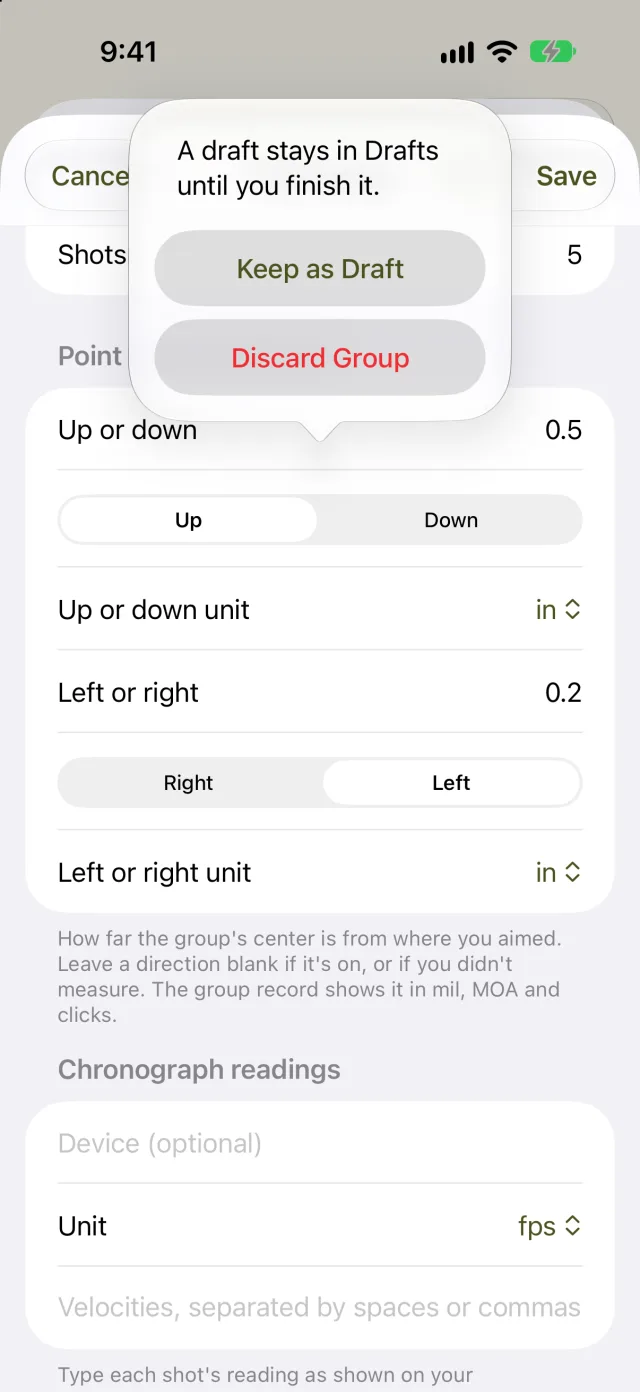
On a new group or session, Cancel shows two choices: Keep as Draft keeps it; Discard Group (or Discard Session) removes it. Tap outside the choices to go back to the form.
-
In Range Mode, a group saved without a size, and the session itself until you end it.
Why it’s useful
At the range you have cold hands, a rifle on the bench and a few seconds between strings. Typing a complete record isn’t realistic, and a half-typed record shouldn’t be lost. Drafts let you capture the part you know now and finish the rest later, with nothing forgotten.
Who uses it, and how:
- Range Mode users: capture groups with the distance and shots only; measure them from the photos at home, then finish each draft.
- Hunters: start a session in the truck, finish it at camp.
- Anyone interrupted: a phone call, a cease-fire, the light going. Keep as Draft and come back.
- Careful record keepers: drafts stay out of Group History, Ammo Comparison and season reports until they’re finished, so half-measured groups never skew your averages.
What’s on the Drafts screen
Only groups and sessions can be drafts. Other records (a cleaning, a dope row, a zero record) are saved when you tap Save, or not at all.
Example
In Range Mode you shot four groups at 100 yd and saved each with Add Group, typing the distance and shots but no size. You ended the session at the bench. At home, More > Drafts shows four groups under “Mountain Rifle”. You open the first, tap ••• > Edit Group, type the size you measured on the paper (0.85 in), and tap Done. It leaves Drafts and appears in Group History. The other three follow.
Tips
- Finish drafts within a day or two, while the targets are still on the kitchen table.
- Photograph targets before you leave the range. A draft with a photo can be measured at home (Measure a group from a photo, Pro).
- Unfinished sessions are also on the Range tab, under Unfinished sessions; tapping one there reopens it in Range Mode.
What it affects
- Group History, Ammo Comparison and reports leave out draft groups; the hunt log and competition reports leave out draft sessions.
- Round counts: a draft session’s Rounds fired is recorded like any other; check it when you finish.
- Backups and exports include drafts, marked as drafts in the spreadsheets.
- Drafts sync to your other devices like any record.
If something goes wrong
- My group isn’t in Group History. It’s still a draft. Finish it from Drafts.
- I tapped Discard Group by mistake. A discarded new record is removed for good (it never was finished). Enter it again.
- I swiped the edit form down and the group is still a draft. Swiping down keeps your changes but doesn’t finish the record. Open it again and tap Done.
- A session stays under Unfinished sessions on the Range tab. It was started in Range Mode and never ended. Open it and use End Session, or edit it and tap Done.
Related
- Next: Recently Deleted.
- Record a group, Log a session, Range Mode, End a session, Quick Entry.
- Words used here: draft, group, session, range mode.
Still stuck? In the app, open More > Help > Contact Support, or More > Settings > Support, which also has Send Error Log (the error log helps us find the problem), or email contact@setriksoftware.com. You can also browse the Help Center or the messages the app can show.