
Work with your exported spreadsheets
Open the CSV files from Export All Data in Numbers, Excel or Google Sheets, understand every file and every column, link the files together, and chart your own records.
The Spreadsheets folder in your export has one CSV file per kind of record: 44 files in all. This guide shows how to open them, what every file and column means, and how the files point to each other, with a worked example that charts group size for each ammunition in one rifle. To make an export first, see Export all your data.
Words used here
- CSV: a plain-text spreadsheet. Each line is a row; commas separate the columns. Every spreadsheet app opens it. See CSV.
- ID: a long hidden code (like
6F1C2A0E-7B3D-4C55-9A1E-2F8B3C4D5E6F) that never changes. It’s how the files point to each other. See ID. - Code: the short code you see in the app (F001, S014, G052, DT003). See code.
- Lookup: a spreadsheet formula (
XLOOKUPorVLOOKUP) that finds a value in another sheet by matching a column, like a group’s firearm ID to the firearm’s name.
Before you start
- An export ZIP, unzipped. See Export all your data, steps 1 to 5.
- A spreadsheet app: Numbers (free on iPhone, iPad and Mac), Microsoft Excel (Mac, Windows, iPhone), or Google Sheets (free in any web browser).
- The files are UTF-8 text with commas between columns and a header row. Nothing else to set up.
Steps
Open a file
On a Mac with Numbers
- Double-click the ZIP to unzip it, then open the Spreadsheets folder.
- Right-click Groups.csv > Open With > Numbers.
On a Mac or PC with Excel
- Unzip the export (on Windows: right-click > Extract All).
- In Excel choose File > Open and pick the CSV. If Excel asks about the format, choose “Delimited”, comma, and UTF-8 (so names with accents or the ° sign read correctly).
- To keep formulas or charts you add, save as an Excel workbook (.xlsx); a CSV can’t keep them.
In Google Sheets
- Go to sheets.google.com > Blank > File > Import > Upload, and pick the CSV.
- Choose “Replace spreadsheet”, or “Insert new sheet” to put several files in one workbook (handy for lookups).
On iPhone or iPad
-
In the Files app, go to where you saved the export (here On My iPhone) and tap the export ZIP. Files unzips it into a folder with the same name, next to the ZIP.
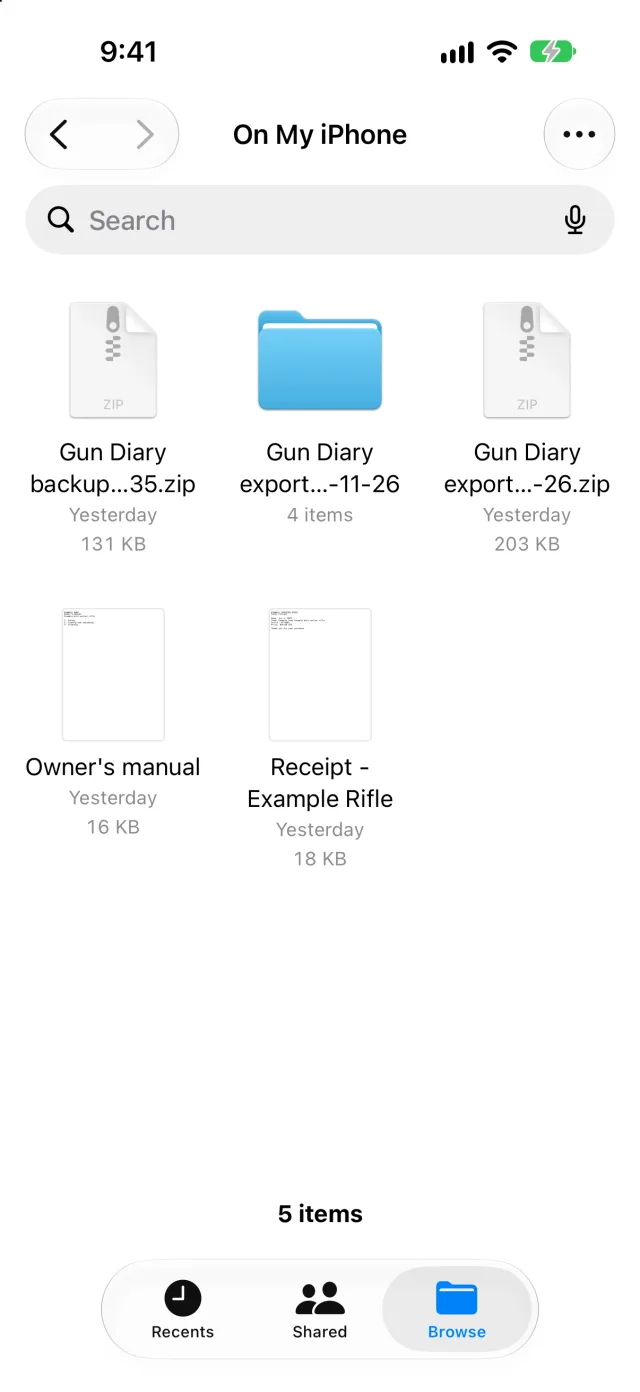
-
Open the export folder. It holds the Spreadsheets folder, the Photos folder, a READ ME file and a full backup ZIP (and a Documents folder when you’ve attached documents).
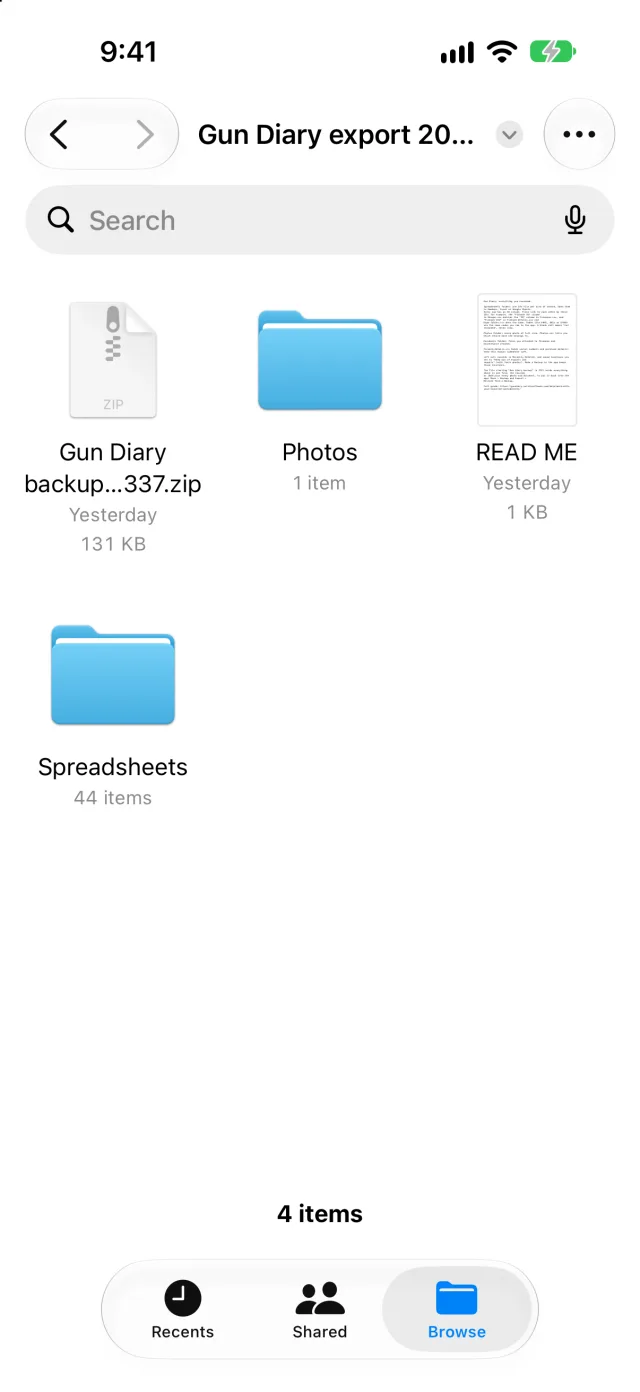
-
Open Spreadsheets: one CSV file per kind of record, named after it (Barrels, Change history, Dope rows…).
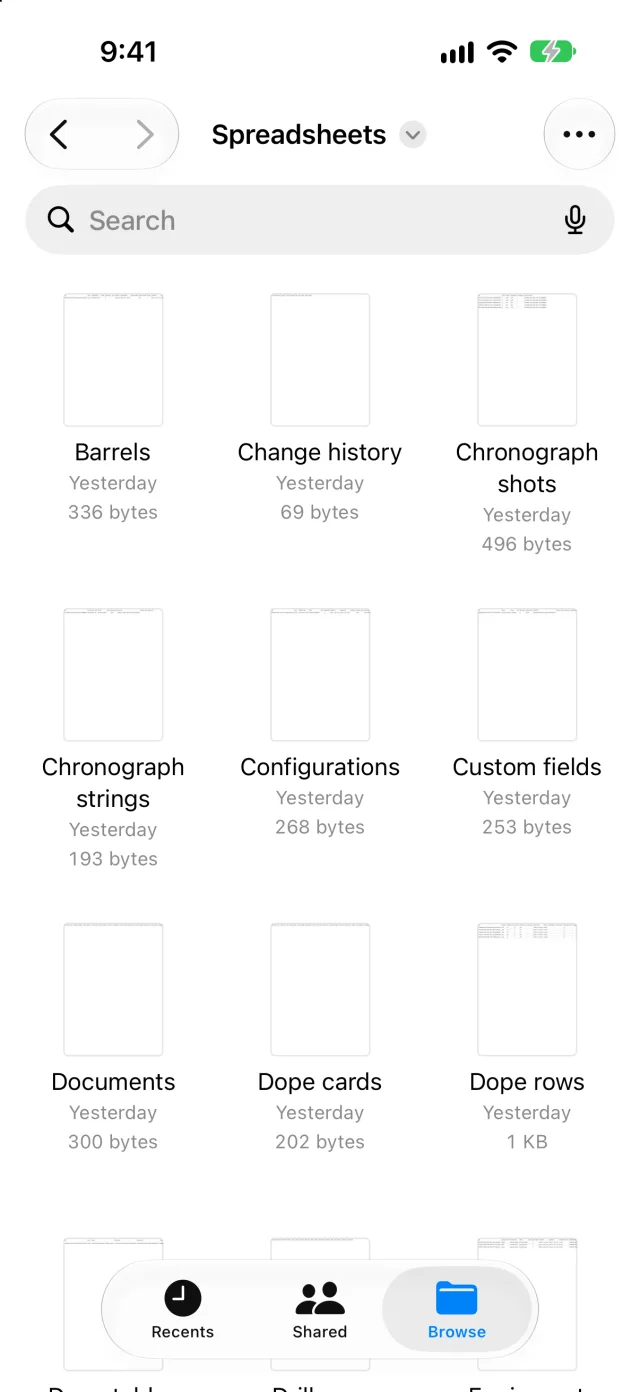
-
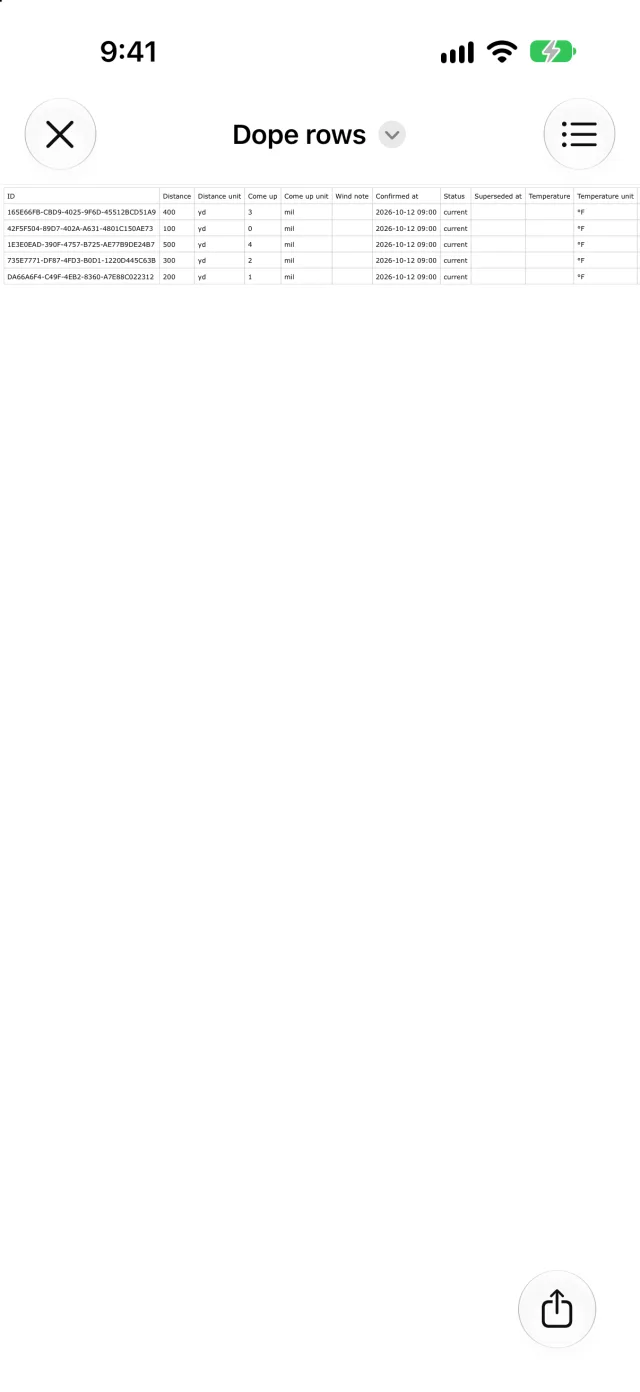
Tap a file to preview it as a table. To work with it, tap the share button at the bottom right and open it in Numbers (or Excel).
Find what you need
- Pick the file for the kind of record you want (every file is listed at the end of this guide): Groups.csv for groups, Sessions.csv for sessions, Firearm details.csv for serial numbers and values, Dope rows.csv for your come-ups, Harvests.csv for harvests.
- Freeze the top row so the column names stay visible (Numbers: Table > Freeze Header Rows; Excel: View > Freeze Top Row; Google Sheets: View > Freeze > 1 row).
- Filter out rows you don’t want, for example
Example= yes (the Example Rifle‘s records) orDraft= yes. - To bring in a value from another file, match its ID column (see “How the files link together”).
How to check it worked
- The first row holds column names (ID, Code, Name…), and every other row is one record.
- Firearms.csv has one row per firearm, with the same codes (F001…) you see in the app.
- Codes in Groups.csv (G001…) match the groups in the app, and their sizes match.
- Values sit in separate columns. If every value is in column A, see “If something goes wrong”.
How the files link together
Every file starts with an ID column, and most have a Code column. When a row belongs to another record, it carries that record’s code and ID:
- In Groups.csv, Firearm ID matches ID in Firearms.csv, Session ID matches ID in Sessions.csv, Factory product ID matches ID in Products.csv (the ammunition) and Lot ID matches ID in Lots.csv.
- Gun Diary’s own files name their links “UID”: Firearm UID in Firearm details.csv, Dope tables.csv, Zero records.csv, Harvests.csv, Patterns.csv, Hunt shots.csv and Drill runs.csv matches ID in Firearms.csv; Product UID matches ID in Products.csv; Session UID matches ID in Sessions.csv.
- Dope rows.csv and Proven holds.csv link to Dope tables.csv by Table ID. Zero shots.csv links to Zero records.csv by Record ID; Pattern shots.csv to Patterns.csv the same way.
- Chronograph shots.csv links to Chronograph strings.csv (Chrono string ID), which links to a group.
- Measurements.csv holds the readings on groups (like extreme spread and mean radius); its Group ID says which group.
- Photos.csv says which record owns each photo, and its File column is the photo’s path in the Photos folder.
- Session firearms.csv holds each firearm’s part of a session: Rounds fired and the ammunition.
Codes are easier to read; IDs are safer for matching. A code stays with its record; rarely, a restore gives a record a new code if its code was already used on this device. An ID never changes.
Some cells hold a list separated by a semicolon: Tags (“cold bore; hunting”), and in Gun Diary’s own files lists of IDs such as Proof group uids, Photo uids, Table uids and Firearm uids.
Blank means “not recorded”
A blank cell means you didn’t record that value. It is never zero. Values keep the unit you entered, in the column next to them (for example Size and Size unit, Distance and Distance unit). Dates look like 2026-10-12 09:00 (year, month, day, then the 24-hour time). Yes/no columns read yes or no. Deleted at columns are always blank, because Recently Deleted isn’t exported.
Directions: in Aim offset up and Aim offset right (Groups.csv), Offset up and Offset right (Zero records.csv) and Up and Right (Zero shots.csv), up and right are positive numbers, down and left negative: -1.5 in an up column means 1.5 below.
Choices read as they do on screen in most files: Activity in Sessions.csv (Practice, Sight-in, Zero check, Hunting, Competition, Patterning, Recreational, Other); Measure in Groups.csv (Center to center, Edge to edge, Other); Kind in Maintenance.csv (Cleaning, Repair, Professional service, Modification, Other); Follow up in Safety observations.csv (Open, Awaiting review, Resolved); Kind in Round counts.csv (Starting count, Rounds fired, Cleaning, Barrel change, Adjustment); Kind and Status in Firearm details.csv (Rifle, Handgun, Shotgun, Rimfire, Muzzleloader, Other; Active, Sold, Traded, Gifted, Lost, Stolen, Recovered).
A few of Gun Diary’s own files store the short form instead: Result in Zero records.csv (stillZeroed, adjusted, outOfTolerance), Status in Dope rows.csv (current, or earlier for a replaced value), Kind in Proven holds.csv (wind, lead), Position and Result in Hunt shots.csv (like sitting, hit), Scoring in Drill runs.csv (time, uspsa, idpa, custom). The report spreadsheets on the Reports screen spell these out.
Columns that are always blank: a few files carry Load, Batch and similar columns that are part of the shared file format. Gun Diary doesn’t fill them; ignore them.
What isn’t in the spreadsheets: records in Recently Deleted, and saved locations set to Keep out of exports and reports (with their photos). Locations.csv holds only the places you allowed in, so its Private column reads no.
Why it’s useful
The app shows your records the way it was designed to; a spreadsheet lets you ask your own questions. Every value is there exactly as you entered it, with its unit, so nothing is lost.
Who uses it, and how:
- Rifle shooters testing ammunition chart group size or velocity SD per ammunition and lot.
- Long-range shooters plot come-up against distance from Dope rows.csv, or zero shifts from Zero records.csv.
- Collectors and anyone with insurance keep Firearm details.csv as a master list of serials, purchases and values.
- Owners tracking wear total rounds per month from Round counts.csv.
- Hunters sum harvests per season and average shot distance from Harvests.csv and Hunt shots.csv.
- Competitors chart drill times and hit factors from Drill runs.csv.
- Shotgunners compare pellet counts per shell from Pattern shots.csv.
- Anyone who prefers their own records in their own format, forever.
What each spreadsheet is for (quick guide)
| You want | Open |
|---|---|
| Your firearms | Firearms.csv, plus Firearm details.csv for serial, purchase, value and status |
| Setups and parts | Configurations.csv, Equipment.csv, Optic settings.csv, Barrels.csv |
| Care and wear | Maintenance.csv, Round counts.csv, Safety observations.csv |
| Ammunition | Products.csv (the Ammo Library), Lots.csv, Lot status.csv, Inventory.csv (boxes on hand) |
| Shooting | Sessions.csv, Session firearms.csv, Groups.csv, Measurements.csv, Chronograph strings.csv, Chronograph shots.csv, Weather.csv, Shot holes.csv |
| Dope | Dope tables.csv, Dope rows.csv, Proven holds.csv, Dope cards.csv |
| Zero, hunting, patterns, drills | Zero records.csv, Zero shots.csv, Hunt shots.csv, Harvests.csv, Patterns.csv, Pattern shots.csv, Drill runs.csv |
| Photos, targets, documents | Photos.csv, Targets.csv, Target regions.csv, Documents.csv |
| Everything else | Favorites.csv, Favorite revisions.csv, Custom fields.csv, Locations.csv, Tags.csv, Saved views.csv, Change history.csv, Imports.csv |
Worked example: chart group size by ammunition for one rifle
- Open Groups.csv. Filter Firearm code to F002 (your Mountain Rifle) and Draft to
no. - Open Products.csv in the same workbook. Add a column to Groups named “Ammunition” with
=XLOOKUP(the group’s Factory product ID,Products’ ID column,Products’ Name column). - Keep only rows where Size unit is the same (for example
in) and Distance is 100. - Make a pivot table: rows = Ammunition, values = average of Size. Chart it as bars.
Example
You want a list of your guns with serial numbers and insured values for your files.
- Open Firearms.csv and Firearm details.csv in Google Sheets, one per sheet.
- In Firearms, add a column “Serial” with
=XLOOKUP(A2, 'Firearm details'!B:B, 'Firearm details'!D:D, "")(column A is ID; in Firearm details, B is Firearm UID and D is Serial number). - Add “Insured value” the same way from Insured value.
- Filter Example = no. You now have Code, Name, Manufacturer, Model, Cartridge, Serial and Insured value for every firearm.
Tips
- Use IDs to match, codes to read.
- Keep the original CSVs. Save your work as .xlsx or .numbers, so the export stays as it was.
- Watch the units. Sizes can be inches, MOA or mils, distances yards or meters; filter or convert before averaging.
- Excel may change long numbers or dates. Import as text if a column looks wrong.
- Need just one report? The Reports spreadsheets are already joined and readable (names instead of IDs).
What it affects
Nothing in your diary. The spreadsheets are copies; editing them doesn’t change the app. To bring firearms in from a spreadsheet, see Import a gun list (Pro). To put the whole diary back, restore the backup file in the export.
If something goes wrong
- Everything is in column A. The app didn’t split on commas. In Excel use Data > From Text/CSV and pick “Comma”; in Google Sheets, File > Import and “Detect automatically”.
- Accents or the ° sign show as odd characters. Open the file as UTF-8 (Excel: Data > From Text/CSV > File origin “65001: Unicode (UTF-8)”).
- A date or code changed when opened. Excel guessed a format. Import the column as text.
- A lookup finds nothing. Match ID to ID, not code to ID, and check you’re looking in the right file (a firearm’s ID is the ID in Firearms.csv, called Firearm ID or Firearm UID elsewhere).
- A file has only the header row. You have no records of that kind (for example Patterns.csv without a shotgun).
- A record is missing. It’s in Recently Deleted, or a private saved location. See Export all your data.
- Notes break across rows. A note with line breaks is kept in one cell inside quotes; open the file with an app that reads CSV properly (all three above do).
Every spreadsheet and column
All 44 files, in the order they’re written. Each file starts with ID; columns ending in code and ID (or UID) point to other records.
Firearms.csv
One row is one firearm. Columns: ID, Code, Name, Manufacturer, Model, Cartridge, Notes, Starting lifetime rounds, Dashboard layout, Sort index, Archived, Example, Created at, Updated at, Deleted at.
Starting lifetime rounds is the count you entered for rounds fired before the diary. Dashboard layout and Sort index are how the app arranges things; ignore them. Example = yes marks the Example Rifle.
Configurations.csv
One row is one dated configuration (setup) of a firearm. Columns: ID, Code, Effective date, Label, Note, Backdated, Created at, Updated at, Deleted at, Firearm code, Firearm ID.
Equipment.csv
One row is one piece of equipment in a configuration. Columns: ID, Category name, Manufacturer, Model, Details, Sort index, Created at, Updated at, Configuration code, Configuration ID.
Barrels.csv
One row is one barrel. Columns: ID, Code, Manufacturer, Length, Length unit, Twist, Material, Installed date, Removed date, Starting rounds, Notes, Created at, Updated at, Deleted at, Firearm code, Firearm ID.
Maintenance.csv
One row is one cleaning, repair, service or modification. Columns: ID, Code, Date, Kind, Title, Details, Round count at time, Notes, Created at, Updated at, Deleted at, Firearm code, Firearm ID, Equipment item ID, Creates configuration code, Creates configuration ID.
Round count at time is the firearm’s count when the work was done. Creates configuration points to the setup an equipment change started.
Safety observations.csv
One row is one safety observation. Columns: ID, Code, Date, Summary, Follow up, Notes, Created at, Updated at, Deleted at, Firearm code, Firearm ID, Session code, Session ID, Load code, Load ID, Batch code, Batch ID, Lot code, Lot ID, Group code, Group ID.
The Load and Batch columns are always blank in Gun Diary.
Round counts.csv
One row is one change to a round counter. Columns: ID, Date, Kind, Count, Reason, Created at, Deleted at, Firearm code, Firearm ID, Barrel code, Barrel ID, Session link ID.
Count is negative for an adjustment that takes rounds away. Session link ID matches ID in Session firearms.csv.
Products.csv
One row is one ammunition in your Ammo Library. Columns: ID, Code, Category, Manufacturer, Name, Model, Cartridge, Weight, Weight unit, Diameter, Diameter unit, Type text, Product number, Notes, Archived, Example, Last used at, Created at, Updated at, Deleted at, Merged into code, Merged into ID.
Category reads Factory Ammunition for ammunition. Merged into is set when you merged a duplicate into another ammunition.
Lots.csv
One row is one manufacturing lot of a product. Columns: ID, Code, Lot number, Acquired date, Notes, Created at, Deleted at, Product code, Product ID.
Measurements.csv
One row is one reading on a group (like extreme spread or mean radius from shot holes). Columns: ID, Name, Value, Unit, Original text, Precision, Source, Verified, Sort index, Load code, Load ID, Batch code, Batch ID, Group code, Group ID, Session code, Session ID.
The Load and Batch columns are always blank in Gun Diary.
Sessions.csv
One row is one shooting session. Columns: ID, Code, Name, Date, End date, Activity, Custom activity, Notes, Score, Placement, Range mode, Draft, Archived, Example, Created at, Updated at, Deleted at, Location ID, Tags, Tags IDs.
Location ID matches ID in Locations.csv (blank for a private place). Range mode = yes for a session logged in Range Mode.
Session firearms.csv
One row is one firearm’s part of a session (rounds fired). Columns: ID, Rounds fired, Notes, Session code, Session ID, Firearm code, Firearm ID, Configuration code, Configuration ID, Load code, Load ID, Factory product code, Factory product ID, Lot code, Lot ID, Favorite revision ID.
Factory product is the ammunition fired. The Load columns are always blank in Gun Diary.
Groups.csv
One row is one group. Columns: ID, Code, Date, Distance, Distance unit, Size, Size unit, Measure, Aim offset up, Aim offset up unit, Aim offset right, Aim offset right unit, Shot count, Notes, Draft, Locked, Created at, Updated at, Deleted at, Firearm code, Firearm ID, Configuration code, Configuration ID, Session code, Session ID, Session firearm ID, Load code, Load ID, Factory product code, Factory product ID, Lot code, Lot ID, Batch code, Batch ID, Target code, Target ID, Region ID, Tags, Tags IDs.
Locked = yes for a group you locked with Lock Record. Region ID matches ID in Target regions.csv. The Load and Batch columns are always blank in Gun Diary.
Chronograph strings.csv
One row is one chronograph string. Columns: ID, Device name, Unit, Source, Notes, Group code, Group ID, Session code, Session ID.
Chronograph shots.csv
One row is one chronograph shot. Columns: ID, Index, Velocity, Original text, Timestamp, Chrono string ID.
Velocity is in the string’s Unit (Chronograph strings.csv).
Weather.csv
One row is one weather record. Columns: ID, Observed at, Temperature, Temperature unit, Humidity, Pressure, Pressure unit, Elevation, Elevation unit, Wind speed, Wind speed unit, Wind direction, Source, Station name, Notes, Session code, Session ID, Group code, Group ID.
Favorites.csv
One row is one favorite ammunition for a firearm. Columns: ID, Name, Purpose, Notes, Sort index, Pinned, Status, Date established, Created at, Deleted at, Firearm code, Firearm ID.
Favorite revisions.csv
One row is one dated revision of a favorite (which ammunition it pointed to from that date). Columns: ID, Number, Effective date, Note, Favorite ID, Load code, Load ID, Factory product code, Factory product ID.
Custom fields.csv
One row is one extra field you added. Columns: ID, Name, Value, Unit, Sort index, Product code, Product ID, Firearm code, Firearm ID, Equipment item ID, Load code, Load ID, Group code, Group ID.
Documents.csv
One row is one attached document (receipt, manual, warranty and so on); the file is in the Documents folder, named by its code. Columns: ID, Code, Title, Category, Edition, Page reference, Source URL, File type, Notes, Created at, Deleted at, Firearms codes, Firearms IDs, Products codes, Products IDs, Loads codes, Loads IDs, Sessions codes, Sessions IDs, Equipment IDs, Maintenance codes, Maintenance IDs, Observations codes, Observations IDs, Tags, Tags IDs.
Photos.csv
One row is one photo (the image is in the Photos folder). Columns: ID, Captured at, Source, Metadata, Edit recipe, Caption, Sort index, Created at, Target code, Target ID, Group code, Group ID, Firearm code, Firearm ID, Product code, Product ID, Lot code, Lot ID, Maintenance code, Maintenance ID, Observation code, Observation ID, Session code, Session ID, Location ID, Equipment item ID, Barrel code, Barrel ID, Load code, Load ID, File.
File is the photo’s path in the export, like Photos/6F1C....jpg; blank if the photo has no image. Edit recipe holds crops and marks; the original is kept as taken.
Inventory.csv
One row is one change to your boxes on hand. Columns: ID, Date, Quantity change, Unit, Location text, Note, Product code, Product ID, Lot code, Lot ID.
Targets.csv
One row is one paper target. Columns: ID, Code, Date, Notes, Sheet kind, Code frozen, Created at, Deleted at, Session code, Session ID.
Target regions.csv
One row is one marked group area on a target photo. Columns: ID, X, Y, Width, Height, Label, Photo ID, Target code, Target ID.
Locations.csv
One row is one saved place. Columns: ID, Name, Address, Latitude, Longitude, Elevation, Notes, Private, Created at.
Only places not set to Keep out of exports and reports.
Tags.csv
One row is one tag. Columns: ID, Name, Color name.
Saved views.csv
One row is one saved Group History view (Pro). Columns: ID, Name, Scope, Filters, Columns, Sort, Limit, Pinned, Sort index, Created at, Firearm code, Firearm ID.
Filters and Columns are stored in the app’s own format.
Change history.csv
One row is one recorded edit (old and new value). Columns: ID, Record type, Record ID, Field, Old value, New value, Date, Device name.
Each edit to a locked or tracked record: the field, old value and new value.
Firearm details.csv
One row is the details and status of one firearm (serial, purchase, status). Columns: ID, Firearm UID, Kind, Serial number, Finish, Purchase date, Purchase price, Currency code, Seller, Insured value, Distinguishing marks, Status, Status date, Disposed to, Last seen date, Police report number, Insurance claim number, Status note, Example, Created at, Updated at.
Private: serial numbers, prices and report numbers. Firearm UID matches ID in Firearms.csv. Currency code is like USD or EUR.
Optic settings.csv
One row is the settings of one scope or optic. Columns: ID, Equipment item UID, Click amount, Click unit, Reticle unit, Focal plane, True magnification, Max magnification, Elevation left, Elevation left unit, Windage left, Windage left unit, Notes, Created at, Updated at.
Lot status.csv
One row is whether one lot is archived. Columns: ID, Lot UID, Archived, Archived at, Created at.
Dope tables.csv
One row is one dope table. Columns: ID, Code, Name, Firearm UID, Product UID, Lot UID, Configuration UID, Optic item UID, Barrel UID, Zero distance, Zero distance unit, Angle unit, Notes, Archived, Example, Sort index, Created at, Updated at, Deleted at.
Angle unit is the table’s unit (mil or MOA). The UID columns match ID in Firearms.csv, Products.csv, Lots.csv, Configurations.csv, Equipment.csv and Barrels.csv.
Dope rows.csv
One row is one proven distance in a dope table. Columns: ID, Distance, Distance unit, Come up, Come up unit, Wind note, Confirmed at, Status, Superseded at, Temperature, Temperature unit, Pressure, Pressure unit, Altitude, Altitude unit, Source, Proof group uids, Proof session uids, Notes, Created at, Updated at, Table code, Table ID.
Status: current or earlier (replaced; Superseded at says when). Proof group uids and Proof session uids list the IDs of the groups and sessions that proved the row.
Proven holds.csv
One row is one proven wind or lead hold. Columns: ID, Kind, Distance, Distance unit, Speed, Speed unit, Clock, Degrees, Hold, Hold unit, Side, Proven, Confirmed at, Notes, Created at, Table code, Table ID.
Kind: wind or lead. Clock and Degrees give the wind direction; Side which way to hold.
Dope cards.csv
One row is one saved dope card layout. Columns: ID, Code, Title, Table uids, Size, Custom width, Custom height, Style, Paper, Units, Show clicks, Show wind, Include estimated, Distances, Show footer, Copies, Last printed at, Example, Created at, Updated at, Deleted at.
Zero records.csv
One row is one Zero Check. Columns: ID, Code, Date, Firearm UID, Session UID, Configuration UID, Product UID, Lot UID, Optic item UID, Zero distance, Zero distance unit, Tolerance, Tolerance unit, Result, Offset up, Offset right, Offset unit, Clicks up, Clicks right, Notes, Example, Created at, Updated at, Deleted at.
Result: stillZeroed, adjusted or outOfTolerance. Offset up and Offset right is where the group centered; Clicks up and Clicks right what you dialed (negative = down or left).
Zero shots.csv
One row is one shot in a Zero Check. Columns: ID, Index, Up, Right, Unit, Cold bore, Source, Photo UID, X, Y, Record code, Record ID.
Cold bore = yes for the first shot from a cold barrel.
Shot holes.csv
One row is one tapped shot hole on a target photo. Columns: ID, Group UID, Photo UID, Index, X, Y, Flyer, Created at.
Hunt shots.csv
One row is one shot taken while hunting. Columns: ID, Time, Session UID, Firearm UID, Dope row UID, Product UID, Lot UID, Distance, Distance unit, Hold text, Position, Result, Follow up shots, Notes, Created at, Deleted at, Harvest code, Harvest ID.
Position and Result use the short form (like sitting, hit). Dope row UID is the dope row you used, if any.
Harvests.csv
One row is one harvest. Columns: ID, Code, Session UID, Firearm UID, Species, Date, General area, Tag number, Weight, Weight unit, Weight kind, Trophy note, Photo uids, Notes, Example, Created at, Updated at, Deleted at.
General area is the text you typed. Weight kind: live, fieldDressed or boned.
Patterns.csv
One row is one shotgun pattern record. Columns: ID, Code, Date, Firearm UID, Session UID, Product UID, Lot UID, Choke text, Distance, Distance unit, Circle diameter, Circle diameter unit, Pellets per shell, Photo uids, Notes, Created at, Updated at, Deleted at.
The per-shell counts are in Pattern shots.csv.
Pattern shots.csv
One row is one shot in a pattern record. Columns: ID, Index, Pellets in circle, Offset up, Offset right, Offset unit, Record code, Record ID.
Drill runs.csv
One row is one drill run. Columns: ID, Session UID, Firearm UID, Name, Date, Scoring, Par time, Draw time, Splits, Points, Points down, Penalties, Hits, Shots, Notes, Created at, Deleted at.
Scoring: time, uspsa, idpa or custom. Splits lists the split times separated by semicolons.
Imports.csv
One row is one gun list import. Columns: ID, Date, File name, Added, Skipped, Firearm uids.
One row per gun list you imported, with the IDs of the firearms it added.
Related
- Next: Export all your data: make the export.
- Reports: ready-made spreadsheets, one report at a time.
- Back up and restore: the backup inside the export.
- Group History: filter and export groups in the app.
- Import a gun list: bring firearms in from a spreadsheet.
- Learning path: Keeping your records safe.
- Words used here: CSV, ID, code, mean radius, extreme spread.
Guides on this topic
- Shooting Log Book Excel Files: Your Range Records in a Spreadsheet
- Gun Inventory Spreadsheet: What to Put in It and How to Move It
Still stuck? In the app, open More > Help > Contact Support, or More > Settings > Support, which also has Send Error Log (the error log helps us find the problem), or email contact@setriksoftware.com. You can also browse the Help Center or the messages the app can show.