
The columns a gun inventory spreadsheet needs
A gun inventory spreadsheet works best with one gun per row and one kind of detail per column, with the column names in the first row. That sounds obvious, but many lists drift into notes like "2 shotguns, bought together" in a single cell, which no sort or filter can read. Gun Diary's own firearm inventory template uses thirteen columns, and they make a good checklist whether you ever import the file or not. Here they are, grouped the way most people think about them.
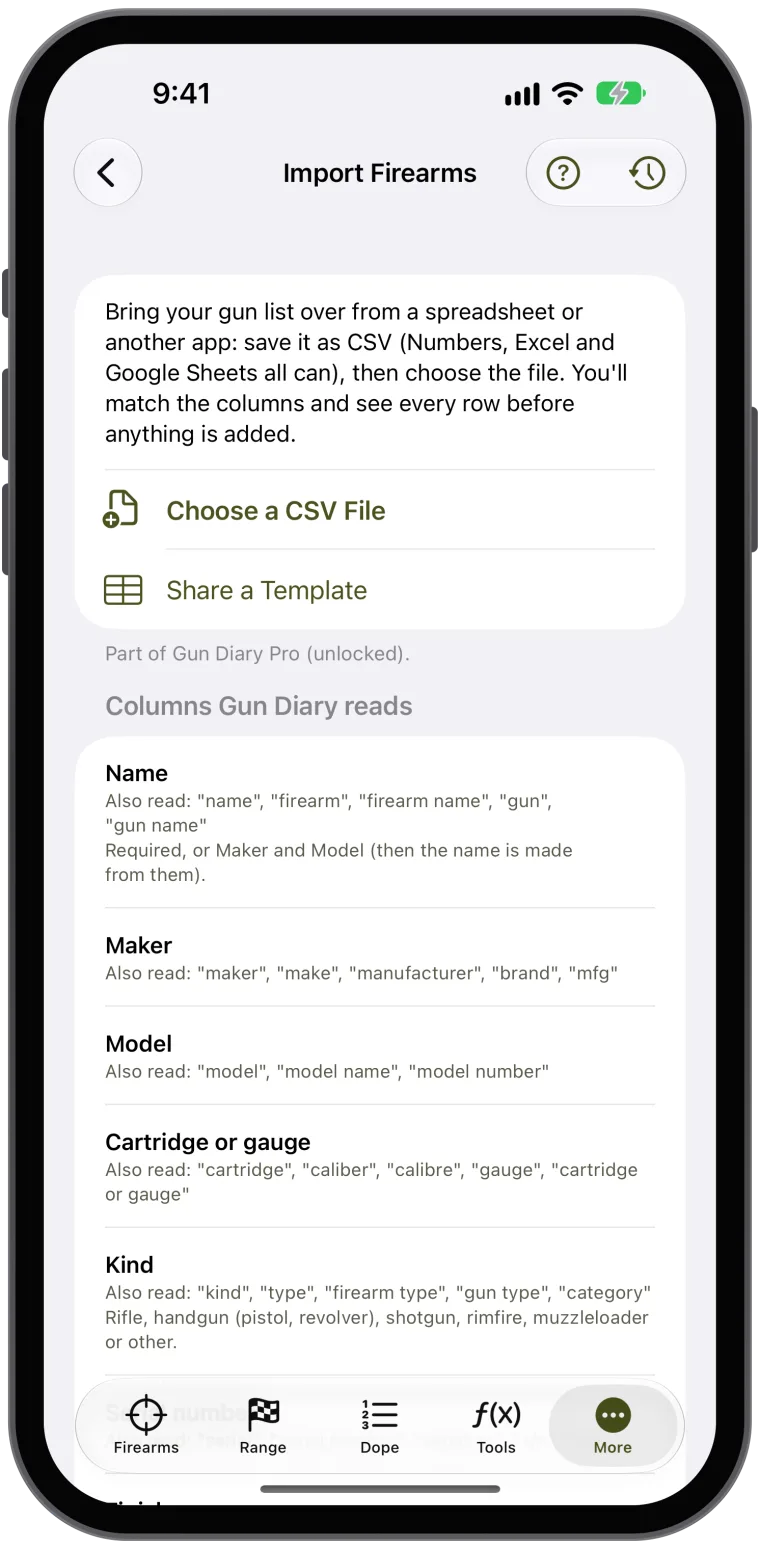
Thirteen columns worth having
Name
What you call the gun, like Deer Rifle or Grandpa's .22.
Maker and Model
As stamped on the firearm, in two columns.
Cartridge or gauge, and Kind
What it's chambered for, and rifle, handgun, shotgun, rimfire, muzzleloader or other.
Serial number
Copied from the gun itself.
Finish
Blued, stainless, a walnut stock: whatever tells it apart.
Purchase date, Purchase price and Seller
Where it came from and what you paid.
Insured value
What it's insured for or worth today.
Starting rounds and Notes
Rounds fired before the list began, and anything else worth keeping.
If your current file has extra columns, like barrel length or the scope, that's fine: keep them in the spreadsheet, since they don't hurt anything there. If it's missing some, add the empty columns now and fill them in a few guns at a time. The serial number and insured value columns are the two an insurer will ask about first, so start there. Our guide to the gun inventory sheet for insurance explains why photos and receipts belong with the list too. Our guide on whether a gun collection is covered explains the records that prove what you own.
Tidy your gun inventory spreadsheet before you move it
Most problems in a firearm inventory spreadsheet come from small habits that only show up later. Dates are the big one: 4/10/2019 can mean April 10 or October 4 depending on who typed it, while 2019-10-04 can only be read one way. Prices are next: write plain numbers like 1249.99, with or without a dollar sign, and avoid the European style with a comma after the dot. Then look for two rows that are really the same gun, and for two identical guns with no serial numbers, which look like duplicates to any program.
Last, read every serial number against the gun itself. It's the one value that has to be exactly right, and it's also the easiest to get wrong when a list has been retyped over the years: an O for a zero, a missing character, two digits swapped. Ten minutes at the safe with the spreadsheet open is enough for most collections. While you're there, note any engraving, scratches or repairs, which are worth a column or a note of their own.
Round counts that add themselves up.
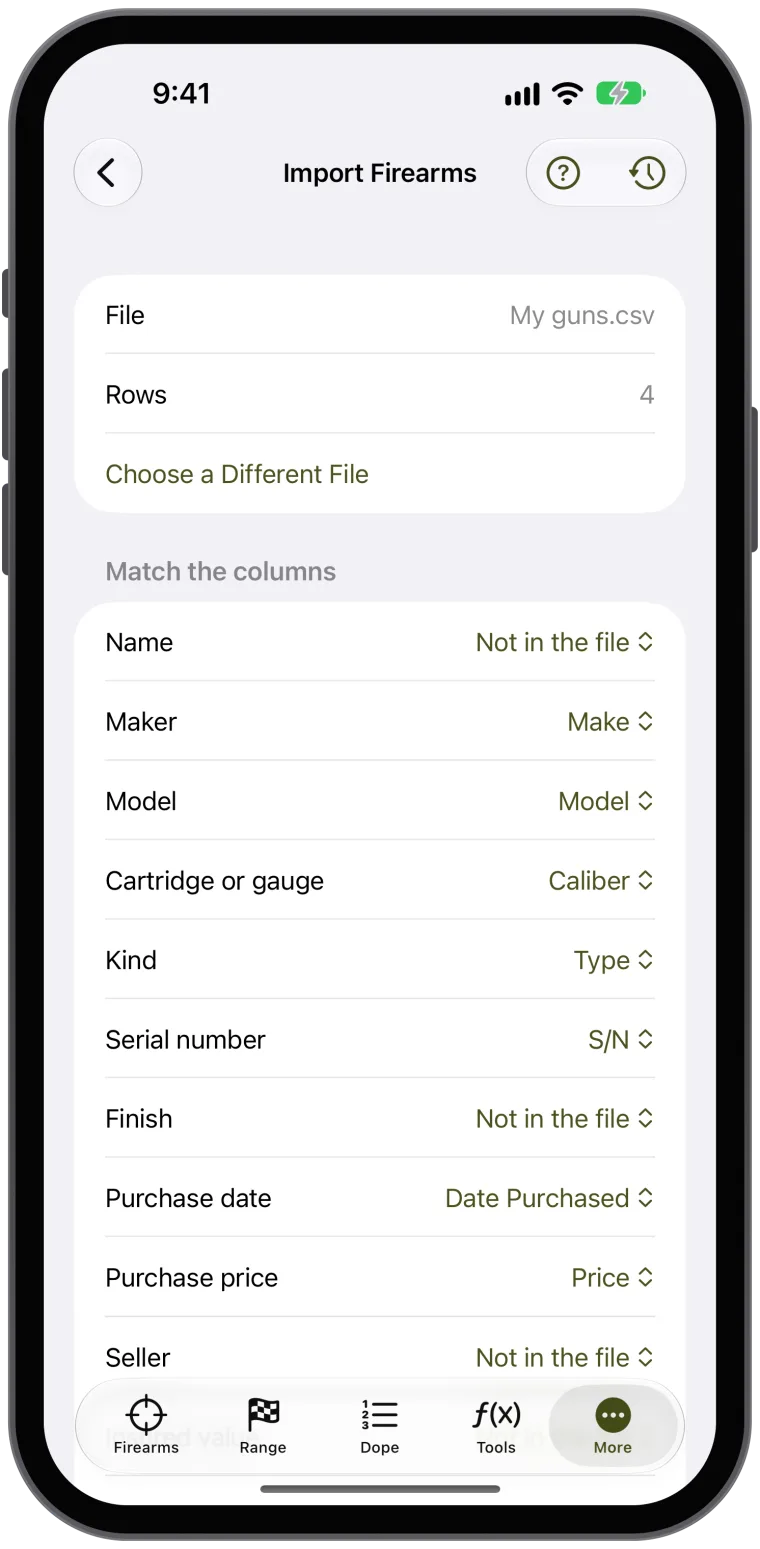
Moving a gun inventory spreadsheet into Gun Diary
Gun Diary reads a CSV file, the plain spreadsheet format that Numbers, Excel and Google Sheets can all save; Apple's Numbers guide shows how to export a spreadsheet as CSV on an iPhone. In the app you choose the file under Import Firearms, and the columns are matched by name, ignoring capitals and punctuation, so "Serial #" and "S/N" both land in Serial number. You can change any match by hand. The import a gun list help has every step and the full list of column names it reads.
Before a single gun is added, Check before importing counts the rows ready to import, the possible duplicates, the rows that can't import and the rows with a value left blank, and the preview shows every row the way it will arrive. Possible duplicates are skipped unless you say otherwise, so importing the same file twice doesn't double anything. Choosing a file and looking at the preview are free; the import itself is part of Gun Diary Pro. If something went wrong, a whole import can be removed in two steps and waits in Recently Deleted for 30 days. The screens shown here are the app's demo diary.
What a spreadsheet can't hold
Picture a family putting an inherited collection on record: they type the list together in a gun inventory spreadsheet, import it once, and then the work moves to each gun. Photos, receipts, barrels, equipment and range trips are added in the app, one firearm at a time, since no spreadsheet column holds them well. Starting rounds become each gun's rounds already fired, and each imported gun begins with an original setup dated its purchase date. Everything stays on your iPhone or iPad and in your own iCloud, with no account and nothing sent to us, and exported spreadsheets give the list back out any time, free.
The bottom line
So, do you still need a gun inventory spreadsheet?
If it's how you like to work, keep it: a tidy gun inventory spreadsheet with one gun per row, clear column names, serial numbers checked against the guns and dates that can only be read one way is a solid record on its own. If you'd rather have photos, receipts and range history attached to each gun, the same tidy file is what makes the move easy. Either way, the tidying is the part worth doing this week. The rest is a few taps or a few rows at a time.
Gun Diary keeps the records you enter. It never predicts bullet drop, wind or a trajectory; your dope is what you proved on paper. Always follow safe firearm handling.
Bring the whole collection across
Import your gun list, check every row before anything is added, then print the collection report for your insurer (Pro).
See the collection toolsComing soon to the App Store