
"Calculator #24: Elevation Left"
Check whether your scope has enough elevation travel left above zero to dial each come-up on a dope table, and the farthest distance it can reach.
Elevation Left (calculator #24) compares each come-up on a dope table with the elevation your scope has left above zero. Each distance shows OK or Out of travel, and Farthest it can dial names the longest distance you can reach by dialing alone. It’s plain arithmetic on your own numbers.
Steps
- Open it one of two ways:
- Tools tab > under Your dope, tap Elevation Left; or
- Dope tab > a dope table > Calculators for This Table > Elevation Left (the table is picked for you).
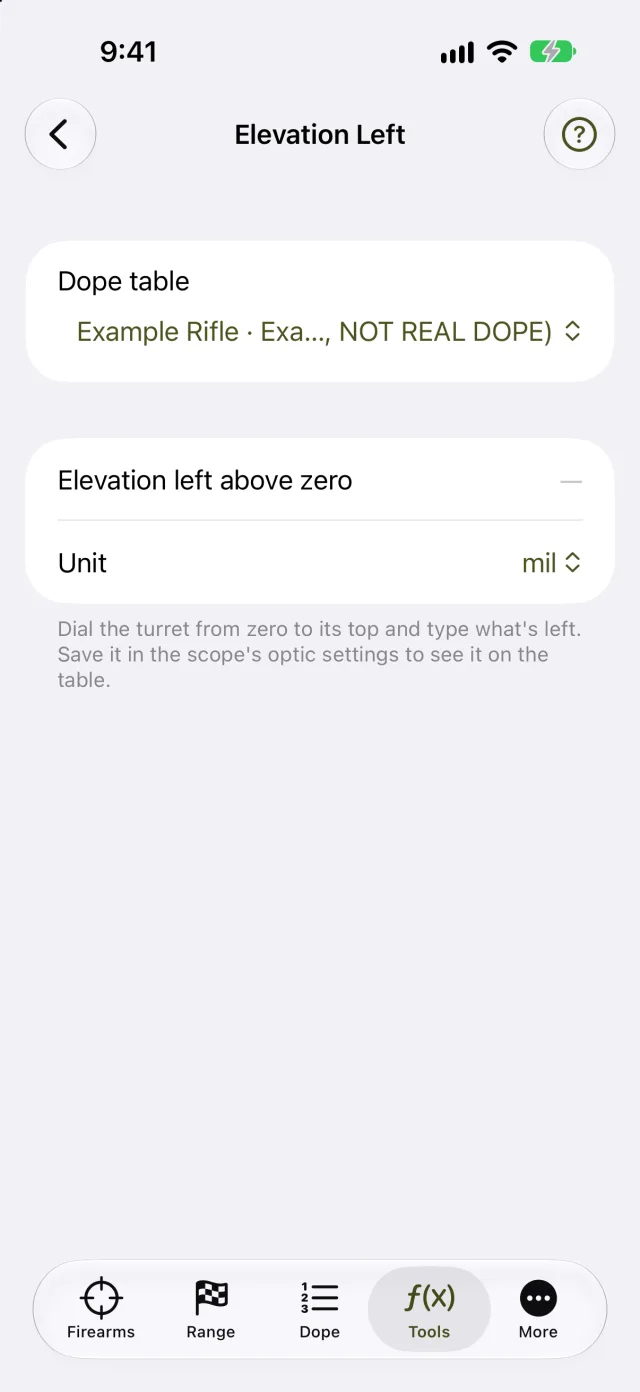
- Check the Dope table; tap it to pick another.
-
Type Elevation left above zero and pick its Unit (mil or MOA). If the table’s scope has this saved in its optic settings, it’s filled in for you and the footnote says “From the scope’s optic settings in the Garage.”
-
Read Each row: every distance with OK or Out of travel (in-between rows are in italics with est.), then Farthest it can dial.
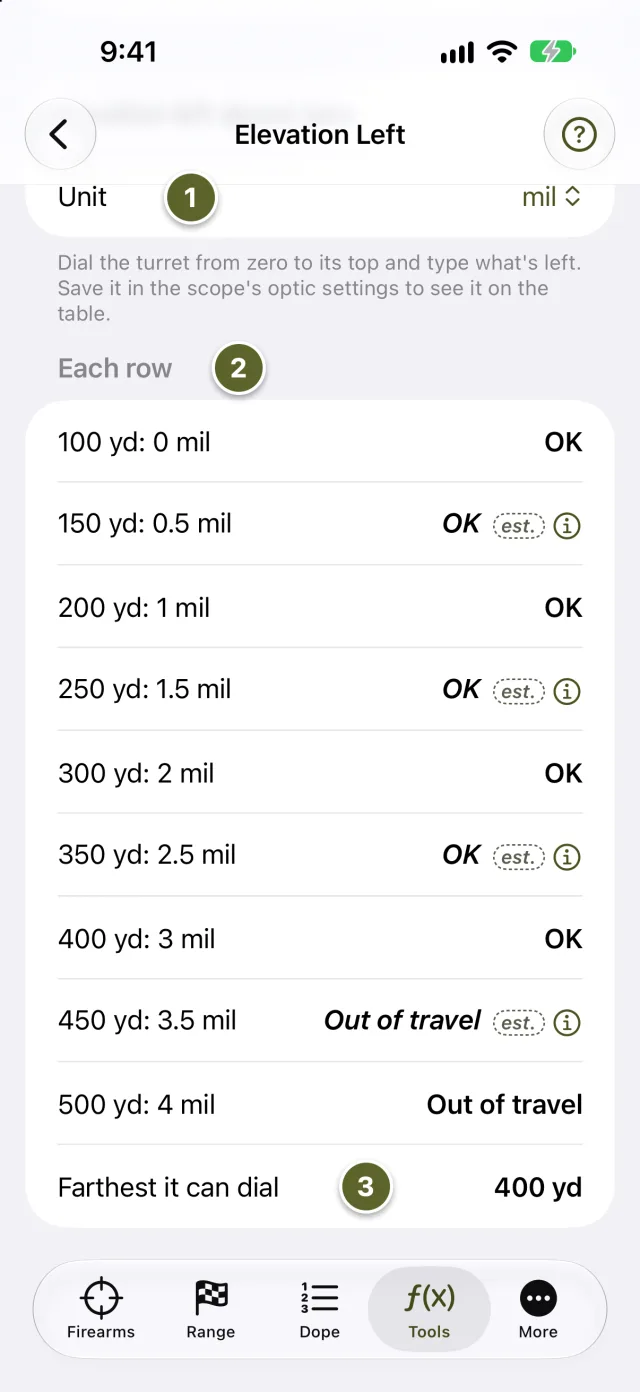
Numbers on the picture: 1 Unit (with Elevation left above zero and the Dope table above it), 2 Each row, 3 Farthest it can dial.
Nothing is saved here. To keep the number, save it in the scope’s optic settings.
Why it’s useful
Every scope has a limit to how far its elevation turret can turn. Once the rifle is zeroed, only the travel above zero is available for come-ups, and on many hunting setups that runs out sooner than people expect. Finding out at home is far better than finding out at the bench with the turret stopped.
Who uses it, and how:
- Long-range and PRS shooters: see the farthest distance you can dial, and decide whether you need a canted (tapered) base or to hold over in the reticle for the last rows.
- Hunters planning longer shots: check that the scope can dial to your longest planned distance.
- Anyone changing scope, mount or zero: the travel left changes; check it again. After a zero change, see Re-Zero Shift.
- New shooters: it explains a common surprise: a scope with “lots of travel” may have only part of it left above zero.
What each option means
How to measure the travel (the footnote): dial the turret from zero to its top and type what’s left. In the scope’s optic settings, the hint says: with the rifle zeroed, count the clicks from zero to the top of the elevation turret’s travel (don’t force it), then multiply by the click value; write down where you started and dial back to zero after. Saved there, the dope table also shows an “Elevation left on the scope” section.
Example
On the Example table (100 yd: 0, 200 yd: 1, 300 yd: 2, 400 yd: 3, 500 yd: 4 mil):
- Type 3 in Elevation left above zero, Unit mil.
- Each row shows OK for 100 to 400 yd (and the in-between rows up to 400) and Out of travel for 450 (est.) and 500 yd. Farthest it can dial: 400 yd.
- Change Unit to MOA and type 10: 10 MOA is about 2.91 mil, so 400 yd is now out of travel and Farthest it can dial is 350 yd (an in-between row). Without the in-between rows it would be 300 yd, which is what the app’s tests check.
For the out-of-travel rows, you’d hold over in the reticle for the extra (see Holdover from Your Dope); how you set up your scope mount is up to you and your gunsmith.
Tips
- Save the travel in optic settings. Then this calculator and the dope table fill it in by themselves.
- Measure gently. Never force a turret against its stop; count clicks and come back to zero.
- Check after any change. A new mount, base, scope or zero changes the travel left.
- Mind the units. If your scope’s travel is in MOA and the table is in mil, pick MOA here; the app converts.
What it affects
Nothing. This screen doesn’t change the dope table or the scope’s optic settings. To save the travel, edit the scope’s optic settings in the Garage.
If something goes wrong
- “Pick a dope table above. Tables are on the Dope tab.” No table is picked, or you have none.
- No rows show. Type Elevation left above zero.
- Farthest it can dial says none. Even the first row needs more than the travel you typed. Check the number and the Unit.
- The travel didn’t fill in. The table’s scope has no elevation left saved, or the table isn’t linked to a scope. Add it in optic settings.
- I picked another table and the travel didn’t change. The travel fills in once when the screen opens; type the new scope’s travel or reopen the calculator from that table.
Related
- Next: Free Recoil.
- Optic settings, A dope table.
- Re-Zero Shift, Holdover from Your Dope, In-Between Rows calculator.
- About estimates, The Tools tab.
- Words used here: come-up, zero, turret, elevation travel, canted base.
Gun Diary keeps records you enter and does arithmetic on them. It never predicts a trajectory; confirm every hold by shooting it at the range, and always know your target and what is beyond it.
Guides on this topic
Still stuck? In the app, open More > Help > Contact Support, or More > Settings > Support, which also has Send Error Log (the error log helps us find the problem), or email contact@setriksoftware.com. You can also browse the Help Center or the messages the app can show.