
"Calculator #16: Energy, Momentum, Power Factor"
Work out a bullet's energy, momentum and power factor from its weight and a speed you measured or read off the box.
Energy, Momentum, Power Factor (calculator #16) turns a bullet weight and a speed into three numbers shooters talk about: kinetic energy (ft-lb and joules), momentum, and power factor, the number competitions use to sort loads into classes. It’s plain arithmetic. The results are marked est. when the speed comes from the box rather than your own chronograph.
Steps
- Tap the Tools tab. Under Energy and recoil, tap Energy, Momentum, Power Factor.
- Type the Bullet weight in grains and the Speed in fps.
- Under Speed from, pick My chronograph if you measured it, or The box (est.) if it’s the number printed on the ammunition box.
-
Read Result: Energy, Momentum and Power factor. A line under them says where the speed came from.
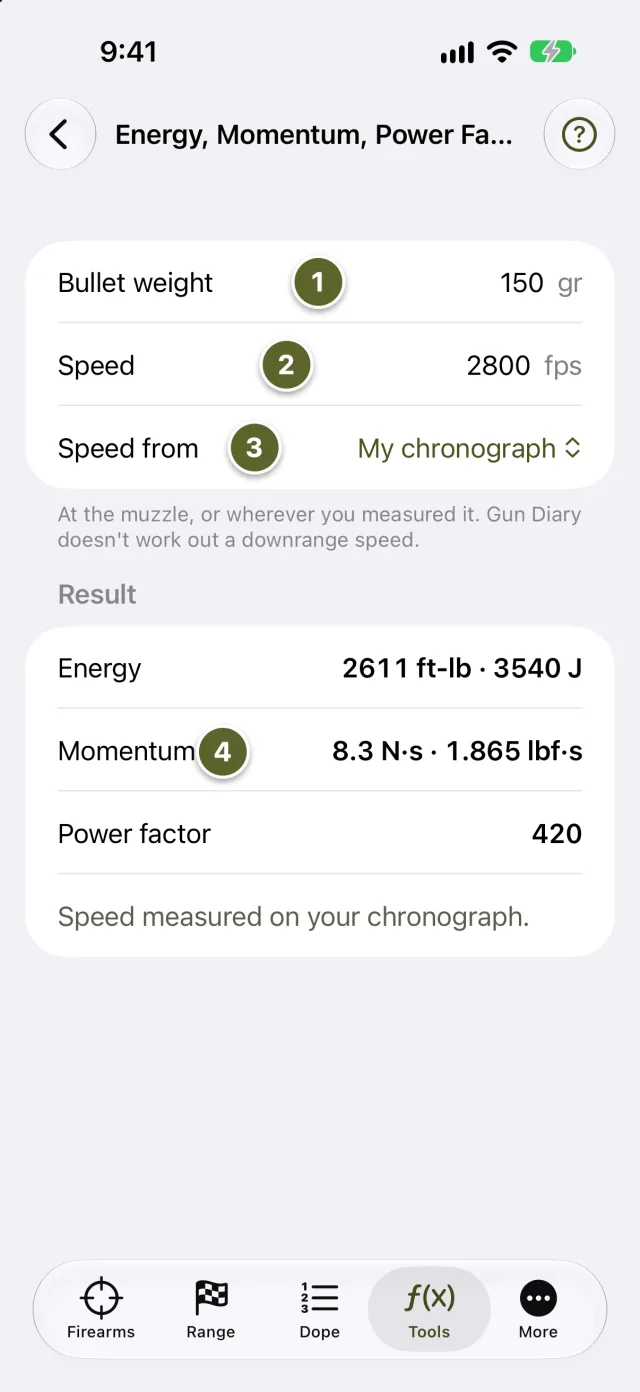
Numbers on the picture: 1 Bullet weight, 2 Speed, 3 Speed from, 4 the results.
Nothing is saved; it’s a scratch pad.
Why it’s useful
These three numbers come up all the time, and each answers a different question. Energy is what many hunting guides and some regulations quote; momentum is how some shooters compare heavy, slow bullets with light, fast ones; power factor decides whether a competition load makes the minimum for its class. Doing the math by hand is easy to get wrong, especially the unit conversions.
Who uses it, and how:
- Hunters: see the energy of your load at the muzzle from your own chronograph number, instead of the box’s optimistic one.
- USPSA, IPSC and IDPA competitors: check that a load’s power factor (bullet grains x fps ÷ 1,000) clears the floor for your division, from a chronograph string. Use Velocity Statistics for the average first.
- Handgun and carry-gun owners: compare loads in the same pistol by energy and momentum.
- New gun owners: see how much bullet weight and speed each matter. Energy grows with the square of the speed; momentum and power factor grow in step with it.
Energy and momentum here are at the place you measured the speed, usually the muzzle. Gun Diary doesn’t work out a downrange speed: that would need a ballistic solver, which the app doesn’t have.
What each option means
Why the box is an estimate: makers measure in a test barrel that’s often longer than yours, so your rifle or pistol is usually slower. Your own chronograph is the real number. See About estimates.
Example
- The screen opens with 150 gr at 2800 fps, My chronograph. It shows Energy 2611 ft-lb · 3540 J, Momentum 8.3 N·s · 1.865 lbf·s and Power factor 420. This is the app’s tested example.
- A Mountain Rifle in 6.5 Creedmoor: your chronograph averaged 2710 fps with 140 gr bullets. Type 140 and 2710: 2283 ft-lb · 3095 J, 7.49 N·s · 1.685 lbf·s, power factor 379.4.
- A 9 mm competition load: 147 gr at an average of 1110 fps from your chronograph string gives power factor 163.2 and energy 402 ft-lb. Switch Speed from to The box (est.) and each result is marked est., and the line under them says “from the box: est.”
Tips
- Use the average of a string. Get it from Velocity Statistics or a session’s chrono string, then type it here.
- Check power factor with a margin. Match chronographs read differently from yours; competitors usually load a little above the floor.
- Compare like with like. Energy at the muzzle says nothing about energy where the bullet arrives.
- For recoil, use Free Recoil: it uses the gun’s weight too.
What it affects
Nothing. The calculator saves nothing. Power factor on a drill run (see Drill runs) is part of that record; this screen doesn’t change it.
If something goes wrong
- “Type a weight and a speed.” Both Bullet weight and Speed need a number above zero.
- The speed is in m/s. This screen takes fps. Convert it first with the Unit Converter (velocity).
- Every result says est. Speed from is set to The box (est.). Pick My chronograph when you measured it.
- The energy doesn’t match the box. The box uses the maker’s test-barrel speed; your measured speed is usually lower, and energy goes with the square of the speed.
Related
- Next: Hit Rate and Scores.
- Velocity Statistics, Free Recoil, Drill Times and Hit Factor.
- About estimates, The Tools tab.
- Words used here: power factor, chronograph, muzzle velocity.
Gun Diary keeps records you enter and does arithmetic on them. It never predicts a trajectory; confirm every hold by shooting it at the range, and always know your target and what is beyond it.
Guides on this topic
Still stuck? In the app, open More > Help > Contact Support, or More > Settings > Support, which also has Send Error Log (the error log helps us find the problem), or email contact@setriksoftware.com. You can also browse the Help Center or the messages the app can show.