
"Calculator #11: Holdover from Your Dope"
Turn a come-up from one of your dope tables into a hold in your reticle's marks (allowing for a second focal plane scope's magnification) or clicks to dial.
Holdover from Your Dope (calculator #11) takes a come-up you proved on one of your dope tables and shows it two ways: as a hold (how many reticle marks to hold over) and as clicks to dial. For a second focal plane scope it allows for the magnification you’re on. It only uses your own rows; nothing is predicted.
Steps
-
On the Tools tab, under Your dope, tap Holdover from Your Dope. Or open a table on the Dope tab and tap it under Calculators for This Table; then that table is already picked.
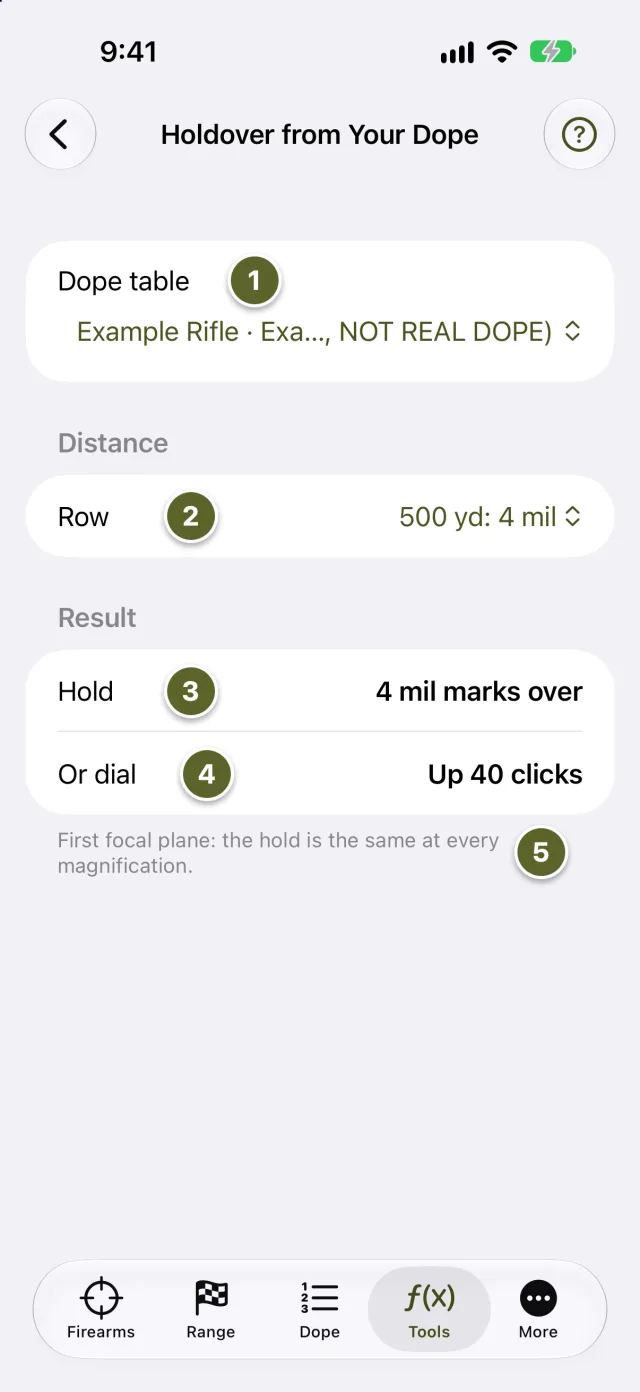
Numbers on the picture: 1 Dope table, 2 Row, 3 Hold, 4 Or dial, 5 the focal plane note.
-
In Dope table, pick the table. Opened from the Tools tab, it starts on your first current-setup table (your own before the Example); tables for an earlier setup end in “(earlier setup)”.
- Under Distance, pick the Row: each proven row reads like “400 yd: 2.6 mil“. For a current setup, in-between rows are listed too, ending in “est.”. It starts on your farthest proven row.
- If the table’s scope is second focal plane, type Magnification now: the power you’re set to. If the scope’s optic settings have no True at magnification, a Reticle true at field shows too: type the power the reticle’s marks are true at (from the scope’s manual, often the highest), or save it once in Optic settings.
- Read Result: Hold (marks over or under) and Or dial (clicks Up or Down). The note under them says how your scope’s focal plane affects the hold: on a second focal plane scope, “the hold is for the magnification you typed”, or with nothing typed, “the hold is for the magnification the reticle is true at”.
Why it’s useful
Dialing is the most exact way to use dope, but there isn’t always time: a deer stepping out at 400 yards, a stage with four targets at four distances, a quick follow-up. Holding with the reticle is faster, but only if you know how many marks your come-up is, and on a second focal plane scope that changes with the power.
Who uses it, and how:
- Hunters: write your holds for 300, 400 and 500 yards on a card at the power you hunt on, and leave the turret at zero.
- Precision competitors: dial for the main target and hold for the rest, from the same table.
- Shooters with an MOA reticle and a mil turret (or the reverse): the hold is converted to the reticle’s unit for you.
- Anyone with an SFP scope: see exactly how much the hold grows when you turn the power down.
What each option means
Where the numbers come from: the table’s units (mil or MOA, yd or m); the reticle unit, focal plane and true magnification from the optic settings of the scope linked to the table; the click value from that scope’s optic settings, else the firearm’s current scope’s. With no optic settings anywhere, there’s no Or dial row: Gun Diary doesn’t guess a click value.
The formula, in plain words: the come-up is converted to the reticle’s unit. On a first focal plane scope, each mark is worth one unit, so hold = that number. On a second focal plane scope, each mark is worth true magnification ÷ current magnification units, so hold = come-up ÷ that. Clicks = come-up ÷ click value, rounded.
Example
Your Mountain Rifle’s table (mil, yards) has proven rows at 100 yd 0 mil, 200 yd 0.6 mil, 300 yd 1.6 mil, 400 yd 2.6 mil and 500 yd 3.8 mil. The scope is a first focal plane mil scope with 0.1 mil clicks.
- Open the table on the Dope tab and tap Holdover from Your Dope.
- Row “400 yd: 2.6 mil”. Hold: 2.6 mil marks over. Or dial: Up 26 clicks.
- Row “450 yd: 3.2 mil est.” (an in-between row). Hold: 3.2 mil marks over est.; Or dial: Up 32 clicks est.
With a second focal plane scope whose marks are true at 10x (saved as True at magnification in its optic settings, or typed in Reticle true at), set to 5x: type 5 in Magnification now. For 400 yd the Hold reads 1.3 mil marks over, because each mark now covers 2 mil. Or dial stays Up 26 clicks: the turret doesn’t care about magnification.
With an MOA reticle on the same mil table (first focal plane), the 400 yd row’s 2.6 mil come-up reads 8.94 MOA marks over.
Tips
- Prove the hold, not just the dial. Shoot the hold at the range once; reticles and turrets don’t always agree perfectly. Save it as a proven hold.
- Est. rows are for planning. Prove 450 yd before you rely on it.
- Link the scope to the table so the reticle and focal plane are right. See A dope table and Optic settings.
- Write it on a card. Dope cards print your rows; add your holds in the notes.
What it affects
Nothing is saved. The dope table and its rows are not changed.
If something goes wrong
- “Pick a dope table above. Tables are on the Dope tab.” No table is picked, or you have none yet. See New dope table.
- “Pick a row.” Choose a distance in Row.
- The note says “Add the scope’s reticle and focal plane in the Garage (optic settings) for the reticle hold.” The table has no scope with optic settings, so the hold is shown in the table’s own unit, as if first focal plane. Link a scope and fill in its optic settings.
- No est. rows in the list. In-between rows need two proven rows at most 200 apart, and the table must be for the current setup. See In-between rows and Earlier setup.
- Magnification now isn’t shown. It appears only when the table’s scope is set to second focal plane.
- “Type the magnification the reticle is true at (from the scope’s manual, often the highest), or save it as True at magnification in the scope’s optic settings.” You typed Magnification now, but Gun Diary doesn’t know what power the reticle is true at, so it can’t scale the hold. Type it in Reticle true at, or add True at magnification in Optic settings.
- There’s no Or dial row. The table’s scope (and the firearm’s current scope) has no optic settings, so there’s no click value. Add the click value in Optic settings.
Related
- Next: In-Between Rows.
- A dope table, Reticle Subtension, Hold-On Distances, Proven holds, What confirmed dope is.
- Learning paths: Building your dope card, Before and after the hunt.
- Words used here: dope, come-up, hold, click value, first focal plane, second focal plane, in-between row.
Gun Diary keeps records you enter and does arithmetic on them. It never predicts a trajectory; confirm every hold by shooting it at the range, and always know your target and what is beyond it.
Guides on this topic
- How to Range with a Mil Dot Reticle (and Trust the Answer)
- First vs Second Focal Plane: What Your Reticle Marks Mean
Still stuck? In the app, open More > Help > Contact Support, or More > Settings > Support, which also has Send Error Log (the error log helps us find the problem), or email contact@setriksoftware.com. You can also browse the Help Center or the messages the app can show.