
"Calculator #9: Zero and Sight-In Helper"
Type where each shot hit and the helper finds the group's center, says whether you're zeroed within your tolerance, and gives the clicks to dial if not.
The Zero and Sight-In Helper (calculator #9) walks you through sighting in, one group at a time. Type where each shot hit relative to your aim; it finds the group’s center, tells you whether that’s close enough to call the rifle zeroed, and if not, how many clicks to dial. Then you shoot again and repeat.
Steps
-
On the Tools tab, under Sight-in and zero, tap Zero and Sight-In Helper. It opens with a three-shot example.
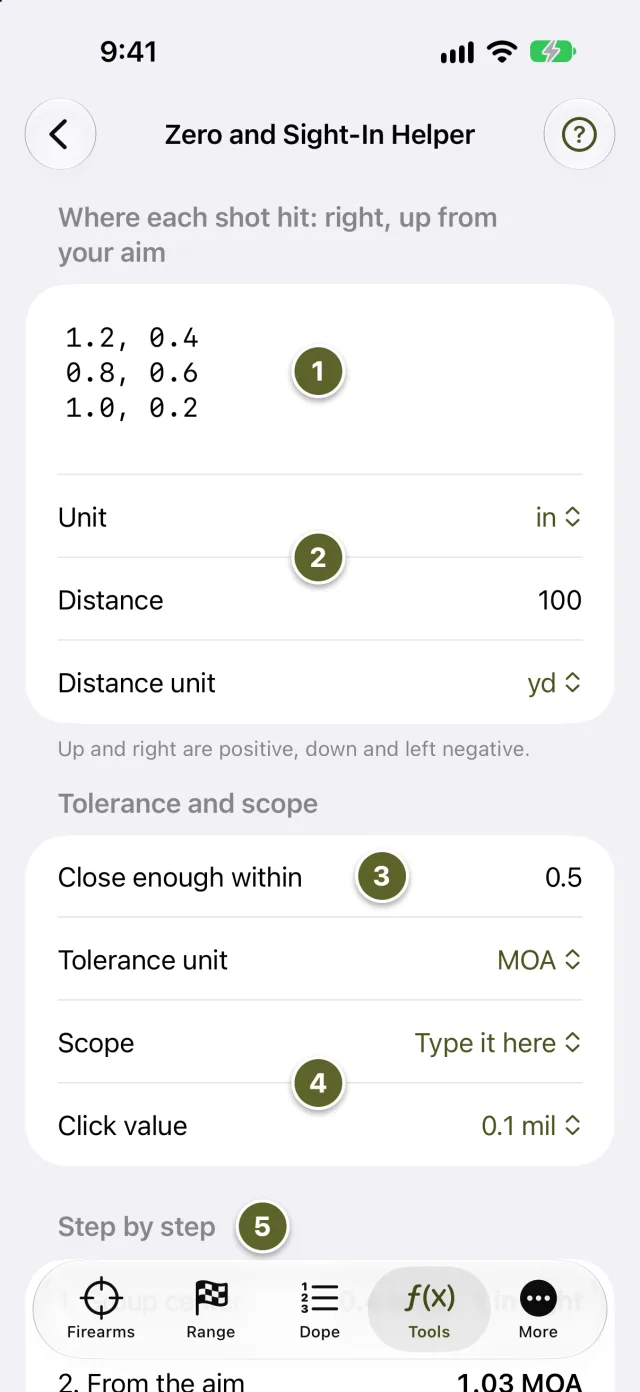
Numbers on the picture: 1 the shot box, 2 Unit and Distance, 3 Close enough within, 4 Scope and Click value, 5 Step by step.
-
Under Where each shot hit: right, up from your aim, clear the example and type one shot per line: how far right, then how far up. Left and down are negative (
-0.3, 0.5). - Pick the Unit (in, mm, MOA or mil), then the Distance and Distance unit.
- Under Tolerance and scope, set Close enough within and its Tolerance unit (MOA or mil): how far from the aim the group’s center may be and still count as zeroed. Pick your Scope or a Click value.
- Read Step by step:
- 1. Group center: the average of your shots.
- 2. From the aim: how far that center is from your aim, as an angle.
- 3. Result: “Zeroed (within …)” or Adjust the sight.
- 4. Dial: the clicks, shown only when you need to adjust.
- Dial the clicks, fire another group of the same size, type the new shots and check again. When it says zeroed, fire one more group to confirm.
Why it’s useful
Sighting in is a loop: shoot, measure, adjust, repeat. People get lost in it by chasing single shots, turning the turret the wrong way, or not knowing when to stop. The helper uses the center of the whole group (not your best or worst shot), gives clear directions, and has a stopping rule you choose.
Who uses it, and how:
- New gun owners with a first scope: a calm, step-by-step way to zero without guessing.
- Hunters before the season: confirm the zero is still within, say, half an MOA, or get the exact fix.
- After mounting a new scope or rings: get from “on paper” to zeroed in a few groups.
- Rimfire and air rifle shooters at 25 or 50 yards: the same method at any distance.
- Instructors: a clear sequence to teach.
What each option means
How it works, in plain words: the group center is the average of the right values and of the up values. It’s turned into an angle in the tolerance unit (a length ÷ the distance). The distance from the aim is the straight line from the aim to that center (both axes together). If that’s within Close enough within, you’re zeroed. If not, each axis is divided by the click value and rounded to whole clicks, in the direction that moves the impact to the aim (a high group needs Down). Every shot counts, the first cold bore shot too.
Example
You mounted a new scope on your Mountain Rifle and you’re at 100 yards with 1/4 MOA clicks. Tolerance 0.5 MOA.
First group. Measured from the aim in inches (right, up):
0.4, 1.2 0.6, 0.8 0.2, 1.0
- 1. Group center: 1 in up · 0.4 in right
- 2. From the aim: 1.03 MOA
- 3. Result: Adjust the sight
- 4. Dial: Down 4 clicks, Left 2 clicks
- The hint: Dial it, then fire another group of the same size and run this again.
Second group, after dialing:
0.1, 0.2 -0.2, 0.1 0, -0.1
- 1. Group center: 0.067 in up · 0.033 in left
- 2. From the aim: 0.07 MOA
- 3. Result: Zeroed (within 0.5 MOA)
- The hint: Fire one more group to confirm, then save it as a Zero Check.
Tips
- Shoot groups, not single shots. Three shots is the least; five is better.
- Get on paper close first. At 25 yards, a bore-sighted rifle is easy to find on the target; then move back.
- Pick a tolerance you can actually shoot. If your groups are 1.5 MOA, a 0.25 MOA tolerance will have you chasing noise.
- Save the zero. Once you’re done, record it as a Zero Check so it’s in the rifle’s zero history.
What it affects
Nothing is saved here. To keep the result, record a Zero Check on the firearm.
If something goes wrong
- “Type at least one shot.” No line has two numbers yet.
- “Type the distance to check the group against your tolerance.” With in or mm, the Distance is needed to work out the angle; until it’s typed, only step 1 shows. Type it.
- It says Adjust the sight but the dial line says “No change (under half a click)”. The group is just outside your tolerance but less than half a click away; loosen the tolerance or leave it.
- The clicks go the wrong way. Up and right are positive; down and left are negative. A group low and left is typed like
-0.5, -1.
Related
- Next: Zero Check.
- Sight Clicks, Point-of-Aim Offset, Group Statistics, Re-Zero Shift.
- Learning paths: Sighting in a new scope, New gun owner.
- Words used here: zero, cold bore, click value, point of aim, group.
Gun Diary keeps records you enter and does arithmetic on them. It never predicts a trajectory; confirm every hold by shooting it at the range, and always know your target and what is beyond it.
Guides on this topic
Still stuck? In the app, open More > Help > Contact Support, or More > Settings > Support, which also has Send Error Log (the error log helps us find the problem), or email contact@setriksoftware.com. You can also browse the Help Center or the messages the app can show.