
"Calculator #3: Mil and MOA"
Convert an angle between mil, MOA and shooter's MOA (IPHY); no distance needed.
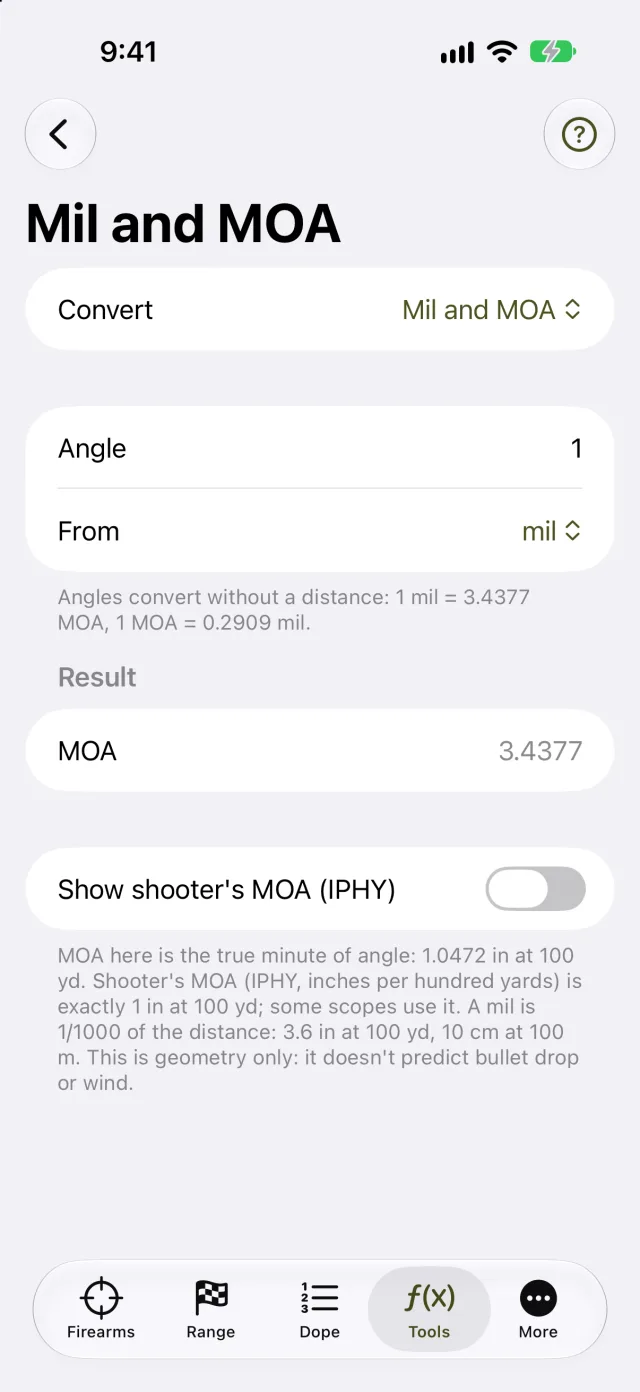
Mil and MOA (calculator #3) converts an angle from one unit to another: mil to MOA, MOA to mil, and either to shooter’s MOA (IPHY) when you turn it on. Angles convert without a distance, so there’s only one number to type.
Steps
-
On the Tools tab, under Angles and clicks, tap Mil and MOA.
-
Type the Angle.
- Pick its unit in From (mil or MOA; IPHY too when the switch is on).
- Read Result: the same angle in each other unit, up to four decimals.
- Need shooter’s MOA? Turn on Show shooter’s MOA (IPHY) at the bottom.
Why it’s useful
Scopes, dope from friends, published reticle drawings and online videos mix mil and MOA all the time. A mil scope with an MOA reticle, or a come-up in MOA from a buddy’s card when your turret is in mil, needs a quick, exact conversion.
Who uses it, and how:
- Shooters with mixed-unit scopes: the turret is in MOA, the reticle in mil; convert a hold to a dial.
- Hunters reading someone else’s card: turn “8.6 MOA” into the mils your scope uses.
- New shooters: see how the two units relate (1 mil is about 3.44 MOA) and pick the one that suits you.
- Owners of older or budget scopes in shooter’s MOA: see the IPHY value too.
What each option means
The formula, in plain words: each unit is a fixed share of the distance (mil 1/1000; true MOA the tangent of 1/60 of a degree, about 1/3438; IPHY 1/3600), so converting is a fixed ratio:
- 1 mil = 3.4377 MOA
- 1 MOA = 0.2909 mil
- 1 MOA = 1.0472 IPHY
Example
A friend’s dope card for the same cartridge says 8.6 MOA at 500 yards; your Mountain Rifle’s scope dials in mil.
- Open Mil and MOA. Type 2.5, From mil: the MOA row reads 8.5944. So 8.6 MOA is just about 2.5 mil.
- To be exact, pick From MOA and type 8.6: the mil row reads 2.5016.
- Turn on Show shooter’s MOA (IPHY) with 2.5 mil: IPHY reads 9.
His card is only a starting point; your own rifle’s come-up is whatever you prove at the range.
Tips
- Remember the two numbers: 1 mil ≈ 3.44 MOA, 1 MOA ≈ 0.29 mil.
- Clicks are different. To know how many turret clicks an angle is, use Sight Clicks, which knows your click value.
- Keep one unit per rifle. Turret, reticle and dope table in the same unit makes field math simple. Set yours in Optic settings.
What it affects
Nothing is saved. The IPHY switch is remembered for all angle tools.
If something goes wrong
- The IPHY row is missing. Turn on Show shooter’s MOA (IPHY).
- The unit I typed in isn’t in Result. Result lists only the other units; the one in From is what you typed.
Related
- Next: Sight Clicks.
- Size to Angle, Angle to Size, Unit Converter.
- Words used here: mil, MOA, IPHY, come-up, click value.
Gun Diary keeps records you enter and does arithmetic on them. It never predicts a trajectory; confirm every hold by shooting it at the range, and always know your target and what is beyond it.
Guides on this topic
Still stuck? In the app, open More > Help > Contact Support, or More > Settings > Support, which also has Send Error Log (the error log helps us find the problem), or email contact@setriksoftware.com. You can also browse the Help Center or the messages the app can show.