
Earlier setup
Why a dope table is marked "Earlier setup" after a scope, mount or barrel change, what changes on it, how to start a table for the new setup, and how to choose which equipment counts.
Dope is proven with one scope, on one mount, on one barrel. Change any of them and the old come-ups may not hit any more. So when you record such a change in The Garage, Gun Diary marks the tables proven with the old setup Earlier setup: their numbers are kept, but they step aside so you don’t carry them by mistake.
Steps
What makes a table an earlier setup. Every table remembers the firearm’s configuration, scope and barrel at the moment it was started. It’s marked Earlier setup when:
- the barrel it was proven with is no longer the firearm’s current barrel (see Barrel history), or
- the firearm’s current configuration has a different optic (scope, sight, red dot), mount (rings, base) or other counted equipment than the configuration the table was proven with (see Record an equipment change).
What you’ll see on an earlier-setup table:
-
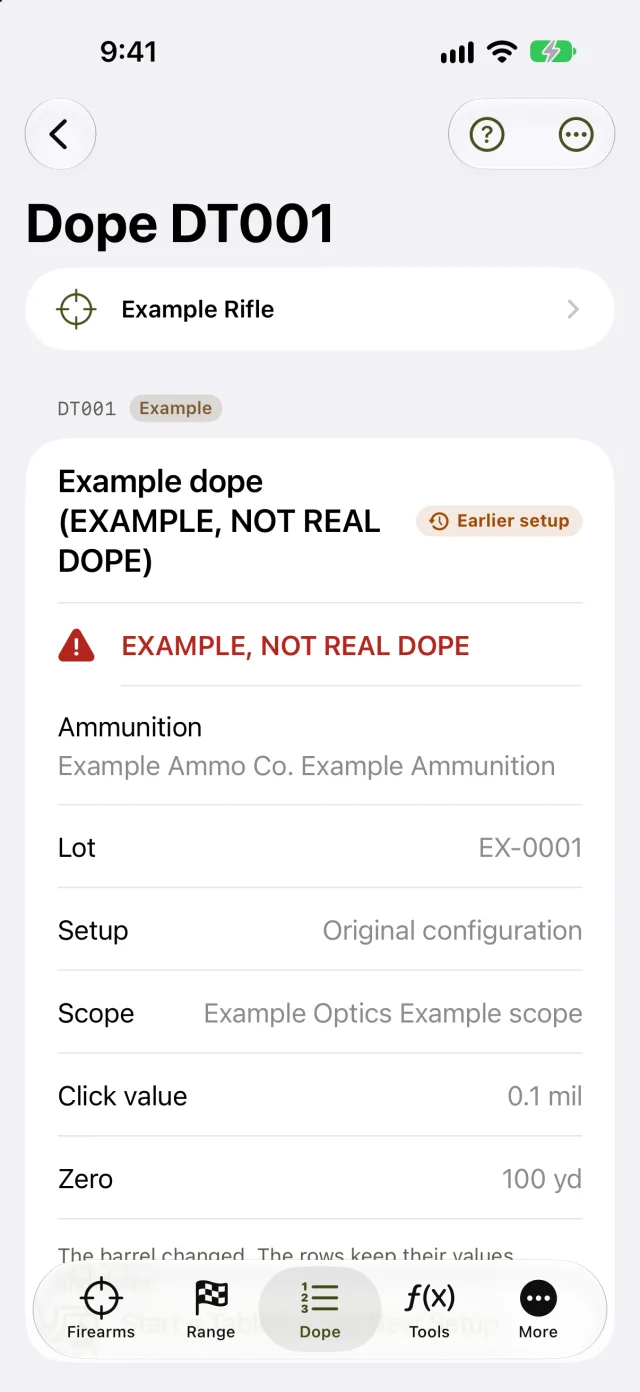
The chip next to its name reads Earlier setup (with a clock icon) instead of Current setup.
-
Below Zero, a line says what changed, for example “The barrel changed. The rows keep their values and dates.” or “Changed: Optic. The rows keep their values and dates.”
-
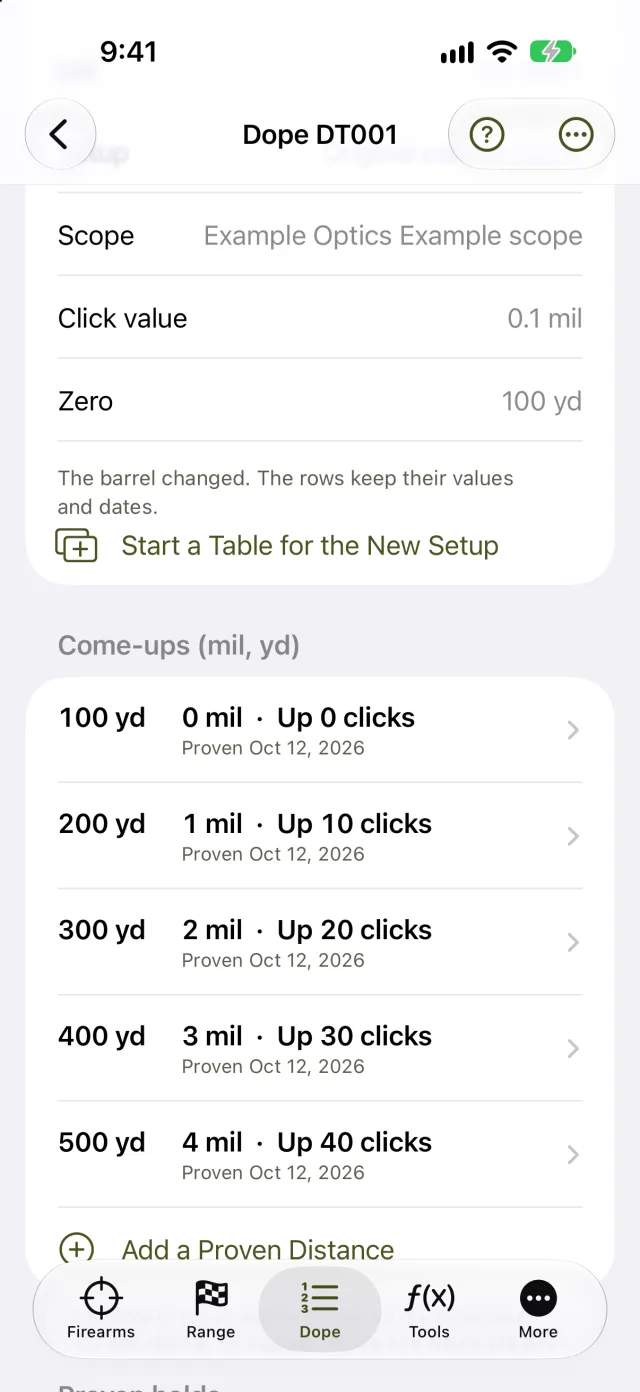
Tap Start a Table for the New Setup to start a new table for the same firearm, ammunition, lot, zero and units, on today’s setup, with no rows. Its notes say which table it replaced. Prove each distance again and add the rows.
Choosing which equipment counts:
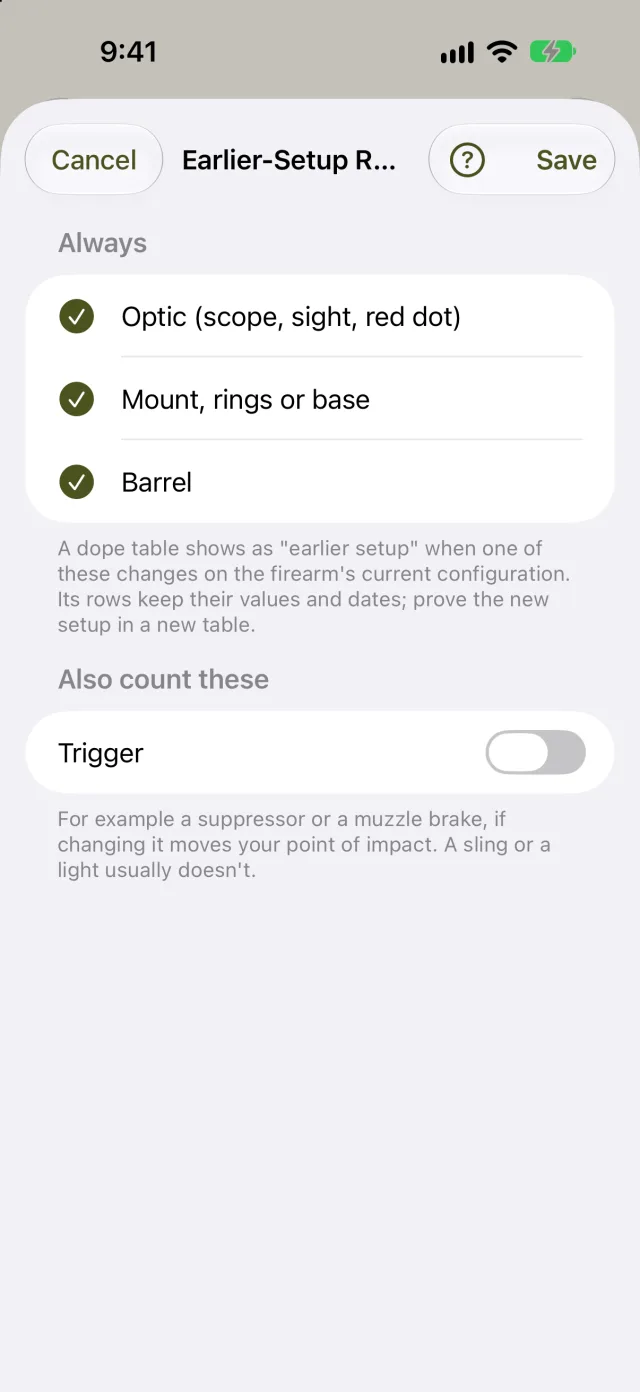
- On the Dope tab, tap Options > Earlier-Setup Rule.
- Under Always: Optic (scope, sight, red dot), Mount, rings or base and Barrel. These always count.
-
Under Also count these, turn on any of your other equipment categories (from The Garage) whose change moves your point of impact, for example a suppressor or a muzzle brake. A sling or a light usually doesn’t. Tap Save.
Why it’s useful
The most common way to miss with good dope is to use it on a rifle that has changed: a new scope, a scope moved to new rings, a new barrel. The numbers on an old card look fine and are wrong. Gun Diary notices the change from your Garage records, so the old table is flagged the moment you record the change, without you having to remember.
Who uses it, and how:
- Hunters who upgrade a scope before the season: the old table is set aside, and Start a Table for the New Setup gives you a clean table to prove at the range.
- Long-range shooters who rebarrel: the worn barrel’s dope stays as history, with its dates, next to the new barrel’s.
- Shooters who move optics between rifles: each rifle’s tables follow what’s really mounted on it.
- Shooters who shoot with and without a suppressor: add the suppressor category to the rule, and keep a table for each setup.
- Collectors keeping a rifle’s history: old tables are never deleted, only marked.
What each option means
What changes on an earlier-setup table:
- It’s hidden on the Dope tab (a line says how many are hidden; Options > Show Earlier Setups shows them).
- It shows no in-between rows (nothing is estimated from it), and the in-between switch is gone.
- In Save as Confirmed Dope it’s listed last, with “(earlier setup)”.
- In the card editor it’s marked “earlier setup”, and a card made from it prints “EARLIER SETUP” before its title and no est. rows.
- Its proven rows, holds, proof and history are all kept, unchanged.
Example
Drew’s Mountain Rifle has DT002 (current setup). Drew mounts a new scope and records it in The Garage as a new configuration (“New scope, Oct 2026”).
- On the Dope tab, DT002 disappears from the list; “1 earlier setup hidden” appears under the filter.
- Drew taps it: DT002 shows Earlier setup and “Changed: Optic. The rows keep their values and dates.”
- Drew taps Start a Table for the New Setup. DT006 opens: Mountain Rifle, same ammunition and lot, zero 100 yd, mil, no rows; its notes read “New setup; the earlier table is DT002.”
- At the range Drew re-zeroes and proves 200, 300 and 400 yd on DT006. The old DT002 stays as a record of the old scope’s dope.
Had Drew only swapped the sling, nothing would change: slings don’t count unless Drew adds them under Also count these.
Tips
- Record equipment changes as they happen, with the right date, in The Garage. That’s what Gun Diary checks.
- Re-zero after any setup change before proving new dope. See Zero Check.
- Keep old tables. They’re the history of what the rifle did with each setup; archive them if you want them out of every list.
- Add categories carefully. Counting something that doesn’t move the impact (a sling, a bipod, a light) only marks good tables as earlier setups for nothing.
- A table started before the firearm had any configuration only notices barrel changes. Set up the firearm’s configuration in The Garage before you start tables. See Specs, equipment and configurations.
What it affects
- The Dope tab, card editor and Save as Confirmed Dope treat the table as described above.
- Cards: “EARLIER SETUP” in the title; no est. rows.
- The rule (Also count these) applies to every firearm’s tables at once.
- Nothing is deleted or changed in the table’s rows.
If something goes wrong
- My table is marked Earlier setup but I didn’t change the scope. Check the firearm’s current configuration in The Garage: a new configuration with a different optic or mount (even a different model name or details text), a barrel change, or a category you turned on under Also count these will do it.
- I changed scopes but the table still says Current setup. Record the change as a new configuration in The Garage (see Record an equipment change), and make sure the item’s category says optic, scope, sight or red dot. A table started before the firearm had a configuration only notices barrel changes.
- I put the old scope back. When the current configuration again has the same optic and mount as the table’s, the table returns to Current setup.
- Start a Table for the New Setup made an empty table. That’s on purpose: the old rows were proven with the old setup. Prove each distance again.
Related
- Next: Proven holds.
- A dope table, The Dope tab, Record an equipment change, Specs, equipment and configurations, Barrel history, Zero Check.
- Learning path: Sighting in a new scope.
- Words used here: earlier setup, configuration, zero, point of impact, dope.
Gun Diary keeps records you enter and does arithmetic on them. It never predicts a trajectory; confirm every hold by shooting it at the range, and always know your target and what is beyond it.
Guides on this topic
- How to Make a Dope Card for Your Rifle (and Print It True)
- What Is Dope in Shooting? Proven Numbers, Not Guesses
- Scope Zero Stop: What It Is, How It's Set, and What to Write Down
Still stuck? In the app, open More > Help > Contact Support, or More > Settings > Support, which also has Send Error Log (the error log helps us find the problem), or email contact@setriksoftware.com. You can also browse the Help Center or the messages the app can show.