
A firearm's dope tables
See one firearm's dope tables from its dashboard, start a new table for it, and reach its dope cards.
Each firearm keeps its own dope tables: one for each ammunition (and lot, and setup) you’ve proven with it. This screen lists only that firearm’s tables, so you can go from the rifle straight to its numbers.
Steps
- On the Firearms tab, tap the firearm to open its dashboard.
- Tap the Dope row. It reads Prove your first distance until the firearm has a table, then how many tables it has (“2 dope tables”).
-
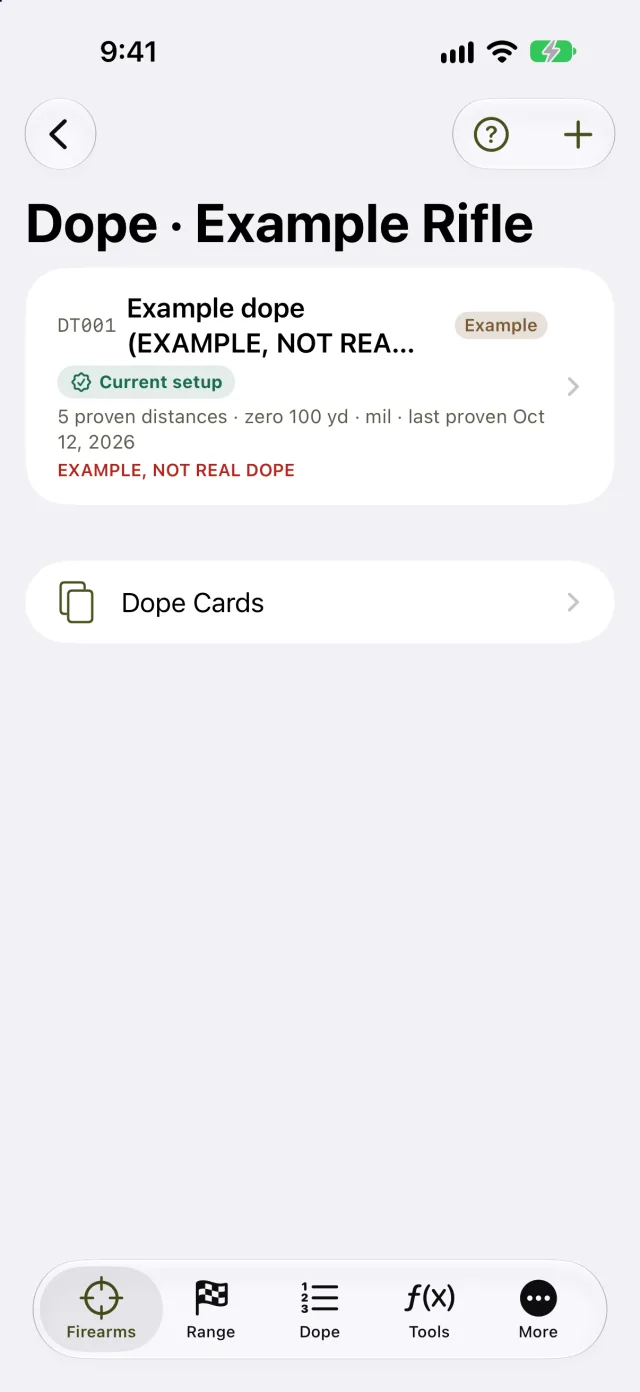
The screen, titled with the firearm’s name (“Dope · Mountain Rifle”), lists its tables: current ones first in your order, then archived ones.
-
Tap a table to open it. See A dope table.
- To start a table for this firearm, tap New Dope Table (the + at the top right). The firearm is already picked. See New dope table.
- To print a card, tap Dope Cards at the bottom of the list. See Dope cards.
Why it’s useful
When you’re thinking about one rifle (before a hunt, after a range day, after a scope change) you want that rifle’s dope and nothing else. This list is the shortest way there from the firearm itself.
Who uses it, and how:
- Hunters: from the hunting rifle’s dashboard, check that its current table is up to date and print a fresh card.
- Shooters testing factory ammunition: one table per ammunition shows which loads you’ve proven distances for, side by side.
- Owners of a rifle with a history: tables from before a scope or barrel change are still here, marked Earlier setup, so the rifle’s whole story stays in one place.
- Collectors and shooters with many guns: each firearm’s dashboard holds only its own dope, so nothing gets mixed up between rifles chambered alike.
What’s on the screen
Unlike the Dope tab, this list shows earlier-setup and archived tables without any filter: it’s the firearm’s complete dope history. When there’s nothing yet it says Prove your first distance: start a table for an ammunition, then add each distance you confirm.
Example
Riley’s “Mountain Rifle” dashboard shows Dope: “3 dope tables”. Tapping it lists:
- DT001 “Factory 140 gr”, Earlier setup (“4 proven distances · zero 100 yd · mil“): proven with the old scope.
- DT005 “Factory 140 gr”, Current setup (“5 proven distances · zero 100 yd · mil · last proven Oct 3, 2026”).
- DT006 “Factory 143 gr”, Archived: a load Riley tried and stopped buying.
Riley opens DT005 and taps Make Dope Card for the coming hunt.
Tips
- Hide the row if you don’t keep dope. Turn off Dope and Dope Cards in Personalize your diary and the Dope row leaves the dashboards (your tables are kept).
- Move the row up if dope is what you check most. See Arrange the dashboard.
- Give tables names when a firearm has several for the same ammunition (for example “Lot 2241”, “Suppressed”).
What it affects
Nothing changes by viewing this list. A table you start here belongs to this firearm and appears on the Dope tab under its name.
If something goes wrong
- There’s no Dope row on the dashboard. It’s hidden: turn Dope and Dope Cards back on in Personalize your diary, or show the section again in Arrange the dashboard.
- A table isn’t listed. Check Recently Deleted under Dope Tables; deleted tables can be restored for 30 days. A table made for another firearm is listed under that firearm.
- The Example Rifle‘s table shows here too. It’s Example data, marked EXAMPLE, NOT REAL DOPE. Remove the Example data when you’re done learning; see Explore the Example Rifle.
Related
- Next: New dope table.
- The Dope tab, A dope table, The firearm dashboard, Dope cards, Earlier setup.
- Learning path: Building your dope card.
- Words used here: dope, earlier setup, lot, zero.
Gun Diary keeps records you enter and does arithmetic on them. It never predicts a trajectory; confirm every hold by shooting it at the range, and always know your target and what is beyond it.
Still stuck? In the app, open More > Help > Contact Support, or More > Settings > Support, which also has Send Error Log (the error log helps us find the problem), or email contact@setriksoftware.com. You can also browse the Help Center or the messages the app can show.