
What confirmed dope is
The idea behind the Dope tab in plain words: what dope, come-ups and holds are, why Gun Diary keeps only what you proved, and what "est." means.
Dope is the shooter’s word for the scope settings that really work for one rifle, with one ammunition, at each distance. Gun Diary keeps your confirmed dope: only numbers you proved by shooting them on paper, each with its date and proof. It never works out or predicts a number for you. This page explains the words and the idea; the next ones show the screens.
Steps
This is the idea in five steps. Each step links the article that shows the screen.
- Zero the rifle. At your zero distance (often 100 yd or 100 m) the bullet hits where the crosshair sits. That is your starting point: 0 on the elevation turret. See Zero Check.
-
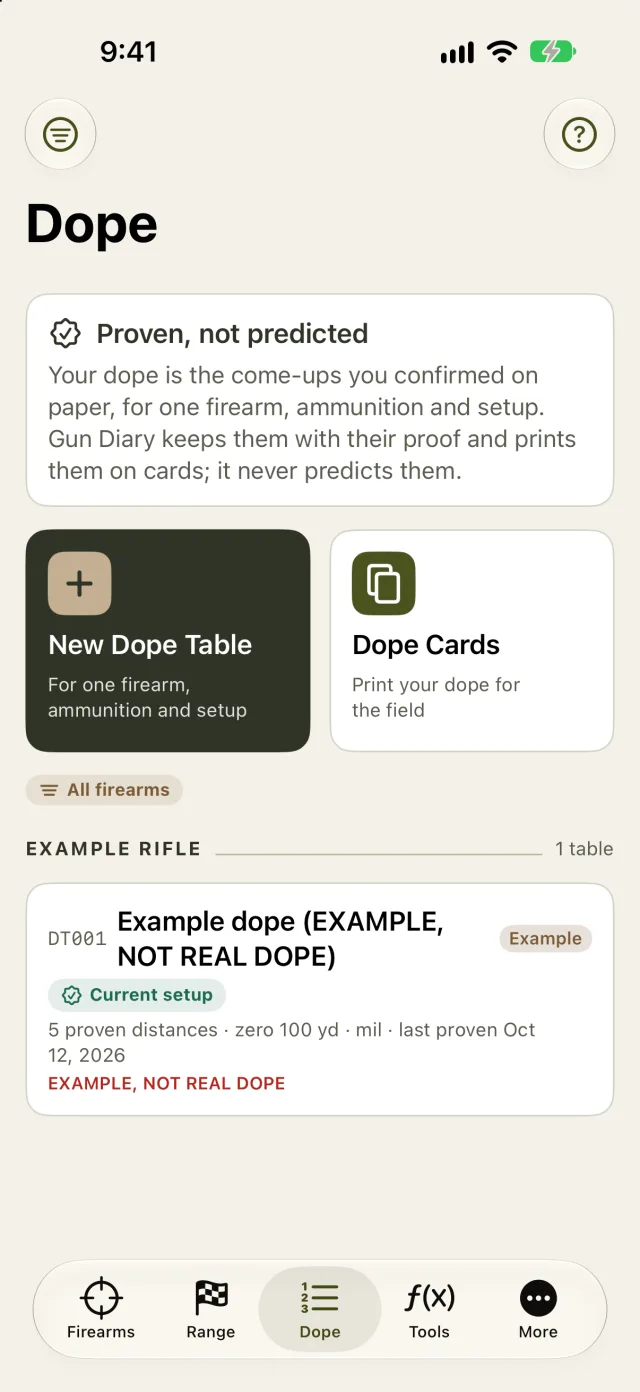
Start a dope table for that rifle, that ammunition and today’s scope and barrel: on the Dope tab, tap New Dope Table. See New dope table.
-
Shoot a farther distance. At 300 yd the bullet lands low, so you turn the elevation turret up until a group lands on your aim. The amount you turned is that distance’s come-up, for example 1.2 mil (12 clicks on a 0.1 mil turret).
-
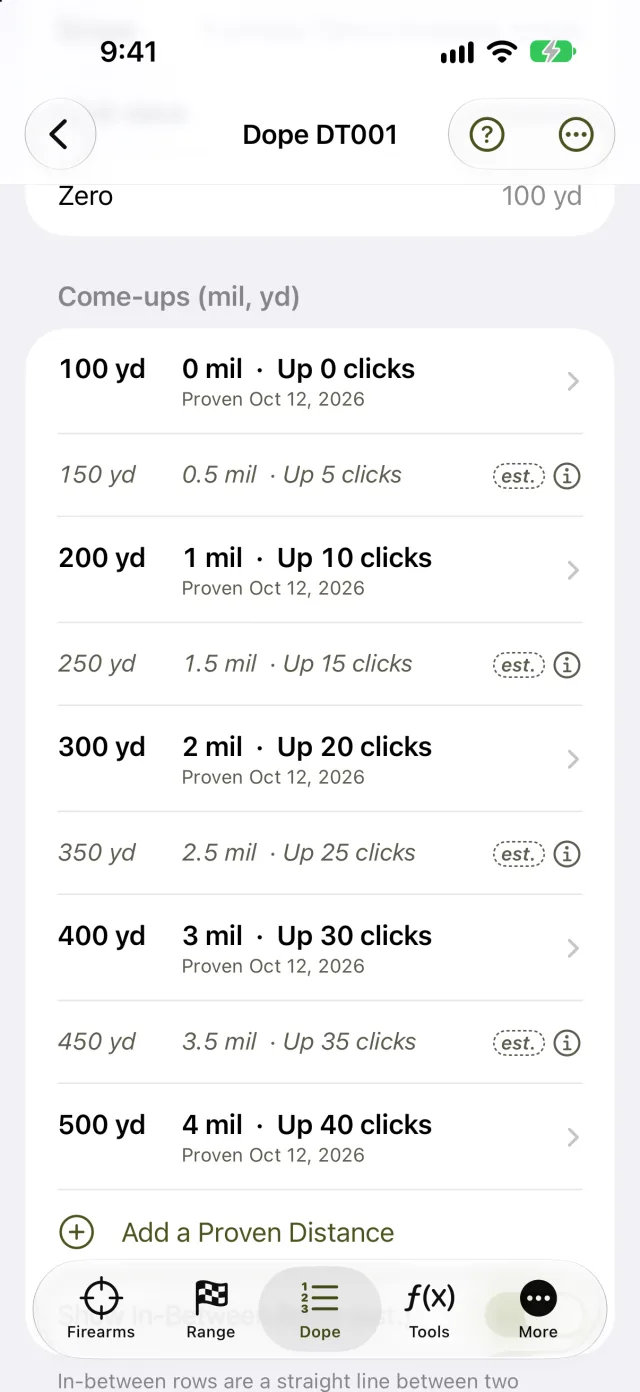
Write down what worked. Tap Add a Proven Distance on the table and type 300 yd and 1.2 mil, or open the group’s record and tap Save as Confirmed Dope. That row is now proven: it carries the date and, if you attach it, the group that showed it. See Add a dope row and Save a group as dope.
-
Print it and take it to the field. Make Dope Card turns the table into a small card for your stock, scope cap or pocket. See Make a dope card.
Why it’s useful
A bullet drops more the farther it flies, so at every distance past the zero the scope needs a different setting. Most shooters keep these numbers on scraps of paper, tape on the stock, or in their head, and lose track of which numbers go with which scope, which ammunition and which barrel. Gun Diary keeps them in one place, with the proof.
Who this helps, and how:
- New gun owners and new long-range shooters: you learn what dope is by building it, one proven distance at a time, and you never have to trust a number you didn’t shoot.
- Hunters: the card in your pocket holds only distances you proved, so the shot at 350 yd uses a number that came from your own rifle and ammunition, not a guess made at home.
- Long-range and PRS-style shooters: every row keeps its date, conditions (temperature, pressure, altitude) and the groups that proved it, so you know how old and how solid each number is.
- Competitors who change ammunition lots: one table per lot, and a quick Duplicate for a New Lot when a new case arrives.
- Anyone who changes scopes or barrels: the old table is marked Earlier setup automatically, so you never carry an out-of-date card. See Earlier setup.
- Collectors with many rifles: each firearm has its own tables, grouped by firearm on the Dope tab.
What each option means
The words Gun Diary uses:
Example
Sam has a “Mountain Rifle” in 6.5 Creedmoor, zeroed at 100 yd, with a scope that clicks 0.1 mil.
- Sam starts a table: Mountain Rifle, the factory 140 grain ammunition Sam shoots, zero 100 yd, come-ups in mil.
- At the range Sam dials and shoots 200 yd (0.4 mil), 300 yd (1.2 mil) and 400 yd (2.0 mil), adding each one when the group lands on the aim.
- The table now shows three proven rows. With Show In-Between Rows (est.) on, it also shows 250 yd: 0.8 mil est. and 350 yd: 1.6 mil est., a straight line halfway between the proven rows. Sam knows those two are not proven yet.
- Sam prints a pocket card for the hunt. Next month Sam proves 350 yd at 1.6 mil, and the card’s 350 yd row turns from est. to proven.
(The numbers are made up for this example. Your rifle’s dope comes only from your own shooting.)
Tips
- Prove distances you might really shoot. A hunter’s card might be 100 to 400 yd every 50; a steel shooter’s every 100 out to 1,000.
- Prove the in-between rows when you can. An est. row is only a line between two proven points; real bullets curve. Shoot it, then add it as proven.
- One table per firearm, ammunition and setup. A different load, a new lot, or a new scope can move the impact. Gun Diary helps with Duplicate for a New Lot and Start a Table for the New Setup.
- Look at the Example table first. The Example Rifle’s table is marked EXAMPLE, NOT REAL DOPE on screen and on every card it prints, so you can’t mistake it for real numbers. See Explore the Example Rifle.
- New to these words? Read Shooting basics for beginners and the glossary.
What it affects
- The Dope tab: every table, grouped by firearm. See The Dope tab.
- The firearm’s dashboard: its Dope row counts the firearm’s tables. See Dope tables.
- Calculators: Holdover from Your Dope, In-Between Rows, Re-Zero Shift, Scaled Wind Holds, Hold-On Distances and Elevation Left read your proven rows. See The Tools tab.
- Dope cards and reports: cards print the rows; the Dope Table report prints the rows with their proof. See Dope table report.
- Hunting: the Quick Hunt Log can record which dope row you used for a shot.
If something goes wrong
- I can’t find a “calculate my dope” button. There isn’t one, on purpose. Gun Diary has no ballistic solver; it keeps what you proved. Shoot the distance, then add the row.
- Some rows are in italic with est. Those are in-between rows, drawn between two proven rows. Turn off Show In-Between Rows (est.) to hide them. See In-between rows.
- My table says Earlier setup. Its scope, mount or barrel is no longer on the firearm. See Earlier setup.
- The Example table’s numbers look odd (0, 1, 2, 3, 4 mil). They are made up on purpose and marked EXAMPLE, NOT REAL DOPE. Never shoot with them.
Related
- Next: The Dope tab, then New dope table.
- Add a dope row, Save a group as dope, In-between rows, Make a dope card, About estimates.
- Learning path: Building your dope card.
- Words used here: dope, come-up, hold, click value, mil, MOA, zero distance, turret, dope card.
Gun Diary keeps records you enter and does arithmetic on them. It never predicts a trajectory; confirm every hold by shooting it at the range, and always know your target and what is beyond it.
Still stuck? In the app, open More > Help > Contact Support, or More > Settings > Support, which also has Send Error Log (the error log helps us find the problem), or email contact@setriksoftware.com. You can also browse the Help Center or the messages the app can show.