
A group record
Everything Gun Diary knows about one group in one place: size in inches, mil and MOA, its offset from your point of aim with the clicks to correct it, shot statistics, velocities, weather, the target it's on, and the actions to edit, measure, lock or delete it.
The Group screen is a group’s full record. Above what you typed, it does the arithmetic for you: the size in mil and MOA at the group’s distance, the offset from your point of aim in several units, and the turret clicks that would move the group onto your aim point. From here you can edit, measure, add shot statistics, save the result as confirmed dope, lock or delete the group.
Steps
-
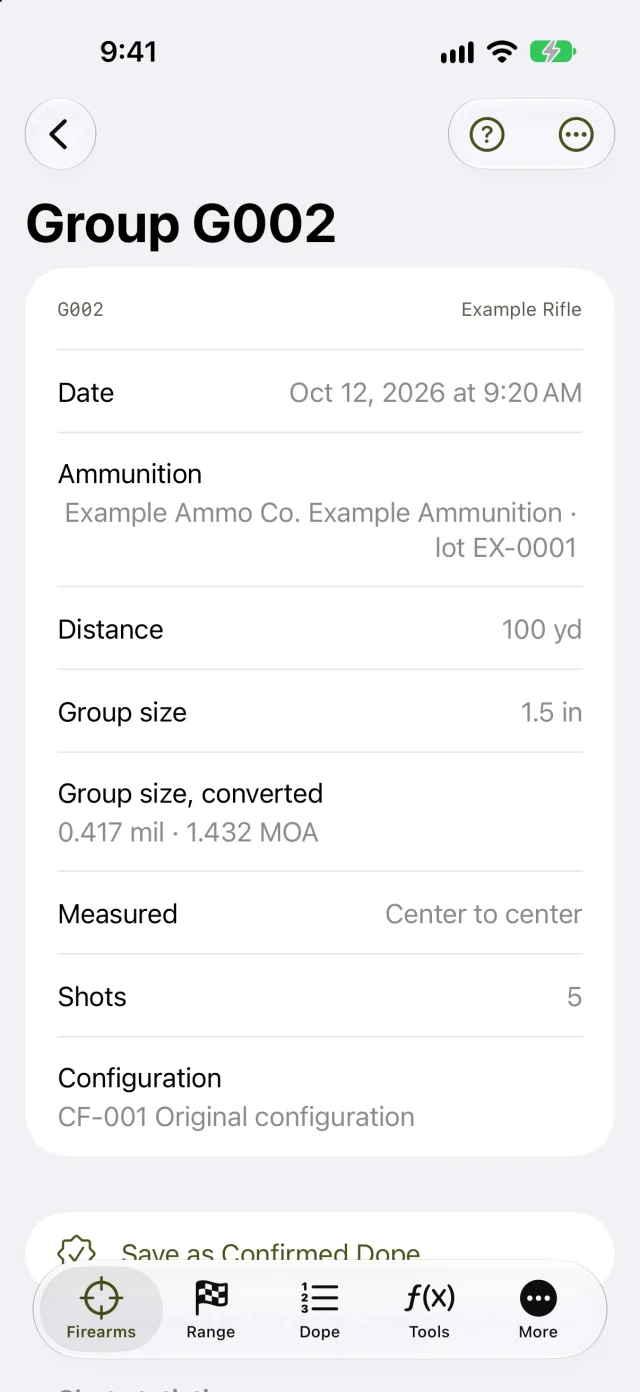
Open a group: tap it in a session, in a firearm’s Shooting Diary or Group History, on a target, in Drafts or in Search. The screen’s title is Group and its code, like “Group G002”.
-
Read the top section: the group’s code, a lock if it’s locked, “Draft” if it isn’t finished, and the firearm’s name, then its values.
-
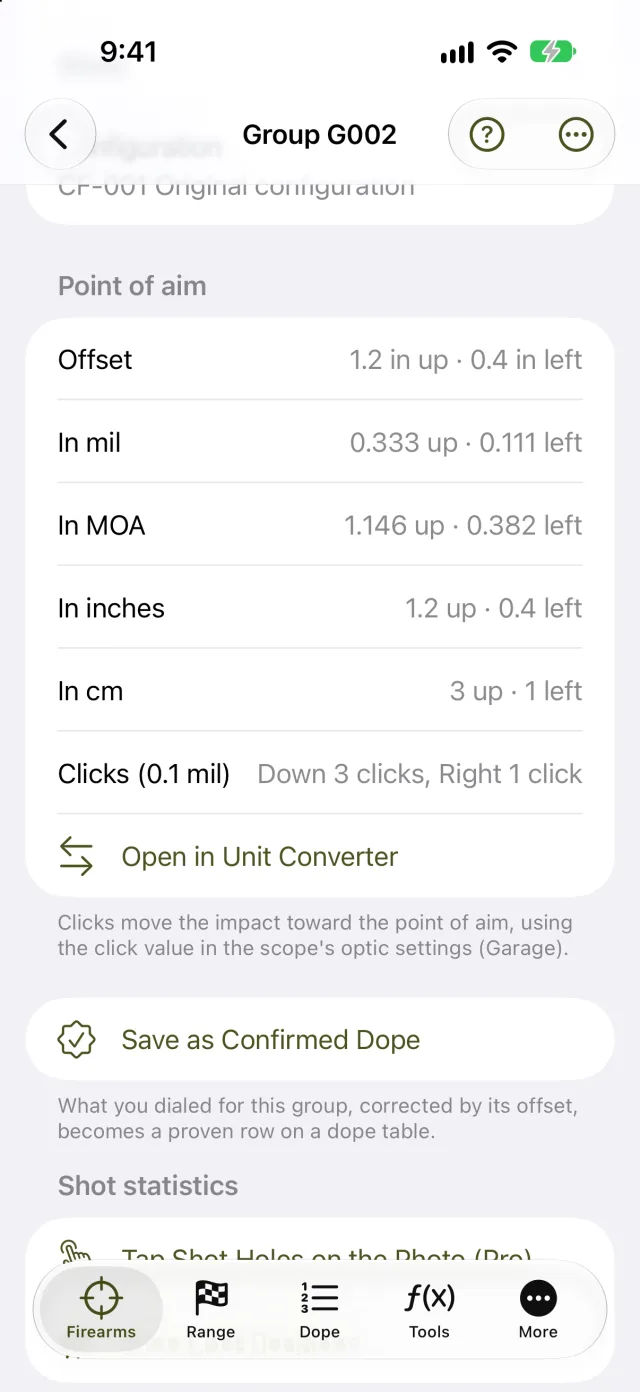
If the group has an offset from the point of aim, the Point of aim section shows it in every unit and in clicks. Tap Open in Unit Converter to work with those numbers. Tap Done to come back.
-
To turn this group into a proven row on a dope table, tap Save as Confirmed Dope. See Save a group as dope.
- Under Shot statistics, tap Type Shot Positions (free) or Tap Shot Holes on the Photo (Pro) for mean radius and spreads. See Shot holes and shot positions.
- Scroll on for the Links (the ammunition and the session), the chronograph readings, the weather, the target the group is marked on (On target and the target’s code), Photos and Notes. Tap a link or the target picture to open it; tap a photo to see it full screen.
-
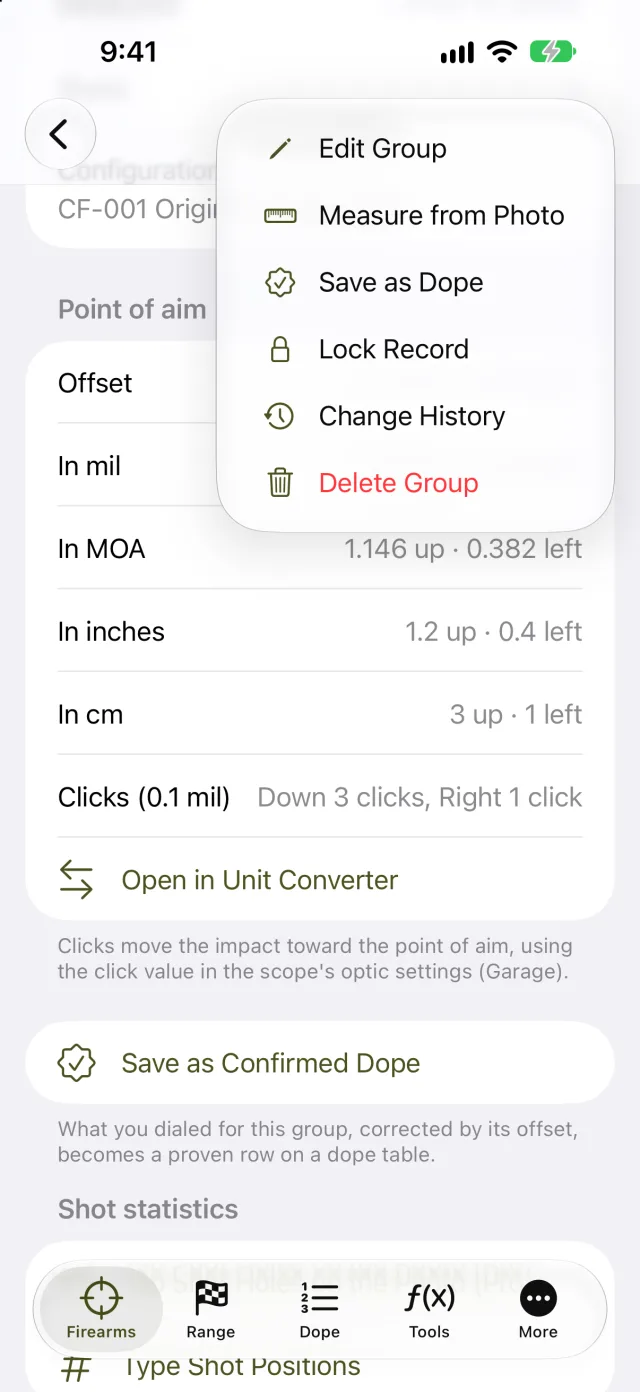
Tap ••• for the actions: Edit Group, Measure from Photo (when the group or its target has a photo), Save as Dope, Lock Record (or Unlock), Change History and Delete Group.
Why it’s useful
A group is more than its size. The same 1.5 in group means 1.4 MOA at 100 yd and well under 1 MOA at 200 yd; the same 1.2 in miss means a few clicks at one distance and many at another. This screen works all of that out from what you typed, so you never have to convert in your head at the bench or at the kitchen table.
Who uses it, and how:
- New shooters sighting in a scope: the Point of aim section shows which way to turn each turret and by how many clicks, using the click value in the scope’s optic settings.
- Shooters comparing ammunition: Group size, converted puts every group in mil and MOA, so groups shot at different distances compare fairly.
- Long-range shooters building dope: Save as Confirmed Dope turns a group shot at a known distance, with what you dialed and its offset, into a proven row on a dope table. Nothing is predicted; the row is what this group proved.
- Measuring from photos: measurements from photos are listed apart from what you typed, marked “unverified” until you check them against the paper.
- Anyone with a chronograph: the average, extreme spread and standard deviation of the group’s velocities sit next to its size.
- Hunters and collectors keeping records: a locked group can’t be edited or deleted by accident, and Change History shows every change made after it was finished.
What each option means
Top section | Row | What it shows | |—|—| | Date | When the group was shot | | Ammunition | The ammunition and its lot, or “No ammunition recorded” | | Distance | Distance and unit | | Group size | The size and unit you typed or saved from a photo | | Group size, converted | A size in inches or mm, shown in mil and MOA at the group’s distance; a size in mil or MOA, shown in inches, mm and the other angle unit. Shooter’s MOA (IPHY) is added when Show shooter’s MOA (IPHY) is on in Unit Converter. Shown only when it can be worked out | | Measured | Center to center, Edge to edge or Other (blank when there’s no size) | | Shots | Number of shots | | Configuration | The firearm’s setup on the group’s date, like “CF-001 Original configuration” | | From photo / From photo (unverified) | Each size measured with Measure from Photo. Mark as Checked Against the Target under an unverified one says you compared it with the paper, and makes it the group’s size |
Point of aim (only when the group has an offset) | Row | What it shows | |—|—| | Offset | As entered, like “1.2 in up · 0.6 in left” | | In mil, In MOA (and In IPHY when that’s turned on) | The offset as an angle at the group’s distance | | In inches, In cm | The offset as a length at the group’s distance | | Clicks | The turret clicks that move the impact toward the point of aim, for the click value in the optic settings of the scope on the group’s configuration (shown in the row’s name, like “Clicks (0.1 mil)”). “No change (under half a click)” when both directions round to zero. With no optic settings the row reads “Add the scope’s optic settings” and the footer says “No click value: add the scope’s optic settings in the Garage to see clicks.” | | Open in Unit Converter | Opens Unit Converter with this group’s numbers filled in |
Other sections | Item | What it does | |—|—| | Save as Confirmed Dope | Opens the save-as-dope sheet. Without a firearm or a distance, the tap says what’s missing at Distance, with an Edit Group button | | Shot statistics | Extreme spread, Mean radius, Vertical spread and Horizontal spread from each shot’s position, and where they came from (the photo or typed positions) | | Links | The ammunition’s record and the session | | Chronograph | Shots recorded, Average, Extreme spread, Standard deviation, and Each shot (tap to open the list) | | Weather (this group) / Weather (from the session) | The group’s own weather, or the session’s when the group has none | | On target | The target photo with this group’s box; tap to open the target | | Photos, Notes | The group’s own photos and notes |
The ••• menu | Action | What it does | |—|—| | Edit Group | Opens the form. See Record a group | | Measure from Photo | Pro. Measures the size (and optionally the offset) from the photo. Only shown when the group or its target has a photo | | Save as Dope | Same as Save as Confirmed Dope | | Lock Record / Unlock | Locking stops editing, measuring and deleting. Unlocking asks first and is noted in Change History | | Change History | Every change to the finished group: what, from what, to what, when | | Delete Group | Moves it to Recently Deleted for 30 days |
Example
Group G012 on the Mountain Rifle: 0.9 in at 100 yd, 5 shots, center to center, with an offset of 1.2 in up and 0.6 in left. The scope’s optic settings say 0.1 mil per click.
- Group size, converted: 0.25 mil · 0.859 MOA.
- Point of aim: Offset 1.2 in up · 0.6 in left; In mil 0.333 up · 0.167 left; In MOA 1.146 up · 0.573 left; In inches 1.2 up · 0.6 left; In cm 3 up · 1.5 left; Clicks (0.1 mil) Down 3 clicks, Right 2 clicks.
The clicks move the impact toward your aim point: the group was high and left, so you dial down and right. After dialing, you shoot a confirming group and record it; once it’s centered, it’s a good candidate for Save as Confirmed Dope.
Tips
- Check the click value first. The Clicks row uses the click value in the optic settings of the scope the group was shot with (its configuration). If your scope is 1/4 MOA, set 0.25 MOA there once; every group, Zero Check and dope card then uses it.
- Add the distance. Without it, a size in inches can’t be shown in mil or MOA, and the offset can’t become clicks.
- Measure the offset from the group’s center, not from the nearest hole.
- Lock groups you’ll rely on, like the group behind a dope row or the proof for a zero, so a stray tap can’t change them.
- Tap the target picture to see the whole sheet and the other groups on it.
What it affects
- Mark as Checked Against the Target: makes that photo measurement the group’s Group size, sets Measured to Center to center, and is listed in Change History on a finished group.
- Save as Confirmed Dope: adds or confirms a row on a dope table, linked back to this group. The group itself doesn’t change.
- Lock Record: the group can’t be edited, measured, given shot statistics or deleted until you unlock it. Reports and exports still include it.
- Delete Group: the group leaves the session, Group History and reports, and goes to Recently Deleted for 30 days. The session’s round count doesn’t change. A region marking it on a target stays, without a group.
- Viewing this screen changes nothing.
If something goes wrong
- Edit Group, Measure from Photo and Delete Group are greyed out. The group is locked (“This group is locked, so it can’t be edited, measured or deleted. Unlock it from ••• (the unlock is noted in Change History).”). Tap ••• > Unlock, then Unlock again.
- There’s no Point of aim section. The group has no offset. Add one in Edit Group under Point of aim (optional), or with step 3 of Measure from Photo.
- “Add the group’s distance to see this offset in mil, MOA and clicks.” The offset is a length; add the group’s Distance.
- “Add the group’s distance first (Edit Group)” after tapping Save as Confirmed Dope. The group has no distance. Tap Edit Group (right under the message) and add it.
- The clicks look wrong. Check the click value shown in the row’s name, and fix it in the scope’s optic settings (Garage). Changed scopes with New Configuration? The new scope starts with a copy of the old one’s settings; change them to match the new scope.
- The Clicks row says “Add the scope’s optic settings”. The group’s configuration has no scope with a click value. Add it in the Garage: the scope > Optic settings.
- There’s no Measure from Photo in the menu. Neither the group nor its target has a photo. Add one in Edit Group under Photos, or mark the group on a target photo.
- Measure from Photo or Tap Shot Holes opens the Pro screen. Tapping on photos is part of Gun Diary Pro. Typing the size or the shot positions is always free.
- I deleted a group by mistake. More > Recently Deleted, find it and restore it within 30 days.
Related
- Record a group, Measure a group from a photo, Shot holes and shot positions.
- Save a group as dope, Unit Converter, Sight clicks calculator.
- A target and its groups, Change history and locking, Recently Deleted.
- Learning paths: Sighting in a new scope, Building your dope card.
- Words used here: group, point of aim, point of impact, MOA, mil, IPHY, click value, dope, mean radius, extreme spread, standard deviation, configuration.
Gun Diary keeps records you enter and does arithmetic on them. It never predicts a trajectory; confirm every hold by shooting it at the range, and always know your target and what is beyond it.
Still stuck? In the app, open More > Help > Contact Support, or More > Settings > Support, which also has Send Error Log (the error log helps us find the problem), or email contact@setriksoftware.com. You can also browse the Help Center or the messages the app can show.