
Edit, archive or delete a firearm
Change a firearm's name, kind, photo, maker, cartridge, serial number, purchase details or starting count; archive a gun you no longer shoot; or delete one, with a two-step check and 30 days to change your mind.
Everything you typed when you added a firearm can be changed later, and nothing else in the diary breaks when you do: sessions, groups, dope and Garage records stay with the gun. When a gun is no longer shot you can archive it, and when a record was made by mistake you can delete it. Deleting a firearm takes two deliberate steps and waits 30 days in Recently Deleted.
Steps
Edit a firearm
- Open the firearm from the Firearms tab.
-
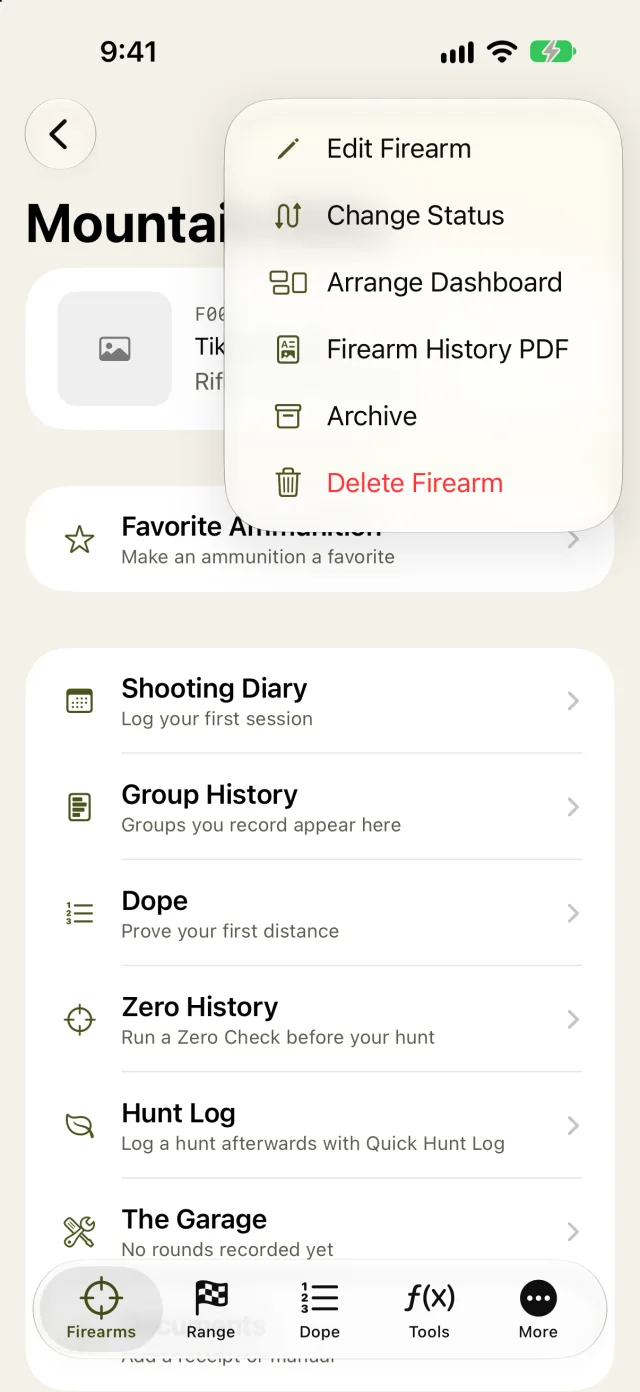
Tap ••• at the top right, then Edit Firearm.
-
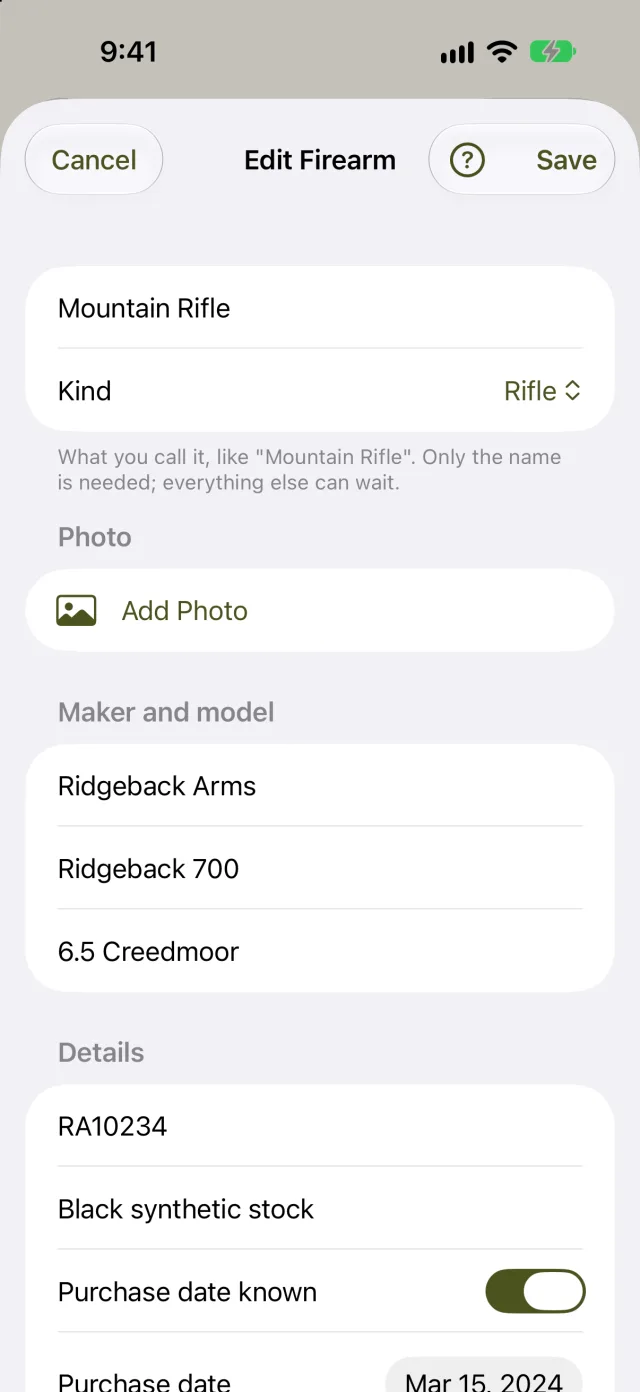
Change any field: Name (required), Kind, the photo (Change Photo or Remove Photo), Maker, Model, the cartridge or gauge, the Details section, Rounds already fired or Notes. Every field is the same as on Add Firearm.
-
Tap Save, or Cancel to leave it as it was.
Archive a firearm
- Open the firearm, tap •••, then Archive.
- The dashboard header shows “Archived”, and the gun leaves the Firearms tab’s main list.
- To see archived guns, turn on Show archived firearms at the bottom of the Firearms tab (it appears once something is archived). The screen title changes to Archived Firearms.
- To bring a gun back, open it and tap ••• > Unarchive.
Delete a firearm
- Open the firearm, tap •••, then Delete Firearm.
-
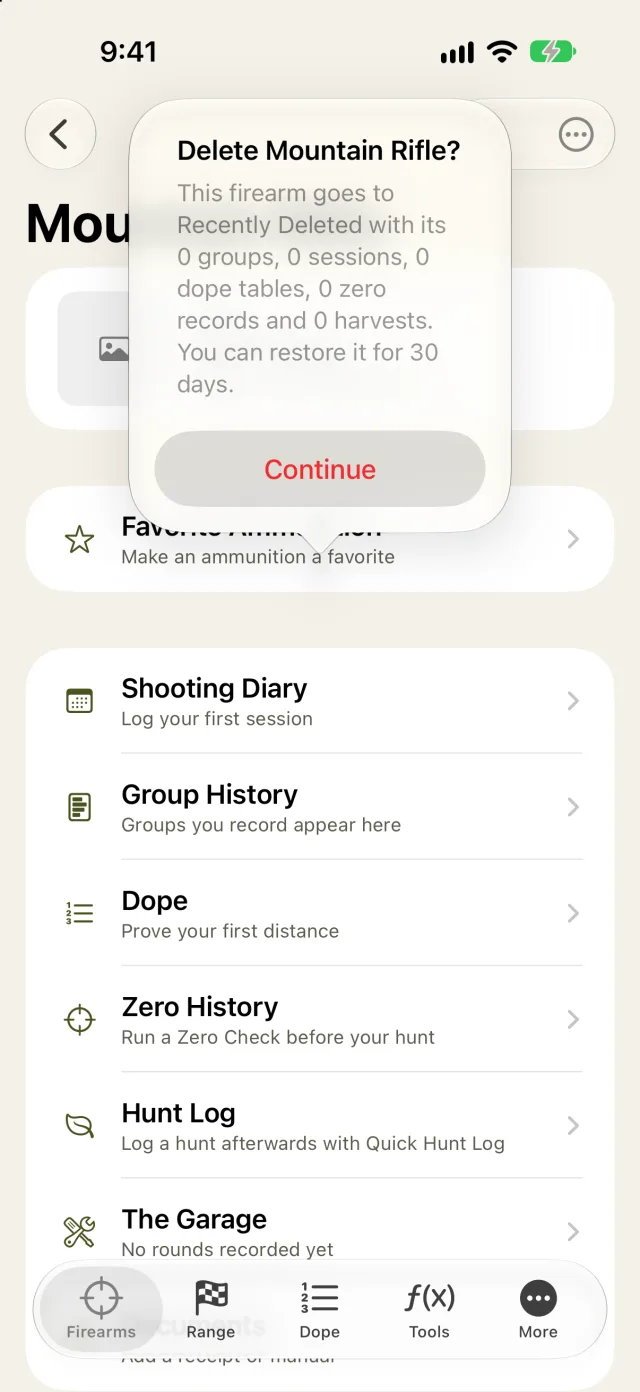
A message titled “Delete Mountain Rifle?” (with your firearm’s name) says exactly what goes with it, for example “This firearm goes to Recently Deleted with its 12 groups, 5 sessions, 1 dope table, 2 zero records and 0 harvests. You can restore it for 30 days.” Tap Continue, or tap outside the message to keep the gun (this message has no Cancel button).
-
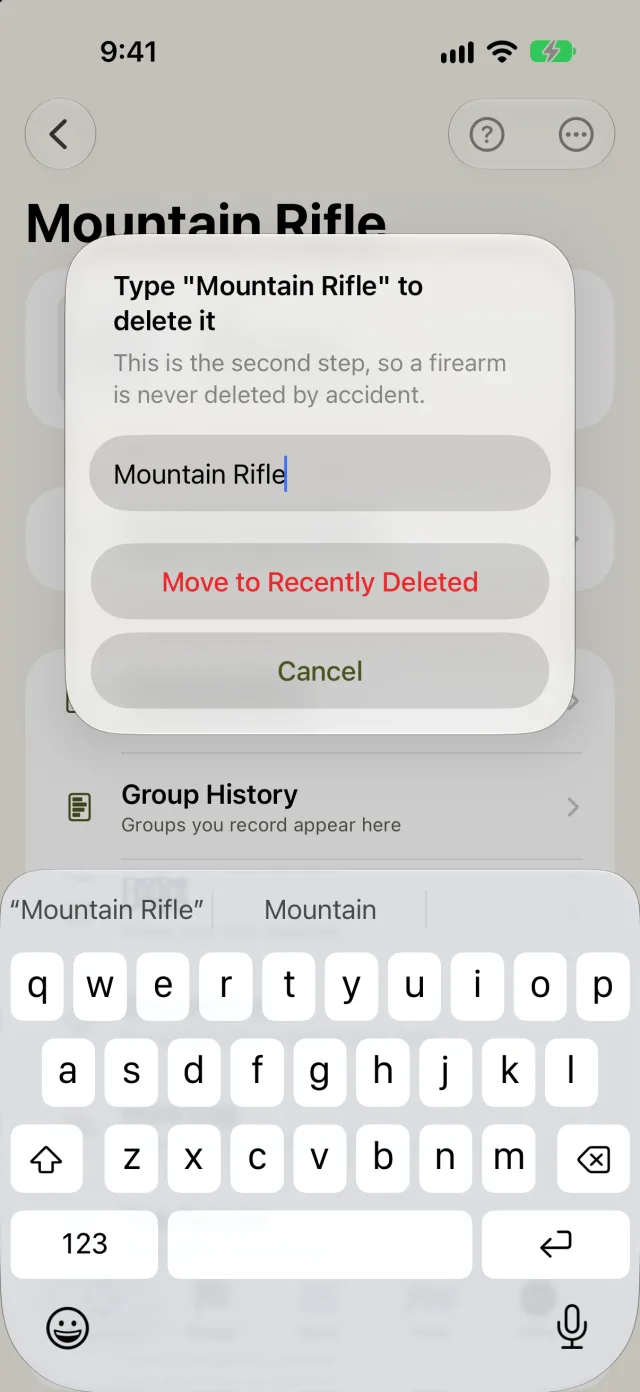
The second step asks you to type the firearm’s name. Type it (capitals don’t matter) and tap Move to Recently Deleted. If the name doesn’t match, nothing is deleted and the box opens again saying “That didn’t match. Type “Mountain Rifle” exactly to delete it” (with your firearm’s name). Tap Cancel to keep the gun.
-
You’re back on the Firearms tab. The gun and its records wait in More > Recently Deleted for 30 days.
Bring back a deleted firearm
- Tap More > Recently Deleted.
- Find the firearm under Firearms, swipe right on it and tap Restore.
Why it’s useful
Records outlive the details you knew on day one. You find the serial number on the receipt a week later, the insurer asks for a current value, a rifle is rechambered and its cartridge changes, or you simply want a better name. Editing in place keeps every session, group and dope table attached, so you never start over.
Who uses it, and how:
- New gun owners add the gun with a name only, then come back to fill in the maker, serial number and photo when they have them.
- Collectors update Insured value each year so the collection report matches the policy.
- Hunters and shooters with a gun they’ve put away archive it: it’s out of the daily list but every record is still there when they take it out again.
- Anyone who made a test firearm or a duplicate by mistake deletes it, knowing it waits 30 days in Recently Deleted.
- Families keeping records of inherited guns archive the ones nobody shoots, keeping the history with the photo and marks.
Archive or change the status? Archive is for a gun you still own but don’t use. When a gun leaves your hands (sold, traded, given away, lost or stolen), use Change Status instead, so the record says where it went.
What each option means
What goes with a deleted firearm: its groups, its sessions, dope tables, zero records and harvests, as the message lists, plus its Garage records. Restoring the firearm brings them all back.
Example
The Mountain Rifle (F002) was added with only a name in January. In March you find the receipt.
- Open Mountain Rifle > ••• > Edit Firearm.
- Serial number: RA10234. Purchase date known on, Purchase date May 6, 2023. Purchase price: 1249.99. Bought from: Valley Sporting Goods.
- Save. The lost or stolen report‘s checklist no longer says “Serial number is empty”.
In October you buy a new rifle and the old .243 you used for coyotes now stays in the safe and is never shot. Open it > ••• > Archive. The Firearms tab now counts one firearm less; turning on Show archived firearms lists the .243 with all its sessions.
Tips
- Rename freely. Codes (F002) never change, and every record points at the gun, not the name.
- Changing Kind to Shotgun shows the Patterns section on the dashboard and changes the cartridge field to Gauge (like 12 ga). What you typed is kept.
- Changing the starting count updates the counters at once. For rounds you fired without a session, use an adjustment instead. See Round counts.
- Archive instead of delete when in doubt. Archive never loses anything.
- Make a backup before deleting a gun with years of records. See Back up and restore.
What it affects
- Everywhere the gun’s name shows (cards, pickers, reports, dope cards): the new name, at once.
- The free version: archived firearms still count toward the one firearm the free diary holds; a deleted firearm doesn’t. See Free and Pro.
- Recently Deleted: a deleted firearm is listed under Firearms with the days left, then removed for good after 30 days.
- Sync and backups: edits sync to your other devices with iCloud on. Backups and Export All Data leave out firearms in Recently Deleted.
If something goes wrong
- “That didn’t match. Type “…” exactly to delete it”. The typed name doesn’t match the firearm’s name. Check spelling and spaces inside the name; capitals and spaces at the ends don’t matter.
- I deleted a gun by mistake. More > Recently Deleted, swipe right on it, tap Restore within 30 days. After 30 days only a backup made before the delete can bring it back.
- My archived gun disappeared. It’s hidden, not gone: turn on Show archived firearms on the Firearms tab.
- The Pro screen opened instead of a PDF. The Firearm History PDF is part of Pro. The lost or stolen report is free. See Free and Pro.
- I can’t add another gun after archiving one. Archived guns count toward the free diary’s one firearm.
Related
- Add a firearm, The firearm dashboard, Change a firearm’s status.
- Recently Deleted and Back up and restore.
- See also the learning path Keeping your collection’s records.
- Words used here: code, archive, Recently Deleted.
Still stuck? In the app, open More > Help > Contact Support, or More > Settings > Support, which also has Send Error Log (the error log helps us find the problem), or email contact@setriksoftware.com. You can also browse the Help Center or the messages the app can show.