
Safety observations
Keep a record of malfunctions, damaged parts, ammunition problems or anything unexpected with a firearm, linked to the session, group and ammunition lot it happened with, with photos, files and a follow-up status.
Safety Observations is a firearm’s record of things that went wrong or looked wrong: a malfunction, a damaged or worn part, a problem with a box of ammunition, anything unexpected. Each observation has a date, what happened, a follow-up status (Open, Awaiting review, Resolved), links to the session, group and ammunition lot it happened with, notes, photos and files. It’s a record for you, not a safety check: Gun Diary doesn’t judge whether a gun or ammunition is safe.
Steps
Add an observation
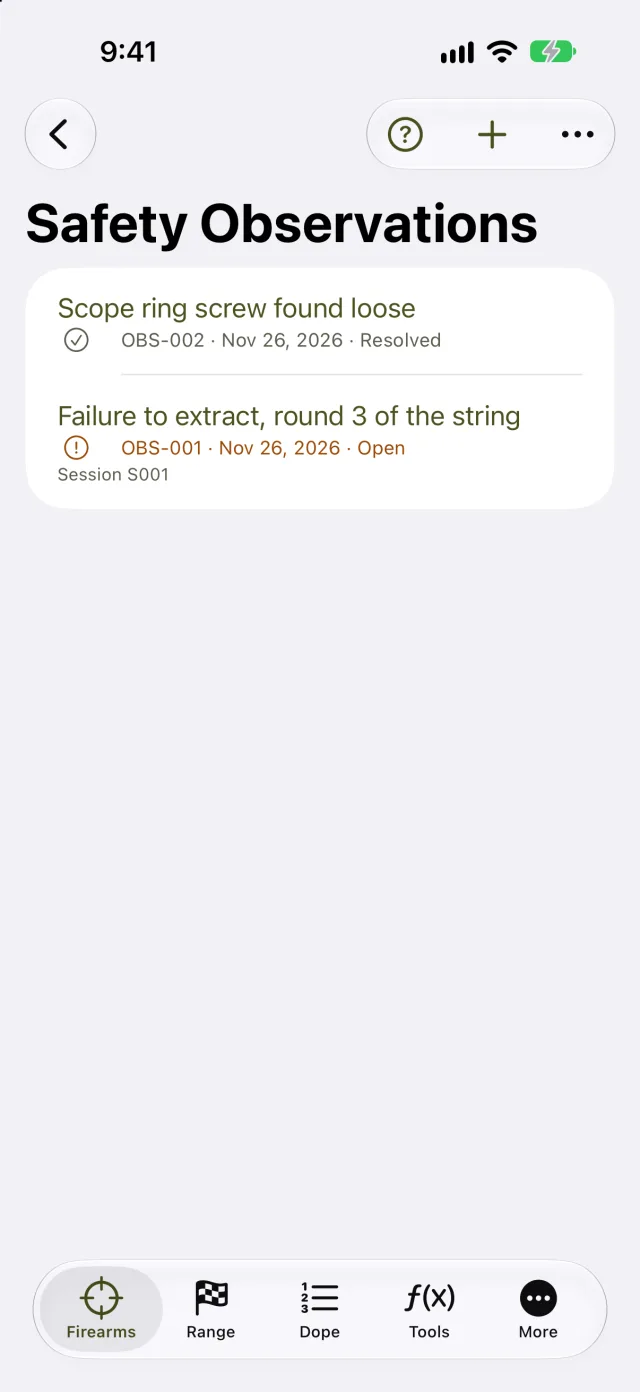
- Open the firearm > The Garage > Add Safety Observation. Or The Garage > Safety Observations > Add Observation (+ at the top right).
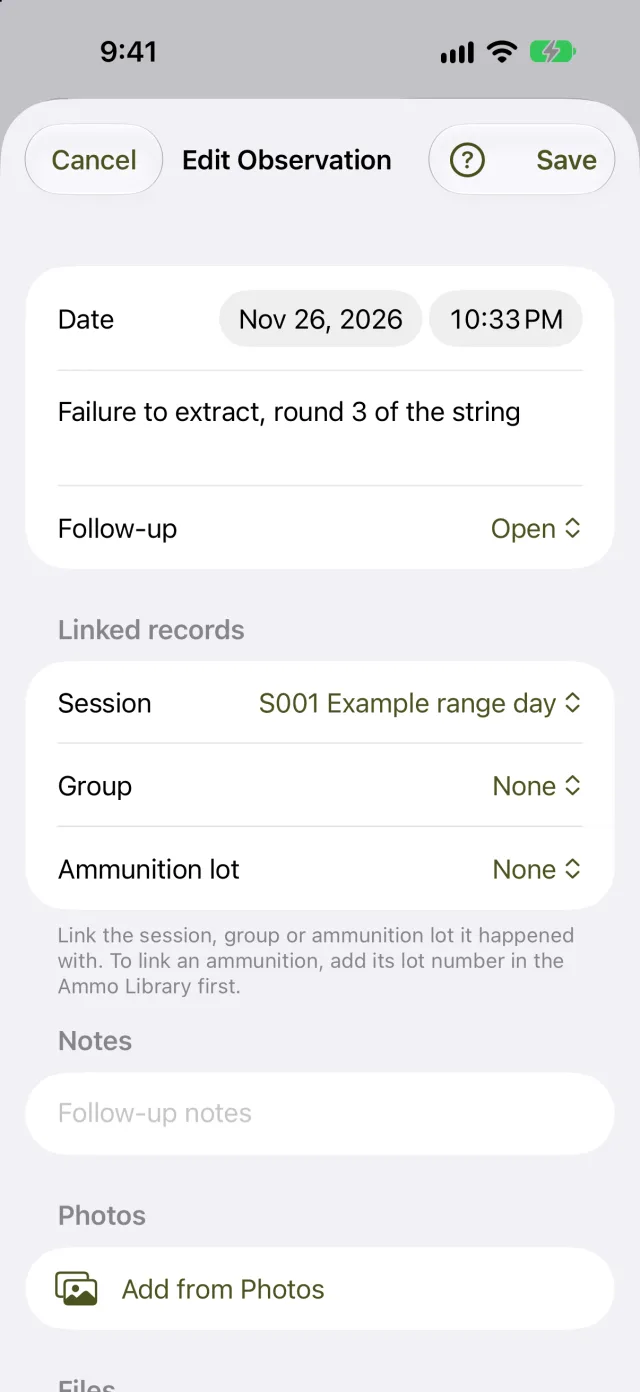
- Set the Date (and time) it happened.
- Describe it under What happened, like “Failure to extract, round 3 of the string“.
-
Pick a Follow-up status: Open (still a question), Awaiting review (waiting on a gunsmith, the maker or the ammunition company) or Resolved.
-
Under Linked records, pick the Session it happened in, then the Group (the list shows that session’s groups), and the Ammunition lot. Each can stay None.
- Add Follow-up notes as things develop.
- Under Photos, tap Take Photo or Add from Photos (the damaged case, the part). Under Files, tap Attach File for a report or letter.
- Tap Save.
Follow up and resolve
- Tap the observation in the list to open Edit Observation.
- Add to Follow-up notes and change Follow-up to Awaiting review or Resolved.
- Tap Save. Resolved observations show in grey with a check mark.
Find or delete observations
- In Safety Observations, newest first. To see one status only, open the menu at the top right and pick it under Status (All, Open, Awaiting review, Resolved).
- To delete one, open it, tap Delete Observation, then Move to Recently Deleted. You can restore it for 30 days.
Why it’s useful
A malfunction that happens once is a curiosity; the same one three times with the same lot of ammunition is a pattern. Writing it down with the date, the session, the group and the lot is how you see the pattern, explain it to a gunsmith or a manufacturer, and know whether it was ever fixed. Memory fades; a record with photos doesn’t.
Who uses it, and how:
- Handgun and carry owners log every stoppage with the magazine and ammunition, to decide whether a gun or a load is reliable enough for them.
- Competitors log malfunctions in matches and see whether they follow a part or a lot.
- Hunters log a misfire or a scope that lost zero, and resolve it before the season.
- Shooters who find an ammunition problem (a split case, a hard primer, a squib) link the lot, photograph it and keep the record for the maker or a recall.
- New gun owners note anything that felt wrong and resolve it with the shop or an instructor.
- Collectors record damage found on a gun, with photos, for insurance or a restorer.
Gun Diary keeps what you enter. It doesn’t decide whether a gun or ammunition is safe to use; when in doubt, stop and have the gun checked by a qualified gunsmith, and contact the maker about ammunition.
What each option means
Linking ammunition: observations link to a lot, not just an ammunition, so you know which boxes were involved. The footer says: “Link the session, group or ammunition lot it happened with. To link an ammunition, add its lot number in the Ammo Library first.” See Lots.
In the list: each row shows what happened, then the code (OBS-001…), date and status, then the linked session, group and lot. With none: “Nothing recorded” and “Log malfunctions, damaged components or anything unexpected. This is a record for you, not a safety check.”
Example
At a range session on June 14 (S021), the Mountain Rifle fails to extract twice in group G088, both with Prairie Ammo Co. 140 gr, lot 2231.
- The Garage > Add Safety Observation. Date: June 14. What happened: “Failure to extract twice, a case stuck in the chamber, stiff bolt lift”. Follow-up: Open.
- Session: S021. Group: G088. Ammunition lot: Prairie Ammo Co. 140 gr · lot 2231.
- Take Photo of the stuck case and the fired cases. Save. It’s OBS-001.
- You stop shooting that lot and send photos to the maker. Open OBS-001, Follow-up: Awaiting review, Follow-up notes: “Emailed maker June 15”. Save.
- In July the maker replaces the lot and a gunsmith checks the rifle. Follow-up: Resolved, add the gunsmith’s report with Attach File. Save.
Tips
- Gun Diary keeps the record; it doesn’t diagnose. If something seems wrong with the gun or the ammunition, stop shooting it and take it to a gunsmith or the maker.
- Write it down at the range, even a line. Add the details and photos later.
- Keep the cases or parts and photograph them next to a ruler.
- Link the lot, not just the ammunition: problems often belong to one lot.
- Record the fix as a Repair or Professional service in the Maintenance log, and mention it in the observation’s notes.
- Use Open and Resolved honestly. The Open filter is your to-do list.
What it affects
- The Garage: the Safety Observations row shows how many are recorded.
- Linked records: the session, group and lot are named on the observation; nothing about them changes.
- Attached files are stored in the Reference Library and linked to the gun’s Documents too. See Firearm documents.
- Reports and export: the safety observations report (PDF Pro, CSV free), backups and Export All Data. See Safety observations report.
If something goes wrong
- The lot I want isn’t in the list. Only factory ammunition lots are offered. Add the lot number to the ammunition in the Ammo Library first. See Lots.
- The group I want isn’t in the list. With a session picked, only that session’s groups show. Set Session to None to see all of this gun’s groups.
- An old session isn’t in the list. The list shows this gun’s latest 100 sessions.
- I deleted an observation by mistake. More > Recently Deleted, swipe right on it, tap Restore within 30 days.
Related
- The Garage, Maintenance log, Lots, A session, A group record, Safety observations report.
- See also the learning path Testing factory ammo.
- Words used here: safety observation, lot, malfunction.
Still stuck? In the app, open More > Help > Contact Support, or More > Settings > Support, which also has Send Error Log (the error log helps us find the problem), or email contact@setriksoftware.com. You can also browse the Help Center or the messages the app can show.