
Reports, backup and exportGun Diary Pro
Firearm history report
Print one firearm's whole story: its status, round counts, every configuration with its equipment, barrels, maintenance, sessions and safety observations, for a date range you choose.
The Firearm History report prints one firearm’s whole story on a few pages: its kind and status, round counts, every configuration with its equipment, barrels, maintenance, sessions and safety observations. It’s the report for a buyer, a gunsmith, an heir or your own files. It’s a PDF, part of Gun Diary Pro.
Steps
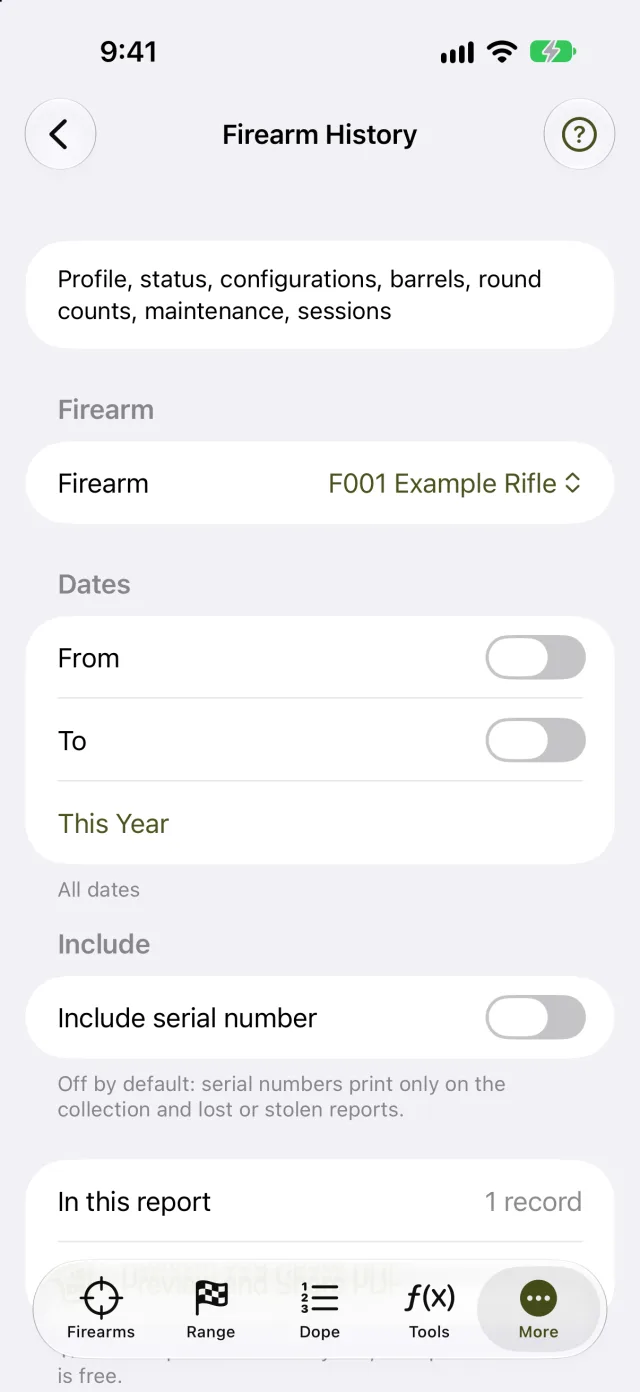
- Tap More > Reports > Firearm History (under Firearm and Garage).
- Pick the firearm next to Firearm.
- Under Dates, leave From and To off for its whole life, or switch them on (or tap This Year) to limit the maintenance, sessions and observations to those dates.
- Under Include, switch Include serial number on only if you want the serial printed (it’s off by default).
-
Tap Preview and Share PDF, check the preview, then Share to print, save or send it.
Quicker: on the firearm’s dashboard, tap the menu at the top right > Firearm History PDF, or tap Firearm History PDF in its Reports card. That makes the report straight away for all dates, without the serial number.
Why it’s useful
A gun’s value and trustworthiness depend on its history: how many rounds, which barrel, what work was done, whether anything went wrong. A dated report that lists it all, built from records made at the time, answers those questions better than memory.
Who uses it, and how:
- Selling or trading a gun: hand the buyer its history with the serial left out until the sale.
- Passing a gun down: the next owner gets its setups, barrels, round count and care.
- Visiting a gunsmith: the smith sees the current setup, barrel age and past work at a glance.
- New gun owners see the whole first year of a gun on paper: every session, cleaning and change.
- Long-range shooters keep a record of which scope and mounts were on the rifle and when.
- Collectors file it with the collection report for each important piece.
What’s on the Firearm History screen
There’s no spreadsheet for this report; the spreadsheets of its parts are in Round count report, Maintenance report and Export all your data.
What the PDF prints
- The firearm’s name as the title, with its code, maker, model and cartridge; when it was prepared and the date range.
- Serial number (when switched on), Kind and Status.
- Round counts: Lifetime, Current barrel, Since cleaning.
- Configurations: each one’s code, label and start date, with its equipment (“Scope: Summit Optics 4-16×44″), or “No equipment recorded”.
- Barrels: code, maker and twist, installed and removed dates (“Current” for the fitted one).
- Maintenance: date, kind and what was done.
- Sessions: date, session code and name, ammunition and rounds.
- Safety observations: date, observation and status.
Barrels, Maintenance, Sessions and Safety observations are left out when they have nothing in them. The file is named like “Firearm history – Mountain Rifle.pdf”.
Example
You’re selling your Mountain Rifle and the buyer asks how it’s been used.
- More > Reports > Firearm History, Firearm: F002 Mountain Rifle. Dates off; Include serial number off.
- Preview and Share PDF. The report shows Kind: Rifle, Status: Active; Round counts: Lifetime 1,455, Current barrel 455, Since cleaning 43; two configurations (CF-001 “Factory” from Mar 3, 2024, and CF-002 “New scope” from Apr 12, 2026); barrels BL001 (removed Aug 30, 2026) and BL002 (Current); four maintenance entries; 22 sessions.
- Share > Mail to the buyer. After the sale you mark it Sold on Change Status.
Tips
- Leave the serial off for anything you send before a sale is final.
- Use dates for a season summary: This Year gives this year’s maintenance and sessions with the full setup history.
- Record equipment changes as you make them so the configurations tell the true story. See Record an equipment change.
- Make one before and after big work (a new barrel, a rebarrel, a scope change) to keep a dated snapshot.
What it affects
Nothing in your diary. The report reads the firearm’s records and builds a new PDF each time.
If something goes wrong
- The Pro screen opens. This PDF is part of Pro. Its records are free in Export all your data.
- “Pick a firearm for this report”. No firearm is picked. Pick one next to Firearm.
- A section is missing. It has nothing in it (or nothing in the dates you picked). Turn From and To off.
- The serial didn’t print. Switch Include serial number on (on the options screen in Reports; the dashboard’s button never prints it), and check the serial is recorded on Edit a firearm.
- Round counts look wrong. They come from your round events. See Round counts.
Related
- Next: Round count report and Maintenance report: the details, with spreadsheets.
- Firearm dashboard: the menu and the Reports card.
- Specs, equipment and configurations, Barrel history, Maintenance log.
- Save and share PDF reports.
- Words used here: configuration, round count, serial number.
Still stuck? In the app, open More > Help > Contact Support, or More > Settings > Support, which also has Send Error Log (the error log helps us find the problem), or email contact@setriksoftware.com. You can also browse the Help Center or the messages the app can show.