
Start a new dope table
Start a dope table for one firearm, one ammunition (and lot) and the firearm's current setup, with its zero and the units you dial in.
A dope table holds the come-ups you proved for one firearm, one ammunition and one setup. This page shows how to start one and what each field means. You can also skip this screen: saving a group as dope can start a table for you (see Save a group as dope).
Steps
-
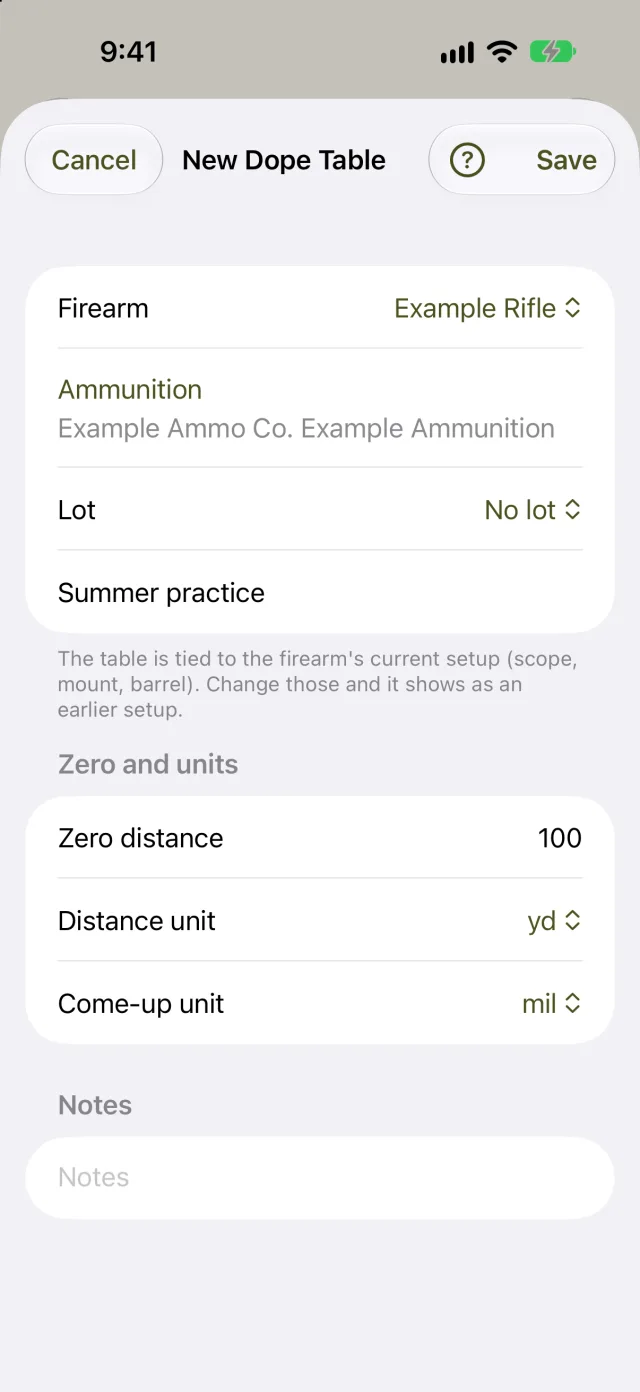
On the Dope tab, tap New Dope Table. (Or, on a firearm’s Dope list, tap New Dope Table at the top right; the firearm is then already picked.)
-
Firearm: pick the firearm. If you keep only one firearm, it’s picked for you. Archived firearms aren’t listed.
- Ammunition: tap it and pick the factory ammunition from your Ammo Library (or add a new one there). When you started from a firearm, Gun Diary fills in the ammunition that firearm shot last; change it if needed. See Pick an ammunition.
- Lot: shown when that ammunition has lots. Pick the lot, or No lot. See Lots.
- Name (optional): a short name such as “Hunting load” or “Suppressed”. Without a name, the table is called by its ammunition.
- Under Zero and units:
- Zero distance: the distance your rifle is zeroed at, like 100. When you started from a firearm that has a zero record, it’s filled in from the latest one.
- Distance unit: yd or m. Every row and every in-between row uses this unit.
- Come-up unit: mil or MOA, the unit your scope’s turret is marked in.
- Notes: anything you want to remember (the scope’s magnification you proved at, the range).
- Tap Save. The form closes and the new table is listed on the Dope tab (and on the firearm’s Dope list) with code DT001, DT002 and so on, marked Current setup. Next, add the distances you proved: see Add a dope row.
To change a table later, open it, tap ••• and tap Edit Dope Table: the same form, with the firearm fixed.
Why it’s useful
A come-up is only true for the combination that proved it. Another ammunition flies differently; another lot of the same ammunition can too; a new scope or barrel can move everything. Keeping one table per combination means the numbers on your card always match what’s in the rifle.
Who uses it, and how:
- New shooters building their first dope: start one table for the rifle and the ammunition you shoot most, and add a distance each range trip.
- Hunters: a table for the hunting ammunition, separate from the cheaper practice ammunition, so the card you carry matches the cartridge in the chamber.
- Shooters who buy by the case: a table per lot, with the lot number on the card.
- Shooters with metric scopes or ranges: meters and mil, or yards and MOA, whatever your range and turret use.
- Anyone who might change scopes: the table remembers the setup it was started on, so a later scope or barrel change marks it Earlier setup instead of leaving wrong numbers on your card.
What each option means
The setup is recorded for you. When you save, Gun Diary stamps the table with the firearm’s current configuration, its scope and its barrel (from The Garage). You don’t pick these. The footer says so: the table is tied to the firearm’s current setup (scope, mount, barrel); change those and it shows as an earlier setup. When editing, the footer reminds you that the setup a table was proven with can’t change. See Earlier setup.
Example
Alex has a “Mountain Rifle” in 6.5 Creedmoor, zeroed at 100 yd, scope in mil.
- From the rifle’s Dope row, Alex taps New Dope Table. Firearm is Mountain Rifle; Ammunition is already the 140 gr factory load Alex shot last week.
- Lot: 2241. Name (optional): left blank. Zero distance: 100 (filled in from the rifle’s zero record). Distance unit: yd. Come-up unit: mil.
- Save. The Dope tab shows DT002 “Factory 140 gr” (the ammunition’s name), Current setup, “0 proven distances · zero 100 yd · mil”.
- At the next range trip Alex adds 200, 300 and 400 yd.
Tips
- Set up The Garage first. Add the scope (with its click value in Optic settings) and the barrel before you start a table. Then the table knows its scope, shows clicks, and can tell when the setup changes.
- Match the units to your turret. If your turret says MRAD or mil, pick mil. If it says MOA, pick MOA.
- New lot? Don’t edit, duplicate. Open the old table and use Duplicate for a New Lot: same settings, no proven rows, since they were proven with the other lot. See A dope table.
- Changing the ammunition on a table that already has proven rows would leave rows proven with one load labeled as another. Start a new table instead.
What it affects
- The Dope tab and the firearm’s Dope list show the new table.
- Search finds it by code, name, ammunition, firearm or notes.
- Save as Confirmed Dope on a group lists it as a table to save into, current-setup tables first.
- Dope cards print its firearm, ammunition, lot, zero and units at the top.
If something goes wrong
- “Pick the firearm for this dope table”. Tapping Save with no firearm shows this under Firearm. Pick one. (With one firearm in the diary, or when you start from a firearm, it’s already picked; otherwise the one you shot most recently is.)
- My firearm isn’t in the Firearm list. It’s archived. Unarchive it from its dashboard first; see The firearm dashboard and Change a firearm’s status.
- My ammunition isn’t in the list. Add it in the Ammo Library first, or with Add Custom Product in the picker. See Add an ammunition.
- There’s no Lot field. The ammunition has no lots yet. Add one in the Ammo Library; see Lots.
- I can’t change the firearm when editing. A table belongs to one firearm for good. Start a new table on the other firearm.
- The new table is already Earlier setup. A table made here takes the firearm’s current setup, so this comes from Duplicate for a New Lot: the copy keeps the copied table’s setup, and if that was an earlier setup, so is the copy. Use Start a Table for the New Setup on the old table instead. See A dope table and Earlier setup.
Related
- Next: Add a dope row, or Save a group as dope.
- A dope table, Earlier setup, Optic settings, Pick an ammunition, Lots.
- Learning path: Building your dope card.
- Words used here: dope, zero distance, mil, MOA, lot, configuration, click value.
Gun Diary keeps records you enter and does arithmetic on them. It never predicts a trajectory; confirm every hold by shooting it at the range, and always know your target and what is beyond it.
Still stuck? In the app, open More > Help > Contact Support, or More > Settings > Support, which also has Send Error Log (the error log helps us find the problem), or email contact@setriksoftware.com. You can also browse the Help Center or the messages the app can show.