
The Dope tab
Find every dope table you keep, grouped by firearm, start a new one, open your dope cards, and filter by firearm, earlier setups or archived tables.
The Dope tab is home for your confirmed dope: every dope table for every firearm, the button to start a new one, and your printed Dope Cards. Open it from the tab bar at the bottom (on iPad, from the sidebar).
Steps
-
Tap Dope in the tab bar. At the top, the Proven, not predicted card reminds you what the tab holds: come-ups you confirmed on paper, never predicted ones.
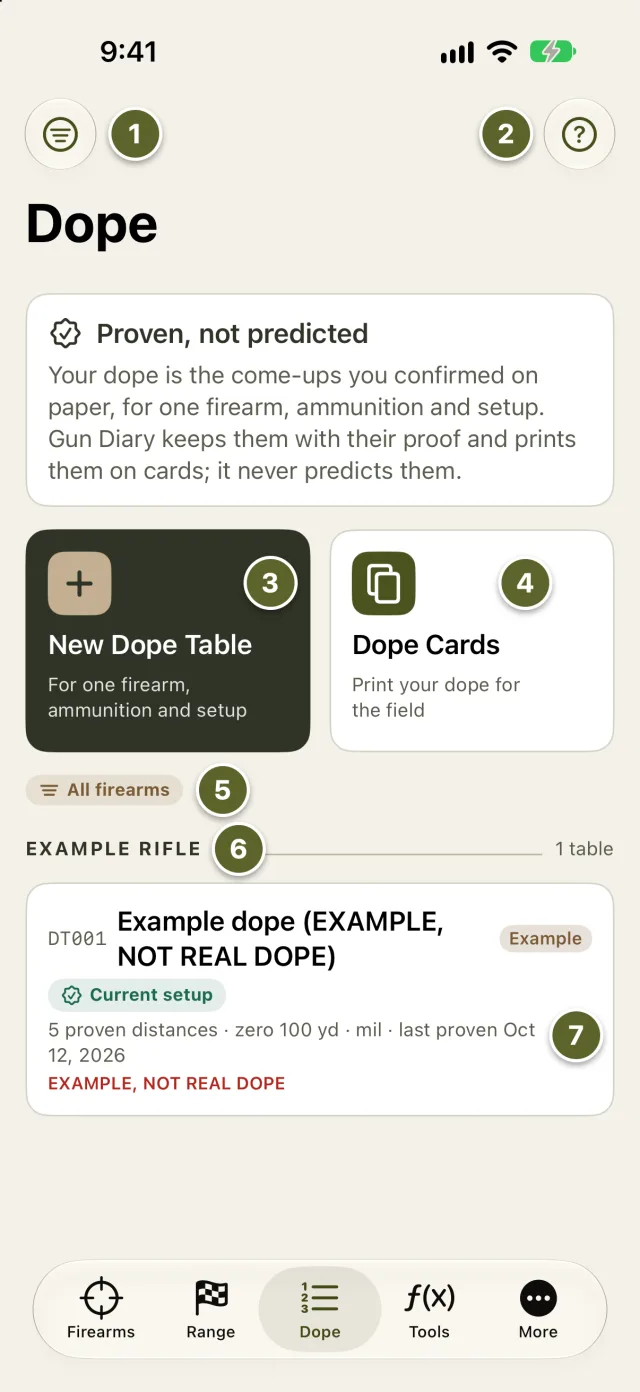
Numbers on the picture: 1 Options, 2 the help button, 3 New Dope Table, 4 Dope Cards, 5 the firearm filter (All firearms), 6 a firearm’s heading with its table count, 7 a table’s card.
-
To start a table, tap New Dope Table. See New dope table.
- To print or reprint a card, tap Dope Cards. See Dope cards.
- To see one firearm’s tables only, tap All firearms and pick the firearm. Pick All firearms again to see them all.
- To search, pull the list down a little to show the search field (Search dope tables) and type part of a table’s code (DT003), its name, its ammunition, its firearm or its notes.
-
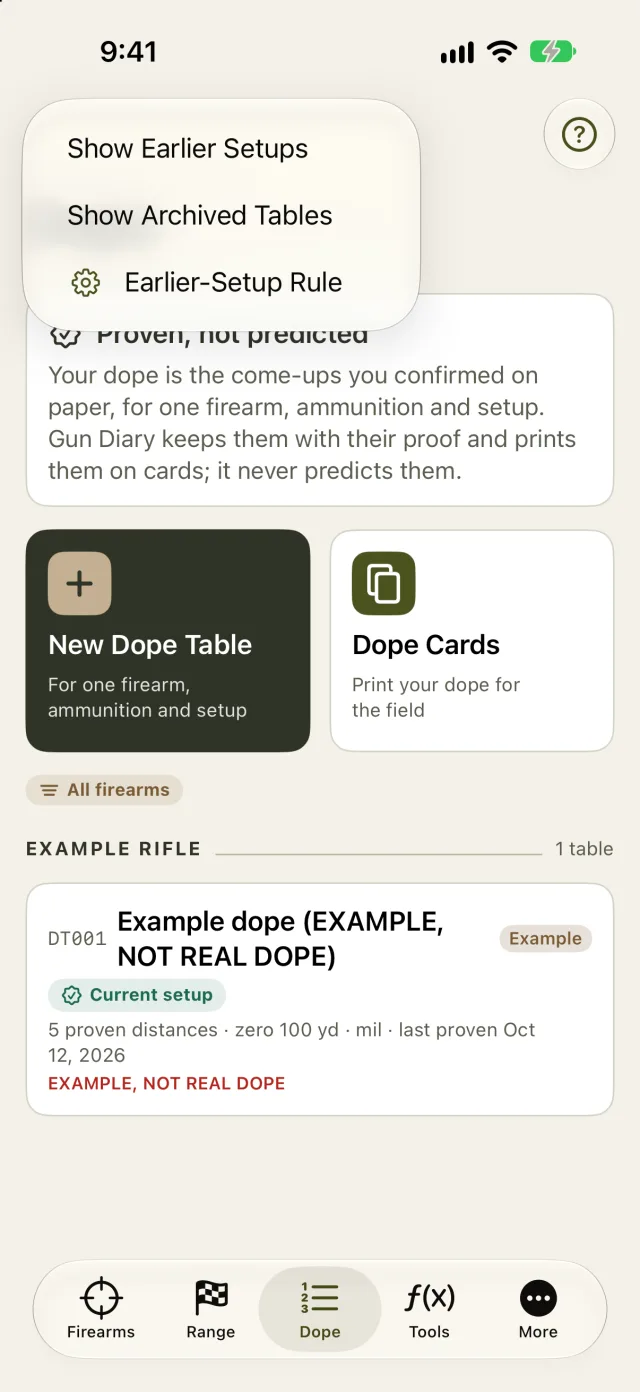
To show tables that are hidden, tap Options (top left):
- Show Earlier Setups shows the tables whose scope, mount or barrel has changed. They’re hidden by default so you don’t pick an out-of-date table by mistake.
- Show Archived Tables shows only the tables you archived (tap again to go back).
- Earlier-Setup Rule opens the list of equipment that marks a table as an earlier setup. See Earlier setup.
-
Tap a table’s card to open it. See A dope table.
Why it’s useful
Dope lives with a firearm, an ammunition and a setup, and a busy shooter ends up with many tables: one per rifle, more per load or lot, older ones after a scope change. The Dope tab puts all of them in one place, so you don’t dig through each rifle to find the numbers you need.
Who uses it, and how:
- Hunters before a trip: open the tab, find the hunting rifle’s current table, check its last proven date and print a fresh pocket card.
- Long-range shooters with several rifles: each firearm has its own heading, with a table count, so you see at a glance which rifle has dope for which ammunition.
- Shooters who changed a scope or barrel: the old tables step out of the way (hidden as earlier setups) but stay one tap away under Options, with every value and date kept.
- Competitors switching lots: tables you no longer use can be archived and hidden, without losing them.
- First-time users: the Example Rifle‘s table, marked EXAMPLE, NOT REAL DOPE, shows what a full table looks like before you prove anything.
What’s on the Dope tab
When there are no tables at all, the tab says Prove your first distance: start a table, then add each distance you confirm, or save a group as dope from its record. When a search or filter hides everything, it says No dope tables match.
Example
Jordan has two rifles. On the Dope tab:
- Mountain Rifle (2 tables): DT002 “140 gr hunting load” with Current setup, “6 proven distances · zero 100 yd · mil · last proven Sep 30, 2026”, and DT004 for a new lot of the same ammunition.
- Rimfire Trainer (1 table): DT003, Current setup, “4 proven distances · zero 50 yd · MOA“.
- Under the filter: “1 earlier setup hidden”. That’s DT001, the Mountain Rifle’s table from before Jordan changed scopes. Jordan taps it once to look back at the old numbers, then taps Hide earlier setups.
Tips
- Name tables when you have more than one per firearm, like “140 gr, lot 2241” or “Suppressed”. The name shows on the tab and on the card.
- Archive, don’t delete, tables you may want later (a load you stopped buying). Archived tables keep everything and stay out of the way.
- The Example table is there to learn from. Remove the Example data when you’re ready; see Explore the Example Rifle.
- Dope also shows on each firearm. A firearm’s dashboard has a Dope row with only that firearm’s tables. See Dope tables.
What it affects
The Dope tab only shows and filters; it changes nothing. The filters and Options choices last while the app is open.
- Earlier setups: hiding them here doesn’t change the tables. They’re still listed (last, marked “(earlier setup)”) when you save a group as dope, and they’re still in Search.
- Search: the app-wide Search also finds dope tables and dope cards.
If something goes wrong
- A table I made is missing. It may be an earlier setup (tap the “earlier setups hidden” line, or Options > Show Earlier Setups), archived (Options > Show Archived Tables), filtered out (tap the firearm chip, pick All firearms), or in Recently Deleted under Dope Tables.
- I see only archived tables. Show Archived Tables is on. Tap Options and tap it again.
- “No dope tables match”. Clear the search field and pick All firearms.
- A table shows Earlier setup but I didn’t change anything. A change to its scope, mount or barrel (or a category you added to the rule) was recorded in The Garage. See Earlier setup.
- I turned off Dope and Dope Cards in Personalize Your Diary, but the tab is still here. That switch hides the Dope row on each firearm’s dashboard and the Dope Table report in Reports; the Dope tab stays. See Personalize your diary.
Related
- Next: New dope table, then A dope table.
- What confirmed dope is, Dope tables, Dope cards, Earlier setup, Search.
- Learning path: Building your dope card.
- Words used here: dope, come-up, zero, earlier setup, lot.
Gun Diary keeps records you enter and does arithmetic on them. It never predicts a trajectory; confirm every hold by shooting it at the range, and always know your target and what is beyond it.
Still stuck? In the app, open More > Help > Contact Support, or More > Settings > Support, which also has Send Error Log (the error log helps us find the problem), or email contact@setriksoftware.com. You can also browse the Help Center or the messages the app can show.