
Saved locations
Keep a list of the ranges and places you shoot, with address, elevation, an optional map pin and notes, and pick one for a session in a single tap.
Saved locations are the ranges, clubs and places you shoot. Save each one once, with its address, elevation and an optional map pin, and from then on picking it for a session is a single tap. Each place counts its visits, so you can see where you’ve been shooting and how often.
Steps
See your places:
-
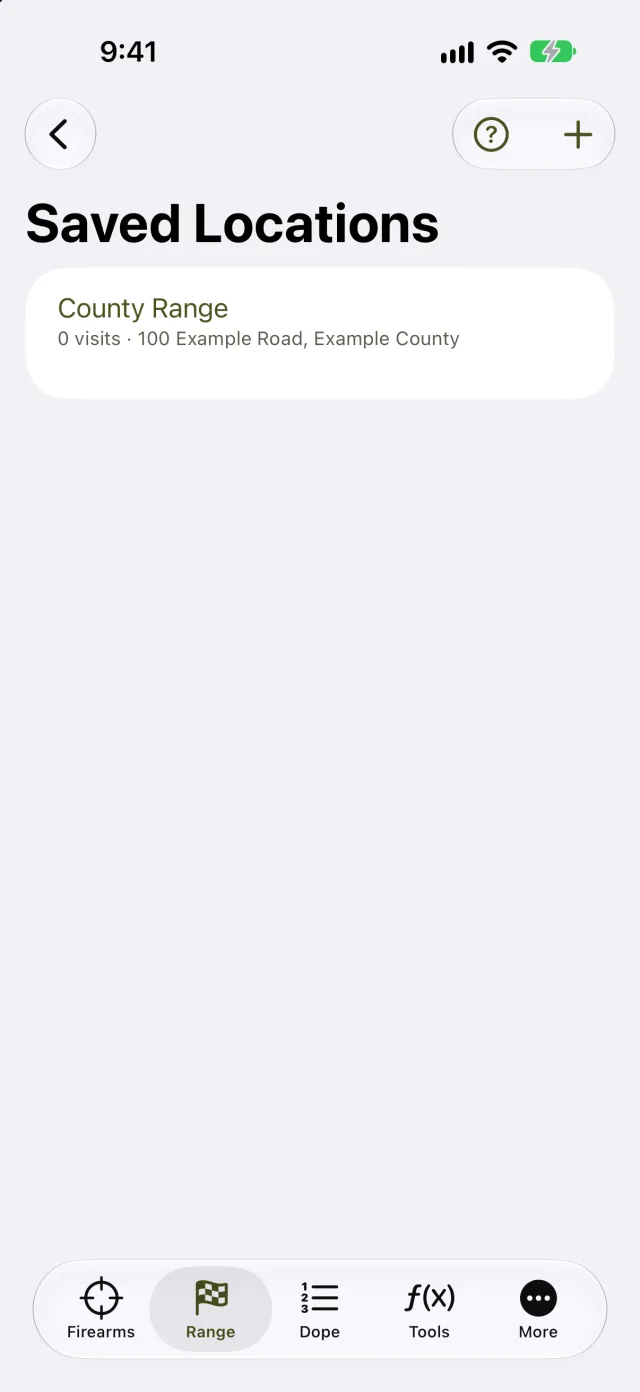
On the Range tab, scroll down and tap Saved Locations.
-
Each row shows the name, the number of visits and the address. Use the search field to find one by name, address or notes (“No Results” when nothing matches). Tap a place to open it.
Add a place:
- On Saved Locations, tap + (Add Location). Or, on a session form, tap New Location… under Location.
- Type a name, like “County Range”. The name is required.
- Optionally type the Address or directions and the Elevation in feet.
-
Under Map pin, tap Pin My Current Position if you’re standing there (iPhone may ask to use your location). A small map shows the pin. Open in Maps opens Apple Maps at the pin, or at the address when there’s no pin.
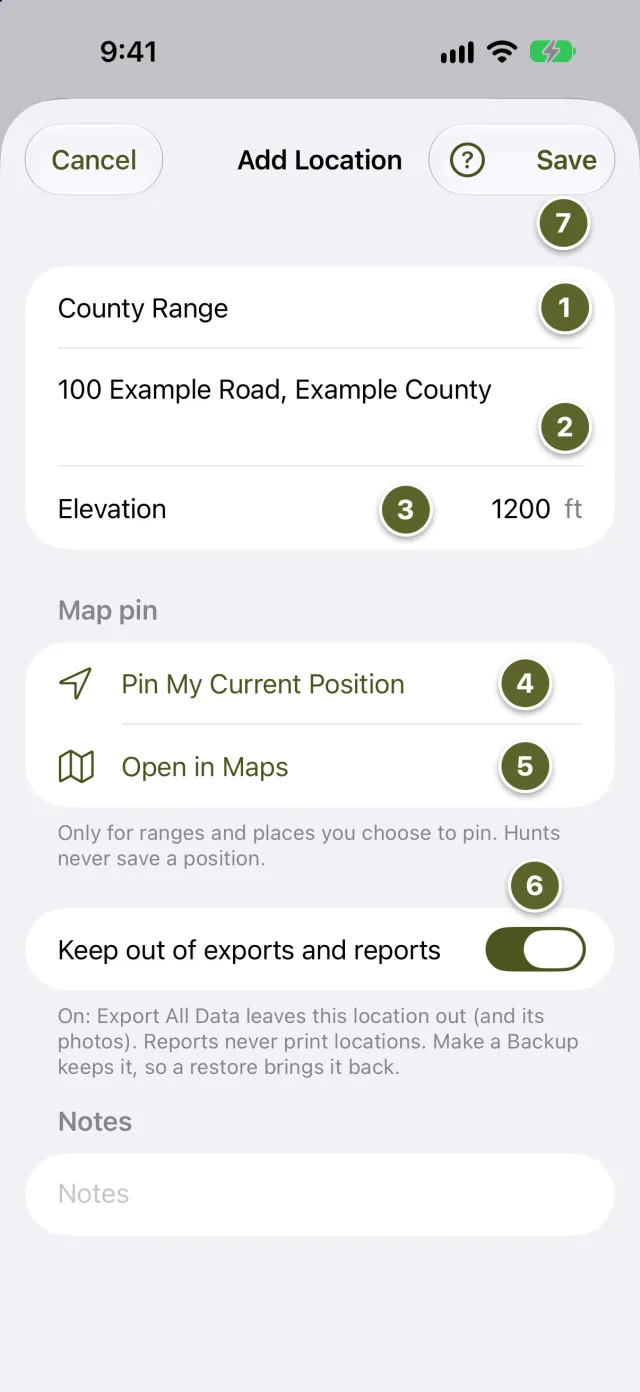
Numbers on the picture: 1 the name, 2 Address or directions, 3 Elevation, 4 Pin My Current Position, 5 Open in Maps, 6 Keep out of exports and reports, 7 Save.
-
Leave Keep out of exports and reports on (the default) or turn it off. See the table below.
- Add any Notes (hours, gate code reminder, range rules) and tap Save.
Use it on a session: in the session form, pick it from Location. See Log a session.
Change or delete a place: open it, change anything and tap Save. To delete, tap Delete Location at the bottom and confirm.
Why it’s useful
Where you shot matters more than it seems. Elevation and the range’s own layout affect long-range dope; a windy club range explains bigger groups than the indoor range; and “how many times did I go to the club this year” is a real question when membership renews.
A long-range shooter saves the ranges where they proved dope, with elevation, so the conditions are complete. A hunter who sights in at a friend’s farm saves it without an address (just “Dad’s farm”) and keeps it private. A competitor saves each match venue with directions and notes on parking. A new shooter keeps the public range’s hours and rules in the notes. Collectors who take guns out a few times a year see where each visit was. And because the place is picked from a list, it’s spelled the same every time, so searches and visit counts work.
What each option means
The Map pin footer says: “Only for ranges and places you choose to pin. Hunts never save a position.” Gun Diary never records where you are on its own; a pin exists only when you tap the button.
Example
- Saved Locations > +. Name: “Ridgeline Rifle Club”. Address or directions: “4100 County Rd 12”. Elevation: 1450.
- You’re at the club, so you tap Pin My Current Position. The map shows the pin.
- Notes: “300 and 600 yd lines open Sat 8-4. Steel at 450.”
- Save. Next Saturday, in Log a Session (or Session Info in Range Mode), Location > Ridgeline Rifle Club.
- After a season, the row reads “14 visits · 4100 County Rd 12”.
Tips
- Save the elevation for any place you prove dope; it belongs with the conditions.
- Leave private places private. Hunting spots, farms and home addresses are better kept out of exports you share.
- Don’t pin a place from somewhere else. Pin My Current Position uses where you’re standing; for a place you’re not at, type the address instead.
- Use the notes for range rules, hours and contacts so you have them at the gate.
What it affects
- Picking a place on a session links them; the place’s visit count goes up and the session shows Location > Place.
- Keep out of exports and reports decides whether the place is in Export All Data. Backups always include it. See Export all your data and Back up and restore.
- Deleting a place removes the place only. Sessions keep everything else.
If something goes wrong
- “Type a name for the location”. The place needs a name before it saves. Type one (like “Club range”) and tap Save again.
- “Your position isn’t available right now. Type the address instead.” Location is off for Gun Diary, or there’s no fix. Allow location in the iPhone Settings app > Gun Diary > Location, or type the address.
- “Delete …?” asks before deleting. The message says how many sessions “will no longer show a place. The sessions themselves stay. This can’t be undone.” A deleted place doesn’t go to Recently Deleted.
- Open in Maps isn’t there. Add an address or a pin first.
- The place is missing from my export. Keep out of exports and reports is on for it. Turn it off before exporting, if you want it included.
Related
- Log a session, A session, Session weather, The Range tab.
- Export all your data, Back up and restore.
- Words used here: session, elevation.
Still stuck? In the app, open More > Help > Contact Support, or More > Settings > Support, which also has Send Error Log (the error log helps us find the problem), or email contact@setriksoftware.com. You can also browse the Help Center or the messages the app can show.