
Session weather
Record the temperature, humidity, pressure, elevation and wind for a session or a single group, filled in from Apple Weather or typed from your own meter.
Weather explains a lot: a velocity that dropped on a cold morning, a zero that walked in a crosswind, groups that opened up in gusts. Gun Diary keeps one set of weather values with each session, and a group can have its own when the conditions changed during the day. Fill them in from Apple Weather with one tap, or type what your own weather meter says.
Steps
- Open the session form: Log a Session on the Range tab, ••• > Edit Session on a session, or Session Info in Range Mode.
-
Scroll to the weather section and turn on Record weather. The weather rows appear.
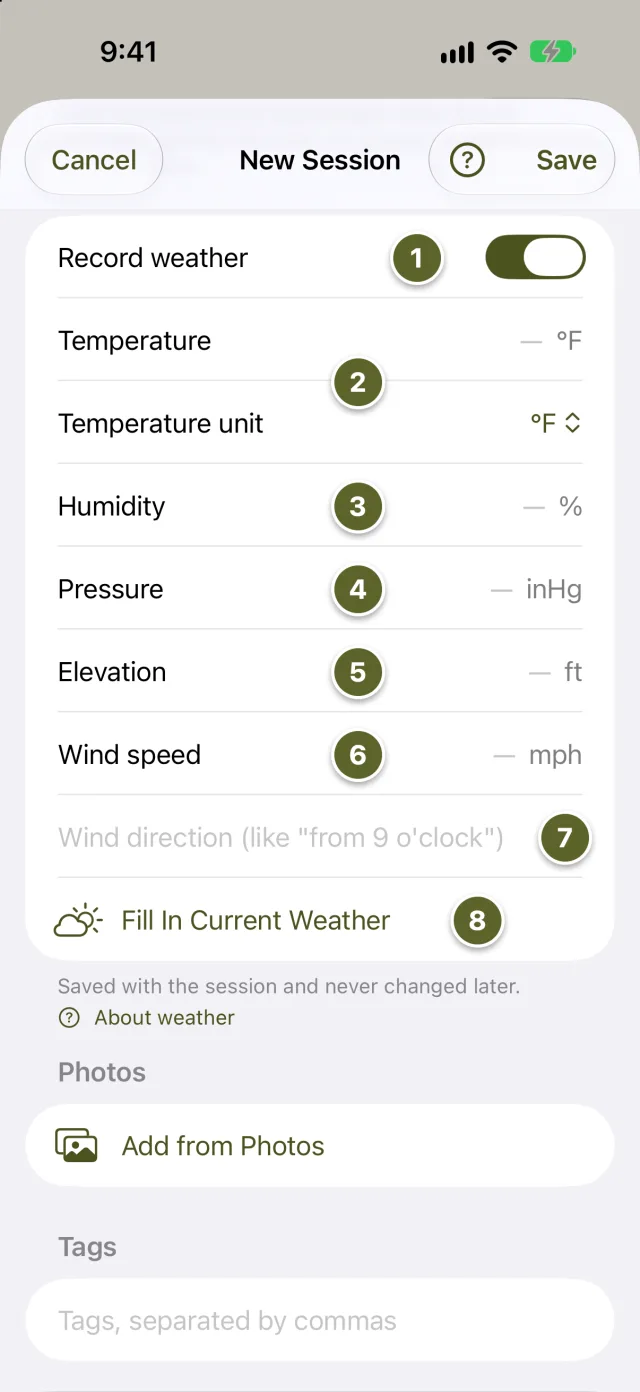
Numbers on the picture: 1 Record weather, 2 Temperature and Temperature unit, 3 Humidity, 4 Pressure, 5 Elevation, 6 Wind speed, 7 the wind direction, 8 Fill In Current Weather.
-
To fill them from Apple Weather, tap Fill In Current Weather. The first time, iPhone asks whether Gun Diary may use your location; allow it. The button reads Getting weather… for a moment, then the rows fill in.
-
Check the values and correct any of them by typing over it.
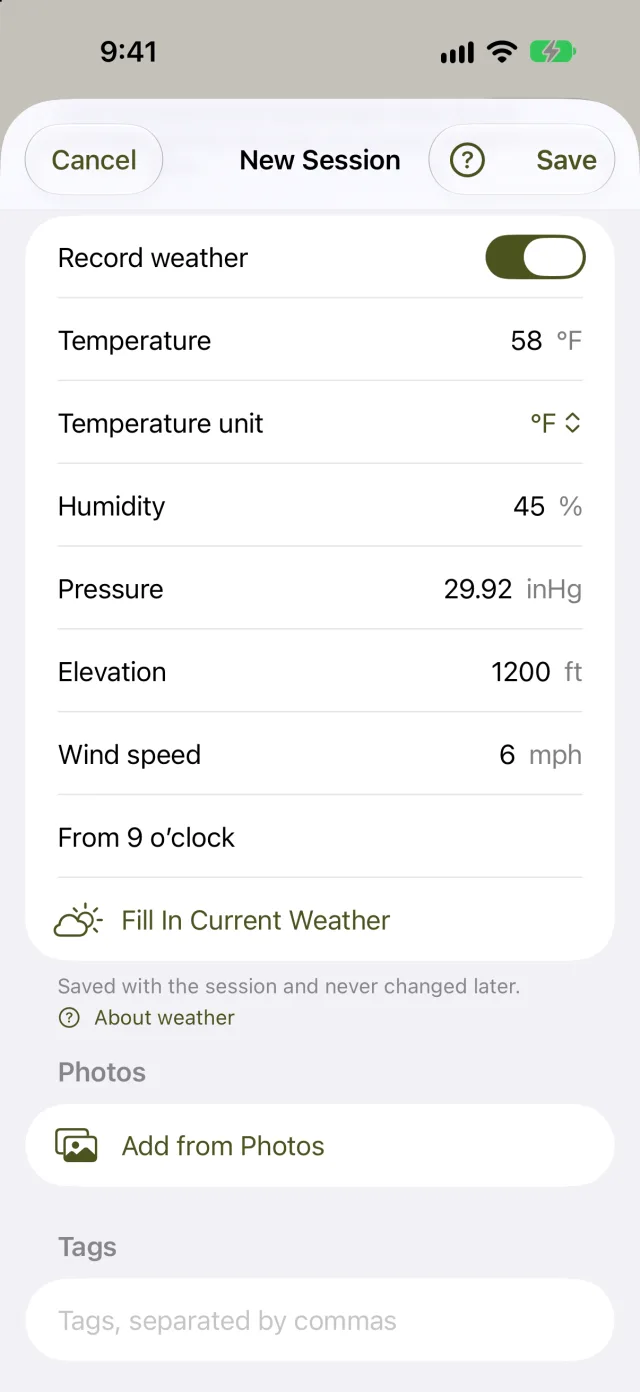
-
Or type every value yourself: pick °F or °C, then type the temperature, humidity, pressure, elevation, wind speed and direction you measured.
- Tap Save (or Done). On the session screen, the Weather section shows the values and their Source.
Weather for one group: open the group form (Record a group), turn on Weather for this group only, and fill it in the same way. With the switch off, the group shows the session’s weather (“Weather (from the session)”).
Why it’s useful
Conditions are the context behind your numbers. A long-range shooter keeps temperature, pressure and elevation next to every dope row they prove, so when a come-up stops working in winter they can see the day it was proven was 40 degrees warmer. Someone testing factory ammunition notices that one load’s velocity swings more with temperature than another’s. A hunter records the wind and temperature on the morning of a zero check. A competitor jots the gusts that blew a stage. A new shooter learns that a windy day really does move bullets, by seeing the wind next to a group that drifted.
Gun Diary records weather and nothing more. It never adjusts a group, a velocity or a dope value for the weather and never predicts what the conditions will do to a shot. What you write down is what you keep.
What each option means
Filled from Apple Weather, the temperature uses the unit you picked, the wind direction reads like “From NW” (the compass direction it blows from), and the elevation comes from your phone’s position. A line under the button then shows ” Weather”, a Data sources link (Apple’s weather attribution) and “· edit any value to correct it”.
On the session screen, Source reads Weather service for filled-in weather and Entered by hand for typed weather.
The section’s footer says: “Saved with the session and never changed later.” Weather is filled in once, when you tap the button. It’s never refreshed in the background.
Example
A cold-morning check of the Mountain Rifle’s 300-yard dope.
- At the range, in Range Mode, you tap Session Info, turn on Record weather and tap Fill In Current Weather.
- It fills 34 °F, 81 % humidity, 30.12 inHg, 1,050 ft, 8 mph, “From NW”.
- Your wind meter at the bench reads 11 mph, so you type 11 over the 8 and change the direction to “from 10 o’clock”.
- Done. Back home, the session’s Weather section shows your corrected values.
- In the afternoon the wind dropped. On the last group you turn on Weather for this group only and type 3 mph.
Tips
- Fill it in at the range. The button uses where your phone is and the weather right now. Writing up a session the next day? Type the values from memory or your notes instead.
- Trust your own meter over the forecast. Apple Weather reports for the area, not your bench. Type over anything your meter measured.
- Clock directions (“from 3 o’clock”) match how most shooters call wind; compass directions match the weather service. Use one style consistently.
- Use group weather sparingly: only when conditions really changed during the session.
What it affects
- The weather is stored with the session (or the group) and shown on its screen, in the session report and in exports.
- Groups without their own weather show the session’s.
- Nothing is calculated from it. Dope, groups and velocities are never adjusted.
- Turning Record weather off deletes the session’s weather values.
If something goes wrong
- “Location is off for Gun Diary. Allow it in Settings, or type the weather in.” You turned down the location request. Open the iPhone Settings app > Gun Diary > Location and allow While Using the App, or type the weather.
- “Weather isn’t available right now. Type the values in instead.” No signal, or Apple Weather didn’t answer. Type the values, or try again later (it fills with the weather at that later time).
- The values are for my house, not the range. The button uses where the phone is when you tap it. Correct the values by hand.
- Source still says Weather service after I corrected a value. That’s expected: the source shows where the values came from first. Your corrections are saved.
- I can’t see the weather rows. Turn on Record weather (on a group: Weather for this group only).
Related
- Log a session, A session, Range Mode, Record a group.
- Dope tables (conditions next to proven dope), Saved locations.
- Words used here: session, elevation, barometric pressure, dope.
Gun Diary keeps records you enter and does arithmetic on them. It never predicts a trajectory; confirm every hold by shooting it at the range, and always know your target and what is beyond it.
Guides on this topic
Still stuck? In the app, open More > Help > Contact Support, or More > Settings > Support, which also has Send Error Log (the error log helps us find the problem), or email contact@setriksoftware.com. You can also browse the Help Center or the messages the app can show.