
Confirmed dope and dope cards
Your proven dope, on a card that fits your rifle
Each dope table keeps the come-ups you proved at each distance, with the date, the conditions and the groups that proved them. Print it as a dope card for the stock, the scope cap or your pocket.
Save as Confirmed Dope from any group with a distance: type what you dialed, and the app shows the proven come-up to confirm.
Proven, not predicted: every saved row is one you shot. In-between rows are marked est. and never saved.
Coming soon to the App Store
One firearm free, forever · For iPhone and iPad · Requires iOS 26 or later
Dope tables
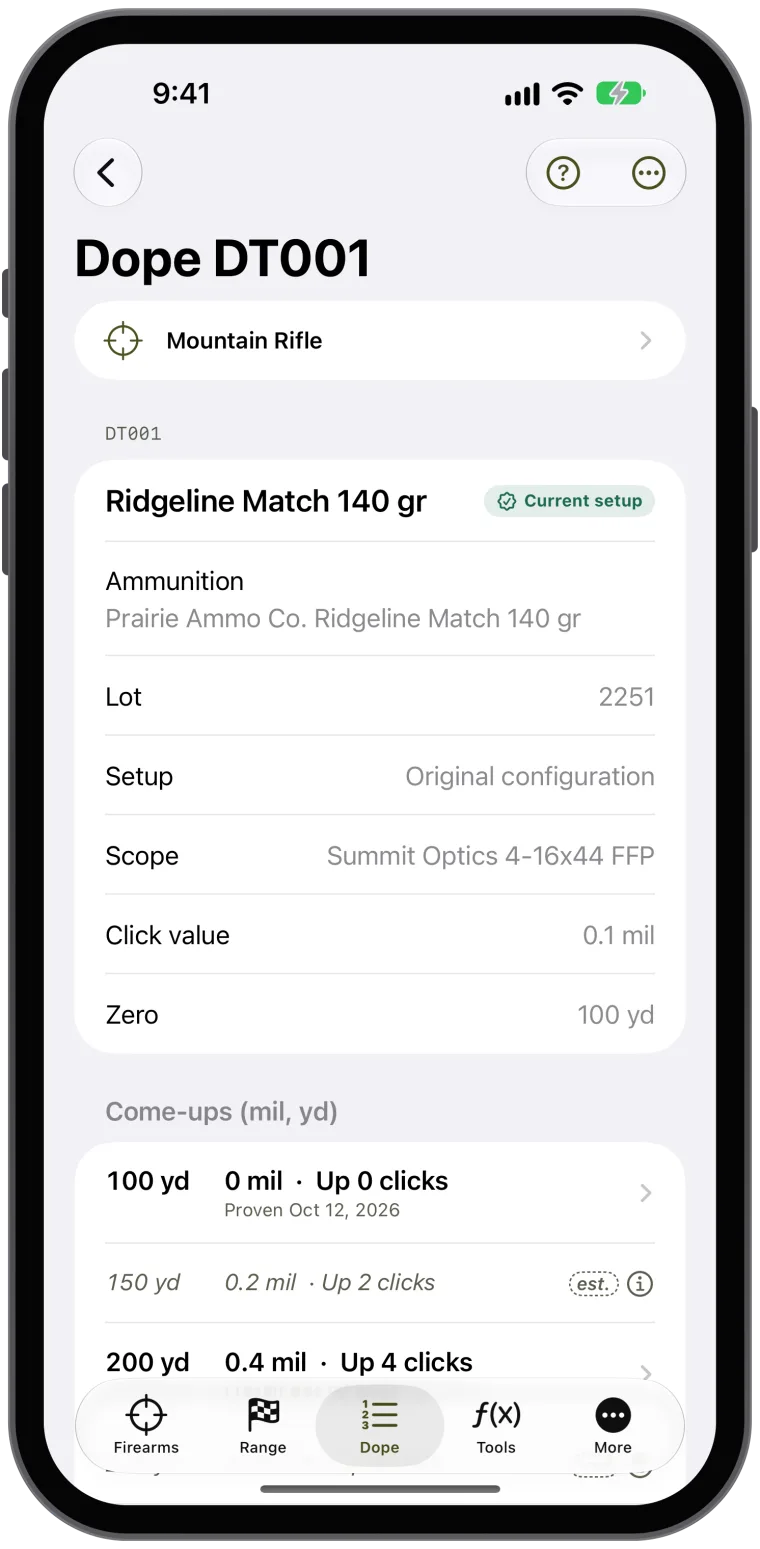
A dope table for each firearm and ammunition
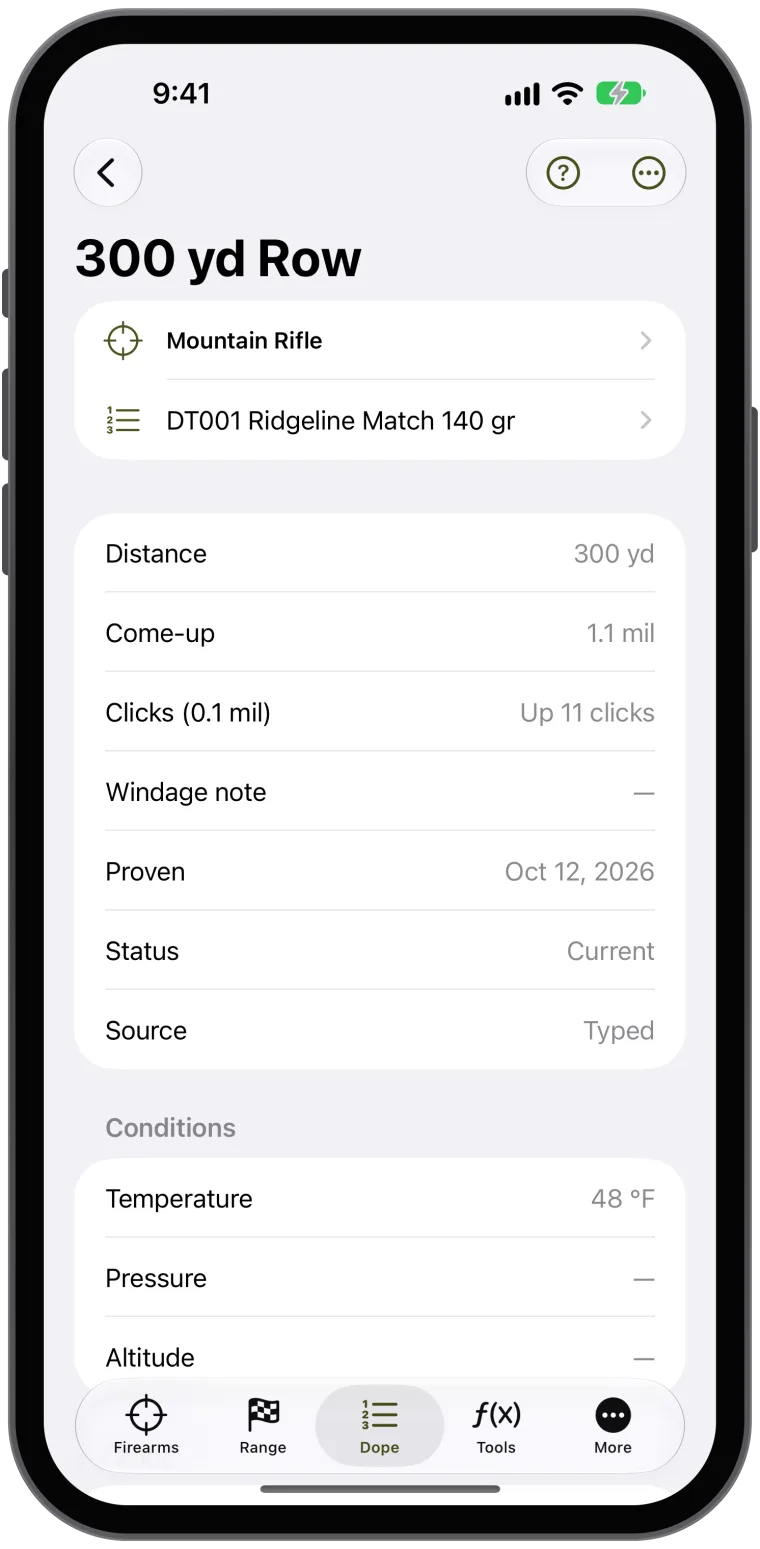
A new table stamps the firearm’s current setup, scope and barrel on it. Each row holds the come-up and the clicks for that scope (“Up 12 clicks”), the date you proved it and the groups that proved it.
Dope row history: replace a proven value and the earlier one is kept with its date and setup.
Proven holds: wind and lead holds, like “Wind 10 mph full value: 0.6 mil left at 400 yd”.
Travel above zero: the farthest row your scope can dial, with rows past it marked “Out of travel”.
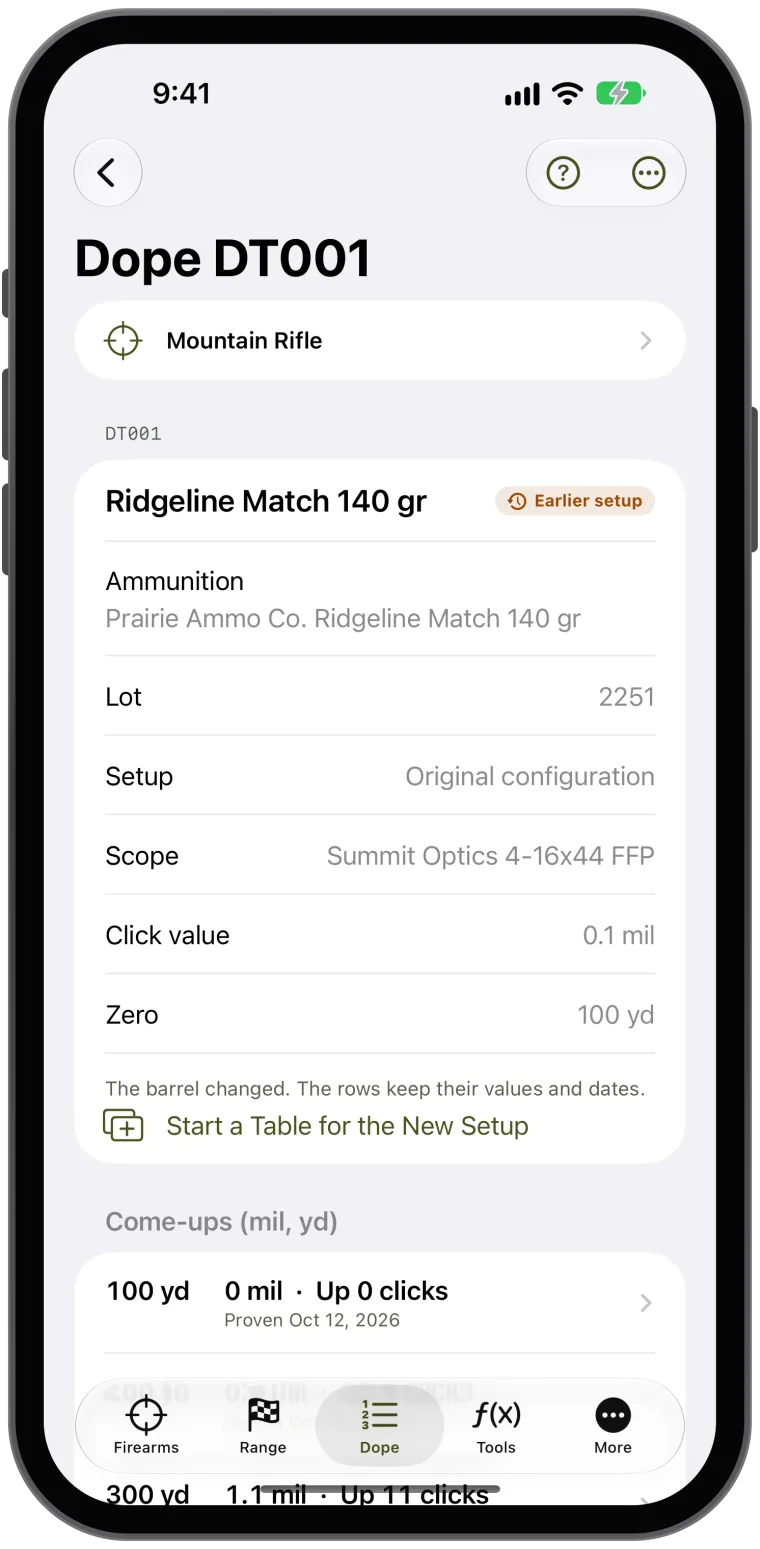
Earlier setup
Old dope never passes as current
Change the optic, the mount or the barrel and the table is marked Earlier setup, with the reason (“The barrel changed”). It’s hidden from the Dope tab, never estimated from, and prints “EARLIER SETUP”.
Start a Table for the New Setup copies its ammunition, lot, zero and units.
In-between rows (est.): straight-line rows between two proven rows at most 200 yd apart; never beyond the first or last proven distance, never saved.
Choose other equipment to count too, under Also count these.
Est. = estimated, not proven. Confirm at the range.
Dope cards
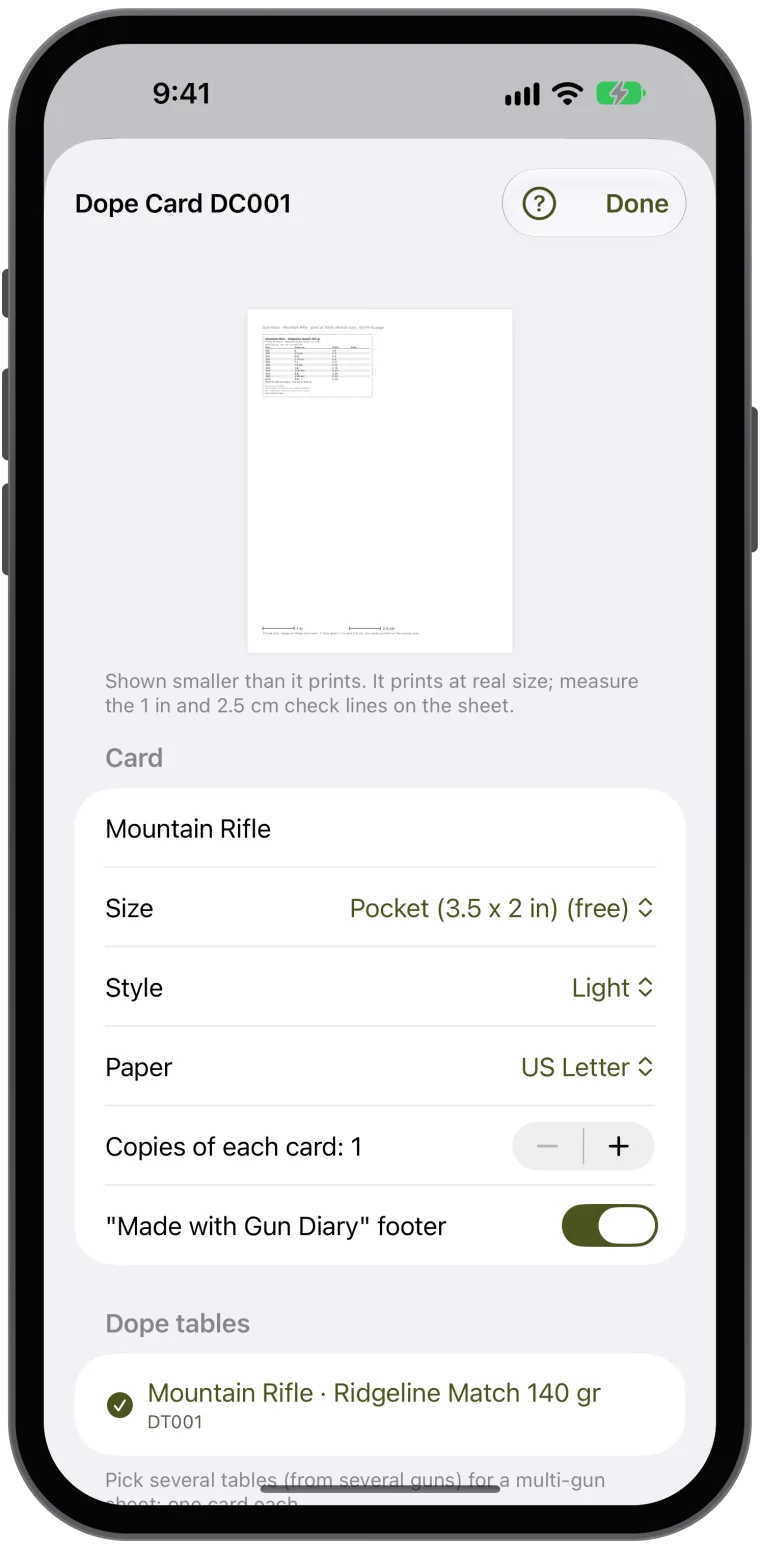
A printable dope card, true to size
Pick a size, a style and US Letter or A4. Every card prints the firearm, ammunition and lot, zero, units and click value, the rows and holds with their proven dates, and “Confirmed by the shooter; not a ballistic prediction.”
Print at 100% (Actual size): every sheet has a 1 in and a 2.5 cm check line, so you know it printed true.
Choose a clicks column, a wind column and holds, in-between rows (est., in italic) and the distances to show.
Card layouts are saved, so a fresh card after you prove a new distance takes two taps.
Card sizes
A size for every spot on the rifle
Cards are the same size on US Letter and A4, with 1 to 20 copies of each card.
3.5 x 2 in · Free. Business-card size; 8 fit on a sheet.
Stock strip
1.5 x 4 in · Pro. Tall and narrow, taped to the stock.
Scope cap
2 x 2 in · Pro. Inside a flip-up scope cap.
Index card
5 x 3 in · Pro. Room for many rows and holds.
Wrist coach
3 x 4 in · Pro. For a wrist-coach sleeve.
Custom size
1 x 1 in to 7 x 8.9 in · Pro. Any size that fits Letter and A4.
Full page
The sheet · Pro. One large card filling the page.
Styles
Light (free) or High contrast (Pro). Several tables (several guns) on one sheet with Pro.
The “Made with Gun Diary” footer is always on without Pro.
Step-by-step help
How it works in the app
Tap-by-tap steps from the Help Center. In the app, the ? on each screen opens the article for that screen.
What confirmed dope is
The idea behind the Dope tab in plain words: what dope, come-ups and holds are, why Gun Diary keeps only what you proved, and what "est." means.
Read the stepsA dope table
Read a dope table's proven come-ups and clicks, add distances and holds, check elevation left on the scope, run the dope calculators, make a card, and duplicate, archive or delete the table.
Read the stepsSave a group as confirmed dope
Turn a group you shot into a proven dope row: what you dialed, corrected by how far the group landed above or below your aim, with the group and its weather as proof.
Read the stepsEarlier setup
Why a dope table is marked "Earlier setup" after a scope, mount or barrel change, what changes on it, how to start a table for the new setup, and how to choose which equipment counts.
Read the stepsMake a dope card
Pick a dope table, a card size, the paper and what to print (units, clicks, wind, est. rows, chosen distances), check the preview, and print or share the card sheet as a PDF.
Read the stepsPrint a dope card at the right size
Print the card sheet at 100% (actual size), not "fit to page", then measure the 1 in and 2.5 cm check lines to be sure the cards came out at their real size.
Read the stepsFree, with every card size in Pro
Dope tables, in-between rows (est.), proven holds, Save as Confirmed Dope, dope history and the pocket dope card are free. Every dope card size, a custom size, high-contrast style, no footer and several guns on one sheet come with Gun Diary Pro. See what each plan includes.
Gun Diary keeps the records you enter. It never predicts bullet drop, wind or a trajectory; your dope is what you proved on paper. Always follow safe firearm handling.
Keep exploring
More of what Gun Diary does
Or see every Gun Diary feature on one page.
Range sessions and Range Mode
Log a range day in seconds; Range Mode gives gloved hands big buttons, a big number pad and Undo.
See Range ModeZero Check and the hunt log
A few shots before the season: “Still zeroed”, or the clicks to dial. Log the shot and the harvest after.
See Zero Check27 calculators
Clicks, mil and MOA, mil-ranging, holdover from your dope, hit chance from your own groups and more. No ballistic solver.
See the calculatorsGroups and target photos
Several groups on one target photo, each its own record; measure from the photo or tap every hole with Pro.
See groups and targetsAmmunition and Ammo Comparison
Factory ammo by maker, product and lot, boxes on hand, and which ammo your rifle groups best, from your own groups.
See ammunitionFirearms and The Garage
Each firearm’s status, dated setups, barrels, round counts that add themselves up, cleanings, repairs and paperwork.
See The GarageProof, not predictions
Prove it on paper, print it, tape it on. One firearm free, forever.
Coming soon to the App Store