
"Calculator #22: Hit Chance from Your Groups"
Estimate your best-case chance of hitting a round target of a given size at a distance, from the mean radius of your own groups.
Hit Chance from Your Groups (calculator #22) takes the mean radius of your own groups and works out what share of your shots would land inside a round target of a given size at a given distance, if nothing else went wrong. It’s the best case: no wind, ranging or holding error. The result is an estimate, marked est.
Steps
- Tap the Tools tab. Under Groups and velocity, tap Hit Chance from Your Groups.
-
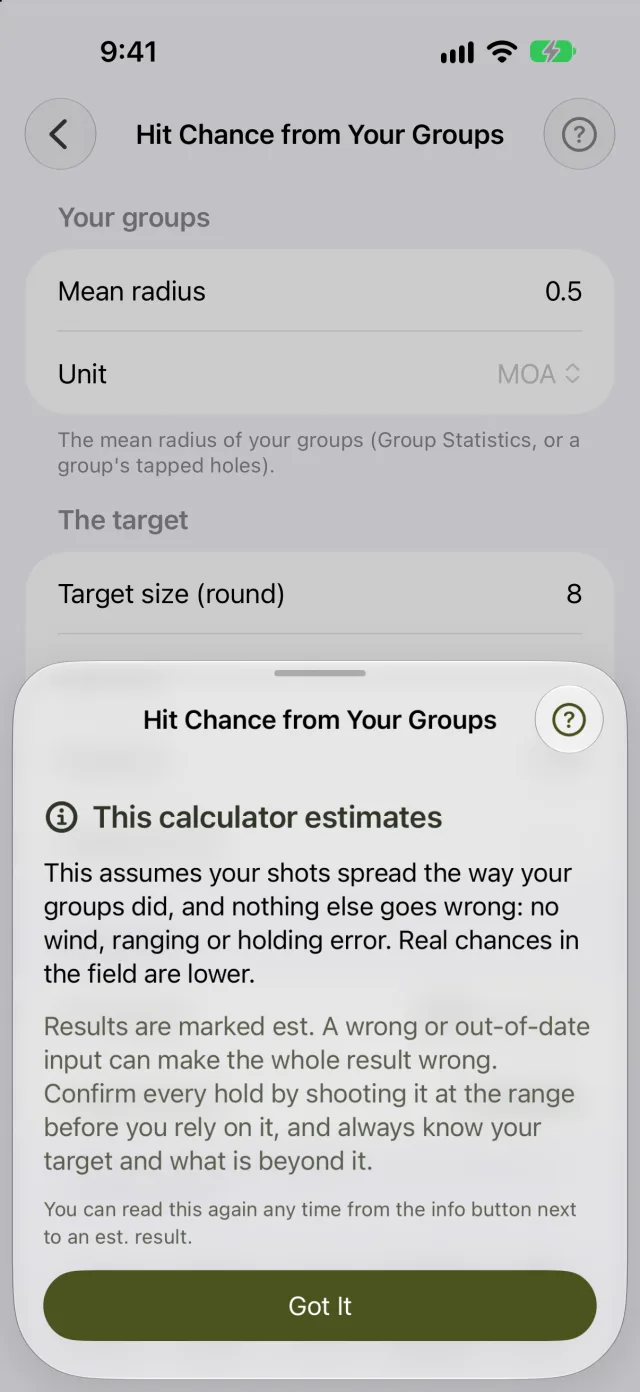
The first time, a note titled This calculator estimates explains the assumption. Read it and tap Got It. It’s also in About estimates.
-
In Your groups, type your Mean radius and pick its Unit: MOA or mil (an angle, good at any distance), or in or cm (a size; then type the distance it was Shot at).
-
In The target, type the Target size (round), its Size unit, the Distance and the Distance unit.
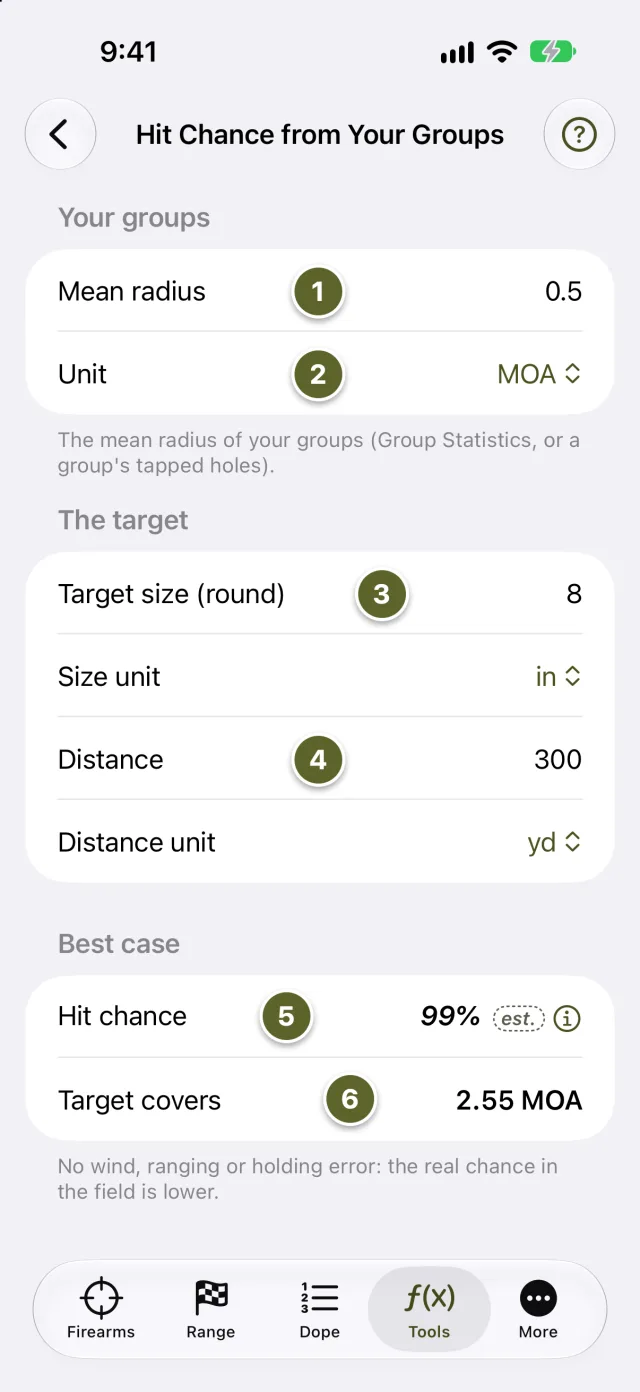
Numbers on the picture: 1 Mean radius, 2 Unit, 3 Target size (round), 4 Distance, 5 Hit chance, 6 Target covers.
-
Read Best case: Hit chance (est.) and Target covers (the target’s size as an angle, in MOA).
Nothing is saved.
Why it’s useful
Group size on paper is only half the story; what matters is how often you’d hit something of a real size at a real distance. Turning your mean radius into a percentage shows where your own precision runs out, before wind and ranging errors make it worse. If the best case is already poor, the shot isn’t one to take.
Who uses it, and how:
- Hunters: type your vital-zone size and see the distance where even the best case drops below what you’d accept; that’s a firm upper limit for an ethical shot.
- Steel and PRS shooters: see which plate sizes at which distances your rifle and ammunition can hold, and where practice (not equipment) is the limit.
- Load and ammunition testers: compare two ammunitions by what their mean radius means on a real target, not just by group size.
- New shooters: it shows plainly why a smaller group matters more at long range: the target shrinks as an angle while your spread stays the same.
What each option means
How it works: the mean radius is turned into an angle, so it scales with distance (a 0.5 MOA mean radius is about 1.6 in at 300 yd). The shots are assumed to spread evenly in every direction around your aim, the way round groups usually do (a statistical model called the Rayleigh distribution). The chance is the share of that spread inside the target’s radius.
What it assumes (the one-time note): this assumes your shots spread the way your groups did, and nothing else goes wrong: no wind, ranging or holding error. Real chances in the field are lower. It also assumes you aim at the center of the target and your zero is right.
Example
- The screen opens with a 0.5 MOA mean radius and an 8 in target at 300 yd. Target covers shows 2.55 MOA and Hit chance 99% est.
- A Mountain Rifle with a 0.6 MOA mean radius from your groups, a 6 in vital zone at 400 yd: Target covers 1.43 MOA, Hit chance 67%. At 600 yd: 0.95 MOA, 39%. Even the best case says no at 600.
- The app’s tested example: a mean radius of 1 on a target 4 across (both in the same angle unit) gives 96%.
Tips
- Use many shots. A mean radius from 20 or 30 shots (several groups) is far more honest than from one good group.
- Measure at the distance you care about when you can; spread often grows a little faster than the distance.
- Treat the result as a ceiling. Real chances are lower; wind, ranging and position all add misses.
- Compare with your real record. Hit Rate and Scores shows how often you actually hit.
What it affects
Nothing. Groups and records are not changed.
If something goes wrong
- “Type your mean radius and the target.” Fill in Mean radius, Target size (round) and Distance (and Shot at for a size in in or cm).
- I only have the group size (extreme spread), not the mean radius. Type the shot positions into Group Statistics, or tap the holes on the group’s photo (Shot holes), to get the mean radius. Don’t type an extreme spread here: it’s much bigger than the mean radius and gives a chance that’s far too low.
- The Shot at row disappeared. It’s only for in or cm; angles don’t need a distance.
- My groups were shot in meters but the target is in yards. Shot at uses the same Distance unit as the target; convert one of them first.
Related
- Next: Drill Times and Hit Factor.
- Group Statistics, Shot holes, A group record.
- Hold-On Distances, Hit Rate and Scores.
- About estimates, The Tools tab.
- Words used here: mean radius, extreme spread, MOA, mil.
Gun Diary keeps records you enter and does arithmetic on them. It never predicts a trajectory; confirm every hold by shooting it at the range, and always know your target and what is beyond it.
Still stuck? In the app, open More > Help > Contact Support, or More > Settings > Support, which also has Send Error Log (the error log helps us find the problem), or email contact@setriksoftware.com. You can also browse the Help Center or the messages the app can show.