
Print a dope card at the right size
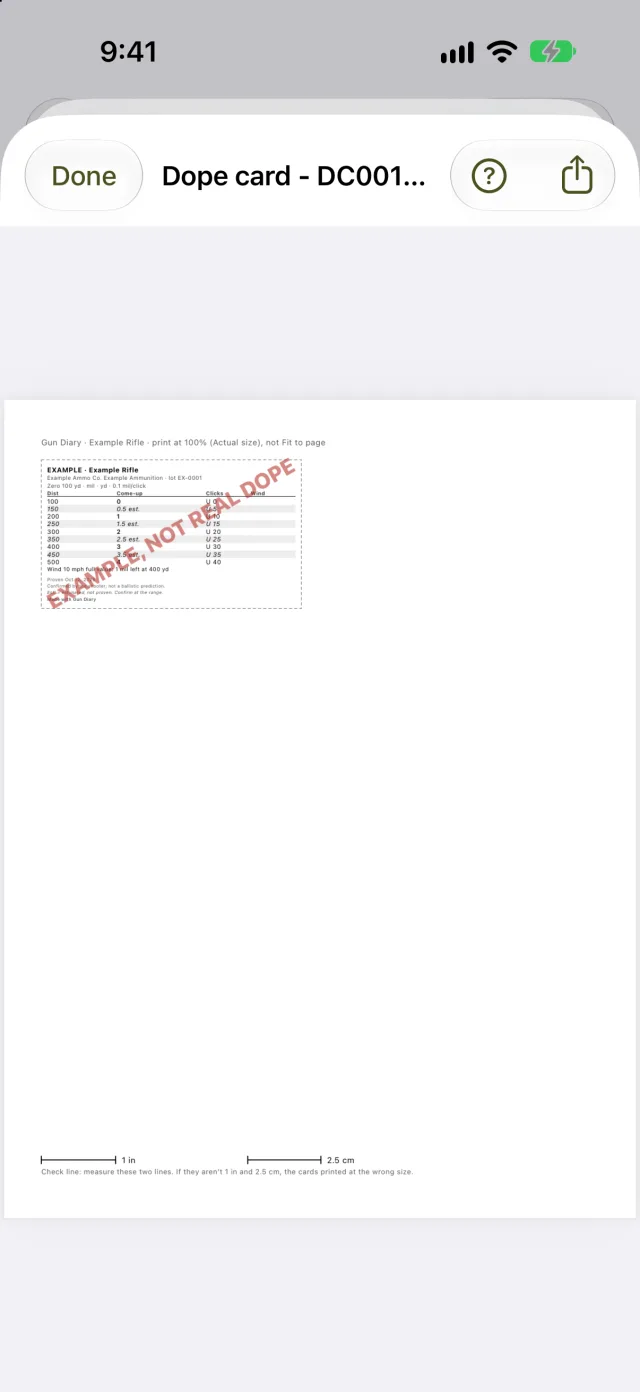
Print the card sheet at 100% (actual size), not "fit to page", then measure the 1 in and 2.5 cm check lines to be sure the cards came out at their real size.
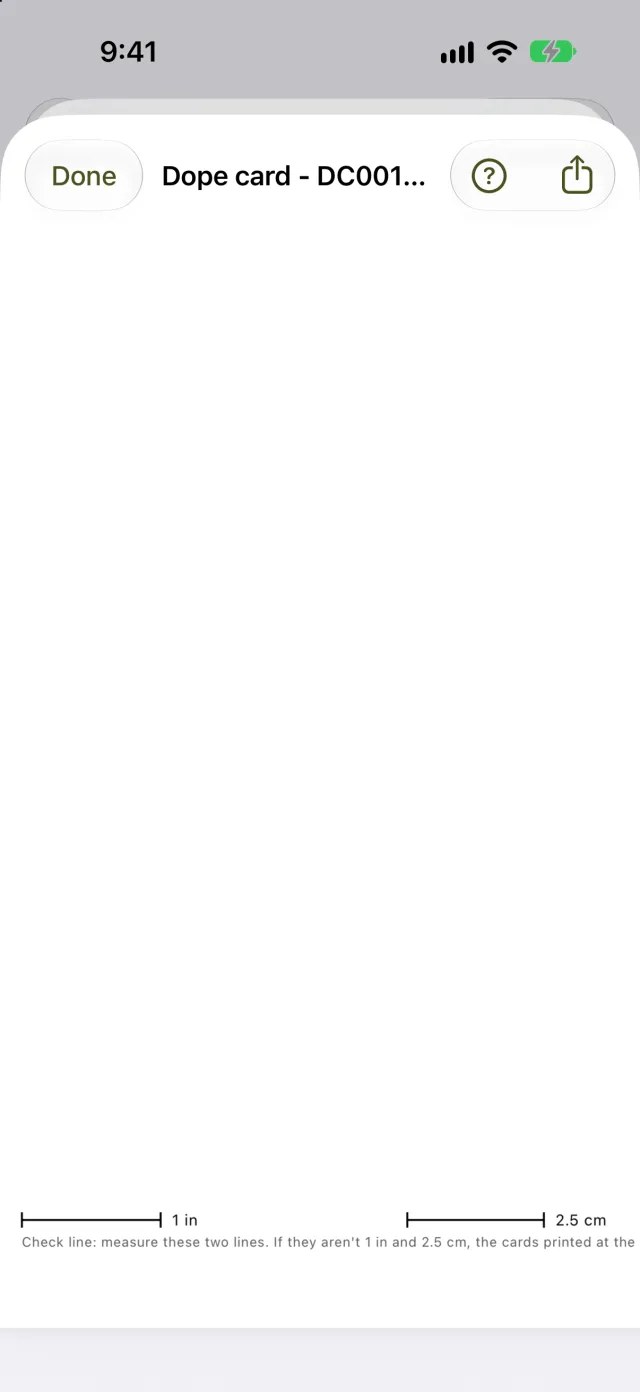
Gun Diary draws each dope card at its real size: a pocket card is exactly 3.5 x 2 in, a scope-cap card exactly 2 x 2 in. But a printer can quietly shrink or stretch a page to “fit” the paper, and then the card no longer fits its sleeve or scope cap. Every sheet has two check lines at the bottom, 1 in and 2.5 cm long, so a ruler tells you in seconds whether it printed right.
Steps
- Make the card and tap Print or Share Card (free) (or Print or Share Card). See Make a dope card.
-
The sheet opens as a PDF. Its top line reminds you: “print at 100% (Actual size), not Fit to page”.
-
Printing from the iPhone or iPad: tap Share, then Print. Choose your printer, and pick the same paper size the card was made for (US Letter or A4, under Paper in the card editor). If the printer offers a scaling choice, choose 100% or actual size.
- Printing from a computer: tap Share and send the PDF to yourself (Save to Files, AirDrop, Mail). Open it, choose Print, and set the scale to 100% or “Actual size”. Turn off anything like “Fit to page”, “Scale to fit” or “Shrink oversized pages”.
-
Measure. At the bottom of the printed sheet, lay a ruler on the line marked “1 in” (it should be exactly 1 inch) and the line marked “2.5 cm” (exactly 2.5 cm). The sheet says: “Check line: measure these two lines. If they aren’t 1 in and 2.5 cm, the cards printed at the wrong size.”
-
If both lines are right, cut the cards out along their outlines (dashed on the light style, solid on high contrast). If not, see If something goes wrong below and print again.
Why it’s useful
Small cards only work at their real size: a scope-cap card must fit inside the cap, a pocket card in its sleeve, a wrist coach in its window. Most print settings quietly resize pages, and a few percent smaller makes small type hard to read in the field. The check lines turn “does this look right?” into a 5-second measurement, before you laminate anything.
Who uses it, and how:
- Hunters printing the free pocket card at home: check once with a ruler, then cut and laminate.
- Shooters with scope-cap or stock-strip cards (Pro): the card must match the cap or the stock exactly; the check line confirms it.
- Shooters outside the US: print on A4 and measure the 2.5 cm line.
- Anyone printing at a library, office or print shop: those printers often default to “fit to page”; the lines show it at once.
What’s on the printed sheet
Sizes, for checking with a ruler: Pocket 3.5 x 2 in (8.9 x 5.1 cm), Stock strip 1.5 x 4 in, Scope cap 2 x 2 in, Index card 5 x 3 in, Wrist coach 3 x 4 in.
Example
Chris prints a sheet of 8 pocket cards on US Letter from the iPhone, with Share > Print. The 1 in line measures 15/16 in: the printer scaled the page to about 94%. Chris sends the PDF to a laptop with Save to Files, opens it there, sets the scale to 100% and turns off “Fit to page”. The second sheet’s 1 in line is exactly 1 in, and a card measures 3.5 x 2 in. Chris cuts the cards out and laminates one for the hunting pack.
Tips
- Always measure the first sheet from a new printer, computer or app.
- Match the paper. Make the card for the paper in your printer (US Letter or A4), so nothing needs scaling.
- Turn off borderless printing if your printer has it: it enlarges pages slightly.
- Use thick paper or card stock for cards that live outdoors, and laminate or sleeve them.
- Keep a spare in the truck or the pack. Copies are free: set Copies of each card in the editor.
What it affects
Nothing in the app. Making the PDF records a “printed” date on the card in Dope Cards; the printer settings are your device’s or computer’s.
If something goes wrong
- The 1 in line is shorter than 1 inch. The page was shrunk: look for “Fit to page”, “Scale to fit” or “Shrink oversized pages” and turn it off; set the scale to 100%. Check the paper size matches the card’s Paper.
- The 1 in line is longer than 1 inch. The page was enlarged (often borderless printing or “fill page”). Turn it off and print at 100%.
- The 1 in line is right but the 2.5 cm line isn’t (or the other way round). The page was stretched in one direction; check the paper size setting.
- There’s no scaling choice on my iPhone’s print screen. Print from a computer instead (step 4), or try printing on paper that matches the card’s Paper setting.
- The type is too small to read. The card holds too many rows for its size. List fewer Distances, or pick a bigger size (Pro).
- The cards say EXAMPLE, NOT REAL DOPE. The card was made from the Example table. Make a card from your own table.
Related
- Back: Make a dope card.
- Dope cards, Save and share PDF reports.
- Learning path: Building your dope card.
- Words used here: dope card, check line.
Gun Diary keeps records you enter and does arithmetic on them. It never predicts a trajectory; confirm every hold by shooting it at the range, and always know your target and what is beyond it.
Guides on this topic
- How to Make a Dope Card for Your Rifle (and Print It True)
- Scope Cap Dope Card, Stock Strip or Wrist Coach: Which Size Fits?
Still stuck? In the app, open More > Help > Contact Support, or More > Settings > Support, which also has Send Error Log (the error log helps us find the problem), or email contact@setriksoftware.com. You can also browse the Help Center or the messages the app can show.