
Boxes on hand
Optionally keep count of how much of each ammunition (and lot) you have, by recording what you buy and what you use.
Boxes on Hand is an optional count of the ammunition you have. You add a line each time you buy some (a positive number) or use some (a negative number), and Gun Diary adds them up into On hand. It keeps no prices. If you don’t care how much is in the cabinet, leave it alone or turn it off.
Steps
- Open the ammunition you want to count: More > Ammo Library > tap it.
-
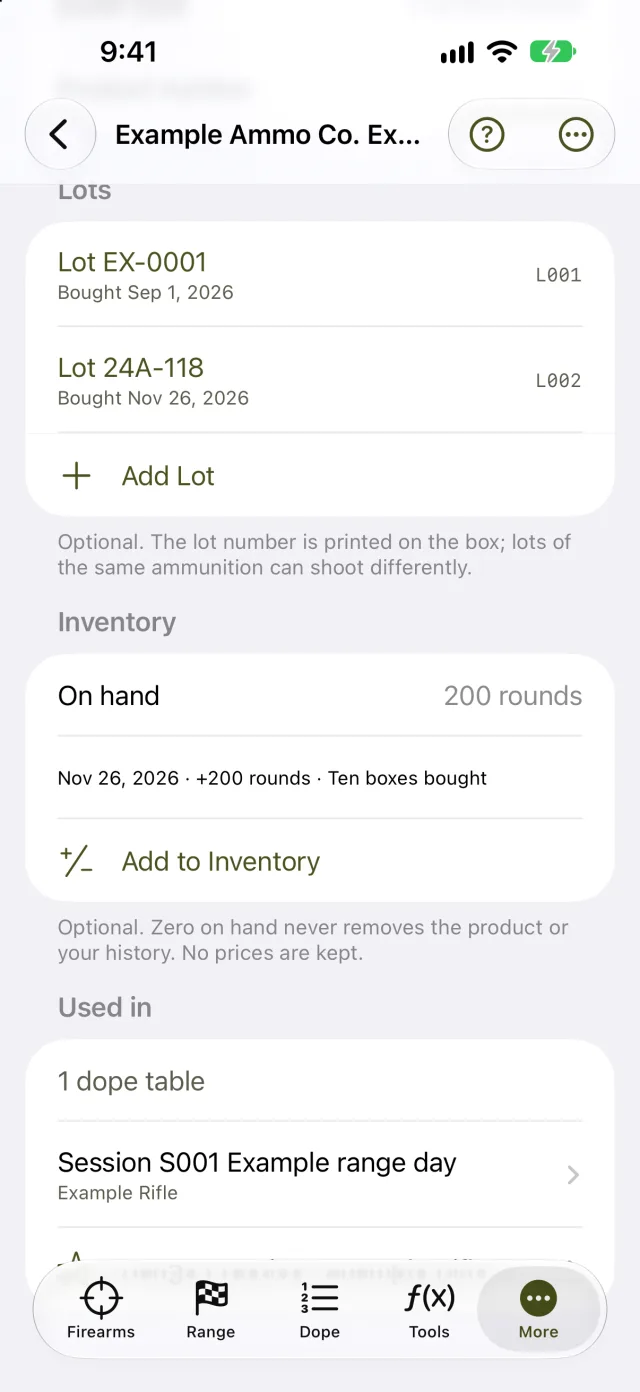
Scroll to the Inventory section and tap Add to Inventory.
-
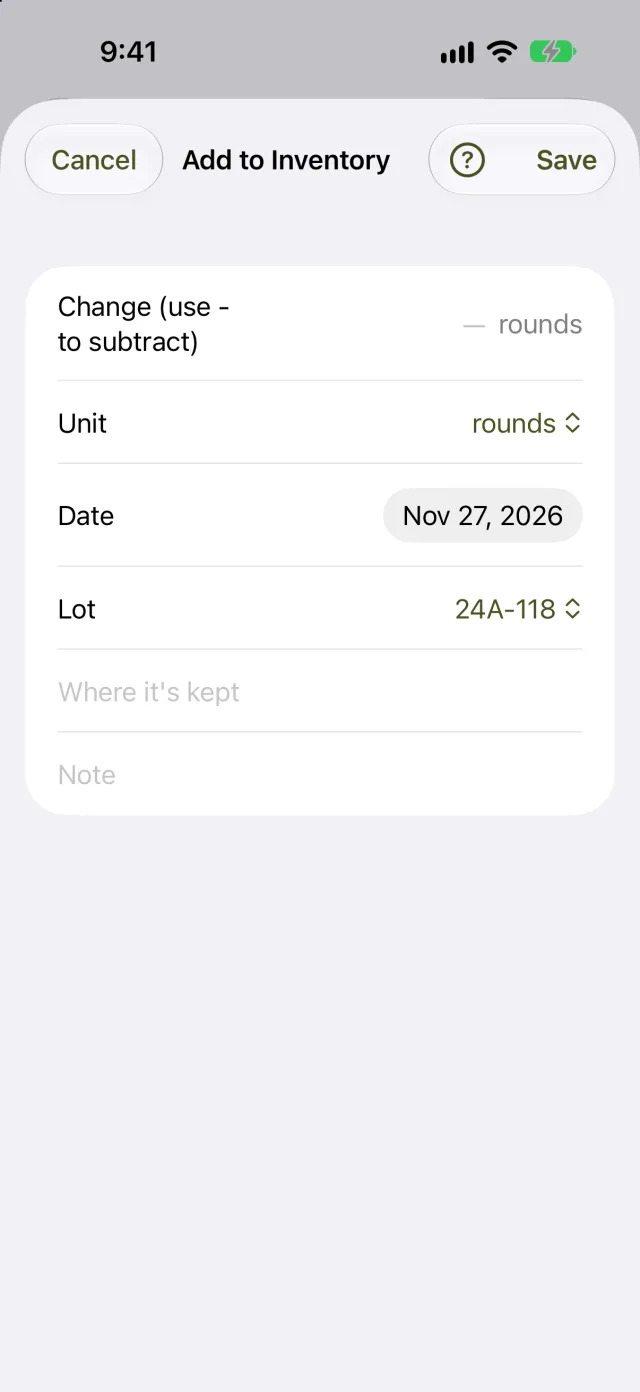
In Change (use – to subtract), type how many you bought (like 200), or a minus number for what you used or sold (like -60).
- Pick the Unit: rounds (the default), boxes or each.
- Check the Date.
- If the ammunition has lots, pick the Lot, or leave Any. When it has only one lot, that lot is already picked for you.
- Optionally type Where it’s kept (like “Safe, top shelf”) and a Note.
-
Tap Save. On hand on the ammunition updates, and the change is listed below it.
-
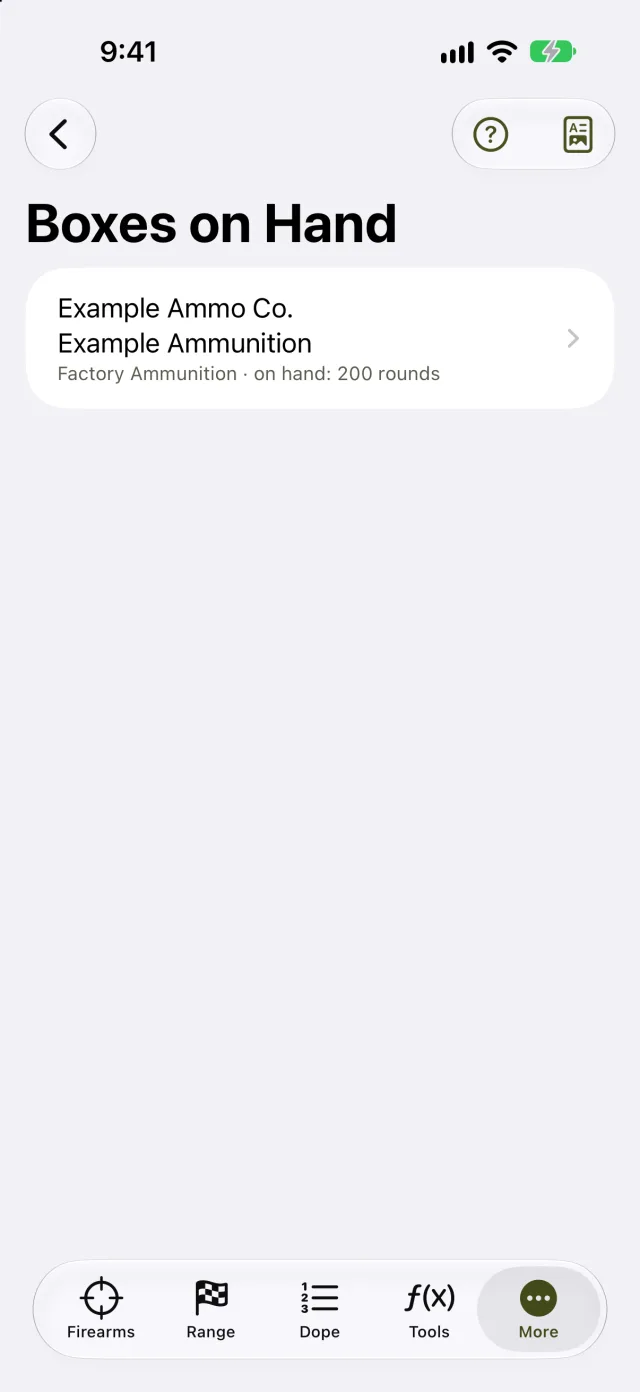
To see everything you’re counting, tap More > Boxes on Hand. The Boxes on Hand screen lists every ammunition with at least one change, with its total on hand. Tap one to open it.
-
To remove a change you entered by mistake, swipe it left on the ammunition and tap Delete, then Delete Change.
Why it’s useful
Knowing what’s on the shelf saves trips and surprises: you don’t buy a fourth case of something you already have, and you don’t arrive at a match or a hunt with half a box. Because each line can carry a lot, you also know how much of a good lot is left before you switch.
Who uses it, and how:
- Competitors and long-range shooters count rounds of their match lot, so they can buy more of the same lot before it runs out.
- Hunters keep track of the few boxes of hunting ammunition they own and where they’re stored.
- Shooters with several calibers see on one screen what they have for each firearm.
- Collectors keep a record of stored ammunition for their own records or insurance lists.
- Casual shooters can ignore it. It’s off the moment you turn Boxes on Hand off in Personalize your diary, and the data stays.
What each option means
Footer on the section: “Optional. Zero on hand never removes the product or your history. No prices are kept.”
Example
You buy a case of Ridgeline Match, lot 24A-118: 500 rounds.
- Ridgeline Match > Add to Inventory: Change 500, Unit rounds, Lot 24A-118, Where it’s kept “Basement safe”. Save. On hand: 500 rounds.
- After a practice session where you fired 60: Add to Inventory, Change -60, rounds, lot 24A-118, Note “Sat practice”. On hand: 440 rounds.
- After a match (100 rounds): -100. On hand: 340 rounds.
- More > Boxes on Hand shows “Ridgeline Match 140 gr” with “Factory Ammunition · on hand: 340 rounds” under it.
Tips
- Count in rounds. It’s the unit your sessions’ round counts use, and the easiest to subtract.
- Enter the use after each session, when you also record rounds fired. Gun Diary doesn’t subtract session rounds from your count for you.
- Use the lot when you buy by the case, so you know how much of each lot remains.
- Correct mistakes with a new line (like +20 “count correction”) or delete the wrong change; On hand is worked out again either way.
- Zero isn’t the end. An ammunition with 0 on hand stays in your library with all its history.
What it affects
- On hand on the ammunition and on the Boxes on Hand screen.
- Nothing else. Inventory changes don’t touch round counts, sessions or groups, and sessions don’t change inventory.
- Exports and backups include every change.
- Turning Boxes on Hand off hides the Inventory section and the Boxes on Hand row; all changes are kept and come back when you turn it on.
If something goes wrong
- “Inventory is optional” on the Boxes on Hand screen: no ammunition has a change yet. Open an ammunition and use Add to Inventory.
- There’s no Inventory section or Boxes on Hand row. Boxes on Hand is off in Personalize your diary.
- “Type how many to add (use – to subtract)” or “Type a change other than 0”. Tapping Save shows this under Change (use – to subtract) when it’s blank or 0. Type the number of rounds or boxes, with a minus to take some away.
- On hand shows two totals (“340 rounds, 2 boxes”). Changes were entered in two units. Add matching changes in one unit, or delete the odd ones, so the count reads as one number.
- My count didn’t go down after a session. Sessions don’t subtract from inventory. Add a minus change for the rounds you fired.
- “Delete this inventory change?” asks before a change is removed: “On hand is worked out again without it.” Tap Delete Change.
- Inventory PDF shows the Pro screen. The PDF is part of Gun Diary Pro; the counts themselves are free.
Related
- An ammunition record, Lots, Personalize your diary.
- Round counts (rounds fired per firearm, a separate count).
- Words used here: lot, round count, Pro.
Still stuck? In the app, open More > Help > Contact Support, or More > Settings > Support, which also has Send Error Log (the error log helps us find the problem), or email contact@setriksoftware.com. You can also browse the Help Center or the messages the app can show.